1. Sarrera
This instruction manual provides essential information for the proper use and maintenance of your new Generic replacement remote control. This remote is designed to be compatible with various Philips LCD HD Display Monitor models. Please read this manual thoroughly before using the remote control to ensure optimal performance and longevity.
2. Segurtasun informazioa
- Bateriaren maneiua: Always insert batteries with the correct polarity (+/-) as indicated in the battery compartment.
- Bateria mota: Use only the specified battery type (2 AAA batteries). Do not mix old and new batteries, or different types of batteries.
- Xedapena: Dispose of used batteries according to local regulations. Do not incinerate batteries.
- Likidoaren esposizioa: Do not expose the remote control to water or other liquids.
- Bero-esposizioa: Keep the remote control away from direct sunlight, heat sources, or extreme temperatures.
- Garbiketa: Garbitu urrutiko agintea oihal leun eta lehor batekin. Ez erabili garbitzaile edo disolbatzaile urratzailerik.
3. Produktua amaitu daview
This remote control is an infrared (IR) replacement unit designed to operate a range of Philips LCD HD Display Monitors. It provides essential functions for controlling your display.
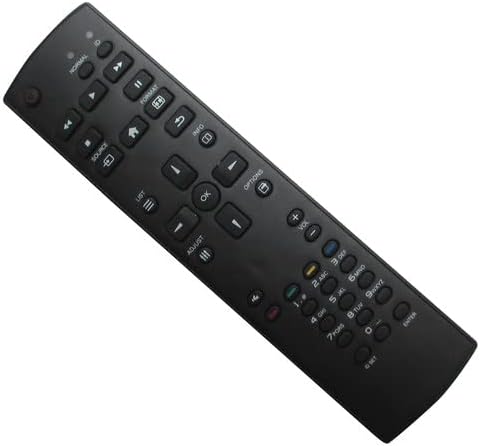
3.1. irudia: Aurrealdea view of the remote control. This image shows the full layout of buttons on the remote, including power, navigation, volume, channel, and numeric keys.

3.2. irudia: Atzealdea view of the remote control. This image displays the ergonomic design of the remote's rear casing.
4. Konfigurazioa
4.1 Bateriaren instalazioa
To begin using your remote control, you must install two AAA batteries.
- Kokatu bateriaren konpartimentuaren estalkia urrutiko agintearen atzealdean.
- Sakatu fitxa behera eta irristatu estalkia geziaren norabidean.
- Insert two new AAA batteries, ensuring that the positive (+) and negative (-) terminals align correctly with the markings inside the compartment.
- Irristatu bateriaren konpartimentuaren estalkia berriro bere lekuan klik egin arte.

Figure 4.1: Battery compartment with cover open, showing where to insert AAA batteries.
The remote control is now ready for use. No programming is typically required for this replacement unit; it should function directly with compatible Philips LCD HD Display Monitors.
5. Funtzionamendu-argibideak
Point the remote control directly at the infrared receiver on your Philips LCD HD Display Monitor. Ensure there are no obstructions between the remote and the display.
5.1 Oinarrizko funtzioak
- Pizteko botoia (⏻): Turns the display On or Off.
- Bolumena igo/behera (Bol +/-): Audioaren bolumena doitzen du.
- Kanal gora/behera (Ch +/-): Changes the display channel (if applicable).
- Source/Input (Iturria): Cycles through available input sources (HDMI, VGA, etc.).
- Nabigazio botoiak (▲ ▼ ◀ ▶): Menuetan nabigatzeko eta aukerak hautatzeko erabiltzen da.
- Ados/Sartu botoia: Menuetako hautaketak berresten ditu.
- Menuko botoia: Opens the display's main menu.
- Zenbakizko teklatua (0-9): For direct channel input or other numeric entries.
Oharra: The functionality of certain buttons may vary slightly depending on your specific Philips LCD HD Display Monitor model. Refer to your display's original manual for detailed function descriptions.
6. Mantentzea
6.1 Garbiketa
To clean the remote control, use a soft, dry, lint-free cloth. Do not use liquid cleaners, sprays, or abrasive materials, as these can damage the remote's surface or internal components.
6.2 Bateria ordezkatzea
If the remote control's range decreases or it becomes unresponsive, the batteries may need to be replaced. Follow the battery installation steps in Section 4.1 to replace the batteries.
7. Arazoak
| Arazoa | Kausa posiblea | Irtenbidea |
|---|---|---|
| Urrunekoa ez dabil | Pila hilak edo gaizki sartutakoak. | Ordeztu bateriak AAA bateria berriekin, polaritate zuzena ziurtatuz. |
| Remote has short range | Weak batteries. Obstruction between remote and display. | Replace batteries. Ensure a clear line of sight to the display's IR receiver. |
| Funtzio batzuk ez dira funtzionatzen | Compatibility variation with specific display model. | This is a replacement remote; some advanced or specific functions of your original remote may not be supported. Refer to your display's original manual. |
| Display does not respond | Remote is not compatible with your specific display model. | Verify your display model number against the compatible models listed in this manual. If your model is not listed, this remote may not be suitable. |
8. Zehaztapenak
- Marka: Generikoa
- Gailu bateragarriak: Philips LCD HD Display Monitors (Models: 65BDL3110Q, 32BDL4050D, 43BDL4050D, 49BDL4050D, 65BDL4050D, 86BDL4150D, 50BDL3010Q, 55BDL3010Q, 65BDL3010Q)
- Konektibitate Teknologia: Infragorriak (IR)
- Energia iturria: 2 x AAA bateria (ez daude barne)
- Kolorea: Beltza
9. Bermea eta Laguntza
As a generic replacement remote control, specific warranty details may vary. This product is intended as a direct replacement for the listed Philips LCD HD Display Monitor models. Please note the following:
- This replacement item may not work with all functions as the original remote control.
- No additional instruction manual is included with the product itself; this document serves as the primary guide.
- Bateriak ez daude urrutiko agintearekin batera.
For issues not covered in this manual, or if you are unsure about compatibility, please refer to the original instruction manual for your Philips LCD HD Display Monitor or contact the seller for further assistance.


