
Roidmi XCQ06RM
Roidmi X20S XCQ06RM Cordless 2-in-1 Vacuum and Mop User Manual
Modeloa: XCQ06RM
1. Sarrera
Thank you for choosing the Roidmi X20S XCQ06RM Cordless 2-in-1 Vacuum and Mop. This appliance is designed to provide efficient and convenient cleaning for various floor types in your home. This manual contains important information regarding the safe use, operation, and maintenance of your device. Please read it thoroughly before first use and keep it for future reference.
2. Segurtasun-argibideak
Sute, deskarga elektriko edo lesio arriskua murrizteko, jarraitu segurtasun neurri hauek:
- Irakurri argibide guztiak aparatua erabili aurretik.
- Ez erabili kanpoan edo gainazal hezeetan.
- Ez utzi jostailu gisa erabiltzea. Arreta handia behar da umeek edo umeek gertu erabiltzen dutenean.
- Erabili eskuliburu honetan deskribatzen den bezala soilik. Erabili fabrikatzaileak gomendatutako osagarriak soilik.
- Ez erabili hondatutako kablearekin edo entxufearekin. Aparatuak behar bezala funtzionatzen ez badu, erori egin bada, hondatu, kanpoan utzi edo uretara erori bada, itzuli zerbitzu zentro batera.
- Ez tiratu edo eraman kabletik, ez erabili kablea helduleku gisa, ez itxi ate bat kabletik, edo ez tiratu kablea ertz edo ertz zorrotzetatik. Ez jarri aparatua kablearen gainean. Mantendu kablea gainazal beroetatik urrun.
- Ez deskonektatu kableari tiraka. Deskonektatzeko, heldu entxufeari, ez kableari.
- Ez maneiatu entxufea edo aparatua esku bustiekin.
- Ez sartu objekturik irekiduran. Ez erabili irekiera blokeatuta dagoela; mantendu hauts, litxar, ile eta aire-fluxua murrizten duen ezer.
- Mantendu ilea, arropa solteak, atzamarrak eta gorputz-atal guztiak irekiguneetatik eta atal mugikorretatik urrun.
- Deskonektatu aurretik, itzali kontrol guztiak.
- Kontuz ibili eskaileretan garbitzean.
- Ez erabili likido sukoiak edo erregarriak jasotzeko, hala nola gasolina, edo erabili egon daitezkeen tokietan.
- Ez hartu erretzen edo erretzen ari den ezer, hala nola zigarroak, pospoloak edo errauts beroak.
- Ez erabili hauts-ontzia eta/edo iragazkiak lekurik gabe.
- Saihestu nahi gabeko abiarazteak. Ziurtatu etengailua itzalita dagoela bateria batera konektatu, aparatua jaso edo eraman aurretik.
- Kargatu fabrikatzaileak zehaztutako kargagailuarekin soilik.
3. Paketearen edukia
Mesedez, egiaztatu paketearen edukia paketea irekitzean, elementu guztiak bertan daudela ziurtatzeko:
- Xurgagailuaren unitate nagusia
- Funtzio anitzeko eskuila
- Mite removal brush
- Washing brush (mop attachment)
- Koltxoirako eskuila elektrikoa
- Haririk gabeko kargagailua
- Iragazkia
- Zirrikitu tresna
- Garbiketa geltokia
- Hutseko hodia
- Mop heads x2
4. Produktua amaitu daview
The Roidmi X20S XCQ06RM is a powerful and versatile cleaning solution, combining vacuuming and mopping capabilities. Its lightweight design and advanced features make home cleaning efficient.

1. irudia: The Roidmi X20S XCQ06RM cordless vacuum cleaner in its upright configuration.
Ezaugarri nagusiak:
- 2-in-1 Xurgagailua eta Fregona: Easily switch between vacuuming and mopping functions by attaching the appropriate head. The mop brush rotates at approximately 200 RPM for deep cleaning.
- Xurgapen indartsua: Features a new generation Engine-x brushless digital motor (up to 120,000 rpm) delivering 138 watts of suction power and 25,000 Pa air intake pressure. Air-x technology ensures consistent suction by separating dust from air.
- 6-Level Filtration System: A multi-level system effectively separates dust, filtering impurities as small as 0.3 µm with a 99% purification rate. The device includes a safety mechanism that prevents operation if filters are not correctly installed.
- Mobile Application Connectivity: Connects via Bluetooth to your smartphone. The app allows monitoring of remaining operating time, cleaning time, and provides notifications for dustbin full or filter replacement.
- Bateriaren iraupen hedatua: Optimized by the BMS-X system, the 8 LG/Samsung lithium batteries provide approximately 65 minutes of runtime. The app displays battery status and alerts.
- Haririk gabeko karga magnetikoa: Convenient and cable-free charging.
- Erabiltzaileentzako diseinua: Operates at a reduced noise level of approximately 72 dB (A). The electric brush includes an LED light for improved visibility in dark areas. Weighing 1.5 kg, it is lightweight for easy handling.

2. irudia: The Roidmi X20S main unit shown with both the vacuum brush head and the mop attachment.

3. irudia: A user operating the Roidmi X20S to vacuum a rug in a living room setting.

4. irudia: The mop attachment of the Roidmi X20S cleaning a wet spill on a tiled kitchen floor.
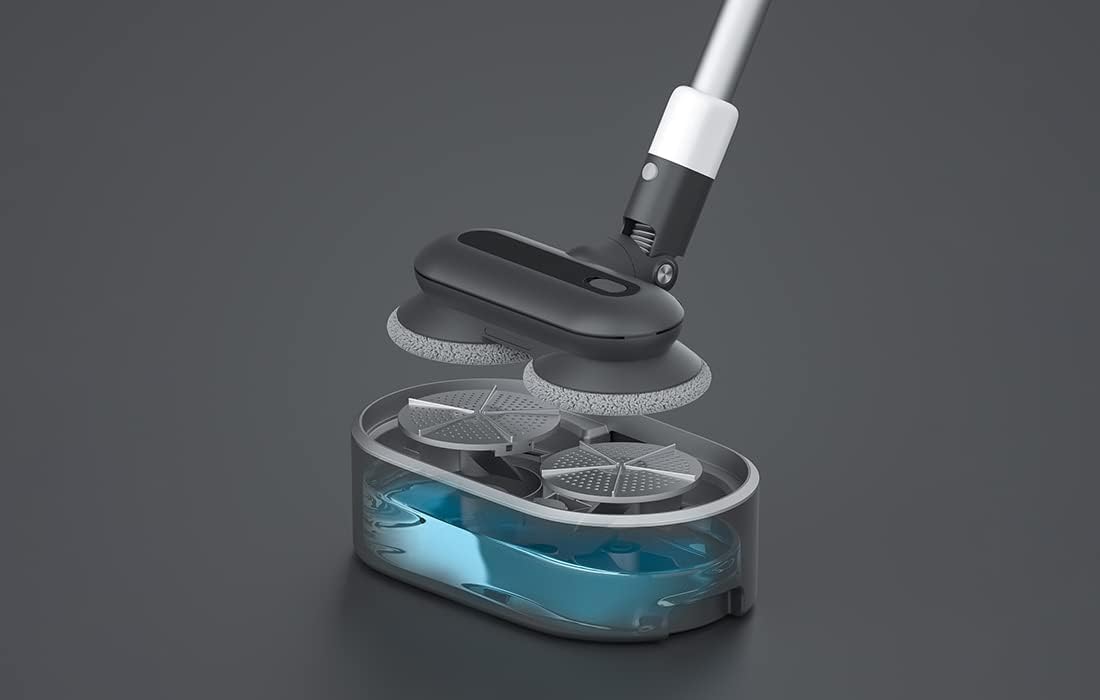
5. irudia: Bat eztanda egin zuen view showing the internal components of the Roidmi X20S mop attachment, including the water tank.
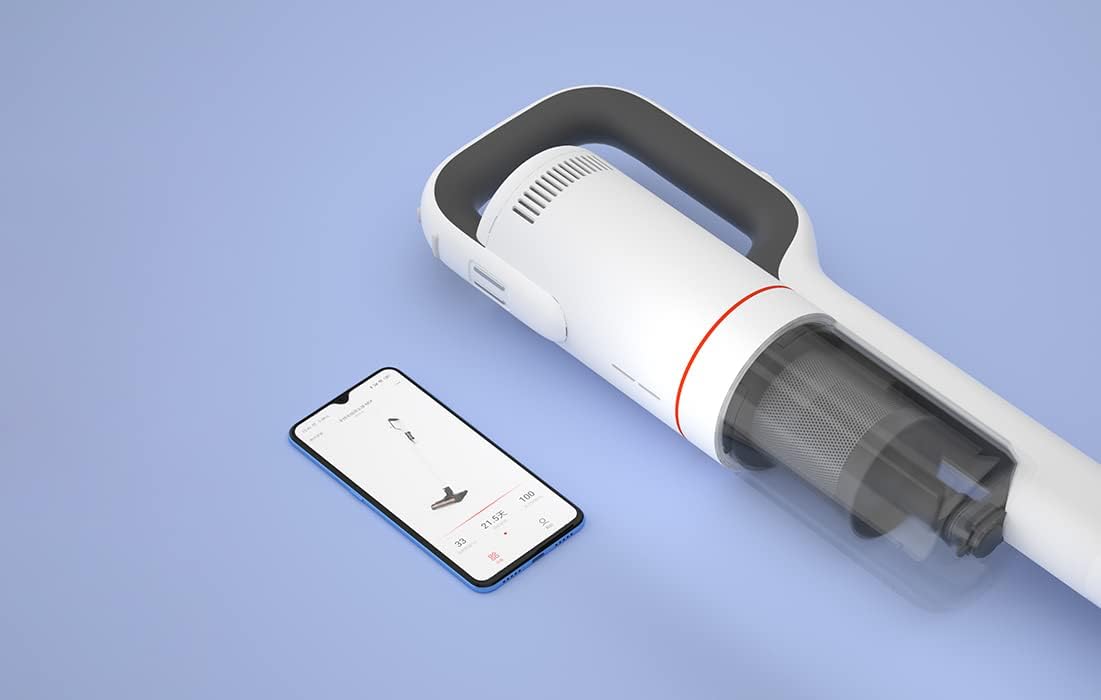
6. irudia: The Roidmi X20S main unit positioned next to a smartphone, illustrating its connectivity with the Roidmi mobile application.

7. irudia: A user demonstrating the Roidmi X20S in handheld mode, cleaning a sofa with an attachment.
5. Konfigurazioa
5.1 Muntaketa
- Connect the Vacuum Tube: Insert the vacuum tube into the main unit until it clicks into place.
- Garbiketa-burua erantsi: Select the desired cleaning head (multi-function brush for vacuuming, or washing brush for mopping) and attach it to the end of the vacuum tube until it clicks.
- Install Mop Pads (for mopping): If using the washing brush, attach the mop pads to the bottom of the mop attachment.
5.2 Kargatzen
Before first use, fully charge the appliance. The Roidmi X20S uses magnetic wireless charging.
- Mount the cleaning station to a wall in a convenient location, ensuring it is near a power outlet.
- Connect the wireless charger to the cleaning station and plug it into a power outlet (220 Volts).
- Place the Roidmi X20S onto the cleaning station. The magnetic connection will secure it, and charging will begin automatically.
- Monitor the battery status via the indicator lights on the device or through the Roidmi mobile application.
6. Funtzionamendu-argibideak
6.1 Aspiragailua
- Ensure the multi-function brush or appropriate vacuum attachment is securely installed.
- Sakatu pizteko botoia hutsean pizteko.
- Select the desired suction mode (if applicable) using the mode selection button.
- Begin vacuuming the desired surface. The LED light on the brush head will illuminate dark areas.
- After use, press the power button to turn off the vacuum.
6.2 Fregona
- Detach the vacuum brush head and attach the washing brush (mop attachment) with mop pads installed.
- Fill the water tank on the mop attachment with clean water. Do not use corrosive liquids or hot water.
- Press the power button to turn on the device. The mop pads will begin to rotate.
- Gently guide the mop attachment over the floor surface to clean.
- After use, press the power button to turn off the device. Empty any remaining water from the tank and clean the mop pads.
6.3 Mobile Application Usage
- Download the Roidmi app from your smartphone's app store (compatible with Android and iOS).
- Enable Bluetooth on your smartphone and open the Roidmi app.
- Follow the in-app instructions to pair your Roidmi X20S with your smartphone.
- Konektatu ondoren, egin dezakezu view battery status, remaining operating time, cleaning history, and receive notifications for dustbin full or filter replacement.
7. Mantentzea
Regular maintenance ensures optimal performance and extends the lifespan of your Roidmi X20S.
7.1 Zaborrontzia hustea
- When the dustbin full notification appears on the app or when visibly full, detach the dustbin from the main unit.
- Ireki zaborrontzia eta hustu bere edukia zaborrontzi batera.
- Close the dustbin and reattach it to the main unit.
7.2 Iragazkiak garbitzea/ordeztea
- The Roidmi X20S features a washable filter. When the app notifies you to clean or replace the filter, remove the filter from the dustbin.
- Rinse the filter under running water until clean. Ensure it is completely dry before reinserting.
- Ordeztu iragazkia hondatuta edo gehiegi higatuta badago.
7.3 Cleaning Brushes and Mop Pads
- Regularly remove hair and debris from the multi-function brush and electric mattress brush. Use the crevice tool or scissors if necessary.
- After mopping, detach the mop pads from the washing brush and rinse them thoroughly. Allow them to air dry completely before storing or reusing.
8. Arazoak
If you encounter issues with your Roidmi X20S, refer to the following common problems and solutions:
| Arazoa | Kausa posiblea | Irtenbidea |
|---|---|---|
| Argirik ez / Ez da pizten | Bateria agortuta dago Device not properly assembled | Kargatu bateria guztiz Ensure all parts are clicked into place |
| Xurgatze potentzia baxua | Zaborrontzia beteta dago Iragazkia beteta dago Eskuila-burua blokeatuta dago | Hustu zakarrontzia Garbitu edo ordeztu iragazkia Remove any obstructions from the brush head |
| Mop function not effective | Ur depositua hutsik dago Mop pads are dirty or worn | Bete ur depositua Clean or replace mop pads |
| Gailua ustekabean gelditzen da | Bateria gutxi dago Filtration system parts not installed correctly | Kargatu bateria Check all filter components are securely in place |
| Aplikazioen konexio arazoak | Bluetootha desaktibatuta dago Gailua ez dago parekatuta | Ensure Bluetooth is enabled on your phone Follow app instructions to re-pair the device |
If the problem persists after attempting these solutions, please contact Roidmi customer support.
9. Zehaztapenak
| Ezaugarri | Zehaztapena |
|---|---|
| Marka | ROIDMI |
| Modelo zenbakia | XCQ06RM |
| Kolorea | Zuria |
| Boterea | 34.2 Watt |
| liburukiatage | 220 Volt |
| Zarata Maila | 72 Decibels (A) |
| Bateriaren iraupena | Gutxi gorabehera. 65 minutu |
| Elementuaren pisua | 3.95 kilogramo |
| Iragazki mota | Cartridge (Washable, HEPA) |
| Energia iturria | Bateriaz elikatua (litio-ioizko bateria 1 barne) |
| Bateragarritasuna | Android, iOS (via Roidmi App) |
| Ezaugarri bereziak | Compact, Lightweight, Portable, Bagless, Wet/Dry (mop function) |
| Fabrikatzailea | Wuxi Roidmi Information Technology Co., Ltd. |
10. Bermea eta Laguntza
For warranty information, please refer to the warranty card included with your product or contact Roidmi customer service directly. Information regarding the availability of spare parts is not provided in the product details.
For technical support or service inquiries, please visit the official Roidmi webgunea edo jarri harremanetan haien bezeroarentzako arreta-kanalekin.
Ask a question about this manual
Ask about setup, troubleshooting, compatibility, parts, safety, or missing instructions. Manuals+ will review the question and use this page’s manual context to help answer it.