
1. Sarrera
Eskerrik asko erosketagatik.asing the TECURS GM003-1 Wired Gaming Mouse. This manual provides detailed instructions for setting up, operating, maintaining, and troubleshooting your new gaming mouse. Please read this manual carefully before use to ensure optimal performance and longevity of your device.

Image 1.1: The TECURS GM003-1 Gaming Mouse highlighting its adjustable DPI, polling rate, and RGB lighting features.
Ezaugarri nagusiak:
- 9 botoi programagarriak: Customize your gaming experience with assignable functions.
- DPI erregulagarria: 5-stage DPI settings from 1200 to 7200 for precise control.
- 13 RGB argiztapen moduak: Personalize your setup with various colorful backlight effects.
- Diseinu ergonomiko eta arina: Ambidextrous design weighing only 90g for comfortable, extended use.
- Bateragarritasun zabala: Supports Windows 11/10/8/7/XP/Vista and Mac OS.
2. Konfiguratzeko argibideak
2.1 Sagua konektatzea
- Unpack the TECURS GM003-1 Gaming Mouse from its packaging.
- Locate an available USB port on your computer (PC, laptop, Macbook, notebook).
- Konektatu saguaren USB konektorea USB atakan.
- Zure ordenagailuak automatikoki detektatu eta instalatu beharko lituzke beharrezko kontrolatzaileak.
2.2 Softwarearen instalazioa (aukerakoa)
For full customization of the 9 programmable buttons, DPI settings, and RGB lighting modes, it is recommended to install the dedicated software. The software can typically be downloaded from the official TECURS website or provided on an included disc (if applicable).
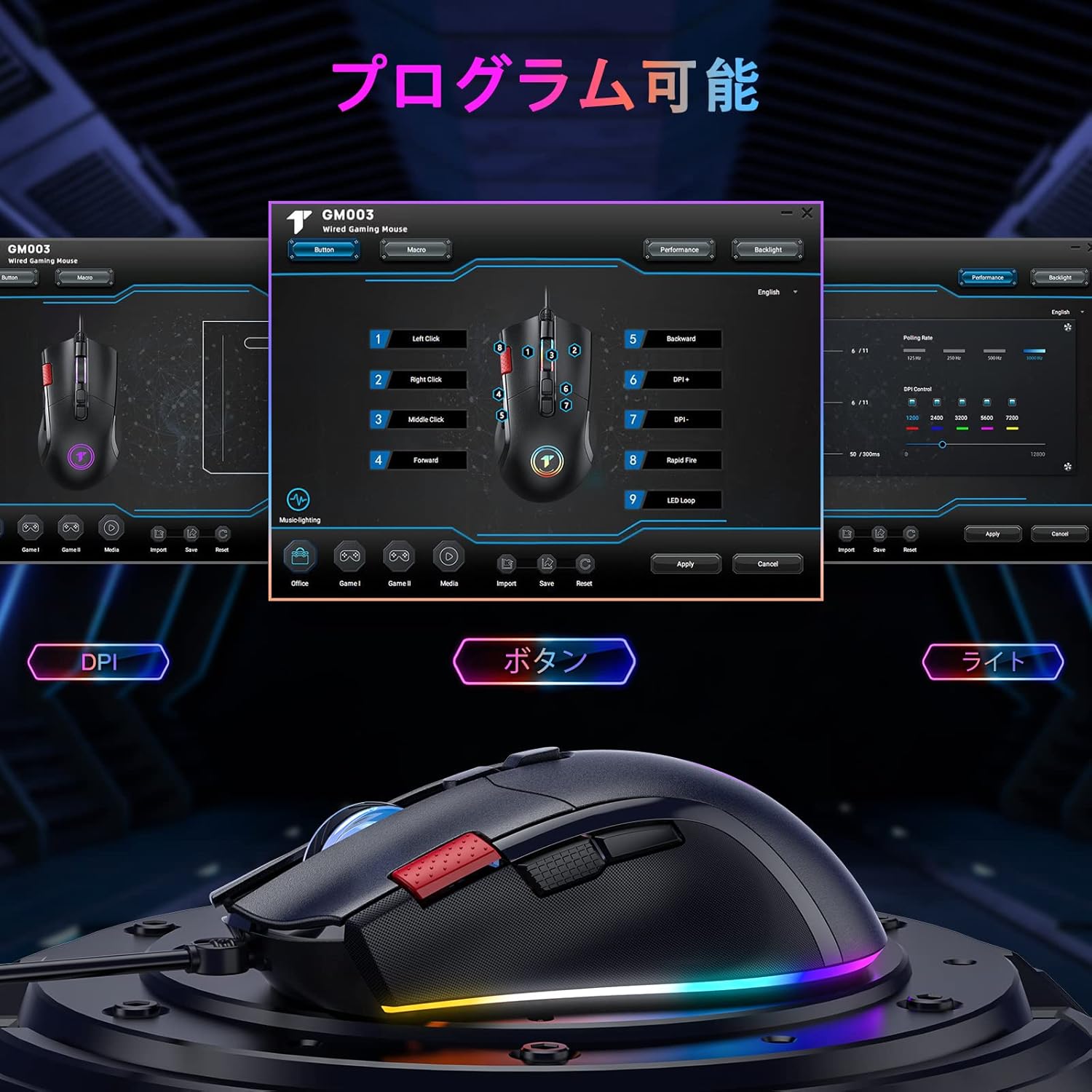
Image 2.1: The mouse software interface allows for comprehensive customization of buttons, DPI, and lighting.
Note: Side buttons and programmable functions are not supported on Mac OS.
3. Funtzionamendu-argibideak
3.1 Botoien funtzioak
The TECURS GM003-1 mouse features 9 buttons. Their default functions are as follows:

Image 3.1: Layout of the 9 programmable buttons on the GM003-1 mouse.
- Ezkerreko klik: Klik egiteko funtzio nagusia.
- Egin klik eskuineko botoiarekin: Bigarren mailako klik funtzio estandarra.
- Middle Click (Scroll Wheel Press): Activates middle click function.
- Scroll Up/Down: Navigates content vertically.
- DPI+ botoia: DPI sentikortasuna handitzen du.
- DPI botoia: DPI sentikortasuna murrizten du.
- Aurrera egiteko botoia: Aurrera nabigatzen du web nabigatzaileak edo file esploratzaileak.
- Atzera botoia: Atzeraka nabigatzen du web nabigatzaileak edo file esploratzaileak.
- Rapid Fire Button: Executes multiple clicks with a single press (programmable via software).
3.2 DPI doikuntza
The mouse offers 5 adjustable DPI levels: 1200, 2400, 3200, 5600, and 7200 DPI. Use the DPI+ and DPI- buttons (typically located near the scroll wheel) to cycle through these settings. The current DPI level may be indicated by a change in the mouse's LED color or through the software interface.
3.3 RGB argiztapen modu
The mouse features 13 distinct RGB lighting modes. These can be cycled through or customized using the dedicated software. Refer to the software interface for specific options to change colors, effects, and brightness.
4. Mantentzea
4.1 Garbiketa
- Deskonektatu sagua ordenagailutik garbitu aurretik.
- Erabili zapi leun, lehor eta lihorik gabeko bat saguaren gainazala garbitzeko.
- Zikinkeria egoskorrentzat, arin dampGarbitu zapi bat urarekin edo garbiketa-soluzio leun batekin. Saihestu produktu kimiko gogorrak.
- Use a cotton swab or compressed air to clean around buttons and the scroll wheel.
- Ensure the optical sensor on the bottom of the mouse is clean and free of debris for accurate tracking.
4.2 Biltegiratzea
When not in use, store the mouse in a clean, dry environment away from direct sunlight and extreme temperatures. Avoid placing heavy objects on the mouse or tangling the cable.
5. Arazoak
5.1 Saguak ez du erantzuten
- Ziurtatu USB kablea ondo konektatuta dagoela ordenagailuko USB ataka funtzional batean. Saiatu beste USB ataka batekin.
- Berrabiarazi ordenagailua.
- Check if the mouse works on another computer to rule out a computer-specific issue.
5.2 Inaccurate Tracking or Cursor Lag
- Garbitu saguaren beheko aldean dagoen sentsore optikoa.
- Ziurtatu sagua gainazal egoki batean erabiltzen ari zarela (adibidez, sagu-alfonbra batean). Saihestu gainazal oso islatzaileak edo gardenak.
- Adjust the DPI settings using the DPI+ and DPI- buttons.
5.3 Programmable Buttons Not Working (Mac OS)
As noted, side buttons and programmable functions are not supported on Mac OS. This is a limitation of the operating system's compatibility with the mouse's advanced features.
5.4 RGB argiztapena ez dabil
- Ziurtatu sagua behar bezala konektatuta dagoela.
- Check the mouse software to ensure RGB lighting is enabled and configured correctly.
6. Zehaztapenak
| Ezaugarri | Zehaztapena |
|---|---|
| Marka | TECURS |
| Modelo zenbakia | GM003-1 |
| Konektibitate Teknologia | USB (kablea) |
| Mugimenduak detektatzeko teknologia | Optikoa |
| Botoi kopurua | 9 (Programagarria) |
| DPI ezarpenak | 1200 / 2400 / 3200 / 5600 / 7200 DPI (5-stage erregulagarria) |
| RGB Argiztapena | 13 moduak |
| Eskuen Orientazioa | Anbidistroa |
| Elementuaren pisua | 90 gramo |
| Energia iturria | Corded Electric (No batteries required) |
| Sistema eragile bateragarriak | Windows 11/10/8/7/XP/Vista, Linux, Mac OS (Note: Limited functionality on Mac OS) |
| Gailu bateragarriak | PC, Laptop, Notebook, Macbook |

Image 6.1: The mouse offers broad compatibility with various operating systems.
7. Bermea eta Laguntza
TECURS products are designed for reliability and performance. For warranty information, technical support, or any inquiries regarding your GM003-1 gaming mouse, please refer to the warranty card included with your product or visit the official TECURS website. Please have your model number (GM003-1) and purchase details ready when contacting support.