
1. Sarrera
This manual provides detailed instructions for the setup, operation, maintenance, and troubleshooting of your Cosmic Byte ARES Wired Controller for PC. Designed for an enhanced gaming experience, this controller features Hall Effect joysticks and triggers, dual vibration, and customizable Turbo functions.
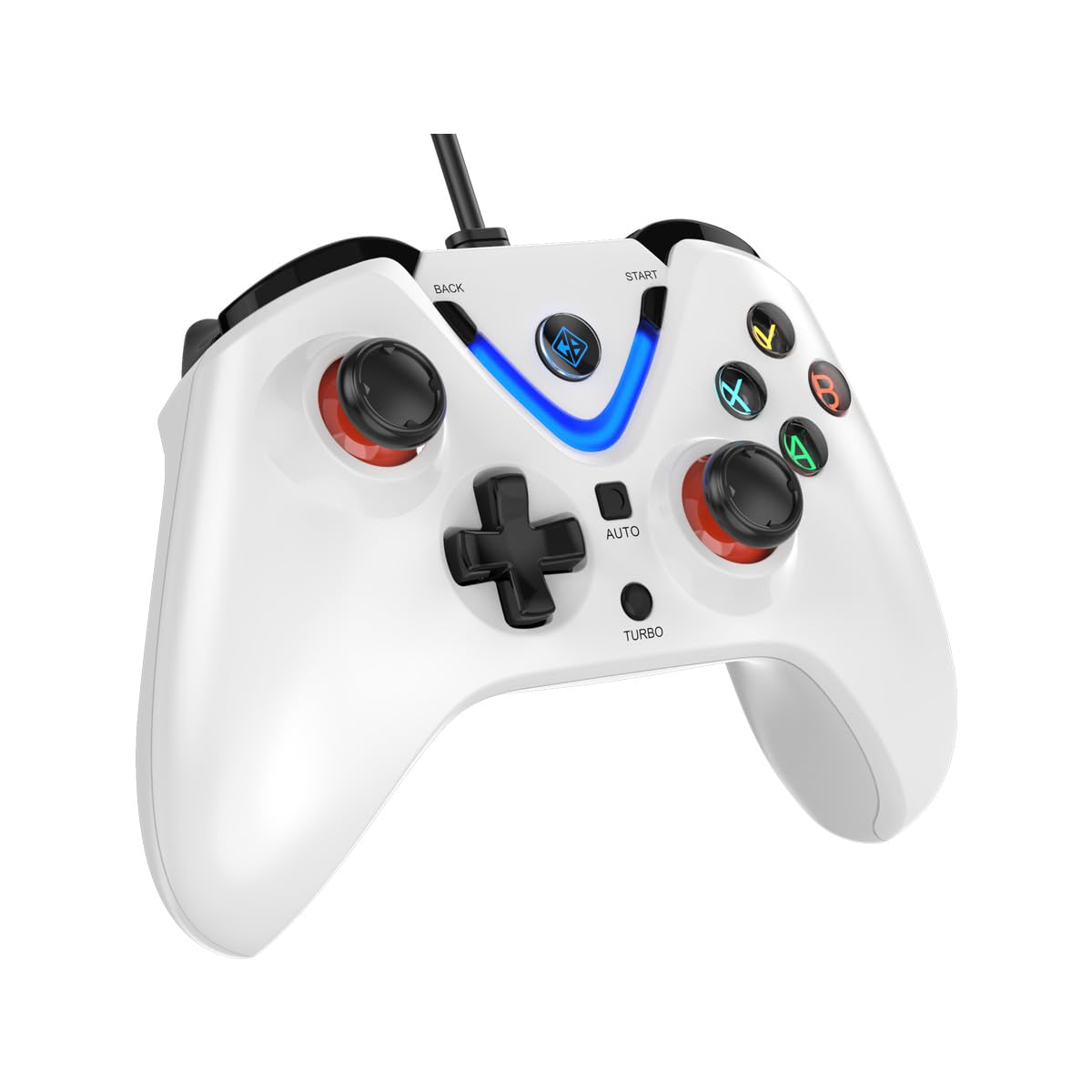
Image 1: The Cosmic Byte ARES Wired Controller in white, showcasinbere diseinu ergonomikoa.
2. Konfiguratzeko argibideak
2.1 PCra konektatzea
- Ziurtatu ordenagailua piztuta dagoela.
- Bilatu erabilgarri dagoen USB ataka zure ordenagailuan.
- Plug the USB connector of the Cosmic Byte ARES Wired Controller into the USB port.
- Sistema eragileak automatikoki detektatu eta instalatuko ditu beharrezko kontrolatzaileak. Prozesu honek minutu batzuk iraun ditzake.
- Once installation is complete, the controller is ready for use.

Image 2: The controller connected via its wired USB connection, ensuring fast response.
3. Funtzionamendu-argibideak
3.1 Oinarrizko kontrolak
The Cosmic Byte ARES controller features standard gamepad layouts, including:
- Left and Right Analog Joysticks: Mugimendu zehatza eta kameraren kontrola lortzeko.
- D-Pad: Norabideko sarrerarako, askotan menuetan edo joko-ekintza zehatzetarako erabiltzen da.
- Ekintza botoiak (A, B, X, Y): For primary game interactions.
- Sorbaldako botoiak (L1, R1) eta abiarazleak (L2, R2): For various in-game functions like shooting, aiming, or accelerating.
- Start and Back Buttons: For pausing games, accessing menus, or specific in-game commands.
- Turbo botoia: For activating rapid-fire functions.
- Auto botoia: For activating automatic rapid-fire functions.
3.2 Hall efektuko joystickak eta abiarazleak
The controller is equipped with Hall Effect joysticks and triggers, which use magnetic sensors instead of physical contacts. This technology provides:
- Zehaztasun hobetua: More accurate and responsive input.
- Iraunkortasun handiagoa: Reduces wear and tear, preventing stick drift over time.
- Funtzionamendu leuna: Consistent and linear response for triggers, allowing for nuanced control in games.

3 irudia: Leherketa bat view illustrating the Hall Effect joystick mechanism and the Hall Effect triggers.
3.3 Bibrazio bikoitzeko feedbacka
The controller features dual vibration motors that provide tactile feedback during gameplay, enhancing immersion by simulating in-game events such as impacts, explosions, or engine rumbling.
3.4 Backlit LED Buttons
The action buttons (A, B, X, Y) and the central V-shaped indicator feature LED backlighting, providing visibility in low-light conditions and adding to the controller's aesthetic.

Image 4: The controller with its LED buttons illuminated and visual representation of vibration effects.
3.5 Turbo and Auto Turbo Functions
The Turbo and Auto Turbo functions allow for rapid, repeated input of a button press without continuously pressing the button.
- Turbo aktibatzea: Press and hold the desired action button (e.g., A) and then press the Turbo button. The button will now rapidly repeat its input as long as you hold it down.
- Activating Auto Turbo: Press and hold the desired action button (e.g., A) and then press the Autoa button. The button will now rapidly repeat its input automatically without needing to be held down.
- Deactivating Turbo/Auto Turbo: To deactivate, repeat the activation steps for the specific button, or press the Garbi button (if available) or disconnect and reconnect the controller.

Image 5: Close-up of the controller showing the Turbo and Auto function buttons.
4. Mantentzea
- Garbiketa: Erabili zapi leun eta lehor bat kontrolatzailea garbitzeko. Zikinkeria egoskorra bada, garbitu zapi pixka bat.amp cloth can be used, ensuring no liquid enters the controller. Avoid harsh chemicals or abrasive cleaners.
- Biltegiratzea: Store the controller in a cool, dry place away from direct sunlight and extreme temperatures. Avoid placing heavy objects on the controller.
- Kableen zainketa: Do not sharply bend or pull the USB cable. Always grasp the plug when disconnecting from the PC.
5. Arazoak
- Kontrolatzailea ez da ezagutzen:
- Ensure the USB cable is securely connected to both the controller and the PC.
- Saiatu kontrolatzailea beste USB ataka batera konektatzen.
- Berrabiarazi ordenagailua.
- Check Device Manager on Windows to see if the controller is listed and if there are any driver issues.
- Botoiak/Joystick-ak ez dute erantzuten:
- Verify the controller is recognized by your PC (see above).
- Test the controller in a different game or a controller testing utility to rule out game-specific issues.
- Ziurtatu beste sarrera-gailurik ez dagoela interferentziarik egiten.
- Bibrazioak ez du funtzionatzen:
- Egiaztatu jokoaren ezarpenak bibrazio-feedbacka gaituta dagoela ziurtatzeko.
- Some games may not support vibration or may have limited vibration effects.
6. Zehaztapenak
| Ezaugarri | Xehetasuna |
|---|---|
| Marka | Byte kosmikoa |
| Ereduaren izena | Ares |
| Gailu bateragarriak | PC |
| Kontrolagailu mota | Gamepad |
| Konektibitate Teknologia | USBa |
| Produktuaren Ezaugarriak | Ergonomia |
| Botoi kopurua | 16 |
| Hardware Plataforma | PC |
| Energia iturri mota | Kable elektrikoa, USB kablea |
| Elementuaren pisua | 220 gramo |
| Elementuaren neurriak | 6 x 10 x 4 zentimetro |
| Kolorea | Zuria |
| Jatorrizko Herrialdea | Txina |

Image 6: A comparison table highlighting features of different ARES controller models.
7. Bermea eta Laguntza
7.1 Bermearen informazioa
The Cosmic Byte ARES Wired Controller comes with a 1 Urteko Bermea Fabrikazio Akatsen Aurkako erosketa-datatik aurrera. Gorde erosketaren egiaztagiria berme-erreklamazioetarako.
7.2 Fabrikatzailearen Harremanetarako Informazioa
For support, service, or warranty inquiries, please contact:
Byte kosmikoaPrakash Warehousing, S. No.163, Hissa No 1-2-3-4-5A-5B/2/1,
Phursungi, Pune 412308, Maharashtra, India
For further assistance, please visit the official Cosmic Byte webwebgunean edo jarri harremanetan bere bezeroarentzako zerbitzuarekin.


