
1. Sarrera
The Focal Theva N°3-D is a high-fidelity 3-way floorstanding loudspeaker designed for home cinema systems. It features Dolby Atmos® compatibility, achieved through a dedicated speaker driver positioned on the top of the cabinet. This driver reflects sound waves off the ceiling to create immersive 3D audio effects. This manual provides essential information for the proper setup, operation, and maintenance of your Theva N°3-D loudspeaker.
2. Segurtasun-argibideak
Please read these safety instructions carefully before using your loudspeaker. Keep this manual for future reference.
- Lekua: Ensure the loudspeaker is placed on a stable, level surface to prevent tipping. Avoid placing it in direct sunlight, near heat sources, or in areas with high humidity.
- Aireztapena: Do not block any ventilation openings. Allow adequate space around the loudspeaker for proper airflow.
- Potentzia: Konektatu bozgorailua batera amplifier with appropriate power ratings. Exceeding recommended power can damage the speaker.
- Garbiketa: Disconnect the loudspeaker from the ampGarbitu aurretik, garbitu zapi leun eta lehor bat. Ez erabili garbitzaile likidorik edo aerosolik.
- Zerbitzua: Do not attempt to service the loudspeaker yourself. Refer all servicing to qualified service personnel.
- Haurrak: Itotzearen arriskua saihesteko, eduki ontziratzeko materialak eta pieza txikiak haurren eskura.
3. Paketearen edukia
Egiaztatu osagai guztiak ontzian daudela:
- Focal Theva N°3-D Floorstanding Loudspeaker (Model: FTHEVAN3LW-D)
- Parrilla (aurrez instalatuta edo bereizita)
- Erabiltzailearen eskuliburua (dokumentu hau)
Elementuren bat falta bada edo hondatuta badago, jarri harremanetan zure saltzailearekin.
4. Produktua amaitu daview
The Theva N°3-D loudspeaker incorporates advanced technologies for superior audio performance and immersive sound.
Ezaugarri nagusiak:
- 3-way floorstanding design, Dolby Atmos® compatible.
- Full-range speaker driver with directional baffle for precise Dolby Atmos® effects.
- Slatefiber technology for immersive and dynamic home cinema sound.
- TNF Tweeter for mellow treble reproduction.
- Time Alignment design for a focused sound image.
Osagaiak:
- Dolby Atmos® Driver: Located on the top, designed to reflect sound off the ceiling.
- TNF Tweeter: Aluminum/Magnesium inverted dome tweeter for high frequencies.
- Gama ertaineko kontrolatzailea: 6.5-inch (16.5cm) Slatefiber cone for balanced and precise mid-range.
- Wooferrak: Two 6.5-inch (16.5cm) Slatefiber cone woofers for powerful bass.
- Tilted Stand: Integrated stand for optimal Time Alignment.

Figure 1: Focal Theva N°3-D Product Sheet illustrating key components and features. This diagram shows the internal structure, driver types (TNF Tweeter, Slatefiber midrange, Slatefiber woofers), and the top-mounted Dolby Atmos driver with its directional baffle.

2. irudia: hurbileko planoa view of the top-mounted Dolby Atmos driver on the Focal Theva N°3-D loudspeaker. This driver is designed to project sound upwards for ceiling reflection, creating immersive 3D audio effects.

3. irudia: Xehetasuna view of the Slatefiber cone material used in the midrange and woofer drivers of the Focal Theva N°3-D. This material contributes to dynamic and immersive sound reproduction.

Figure 4: Close-up of the TNF Tweeter, an Aluminum/Magnesium inverted dome, responsible for clear and mellow high-frequency reproduction in the Focal Theva N°3-D loudspeaker.
5. Konfigurazioa
5.1 Jartzea
Optimal placement is crucial for achieving the best sound performance from your Theva N°3-D loudspeakers, especially for Dolby Atmos effects.
- Estereoaren konfigurazioa: For a traditional stereo setup, place the loudspeakers equidistant from your primary listening position, forming an equilateral triangle.
- Home Cinema Setup: In a home cinema configuration, the Theva N°3-D speakers should be positioned as your front left and right channels. Ensure they are placed symmetrically relative to your screen and listening area.
- Dolby Atmos: The integrated upward-firing driver requires a reflective ceiling. Position the speakers so that the sound from the top driver can reflect off the ceiling and reach your listening position. Avoid placing them under sound-absorbing materials or very high ceilings that might diminish the effect.
- Harresietatik distantzia: Experiment with the distance from the rear and side walls. Placing speakers too close to walls can overemphasize bass, while too far can reduce bass impact. A good starting point is 1-2 feet (30-60 cm) from the rear wall.

5. irudia: Adibample of a Focal Theva home cinema setup, demonstrating typical speaker placement for optimal sound dispersion and Dolby Atmos effects. Note the symmetrical positioning relative to the vieweremua.
5.2 Konexioak
The Theva N°3-D loudspeakers connect to your amplifier using standard speaker cables.
- Kable aukeraketa: Use high-quality speaker cables of appropriate gauge for the length required.
- Polaritatea: Ensure correct polarity (+ to + and - to -) when connecting the speaker terminals to your amplifier. Incorrect polarity will result in poor sound quality and imaging.
- Terminal mota: The Theva N°3-D features binding posts that accept bare wire, spade connectors, or banana plugs.
- AmpKanalak: Connect the main speaker terminals to the front left and right channels of your amplifier. For the Dolby Atmos effect, ensure your amplifier or AV receiver has dedicated height channels and connect the top-mounted driver terminals to these outputs. Consult your amplifier's manual for specific height channel connections.

6. Irudia: Atzealdea view of the Focal Theva N°3-D loudspeaker, showing the speaker terminals for connection to an amplifier. Note the separate terminals for the main drivers and the top-mounted Dolby Atmos driver.
6. Funtzionamendu-argibideak
Once properly set up and connected, operating your Theva N°3-D loudspeakers is straightforward.
- Piztu: Ziurtatu zure ampLider piztuta dago eta sarrera-iturri egokian ezarrita dago.
- Bolumen kontrola: Egokitu bolumen-maila zure amplifier. Start at a low volume and gradually increase it to a comfortable listening level.
- Jatorrizko materiala: For optimal Dolby Atmos experience, use content encoded with Dolby Atmos audio tracks.
- Atsedenaldia: Loudspeakers typically require a break-in period of several hours of use to achieve their full sonic potential. During this time, the drivers will loosen up and perform optimally.
7. Mantentzea
Proper care will ensure the longevity and performance of your loudspeakers.
- Armairua garbitzea: Use a soft, dry, lint-free cloth to wipe the cabinet surfaces. For stubborn marks, a slightly damp zapi bat erabil daiteke, eta ondoren zapi lehor bat. Saihestu garbitzaile edo disolbatzaile urratzaileak.
- Parrilla garbitzea: The fabric grille can be gently vacuumed with a soft brush attachment to remove dust.
- Gidariaren Arreta: Avoid touching the speaker cones or tweeters directly, as this can cause damage.
- Ingurumen-baldintzak: Babestu bozgorailuak muturreko tenperaturetatik, hezetasunetik eta eguzki-argia zuzenean jasotzetik.
8. Arazoak
If you encounter issues with your Theva N°3-D loudspeakers, refer to the following common problems and solutions:
| Arazoa | Kausa posiblea | Irtenbidea |
|---|---|---|
| Bozgorailutik soinurik ez | Loose cable connection, incorrect input selection on amplifikatzailea, amplifier off, speaker damaged. | Check all cable connections (speaker to amplifier, source to amplifier). Ensure ampBozgorailua piztuta dago eta sarrera zuzena hautatuta dago. Ahal bada, probatu beste bozgorailu batekin. |
| Soinu distortsionatua | Gaindituta amplifier, damaged speaker driver, incorrect cable connection (polarity). | Murriztu amplifier volume. Check speaker cable polarity. Inspect speaker drivers for visible damage. |
| Baxu ahula edo batere ez | Incorrect speaker placement, phase issue, ampdeformatzaileen ezarpenak. | Adjust speaker placement relative to walls. Check amplifier's bass/tone controls or room correction settings. Ensure correct polarity. |
| Poor Dolby Atmos effect | Okerra amplifier setup, unsuitable room acoustics, speaker placement. | Verify height channel connections on your amplifier. Ensure your AV receiver is configured for Dolby Atmos. Check ceiling height and material for proper reflection. Adjust speaker angle if possible. |
If the problem persists after attempting these solutions, please contact Focal customer support or your authorized dealer.
9. Zehaztapenak
Detailed technical specifications for the Focal Theva N°3-D Floorstanding Loudspeaker.
| Ezaugarri | Zehaztapena |
|---|---|
| Ereduaren izena | FTHEVAN3LW-D |
| Hizlari mota | 3-way Floorstanding, Dolby Atmos Compatible |
| Materiala | Egurra |
| Kolorea | Egur Argia |
| Produktuaren neurriak (L x W x H) | 34"D x 116"W x 26.5"H (Note: Dimensions seem unusually large, please verify with manufacturer if critical) |
| Elementuaren pisua | 48 kilo |
| Speaker Size (Woofer/Subwoofer) | 6.5 hazbete |
| Bozgorailuaren irteera-potentzia maximoa | 250 Watt |
| Seinaleen eta zarataren arteko erlazioa | 91 dB |
| Audio irteera modua | Stereo, Dolby Atmos |
| Muntatze Mota | Zutikako eserlekua |
| Konektibitate Teknologia | Power Cord (Note: This typically refers to active speakers, but Theva N°3-D is passive. This might be a data entry error in the source.) |
| Gomendatutako Erabilerak | For DVD Players, For Gaming Consoles, For Surround Sound Systems, For Televisions, Home Cinema |
| Gailu bateragarriak | Laptop, Smartphone, Tablet, Television (via ampbiziagoa) |
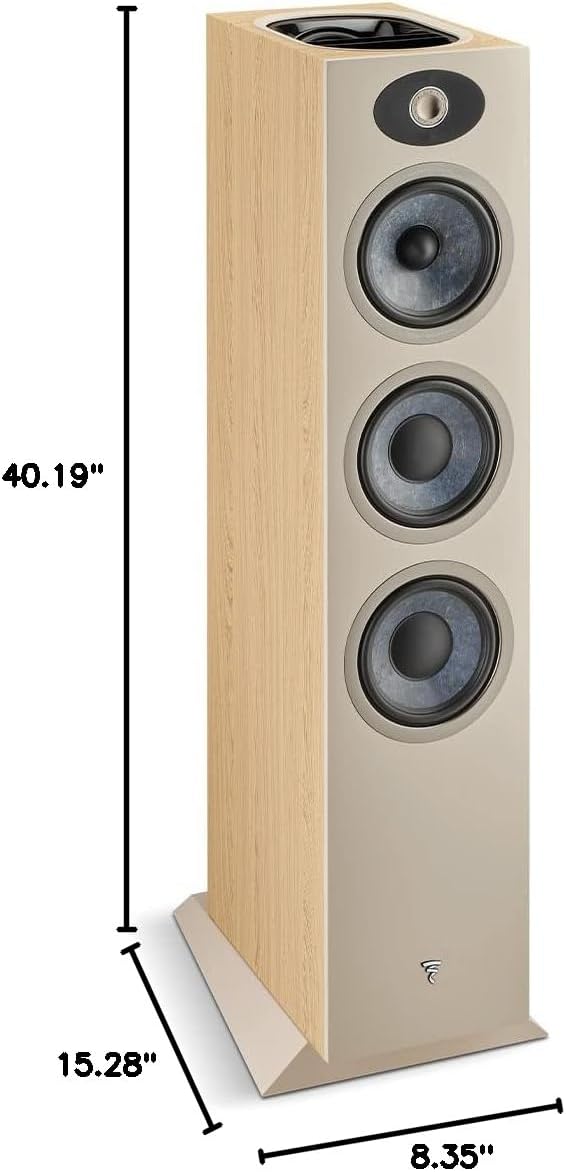
Figure 7: Dimensions diagram for the Focal Theva N°3-D loudspeaker, showing height (40.19"), depth (15.28"), and width (8.35").
10. Bermea eta Laguntza
10.1 Bermearen informazioa
The Focal Theva N°3-D loudspeaker comes with a limited warranty. Please refer to the warranty card included with your product or visit the official Focal webwebgunean estaldura, iraupena eta erreklamazio-prozedurei buruzko baldintza eta zehaztapenak aurkituko dituzu.
10.2 Bezeroarentzako laguntza
For technical assistance, troubleshooting beyond this manual, or warranty inquiries, please contact your authorized Focal dealer or visit the official Focal support webgunea:
- Fokua Webgunea: www.focal.com
- Saltzailearen informazioa: Refer to your purchase receipt or the Focal website to locate an authorized dealer near you.