
1. Sarrera
The iZEEKER GD850 is a high-performance 4K WiFi Dual Dashcam designed to provide comprehensive road surveillance for your vehicle. Featuring a 4K front camera and a 1080P rear camera, it captures clear footage with a wide 170° angle lens, minimizing blind spots. The intuitive 3-inch IPS touchscreen allows for easy monitoring and playback. Equipped with built-in WiFi and GPS, the GD850 offers convenient connectivity for managing recordings via the "iZEEKER Tour" app and precise location/speed tracking.
Key features include 24/7 parking monitoring (requires hardwire kit), automatic loop recording, and G-sensor activated emergency recording to secure critical footage. The dashcam supports up to 256GB microSD cards and comes with a 32GB card to get you started. Two mounting options, a suction cup and an adhesive mount, are provided for flexible installation.
2. Zer dago kutxan
Upon opening your iZEEKER GD850 package, you should find the following components:
- iZEEKER GD850 4K Dual Dashcam (Front Unit)
- Rear Camera (1080P)
- 32 GB MicroSD txartela
- Suction Cup Mendia
- Itsasgarri Mendia
- Car Charger with GPS Module
- Atzeko Kameraren Kablea
- Erabiltzailearen eskuliburua
- Hardwire Kit (for 24/7 Parking Monitoring, may be included or require separate purchase depending on package)

Image: All components included in the iZEEKER GD850 Dashcam package.
3. Konfigurazioa
3.1. MicroSD txartela instalatzea
Before first use, insert the provided 32GB MicroSD card into the dashcam. Ensure the dashcam is powered off before inserting or removing the card. The GD850 supports up to 256GB MicroSD cards.
3.2. Dashcam muntatzea
The iZEEKER GD850 offers two primary mounting options:
- Bentosa muntaia: Ideal for easy removal and repositioning. Attach the suction cup to a clean, dry area on your windshield, then twist the locking mechanism to secure it.
- Itsasgarriaren muntaia: Provides a more permanent and compact installation. Clean the desired area on your windshield thoroughly. Apply the adhesive mount firmly. It is recommended to use the provided clear cling film pieces on the glass before applying the adhesive directly.
Mount the front camera in a position that does not obstruct your view of the road. The rear camera should be mounted on the rear windshield, ensuring a clear view.

Image: Illustration of the two mounting methods: suction cup and 3M adhesive.
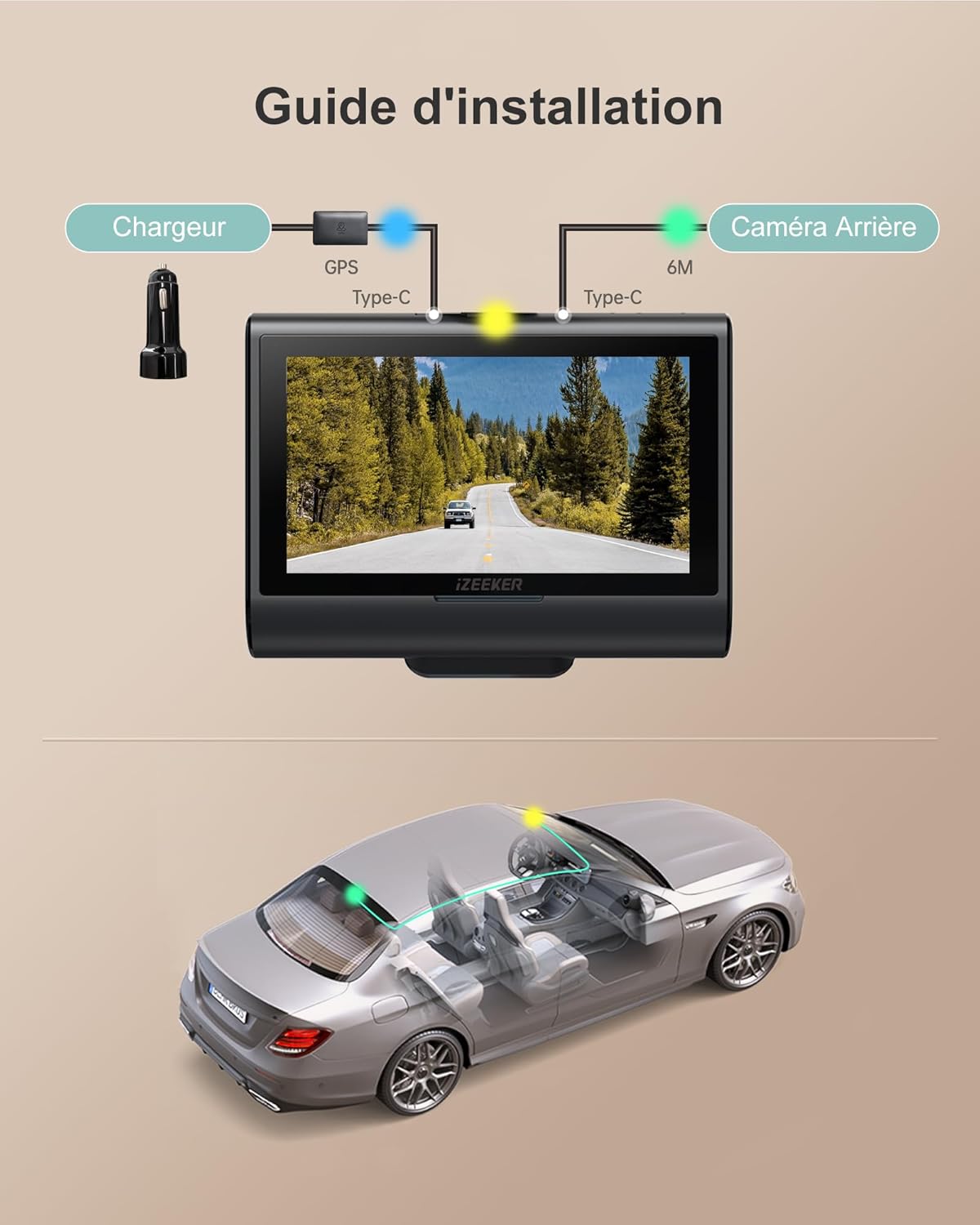
Image: Wiring diagram for connecting the front camera, rear camera, and car charger with GPS.
3.3. Powering the Dashcam
Connect the car charger to your vehicle's cigarette lighter socket and the dashcam's Type-C port. The dashcam will automatically power on and begin recording when your vehicle starts.
3.4. Initial Setup and SD Card Formatting
It is crucial to format the MicroSD card before first use and periodically thereafter to ensure optimal performance and prevent data corruption. You can format the SD card directly on the dashcam.
- Piztu dashcam.
- Tap the "Menu" icon on the touchscreen.
- Navigate to "System Settings".
- Scroll down and select "Format".
- Confirm to delete all data and format the card.
Video Instruction: How to Format SD Card
Video: A short instructional video demonstrating how to format the SD card on the iZEEKER GD850 dashcam.
4. Funtzionamendua
4.1. Oinarrizko grabaketa
The dashcam automatically starts recording when powered on and stops when the vehicle is turned off. Videos are saved in 3-minute segments. Unlocked videos are overwritten by new recordings when the memory card is full (Loop Recording).

Image: G-sensor protection and loop recording functionality.
4.2. Larrialdiko grabaketa (G-sentsorea)
The built-in G-sensor automatically detects sudden vibrations or impacts (e.g., in case of a collision) and locks the current video segment to prevent it from being overwritten. You can also manually lock a video by pressing the "!" icon on the screen.
4.3. Aparkalekuen jarraipena
When the parking protection function is enabled, the dashcam will record approximately three 30-second locked video segments upon detecting vibrations while the vehicle is off. For continuous 24/7 parking monitoring, a hardwire kit is required to provide constant power to the dashcam. Please note that while a hardwire kit may be included, its installation is necessary for full 24/7 functionality.

Image: Parking mode options, highlighting the need for a hardwire kit for 24/7 surveillance.
4.4. WiFi Connectivity and iZEEKER Tour App
The GD850 features built-in WiFi for convenient management of your dashcam via the "iZEEKER Tour" app on your iOS or Android device. This allows you to view bizi footage, download recordings, and share videos.
- Download the "iZEEKER Tour" app from Google Play Store (Android) or Apple App Store (iOS).
- On the dashcam, tap the WiFi icon to turn on WiFi. The screen will display the WiFi SSID and password.
- On your phone/tablet, go to WiFi settings and connect to the GD850's WiFi network using the provided password.
- Open the "iZEEKER Tour" app. Once successfully connected, you can control recording and access files.
Video Instruction: How to Use the iZEEKER Tour App
Video: A short instructional video demonstrating how to connect to and use the iZEEKER Tour app with the GD850 dashcam.

Image: The iZEEKER Tour app on a mobile device and the GPS Player software on a computer, displaying video footage and GPS data.
4.5. GPS Tracking and GPS Player
The external GPS module ensures precise tracking of your vehicle's position and speed. You can review datu hauek zure bideoarekin bateratage using the dedicated GPS Player software on your computer.
- Bideoa transferitu files from the dashcam's SD card to your computer using a Type-C USB cable or an SD card reader.
- Open the "GPS Player" folder (usually found on the SD card or provided by iZEEKER).
- If your computer does not support 4K video playback, download and install the recommended codec pack (e.g., K-Lite Mega Codec Pack) first.
- Launch the GPS Player application.
- Click to select the video file you wish to play. The player will display the video, map, speed, and other GPS data.
Video Instruction: How to Install and Use GPS Player
Video: A short instructional video demonstrating how to install and use the GPS Player software for the GD850 dashcam.
4.6. Ukipen-pantailaren interfazea
The 3-inch IPS touchscreen provides a simple and intuitive way to navigate menus, adjust settings, and review footage zuzenean gailuan.
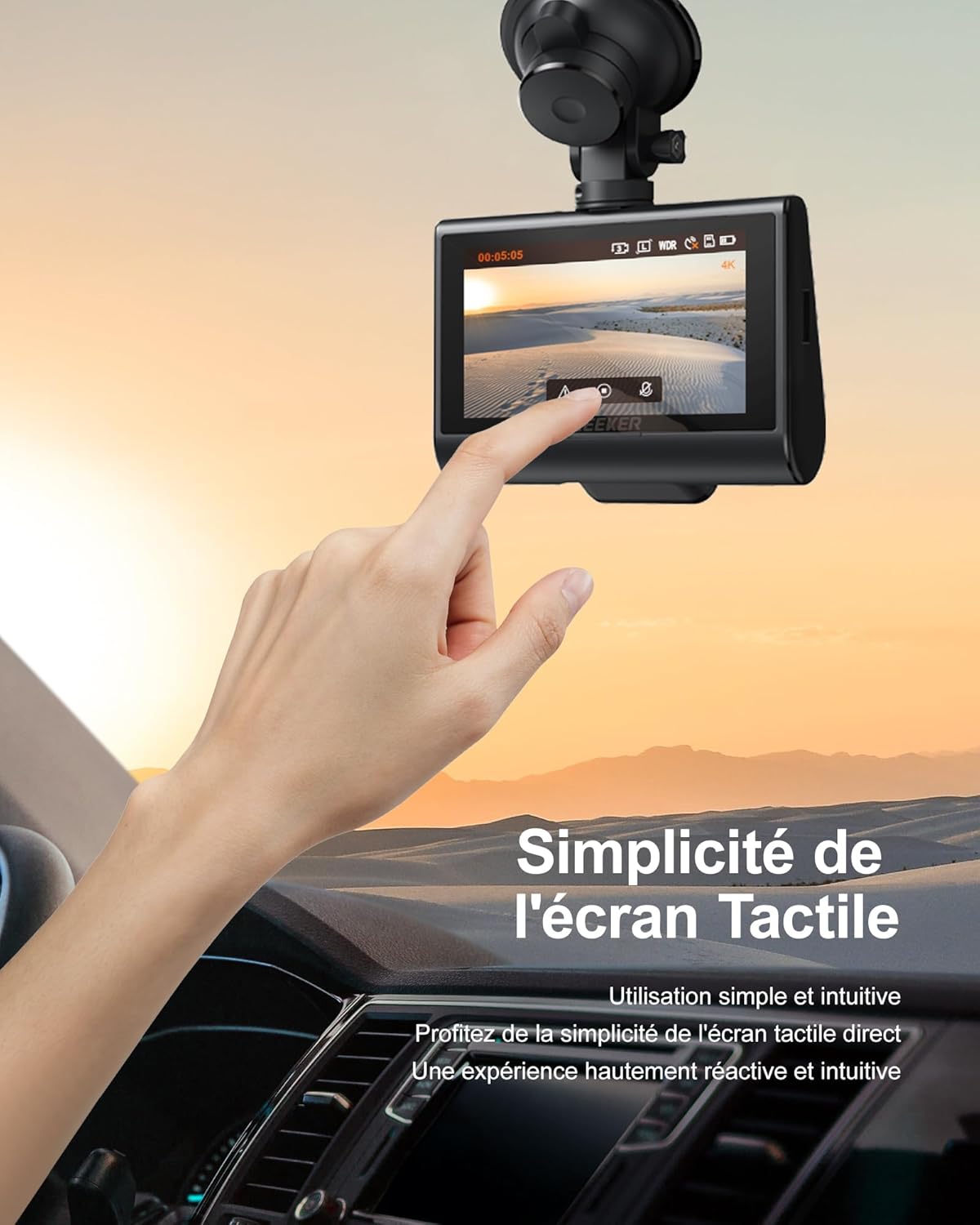
Image: User interacting with the responsive and intuitive touchscreen of the dashcam.
4.7. Bideoaren kalitatea eta gaueko ikusmena
The GD850 records in 4K (front) and 1080P (rear) resolutions. With WDR (Wide Dynamic Range) technology and a Sony Starvis sensor, the dashcam captures clear video even in challenging lighting conditions, including low-light environments at night.

Image: Visual comparison of 4K front camera and 1080P rear camera footage.

Image: Enhanced night vision capturing details in low-light conditions.
5. Mantentzea
- SD Txartelaren Mantentze-lanak: Format the MicroSD card regularly (e.g., once a month) to prevent data corruption and ensure smooth recording. Replace the SD card if you notice any recording errors or performance degradation.
- Garbiketa: Use a soft, dry cloth to clean the dashcam lens and screen. Avoid using abrasive cleaners or solvents.
- Tenperatura: Avoid exposing the dashcam to extreme temperatures for extended periods. If the vehicle is parked in direct sunlight, consider removing the dashcam or using a sunshade.
- Firmware eguneraketak: Begiratu iZEEKER-i website or app periodically for firmware updates to ensure optimal performance and access to new features.
6. Arazoak
| Arazoa | Kausa posiblea | Irtenbidea |
|---|---|---|
| Dashcam-ak ez du pizten. | No power supply; faulty car charger; loose connection. | Check car charger connection and vehicle's cigarette lighter socket. Try another power source if available. |
| Dashcam stops recording unexpectedly. | SD card full or corrupted; power interruption; G-sensor sensitivity too high. | Format the SD card. Reduce G-sensor sensitivity in settings. Ensure stable power supply. |
| Bideoa footage lausoa edo argi ez dagoena. | Protective film on lens; dirty lens; incorrect focus (unlikely for fixed focus dashcam); low light conditions. | Remove any protective film. Clean the lens with a soft cloth. Ensure WDR is enabled for low light. |
| WiFi konexio arazoak. | Incorrect password; WiFi not enabled on dashcam; interference. | Ensure WiFi is enabled on the dashcam and the correct password is entered. Try reconnecting. |
| Parking monitoring not working 24/7. | Hardwire kit not installed or incorrectly installed; parking mode not enabled. | Ensure the hardwire kit is correctly installed and connected to a constant power source. Verify parking mode settings. |
7. Zehaztapenak
| Ezaugarri | Xehetasuna |
|---|---|
| Marka | iZEEKER |
| Ereduaren izena | GD850 |
| Bideo Grabaketa Ebazpena | Front: 4K (2160p), Rear: 1080P |
| Pantailaren tamaina | 3 Inches IPS Touchscreen |
| Konektibitate Teknologia | Wi-Fi |
| Ezaugarri bereziak | 4K UHD Dual Camera, Easy Mounting Options, MicroSD Card Included, Automatic & Loop Recording, Automatic & Manual Emergency Recording, Built-in WiFi & GPS, 24/7 Parking Monitoring (requires hardwire kit) |
| Dakarten osagaiak | 32GB SD Card, Suction Cup Mount, Adhesive Mount, User Manual, Hardwire Kit |
| Muntatze Mota | Windshield Mount, License Plate Mount (Rear Camera) |
| ren eremua View | 170 gradu |
| Kontrol-metodoa | Ukitu |
| Flash memoria mota | microSD |
| Gehieneko irekiera | f/1.8 |
| Bateria mota | Litio-ioi |
| Fotograma-tasa | 30 FPS |
| Max Supported Memory Card Size | 256 GB |
| Elementuaren neurriak (L x W x H) | 13 x 14 x 12 milimetro |
8. Bermea eta Laguntza
iZEEKER-ek eskaintzen du 2 urteko bermea for the GD850 dashcam. Dedicated customer service personnel are available to provide technical assistance and support for replacement parts.
For any inquiries, technical support, or warranty claims, please contact iZEEKER customer support at support@izeeker.co.
Please have your product model (GD850) and purchase details ready when contacting support for faster service.