Sarrera
This user manual provides detailed instructions for the operation and maintenance of your Jensen CD-660 Portable Stereo CD Player Boombox. Please read this manual thoroughly before using the device to ensure proper function and to maximize your listening experience. Keep this manual for future reference.
Segurtasun-argibide garrantzitsuak
Deskarga elektriko, sute edo lesio arriskua murrizteko, jarraitu beti oinarrizko segurtasun neurri hauek:
- Ez jarri aparatu hau euri edo hezetasunera.
- Ez blokeatu aireztapen-zulorik.
- Ez instalatu bero-iturri inongo ondoan, esate baterako, erradiadoreak, bero-erregistroak, sukaldeak edo beste aparatu batzuk (barne ampberoa sortzen duten argitzaileak).
- Babestu korronte-kablea ibiltzeko edo atximur ez dadin.
- Erabili soilik fabrikatzaileak zehaztutako eranskinak/osagarriak.
- Deskonektatu tresna hau tximista-ekaitzetan edo denbora luzez erabiltzen ez duzunean.
- Jarri zerbitzu-zerbitzu guztiak zerbitzu-pertsonal kualifikatuari.
Paketearen edukia
Egiaztatu behean zerrendatutako elementu guztiak zure paketean sartuta daudela:
- Jensen CD-660 Portable Stereo CD Player Boombox
- AC Adapter (120V)
- Jabearen eskuliburua
Produktua amaituview
Familiarize yourself with the various parts and controls of your Jensen CD-660 boombox.
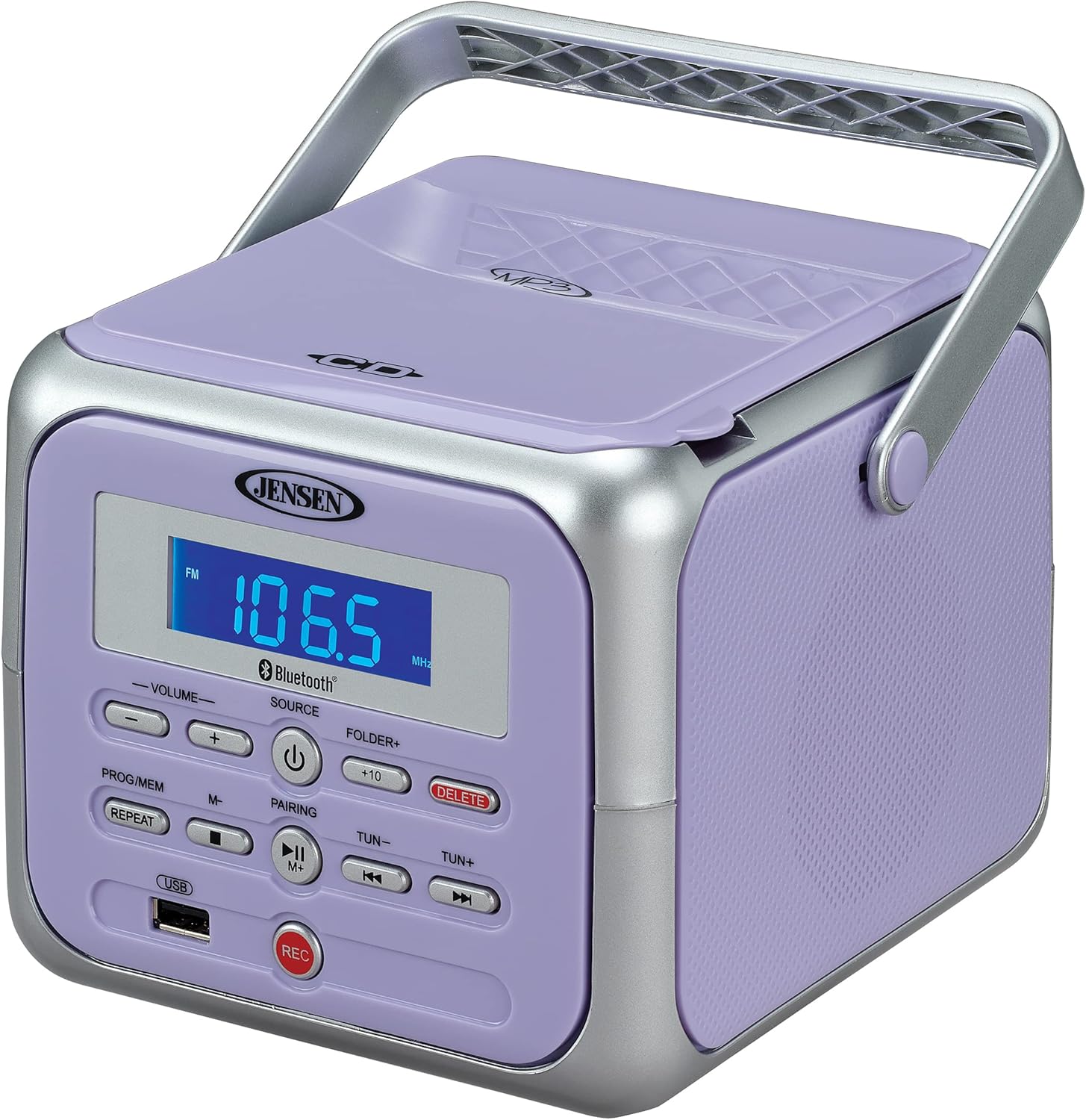
1. irudia: Aurrealdea view of the Jensen CD-660 with the carrying handle extended. This image displays the main control panel, including the display screen, volume controls, source selection, and playback buttons.

2. irudia: Aurrealdea view of the Jensen CD-660 with the carrying handle folded down. This perspective highlights the compact design and the arrangement of buttons and the LCD display.

3. irudia: Goikoa view of the Jensen CD-660 with the CD compartment lid open, revealing the CD tray. This illustrates the top-loading mechanism for disc insertion.
Kontrol panelaren ezaugarriak:
- LCD pantaila: Uneko modua, pistaren zenbakia, maiztasuna eta bestelako informazioa erakusten ditu.
- BOLUMENA +/- botoiak: Doitu audio irteerako maila.
- SOURCE botoia: Selects between CD, Bluetooth, FM Radio, and Aux-in modes.
- POWER botoia: Unitatea pizten edo itzaltzen du.
- PROG/MEM Button: Programs CD tracks or stores FM radio presets.
- ERREPIKATU botoia: Uneko pista edo pista guztiak errepikatzen ditu.
- PAIRING Button: Bluetooth parekatze modua abiarazten du.
- PLAY/PAUSE botoia: Erreprodukzioa hasten edo eten egiten du.
- STOP botoia: Erreprodukzioa geldiarazten du.
- SALTATU/BILATU botoiak (◀◀ / ▶▶): Pistak saltatzen ditu edo pista baten barruan bilatzen du.
- TUN +/- Buttons: FM irrati-maiztasuna sintonizatzen du.
- FOLDER+ Button: Navigates to the next folder on a USB device.
- +10 botoia: Skips 10 tracks forward on CD/USB.
- Ezabatu botoia: Deletes recorded files USBtik.
- REC botoia: Initiates recording to a USB flash drive.
- USB ataka: For USB flash drive playback and recording.
- Aux-in Jack: Kanpoko audio gailuak konektatzen ditu.
- Aurikularrak Jack: Entzun pribaturako.
Konfigurazioa
Unitatea elikatzea
The Jensen CD-660 can be powered by either the included AC adapter or batteries.
Korronte alternoaren funtzionamendua:
- Plug the AC adapter into the AC IN jack located on the back of the unit.
- Plug the other end of the AC adapter into a standard 120V AC wall outlet.
Bateriaren funtzionamendua:
For portable use, the unit requires 6 x 'C' (UM-2) batteries (not included).
- Ireki unitatearen behealdean dagoen bateriaren konpartimentuaren estalkia.
- Insert 6 'C' size batteries, ensuring correct polarity (+/-) as indicated inside the compartment.
- Itxi bateriaren konpartimenduaren estalkia ondo.
Oharra: Disconnect the AC adapter when operating on battery power. Remove batteries if the unit will not be used for an extended period.
Funtzionamendu-argibideak
Eragiketa orokorra:
- Sakatu BOTEREA botoia unitatea pizteko.
- Sakatu ITURRIA button repeatedly to select your desired mode (CD, Bluetooth, FM, USB, AUX).
- Doitu bolumena BOLUMENA +/- botoiak.
CD erreprodukzioa:
The unit supports CD, CD-R/RW, MP3, and WMA disc formats.
- Ireki CDaren konpartimentuaren tapa.
- Jarri CD bat etiketa gora begira duela ardatzean.
- Itxi CD konpartimentuaren estalkia.
- Sakatu ITURRIA botoia CD modua hautatzeko.
- Sakatu JOLASTU/PAUSTU botoia erreproduzitzen hasteko.
- Erabili SALTU / BILATU botoiak (◀◀ / ▶▶) abestietan nabigatzeko.
- Sakatu GELDITU erreprodukzioa gelditzeko botoia.
Bluetooth funtzionamendua:
Erreproduzitu audioa haririk gabe zure Bluetooth gaitutako gailutik.
- Sakatu ITURRIA button to select Bluetooth mode. The display will show "BT" and flash, indicating pairing mode.
- Zure Bluetooth gailuan, gaitu Bluetootha eta bilatu eskuragarri dauden gailuak.
- Select "JENSEN CD-660" from the list of devices.
- Once paired, the display will stop flashing and show "BT".
- Start playing audio on your connected device.
- Erabili JOLASTU/PAUSTU eta SALTU / BILATU buttons on the boombox or your device to control playback.
FM irratia:
Entzun zure FM irrati-kate gogokoenak.
- Sakatu ITURRIA botoia FM irrati modua hautatzeko.
- Extend the FM wire antenna for optimal reception.
- Sakatu TUN +/- botoiak irrati bat eskuz sintonizatzeko.
- Eduki sakatuta TUN +/- hurrengo irrati eskuragarrira automatikoki eskaneatzeko botoiak.
Aurreikuspenak gordetzea eta gogoratzea:
The unit can store up to 30 FM presets.
- Sintonizatu nahi duzun FM geltokia.
- Sakatu PROG / MEM botoia. Pantailak aurrezarpen zenbaki keinukari bat erakutsiko du.
- Erabili SALTU / BILATU buttons (◀◀ / ▶▶) to select the desired preset number.
- Sakatu PROG / MEM botoia berriro sakatu irratia berresteko eta gordetzeko.
- Aurrezarpen bat berreskuratzeko, sakatu PROG / MEM botoia behin eta berriz sakatu gordetako irratiak zeharkatzeko.
USB erreprodukzioa:
Play MP3, WAV, or FLAC audio fileUSB flash unitate batetik.
- Sartu USB flash unitate bat USB atakan.
- Sakatu ITURRIA botoia USB modua hautatzeko.
- The unit will automatically begin playing the first compatible audio file.
- Erabili SALTU / BILATU botoiak (◀◀ / ▶▶) abestietan nabigatzeko.
- Erabili CARPETA+ button to navigate between folders on the USB drive.
- The +10 button can be used to skip 10 tracks forward.
USB Grabaketa:
Record audio directly to a USB flash drive from CD, FM Radio, Aux-in, or Bluetooth sources.
- Sartu USB flash unitate bat USB atakan.
- Select the desired audio source (CD, FM, AUX, or Bluetooth).
- Start playback of the audio you wish to record.
- Sakatu REC button to begin recording. The display will indicate recording status.
- Sakatu REC botoia berriro grabaketa gelditzeko.
- Grabatutako bat ezabatzeko file, nabigatu file in USB playback mode and press the EZABATU botoia.
Aux-in Connection:
Connect external audio devices like smartphones or tablets.
- Connect one end of a 3.5mm audio cable (not included) to the Aux-in jack on the boombox.
- Konektatu kablearen beste muturra kanpoko gailuaren entzungailuen konektorera edo audio irteerara.
- Sakatu ITURRIA button to select Aux-in mode.
- Start playing audio on your external device.
- Soinu optimoa lortzeko, doi ezazu boombox-aren eta kanpoko gailuaren bolumena.
Mantentzea
Unitatea garbitzea:
- Garbitu unitatearen kanpoaldea leun batekin, damp oihal. Ez erabili garbitzaile edo disolbatzaile urratzailerik.
- CD lentearentzat, erabili CD lenteak garbitzeko disko espezializatu bat.
Bateria zaintzea:
- Kendu bateriak unitatea denbora luzez erabiliko ez bada, isuriak saihesteko.
- Ez nahastu bateria zaharrak eta berriak, edo bateria mota desberdinak.
Arazoak konpontzea
If you encounter issues with your Jensen CD-660, refer to the following table for common problems and solutions.
| Arazoa | Kausa posiblea | Irtenbidea |
|---|---|---|
| Botererik ez | Korronte-egokitzailea ez dago konektatuta; Bateriak agortuta edo gaizki sartuta. | Ensure AC adapter is securely plugged in; Replace batteries or check polarity. |
| Soinurik ez | Bolumena baxuegia; Iturri okerra hautatuta; Entzungailuak konektatuta. | Increase volume; Select correct source; Disconnect headphones. |
| CDa ez da erreproduzitzen | CD inserted incorrectly; Disc is dirty or scratched; CD compartment not closed. | Insert CD with label side up; Clean or replace disc; Close compartment securely. |
| Ezin izan da Bluetooth parekatzea | Device too far; Bluetooth not enabled on external device; Boombox not in pairing mode. | Move device closer; Enable Bluetooth; Ensure boombox is in BT pairing mode. |
| FM harrera eskasa | Antena ez dago luzatuta; Seinale ahula. | Fully extend the FM wire antenna; Reposition the unit for better reception. |
| USB erreprodukzio arazoak | Onartu gabe file format; USB drive not properly inserted or corrupted. | Ziurtatu files are MP3/WAV/FLAC; Reinsert USB drive; Try a different USB drive. |
Zehaztapenak
| Ezaugarri | Xehetasuna |
|---|---|
| Modelo zenbakia | CD-660 |
| Energia iturria | AC 120V (included adapter) or 6 x 'C' (UM-2) batteries (not included) |
| Konektibitatea | Bluetooth 5.1 (A2DP, AVRCP), USB, Aux-in |
| CD bateragarritasuna | CD, CD-R/RW, MP3, WMA |
| USB erreprodukzioa | MP3, WAV, FLAC |
| FM Irratia | Stereo Receiver with 30 Presets, PLL Digital Tuning |
| Neurriak (W x H x D) | 6.38" x 5.2" x 6.57" (16.2 cm x 13.2 cm x 16.7 cm) |
| Pisua | Gutxi gorabehera 2.46 lb (1.12 kg) |
Bermea eta Laguntza
This Jensen CD-660 Portable Stereo CD Player Boombox comes with a manufacturer's warranty. Please refer to the included Owner's Manual for specific details regarding warranty coverage, terms, and conditions. For technical support or service inquiries, please contact Jensen customer service directly. Contact information can typically be found in the Owner's Manual or on the official Jensen webgunea.