
1. Sarrera
The Samson Expedition Explor is a portable, rechargeable PA system designed for various applications including live performances, presentations, and outdoor events. This system features a powerful 200-watt amplifier, a 3-way speaker system, and an integrated 3-channel mixer. It includes a Samson XPD2 USB Digital Handheld Wireless System for cable-free microphone use and offers Bluetooth connectivity for audio streaming. The internal lithium-ion battery provides extended operation, and its lightweight design with multiple positioning options ensures versatility.
2. Segurtasun informazio garrantzitsua
Produktu hau erabili aurretik, irakurri eta ulertu segurtasun-argibide guztiak. Gorde eskuliburu hau etorkizunean erreferentzia gisa.
- Energia iturria: Use only the specified power adapter. Disconnect the power cord during lightning storms or when unused for long periods.
- Ura eta hezetasuna: Do not expose this unit to rain, moisture, dripping, or splashing. Do not place objects filled with liquids on the unit.
- Beroa: Ez jarri unitatea bero-iturrien ondoan, hala nola erradiadoreen, bero-erregistroen, sukaldeen edo beste aparatuen ondoan (adibidez, ampberoa sortzen duten argitzaileak).
- Aireztapena: Ziurtatu aireztapen egokia dagoela. Ez blokeatu aireztapen-irekidurak.
- Garbiketa: Garbitu zapi lehor batekin bakarrik.
- Zerbitzua: Ez saiatu produktu hau zuk zeuk ematen. Bidali zerbitzu guztiak zerbitzu kualifikatuko langileengana.
- Bateriaren segurtasuna: Do not disassemble, crush, or expose the battery to high temperatures or fire. Dispose of batteries properly.
3. Paketearen edukia
Egiaztatu elementu guztiak zure paketean daudela:
- Samson Expedition Explor PA System
- Samson XPD2 Wireless Handheld Microphone
- USB Receiver for Wireless Microphone
- Elikatze-moldagailua
- Hauts Estalkia
- Erabiltzailearen eskuliburua (dokumentu hau)
4. Produktua amaitu daview
The Expedition Explor PA system is designed for clear and powerful audio reproduction. Familiarize yourself with its components and controls.
4.1 Bozgorailuen osagaiak

4.1. irudia: Diagram illustrating the internal speaker components of the Expedition Explor, including the 8-inch woofer, 3.5-inch midrange driver, and dual 1-inch tweeters for a 3-way sound system.
- 8" Woofer: Maiztasun baxuko erantzun sendoa eskaintzen du.
- 3.5" Midrange Driver: Delivers clear and articulate mid-range frequencies.
- Dual 1" High-Frequency Drivers (Tweeters): Ensures crisp and detailed high-frequency reproduction.
4.2 Rear Panel and Mixer Controls

4.2. irudia: Xehetasuna view of the rear panel of the Expedition Explor, showing the 3-channel mixer with various input/output jacks and control knobs for volume, reverb, and EQ.
- Channel 1 & 2 Inputs: Two XLR-1/4" combo jacks for microphones, line-level devices, or high-impedance instruments like guitars. Each channel has independent volume and reverb controls.
- 3. kanaleko sarrera: 1/8" auxiliary input for connecting external audio devices (e.g., smartphones, tablets). This channel also features Bluetooth connectivity.
- Bluetooth parekatzeko botoia: Initiates Bluetooth pairing mode for Channel 3.
- Master 3-Band EQ: Controls for Treble, Mid, and Bass to adjust the overall tone of the mix.
- Variable Reverb Controls: Adjusts the amount of reverb effect applied to channels 1 and 2.
- 1/4" Line Out: Allows connection to additional Expedition Explor speakers or other PA systems.
- Power Switch & AC Input: For turning the unit on/off and connecting the power adapter.
- Charge/Power Indicator: LED to show charging status and power on/off.
4.3 Haririk gabeko mikrofono-sistema

4.3. irudia: The Samson XPD2 wireless handheld microphone and its accompanying USB receiver, which provides wireless audio input to the PA system.
The included Samson XPD2 USB Digital Handheld Wireless System provides a convenient, cable-free solution for vocal performances or presentations. The USB receiver plugs directly into the PA system's USB port.
4.4 Portability and Positioning
4.4. irudia: The Samson Expedition Explor PA system being carried by its integrated top handle, highlighting its portability.

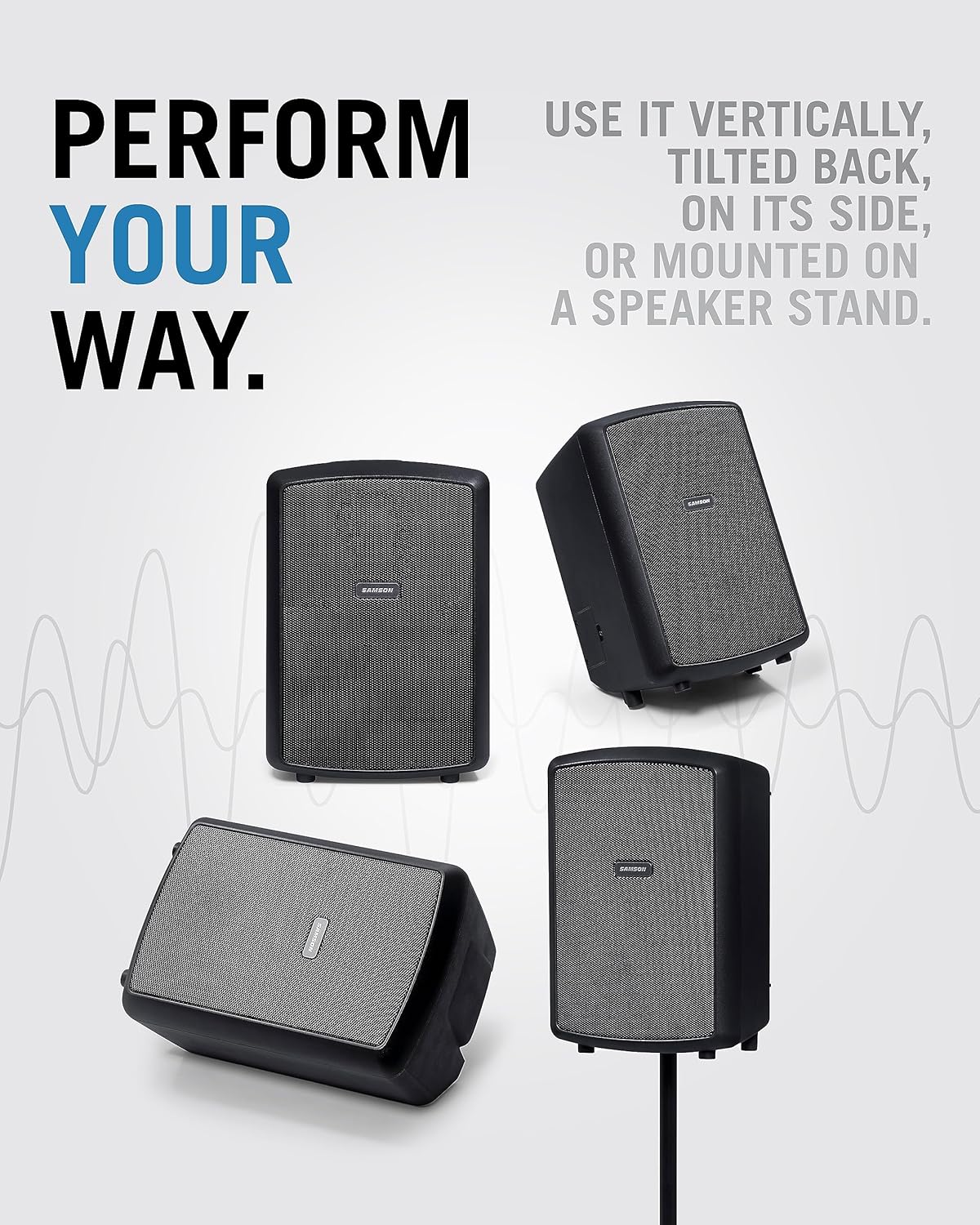
4.5. irudia: Various positioning options for the Expedition Explor PA system, including vertical, tilted back, on its side as a monitor, and mounted on a speaker stand.
Weighing approximately 15 pounds and featuring an integrated carry handle, the Expedition Explor is highly portable. It offers four performance positions:
- Bertikala: Standard upright position for general sound projection.
- Tilted Back: Angled position for upward sound projection, useful when placed on the floor.
- Horizontal (Monitor): Laying on its side, ideal for use as a stagmonitore.
- Zutoinaren muntaia: Utilizes the built-in 1 3/8" pole mount for elevated sound dispersion.
5. Konfigurazioa
5.1 Bateria kargatzea
- Connect the included power adapter to the AC Input on the rear panel of the Expedition Explor.
- Entxufatu korronte-egokitzailea korronte-hartune egoki batera.
- The Charge/Power indicator LED will illuminate to show charging status. A full charge provides up to 12 hours of continuous use.
5.2 Connecting the Wireless Microphone
- Insert the Samson XPD2 USB receiver into the USB port on the rear panel of the Expedition Explor.
- Turn on the wireless handheld microphone.
- The receiver and microphone should automatically pair. Adjust the volume for the corresponding channel (Channel 1 or 2) using its dedicated volume knob.
5.3 Connecting Other Audio Sources
- Mikrofonoak/Instrumentuak: Connect wired microphones, line-level devices, or high-impedance instruments to the XLR-1/4" combo jacks on Channel 1 or 2. Adjust the respective volume knobs.
- Gailu lagungarriak: Connect smartphones, MP3 players, or other audio sources to the 1/8" AUX IN jack on Channel 3. Adjust the Channel 3 volume knob.
- Bluetooth gailuak: Haririk gabeko audio-streaming-erako, jo 6.2 atalera Bluetooth parekatzeko argibideetarako.
5.4 PA sistemaren kokapena
Choose the optimal position for your Expedition Explor based on your environment and audience. Refer to Image 4.5 for visual examples.
- For general use, place the unit vertically on a stable surface or mount it on a speaker stand.
- If placing on the floor, tilt it back to direct sound upwards towards the audience.
- For monitoring purposes, lay the unit horizontally on its side.
6. Funtzionamendu-argibideak
6.1 Powering On/Off and Volume Adjustment
- Ziurtatu konexio guztiak seguruak direla.
- Turn the Master Volume knob to its minimum setting.
- Press the Power switch on the rear panel to turn on the unit. The Power LED will illuminate.
- Gradually increase the volume of the connected input channels (Channel 1, 2, or 3) and then the Master Volume to achieve the desired sound level.
- To power off, turn the Master Volume to minimum, then press the Power switch.
6.2 Bluetooth parekatzea
- Ensure the Expedition Explor is powered on.
- Eduki sakatuta Bluetooth parekatzea button on the rear panel (Channel 3 section) until the Bluetooth indicator LED begins to flash. This indicates the unit is in pairing mode.
- On your Bluetooth-enabled device (e.g., smartphone), navigate to its Bluetooth settings and select "Samson Explor" from the list of available devices.
- Once paired, the Bluetooth indicator LED on the Expedition Explor will glow solid.
- Play audio from your device and adjust the Channel 3 volume knob on the PA system.
6.3 Using Reverb and EQ
- Erreberbazioa: Use the individual Reverb knobs for Channel 1 and 2 to add a spatial effect to microphones or instruments. Start with a low setting and gradually increase to taste.
- Master EQ: Adjust the Treble, Mid, and Bass knobs in the Master section to fine-tune the overall sound of your mix. Increase Treble for brighter sound, Bass for more low-end, and Mid for vocal clarity.
6.4 Connecting Additional Explor Speakers
To expand your sound system, connect the 1/4" Line Out of one Expedition Explor to an input channel of another Expedition Explor unit. This allows you to daisy-chain multiple units for larger venues.
6.5 Produktu Ofizialen Bideoak
6.1. bideoa: Bat baino gehiagoview of the Samson Expedition Explor PA system, demonstrating its features and portability in a vertical format. (Duration: 1:01)
6.2. bideoa: A comprehensive demonstration of the Samson Expedition Explor, detailing its setup, mixer functions, and various applications. (Duration: 8:12)
7. Mantentzea
- Garbiketa: Wipe the unit with a soft, dry cloth. Avoid using abrasive cleaners, solvents, or waxes.
- Bateria zaintzea: For optimal battery life, avoid fully discharging the unit frequently. Recharge the battery regularly, even if not in use, to maintain its capacity. Store the unit in a cool, dry place.
- Biltegiratzea: When not in use, store the Expedition Explor in a dry environment, preferably covered with the included dust cover to protect it from dust and debris.
8. Arazoak
| Arazoa | Kausa posiblea | Irtenbidea |
|---|---|---|
| Ez dago soinu irteerarik |
|
|
| Haririk gabeko mikrofonoa ez dabil |
|
|
| Bluetooth gailua ez da parekatzen |
|
|
| Soinu distortsionatua |
|
|
9. Zehaztapenak
| Ezaugarri | Xehetasuna |
|---|---|
| Irteera Potentzia | 200 Watt |
| Bozgorailu sistema | 3-way (8" woofer, 3.5" midrange, dual 1" tweeters) |
| Maiztasun Erantzuna | 52 Hz - 20 kHz |
| Bateria mota | Internal Lithium-ion rechargeable |
| Bateriaren iraupena | Gehienez 12 ordu |
| Kanalak | 3 |
| Sarrerak | 2x XLR-1/4" Combo, 1/8" Aux In, Bluetooth, USB (for XPD2 wireless) |
| Irteerak | 1/4" Line Out |
| EQ | Master 3-band (Treble, Mid, Bass) |
| Eraginak | Variable Reverb |
| Haririk gabeko sistema | Samson XPD2 USB Digital Handheld Wireless System |
| Neurriak (L x W x H) | 23.5 x 14.2 x 12.6 hazbete |
| Elementuaren pisua | 15 pounds (Note: Product data lists 1 pound, but description and context suggest 15 pounds for a PA system) |
| Muntatze Mota | Tabletop, Pole Mount (1 3/8") |
| Modelo zenbakia | SAXPXPLRW |
| UPC | 809164027584, 809164027591 |
10. Bermearen informazioa
For detailed warranty information regarding your Samson Expedition Explor Rechargeable PA System, please refer to the warranty card included in your product packaging or visit the official Samson webgunea. Bermearen baldintzak eta zehaztapenak eskualdearen eta produktuaren arabera alda daitezke.
11. Laguntza
If you require technical assistance, service, or have questions about your Samson Expedition Explor, please contact Samson customer support through their official webgunea edo zure produktuaren dokumentazioan emandako harremanetarako informazioa. Bisitatu ere egin dezakezu Samson denda Amazonen produktuaren informazio gehigarrirako.