1. Sarrera
Thank you for choosing the SPLITSKY NZFS Kids Alarm Clock. This device combines an alarm clock, white noise sleep aid, and an 8-mode RGB night light, designed to assist with sleep and wake-up routines for children and adults. Please read this manual thoroughly to understand its features and ensure proper operation.
Segurtasun informazioa:
- Mantendu gailua uretatik eta hezetasun handiko inguruneetatik urrun.
- Ez saiatu gailua zuk zeuk desmuntatzen edo konpontzen.
- Use only the provided USB-C power cable or a certified equivalent.
- Ziurtatu aireztapen egokia gailuaren inguruan.
2. Paketearen edukia
Egiaztatu elementu guztiak zure paketean daudela:
- SPLITSKY NZFS Kids Alarm Clock
- 1.2M (4.7 inch) USB-C Power Cable
- Erabiltzailearen eskuliburua (dokumentu hau)
- 1 x CR2032 Lithium Ion Battery (pre-installed for memory backup)
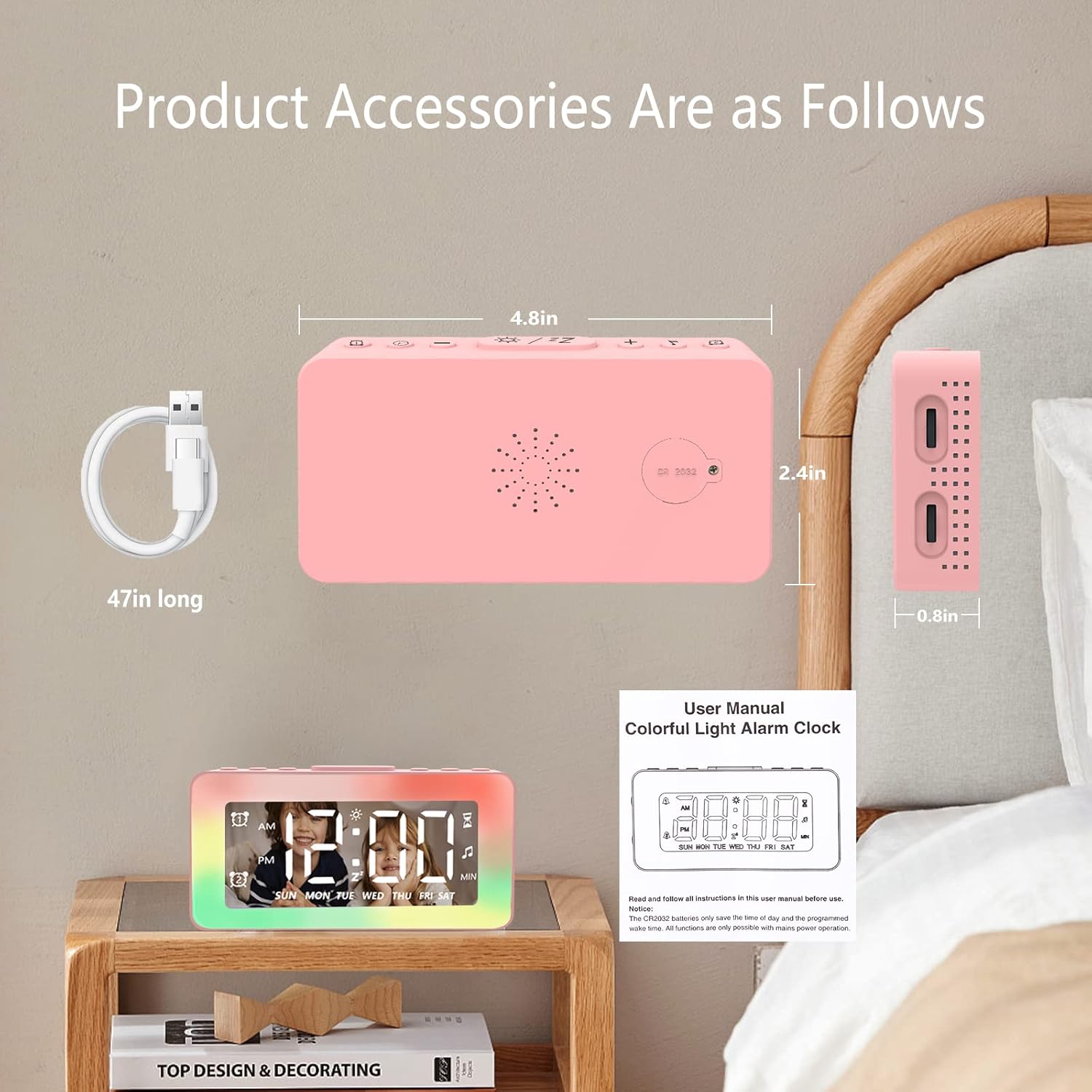
Image: The SPLITSKY NZFS Kids Alarm Clock, a USB-C power cable, and the user manual are included in the package.
3. Produktua amaitu daview
Familiarize yourself with the buttons and ports on your alarm clock:

Irudia: Xehetasun handikoa view of the alarm clock's top buttons and side ports, including Alarm 1, Time Setting, Light Minus/Settings, Snooze/Light Mode Switch, Light Plus/Setup, Music Switch, Alarm 2, Volume Setting, Time Brightness Setting, USB Output Charging Port, and Type-C Input Interface.
- Alarma 1 botoia: Set and activate Alarm 1.
- Ordua ezartzeko botoia: Doitu uneko ordua.
- Light Minus / Settings Button: Decrease light brightness or navigate settings.
- Snooze / Light Mode Switch Button: Activate snooze, or cycle through light modes.
- Light Plus / Setup Button: Increase light brightness or confirm settings.
- Music Switch Button: Cycle through white noise sounds.
- Alarma 2 botoia: Set and activate Alarm 2.
- Volume Setting Wheel (Side): Adjust alarm and white noise volume.
- Time Brightness Setting Wheel (Side): Doitu pantailaren distira.
- USB Output Charging Port (Side): Charge external devices.
- Type-C Input Interface (Side): Connect power cable to the alarm clock.
4. Konfigurazioa
4.1 Energia-konexioa
- Connect the provided USB-C power cable to the Type-C Input Interface on the side of the alarm clock.
- Plug the other end of the USB-C cable into a compatible USB power adapter (not included) or a USB port.
- Pantaila piztuko da, erlojua piztuta dagoela adieraziz.

Image: The SPLITSKY NZFS Kids Alarm Clock is shown powered on and connected via its USB-C port, also demonstrating its capability to charge a smartphone.
4.2 Battery Installation (Memory Backup)
The alarm clock includes a pre-installed CR2032 battery. This battery serves as a memory backup to retain time and alarm settings during a power outage or when the main power is disconnected. It does not power the clock for regular operation.
- If the battery needs replacement, locate the battery compartment on the back of the unit.
- Erabili bihurkin txiki bat konpartimendua irekitzeko.
- Ordeztu CR2032 bateria berri batekin, polaritate zuzena ziurtatuz.
- Itxi konpartimendua seguru.
5. Funtzionamendu-argibideak
5.1 Setting the Time (12H/24H Format)
- Eduki sakatuta Ordua ezartzeko botoia orduko digituak keinuka hasi arte.
- Erabili Light Minus / Settings Button (behera) edo Light Plus / Setup Button (up) to adjust the hour.
- Sakatu Ordua ezartzeko botoia again to move to minute adjustment. Adjust minutes using the Light Minus/Plus buttons.
- Sakatu Ordua ezartzeko botoia a third time to select 12-hour or 24-hour format. Adjust using the Light Minus/Plus buttons.
- Sakatu Ordua ezartzeko botoia berriro ere baieztatzeko eta ordua ezartzeko modutik irteteko.
5.2 Setting Alarms (Dual Alarm, Daily/Weekday/Weekend Mode)
The clock supports two independent alarms (Alarm 1 and Alarm 2).
- Eduki sakatuta Alarma 1 botoia (1. alarmarako) edo Alarma 2 botoia (for Alarm 2) until the alarm hour digits flash.
- Erabili Light Minus / Settings Button or Light Plus / Setup Button ordua egokitzeko.
- Press the respective Alarm Button again to move to minute adjustment. Adjust minutes using the Light Minus/Plus buttons.
- Press the respective Alarm Button again to select the alarm mode:
- Eguneroko modua: Alarma egunero jotzen du.
- Weekday Mode: Alarm sounds Monday to Friday.
- Weekend Mode: Alarm sounds Saturday and Sunday.
- Press the respective Alarm Button once more to confirm and exit alarm setting mode.
- To enable/disable an alarm, short press the Alarma 1 botoia or Alarma 2 botoiaAlarma-ikono bat agertuko/desagertuko da pantailan.
5.3 Snooze funtzioa
When an alarm sounds, tap the Snooze / Light Mode Switch Button on top to activate snooze. The alarm will pause for 9 minutes and then sound again. This can be repeated multiple times.
5.4 Night Light (8 Modes RGB, 10-level dimming)
The alarm clock features 6 solid color lights and 2 ambient colorful lights.
- Sakatu laburra Snooze / Light Mode Switch Button to turn on the night light and cycle through the 8 color modes.
- To adjust the brightness (10 levels), use the Light Minus / Settings Button or Light Plus / Setup Button while the night light is active.
- To turn off the night light, continue pressing the Snooze / Light Mode Switch Button argia itzali arte.

Image: Multiple SPLITSKY NZFS Kids Alarm Clocks are shown, each displaying a different color from the 8 available RGB night light modes.
5.5 White Noise Sleep Aid (8 Sounds)
The clock offers 8 soothing sounds to aid sleep.
- Sakatu laburra Musika aldatzeko botoia to turn on the white noise and cycle through the available sounds.
- To adjust the volume (16 levels), use the Volume Setting Wheel on the side of the clock.
- To turn off the white noise, continue pressing the Musika aldatzeko botoia until the sound stops.

Image: The SPLITSKY NZFS Kids Alarm Clock is displayed on a bedside table, with icons illustrating the various white noise options such as rain, cicadas, piano, bonfire, waves, birdsong, and church bells.
5.6 Sleep Timer (10-120 minutes)
The sleep timer allows you to set a duration for the white noise and/or night light to play before automatically turning off.
- While white noise or night light is active, press and hold the Musika aldatzeko botoia (for white noise timer) or Snooze / Light Mode Switch Button (for light timer).
- Erabili Light Minus / Settings Button or Light Plus / Setup Button to select the desired timer duration (10, 20, 30, 60, 90, 120 minutes).
- Press the respective button again to confirm the timer setting. The timer icon will appear on the display.
5.7 Pantailaren distira doitzea
Adjust the brightness of the LED time display using the Time Brightness Setting Wheel on the side of the clock.
5.8 USB kargatzeko ataka
The USB output charging port on the side of the alarm clock can be used to charge other small electronic devices, such as smartphones. Connect your device's charging cable to this port.
6. Mantentzea
6.1 Garbiketa
- Ziurtatu gailua deskonektatuta dagoela garbitu aurretik.
- Garbitu gainazala zapi leun eta lehor batekin.
- Ez erabili garbitzaile urratzaileak, disolbatzaileak edo spray kimikoak.
6.2 Biltegiratzea
When not in use for extended periods, store the alarm clock in a cool, dry place, away from direct sunlight and extreme temperatures.
7. Arazoak
If you encounter issues with your SPLITSKY NZFS Kids Alarm Clock, refer to the table below for common problems and solutions.
| Arazoa | Kausa posiblea | Irtenbidea |
|---|---|---|
| Erlojuaren pantaila itzalita edo ilunduta dago. | Not connected to power; Time brightness set too low. | Ensure USB-C cable is securely connected to a power source. Adjust the Time Brightness Setting Wheel. |
| Alarmak ez du jotzen. | Alarma ez da aktibatu; Alarmaren bolumena baxuegia da. | Check if the alarm icon is displayed. If not, short press the respective Alarm Button to activate. Adjust the Volume Setting Wheel. |
| Time/settings reset after power disconnection. | CR2032 backup battery is depleted or missing. | Replace the CR2032 battery in the battery compartment. |
| Night light or white noise not working. | Function not activated; Sleep timer active. | Sakatu laburra Snooze / Light Mode Switch Button or Musika aldatzeko botoia to activate. Check if a sleep timer is set. |
8. Zehaztapenak
| Ezaugarri | Xehetasuna |
|---|---|
| Marka | SPLITSKY |
| Modelo zenbakia | NZFS |
| Bistaratzeko mota | LED digitala |
| Produktuaren neurriak | 3.17"W x 3.17"H (approximately 8.05 cm W x 8.05 cm H) |
| Elementuaren pisua | 8.1 ontza (gutxi gorabehera 230 gramo) |
| Energia iturria | Corded Electric (USB-C), Battery Powered (CR2032 for memory) |
| Gaueko argi moduak | 8 (6 solid colors, 2 ambient colorful) with 10-level dimming |
| Zarata Zuriaren Soinuak | 8 soinu lasaigarriak |
| Alarma-tonuak | 7 wake-up alarm tones with 16-level volume control |
| Alarma Ezaugarriak | Dual Alarm, Daily/Weekday/Weekend modes, 9-minute Snooze |
| Tenporizadorearen funtzioa | 10-120 minute sleep timer for sounds and lights |
| Konektibitatea | USB-C Input, USB-A Output (for charging external devices) |
| Materiala | Akrilonitrila Butadiene estirioa |
9. Bermea eta Laguntza
9.1 Bermearen informazioa
Please refer to the warranty information provided at the time of purchase or contact your retailer for details regarding the product warranty. Keep your proof of purchase for any warranty claims.
9.2 Bezeroarentzako laguntza
For technical assistance, troubleshooting beyond this manual, or general inquiries, please contact the seller through the platform where you purchased the product. Provide your order number and a detailed description of the issue for prompt support.