
VAIO VJPF11C11N
VAIO Pro PF (VJPF11C11N) Notebook PC User Manual
1. Sarrera
This manual provides essential information for setting up, operating, maintaining, and troubleshooting your VAIO Pro PF (Model: VJPF11C11N) notebook PC. Please read this manual thoroughly before using your device to ensure proper and safe operation.
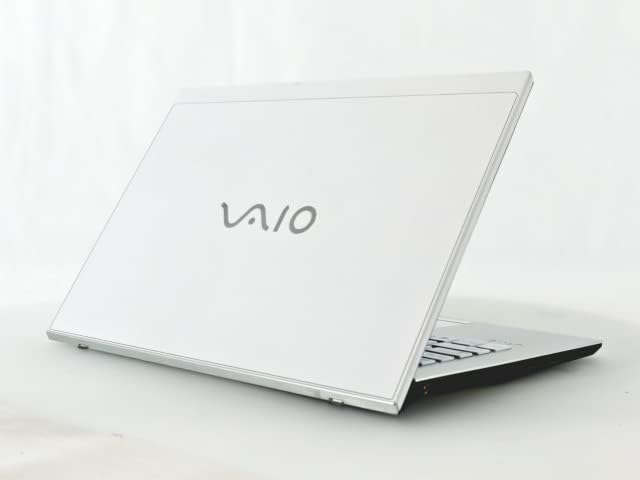
Figure 1: VAIO Pro PF Notebook PC
The VAIO Pro PF is a lightweight and compact mobile notebook designed for productivity. It features an 11.6-inch Full HD display, an Intel 8th Generation Core i5-8250U processor, 8GB of RAM, and a 256GB SSD, running on Windows 11 Pro. The device also includes a backlit keyboard for comfortable typing in various lighting conditions.
2. Konfigurazioa
2.1 Paketatzea
Kontu handiz atera osagai guztiak paketetik. Ziurtatu elementu hauek daudela:
- VAIO Pro PF Notebook PC
- AC egokitzailea eta korronte kablea
- Dokumentazioa (eskuliburu hau, bermearen informazioa)
2.2 Potentziara konektatzea
Before initial use, connect the AC adapter to the laptop's power input port and then plug the power cord into a wall outlet. Allow the battery to charge fully.
2.3 Hasierako piztea eta Windows konfigurazioa
Press the power button to turn on the laptop. Follow the on-screen instructions to complete the initial Windows 11 Pro setup, including language selection, network connection, and user account creation.
3. Operating Your VAIO Pro PF
3.1 Teklatua eta ukipen-panela
The VAIO Pro PF features a full-sized keyboard with a backlight for improved visibility. The touchpad located below the keyboard supports multi-touch gestures for navigation.

2. irudia: Teklatuaren eta ukipen-panelen diseinua
3.2 Kanpoko gailuak konektatzea
Zure ordenagailu eramangarriak kanpoko gailuak konektatzeko hainbat ataka ditu:
- USB 3.0 portuak (x3): Kanpoko disko gogorrak, saguak edo teklatuak bezalako USB gailuak konektatzeko.
- HDMI ataka: For connecting to external displays or projectors with HDMI input.
- D-SUB15 (VGA) Port: For connecting to older external displays or projectors with VGA input.
- Wired LAN Port: Ethernet kable bat erabiliz kable bidezko sare batera konektatzeko.
- Aurikularrak Jack: Entzungailuak edo kanpoko bozgorailuak konektatzeko.
3.3 Haririk gabeko konexioa
The VAIO Pro PF supports both Wi-Fi and Bluetooth connectivity:
- Wi-Fia (802.11n): To connect to a wireless network, go to Windows Settings > Network & Internet > Wi-Fi, turn Wi-Fi on, and select your desired network.
- Bluetootha: To connect Bluetooth devices, go to Windows Settings > Bluetooth & devices, turn Bluetooth on, and pair your device.
3.4 Erabili Web Kamera
Integratua web camera can be used for video calls and conferences. Access it through applications like Camera, Microsoft Teams, or Zoom.
4. Mantentzea
4.1 Ordenagailu eramangarria garbitzea
To clean the exterior of your laptop, use a soft, lint-free cloth slightly dampened with water or a mild, non-abrasive cleaning solution. Avoid spraying liquids directly onto the device. For the screen, use a specialized screen cleaner.
4.2 Software eguneraketak
Egiaztatu eta instalatu aldizka Windows eguneraketak zure sistemak azken segurtasun-adabakiak eta errendimendu-hobekuntzak dituela ziurtatzeko. Joan Windows Ezarpenak > Windows Eguneratzea atalera.
4.3 Bateria zaintzea
Bateriaren iraupena luzatzeko, saihestu tenperatura muturrekoak eta deskargatu bateria maiz erabat. Epe luzerako biltegiratzeko, kargatu bateria % 50-70 ingurura arte.
5. Arazoak
This section addresses common issues you might encounter with your VAIO Pro PF.
| Arazoa | Irtenbidea |
|---|---|
| Ordenagailu eramangarria ez da pizten. | Ziurtatu korronte-egokitzailea ondo konektatuta dagoela eta entxufea funtzionatzen duela. Saiatu pizteko botoia sakatuta 10-15 segundoz. |
| Wi-Fi konexio arazoak. | Check if Wi-Fi is enabled in Windows Settings. Restart your router and the laptop. Ensure you are within range of the Wi-Fi network. |
| Keyboard backlight is not working. | Check if the backlight function key (often Fn + F key) is enabled. Adjust brightness settings if available. |
| External display not detected. | Ensure the cable is securely connected to both the laptop and the display. Use Windows display settings to detect or extend displays. Try a different cable or port if available. |
6. Zehaztapenak
| Ezaugarri | Xehetasuna |
|---|---|
| Ereduaren izena | VAIO Pro PF (VJPF11C11N) |
| Marka | VAIO (Manufacturer: SONY) |
| Bistaratzeko tamaina | 11.6 hazbetekoa |
| Ebazpena | 1920x1080 pixel (Full HD) |
| CPU | Intel Core i5-8250U (8th Gen, 4 Cores, 8 Threads, 1.6 GHz base, up to 3.4 GHz) |
| RAM | 8 GB DDR4 SDRAM |
| Biltegiratzea | 256 GB SSD (egoera solidoko unitatea) |
| Sistema eragilea | Windows 11 Pro (64 biteko) |
| Grafikoak | Intel Graphics integratua |
| Haririk gabeko konexioa | Wi-Fi (802.11n), Bluetooth |
| Portuak | 3x USB 3.0, 1x HDMI, 1x D-SUB15 (VGA), 1x Wired LAN, 1x Headphone Jack |
| Web Kamera | Integratua |
| Teklatua | Atzeko argiztatutako teklatua |
| Pisua | Approx. 0.87 kg (870 g) |
| Eskuragarri dagoen lehen data | 10ko maiatzaren 2023a |
7. Bermea eta Laguntza
For information regarding your product's warranty, please refer to the warranty card included with your purchase or visit the official VAIO support website. For technical assistance, driver downloads, or further inquiries, please contact VAIO customer support through their official channels.
Ask a question about this manual
Ask about setup, troubleshooting, compatibility, parts, safety, or missing instructions. Manuals+ will review the question and use this page’s manual context to help answer it.