
NexiGo D621
NexiGo 3 Kanaleko Dash Cam D621 Erabiltzailearen Eskuliburua
Eredua: D621
1. Sarrera
This manual provides detailed instructions for the installation, operation, and maintenance of your NexiGo 3 Channel Dash Cam D621. Please read this manual thoroughly before using the device to ensure proper functionality and safety. Keep this manual for future reference.
2. Zer dago kutxan
Verify that all items are present and in good condition upon unboxing.
- NexiGo D621 Dash Cam
- 128 GB SD txartela
- Xurgapen Mendia
- Auxiliary Power Cable (11.5 ft)
- Rear Camera with Extension Cable (21.3 ft)
- Pry tresna
- Garbiketa Oihala
- Erabiltzailearen eskuliburua

Image: NexiGo D621 Dash Cam and its components, including the main unit, suction mount, cables, and SD card.
3. Produktua amaitu daview
The NexiGo D621 is a 3-channel dash cam designed to record front, interior, and rear views simultaneously. It features a rotatable interior/front camera for flexible recording options.
Ezaugarri nagusiak:
- Rotatable Interior/Front Camera: Allows the interior camera to be rotated to face forward, providing dual front-facing recording.
- High Resolution Recording: Front camera records in 4K/2K, interior and rear cameras in 1080P.
- Sony STARVIS Sensors: Enhanced low-light performance for clear night vision.
- Wi-Fi integratua: Supports 5.0 GHz and 2.4 GHz for fast file transfer and app connectivity.
- GPS integratua: Records real-time trip data including location and speed.
- 24 orduko aparkaleku modua: Monitors your vehicle when parked (requires hard-wire kit, sold separately).
- G-sentsorea: Automatically locks emergency footage inpaktua detektatzean.
- Loop grabaketa: Janaririk zaharrena gainidazten dutage when the SD card is full.

Image: Diagram illustrating the three-channel recording capability of the NexiGo D621, showing simultaneous front, interior, and rear views.

Image: Visual representation of the optimized field of view for the front (88°) and interior (132°) cameras of the NexiGo D621.
4. Konfigurazioa
4.1. Hasierako instalazioa
- Lotu xurgapen-euskarria: Slide the suction cup mount into the slot on the top of the dash cam until it clicks securely into place.
- Sartu SD txartela: If not already inserted, gently push the provided 128GB Micro SD card into the TF slot on the side of the dash cam until it clicks. The dash cam supports up to 256GB.
- Kamera muntatu: Clean the desired area on your windshield. Attach the suction mount firmly to the windshield, ensuring it does not obstruct your view.
- Konektatu energia: Plug the auxiliary power cable into the dash cam and then into your vehicle's 12V auxiliary power outlet.
- Atzeko kamera instalatu: Connect the rear camera to the main unit using the extension cable. Route the cable neatly along the vehicle's interior trim using the pry tool. Mount the rear camera on the rear windshield or above the license plate.
Video: Official NexiGo D621 User Guide demonstrating the physical installation of the dash cam and its components.
4.2. Piztea eta hasierako ezarpenak
- Once connected to power, the dash cam will automatically power on and begin recording.
- Use the physical buttons below the screen to navigate the menu.
- Access "Settings" (gear icon) to configure basic settings like date, time, and time zone.
- Ensure the date and time are correct for accurate timestampgrabazioen grabazioa.
5. Funtzionamendu-argibideak
5.1. Grabaketa moduak
- Grabaketa arrunta: Automatically starts when the vehicle is powered on. Footage is saved in continuous loops.
- Larrialdietako grabaketa: Activated by the G-sensor upon detecting an impact. This footage is locked and will not be overwritten.
- Aparkaleku modua: When connected to a hard-wire kit (ASIN: B0C5RYDBBD, sold separately), the dash cam can monitor your vehicle for impacts or motion while parked.
5.2. Adjusting Camera Views
The interior camera can be rotated to face forward, effectively providing two front-facing cameras. To do this:
- Physically rotate the interior camera lens until it faces forward.
- Navigate to "Camera Settings" in the menu.
- Toggle "Rear Camera: Flip Horizontally" to ON if needed to correct the image orientation.
- Set "Interior Camera Recording" to "Front" to ensure it records the forward view.
Video: Official NexiGo D621 User Guide demonstrating how to rotate the interior camera and adjust settings for dual front-facing recording.
5.3. Night Vision and Exposure
The D621 features Sony STARVIS sensors and infrared LED lights for enhanced night vision. You can adjust the exposure level for optimal clarity in low-light conditions, especially for capturing license plates.
- Press and hold the OK button to quickly access the front camera's special exposure settings.
- Use the up and down buttons to adjust the exposure level until license plates are clearly visible.
- To automate this, go to "Camera Settings" and select "Set special exposure time" to define a time range (e.g., sunset to sunrise) for automatic exposure adjustments.

Image: Comparison showing a default image versus an image with Manual Highlight Compensation (HLC) enabled, demonstrating improved readability of license plates at night.
6. Wi-Fi Connection and App Usage
The NexiGo D621 features built-in Wi-Fi (2.4 GHz and 5.0 GHz) for seamless connection to the NexiGo app on your iOS or Android device.
- Deskargatu aplikazioa: Bilatu "NexiGo Dash Cam" in your device's app store and install it.
- Enable Wi-Fi on Dash Cam: On the dash cam, navigate to "Settings" > "Wi-Fi Settings" > "Wi-Fi Information" to view the Wi-Fi SSID and password.
- Connect Phone to Dash Cam Wi-Fi: On your smartphone, go to Wi-Fi settings, find the NexiGo dash cam's SSID, and connect using the provided password.
- Erabili aplikazioa:
- Zuzenean View: Erreproduzitu janaria denbora errealeantagauto-kameretatik zure telefonora.
- Erreproduzitu eta deskargatu: Access recorded videos and photos stored on the SD card. You can stream them directly or download them to your phone.
- Ezarpenak: Adjust dash cam settings directly from the app, including video resolution, loop recording duration, G-sensor sensitivity, and Wi-Fi password.

Image: Illustration of the NexiGo D621 Dash Cam wirelessly transferring data to a smartphone via Wi-Fi, showing different transfer speeds for 5G and 2.4G Wi-Fi.
Video: Official NexiGo D621 User Guide demonstrating the process of connecting the dash cam to the mobile app and navigating its features.
7. Mantentzea
- Lente garbiak: Regularly clean the camera lenses with the provided cleaning cloth to ensure clear recordings.
- Formatu SD txartela: Format the Micro SD card periodically (e.g., once a month) to prevent data corruption and ensure optimal performance. This can be done via the dash cam's settings menu.
- Firmware eguneraketak: Check the NexiGo webwebgune edo aplikazioan, errendimendua hobetzeko eta funtzio berriak gehitzeko firmware eguneratzeak eskuragarri dauden ikusteko.
- Tenperatura: The dash cam is designed to operate in temperatures from -4°F (-20°C) to 158°F (70°C). Avoid prolonged exposure to extreme temperatures outside this range.
Video: Official NexiGo D621 User Guide demonstrating how to format the Micro SD card.
8. Arazoak
- Dash Cam-ek ez du pizten:
- Ensure the power cable is securely connected to both the dash cam and the vehicle's 12V outlet.
- Check the vehicle's 12V outlet for power.
- Try a different power cable or outlet if available.
- Recording Issues (e.g., blurry footage, missing files):
- Garbitu kameraren lenteak.
- Formatu SD txartela.
- Ensure the SD card is properly inserted and not full. Replace the SD card if it's old or damaged.
- Egiaztatu bideoaren bereizmenaren ezarpenak menuan.
- Wi-Fi konexio arazoak:
- Ziurtatu Wi-Fia gaituta dagoela auto-kameran eta telefonoan.
- Verify the correct SSID and password are being used.
- Ahaztu telefonoaren kameraren Wi-Fi sarea eta konektatu berriro.
- Berrabiarazi autoko kamera eta telefonoa.
- GPS Data Not Displaying Correctly:
- Ziurtatu GPS modulua behar bezala konektatuta dagoela eta argia duela. view zeruko.
- Check time zone settings in the dash cam menu.
- For full GPS data, download the DVPlayer app from nexigo.com/dashcam eta view footage ordenagailu batean.
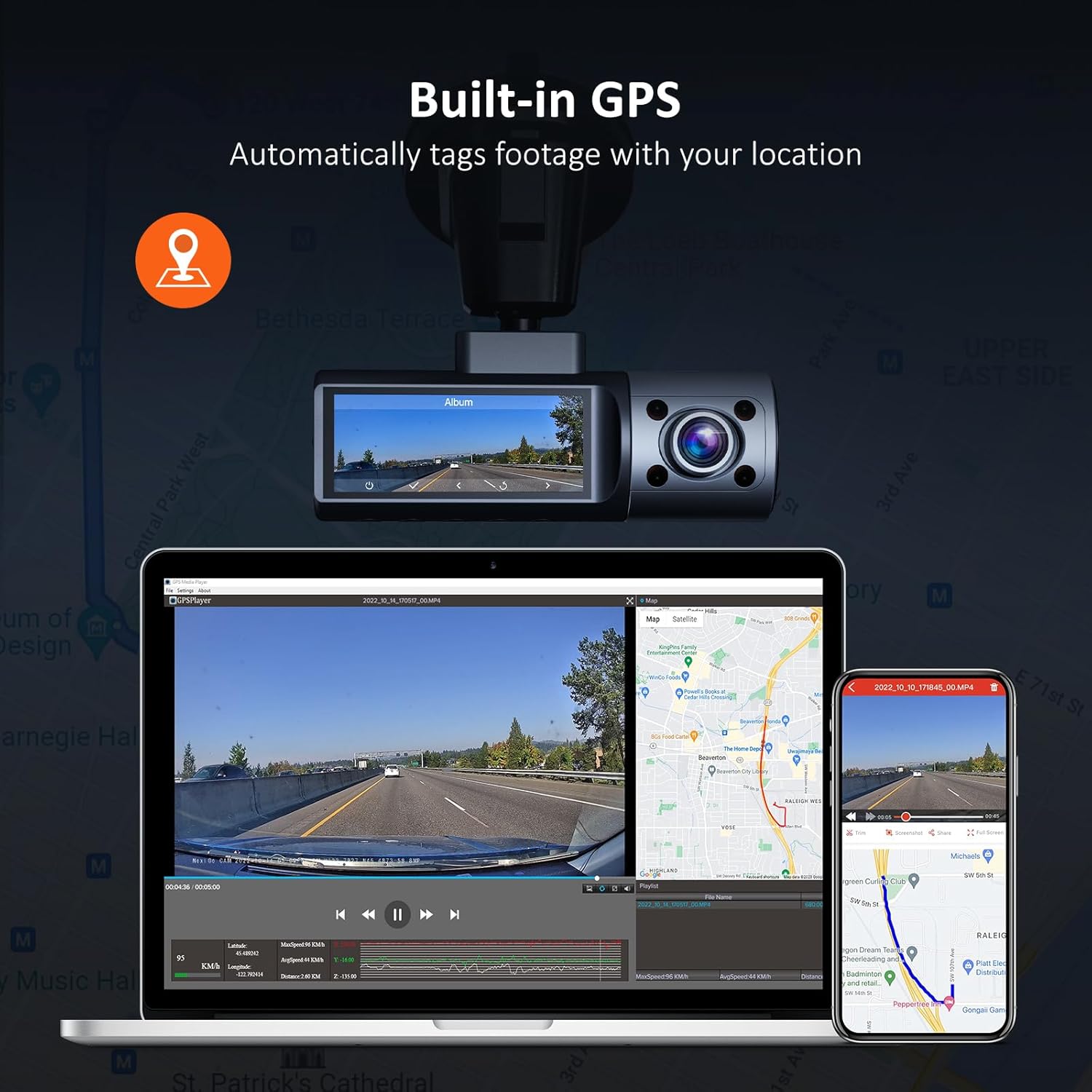
Image: Illustration of the NexiGo D621 Dash Cam's built-in GPS, showing how it tags footage with location data, viewable on a map via the app or desktop software.
9. Zehaztapenak
| Eredua | D621 |
| Bideo Ebazpena | Front: 4K/2K (1440P), Interior: 1080P, Rear: 1080P |
| ren eremua View (FOV) | Front: 88°, Interior: 132°, Rear: 132° |
| Sentsoreak | Sony STARVIS IMX335 & IMX307 |
| Konektibitatea | Wi-Fi (2.4 GHz & 5.0 GHz), GPS |
| Biltegiratzea | 256 GB arteko Mikro SD txartela onartzen du (128 GB barne) |
| Funtzionamendu-tenperatura | -4°F eta 158°F (-20°C eta 70°C) |
| Energia iturria | Super Kondentsadorea |
| Neurriak | 5 x 4 x 2 hazbete |
| Pisua | 1.79 kilo |
10. Bermea eta laguntza
NexiGo products come with a standard manufacturer's warranty. For specific warranty details, product registration, or technical support, please visit the official NexiGo webwebgunean edo jarri harremanetan bere bezeroarentzako zerbitzuarekin.
- Ofiziala Webgunea: www.nexigo.com
- Laguntza-posta elektronikoa: Ikusi zure produktuaren ontzia edo agiri ofiziala webharremanetarako informazioa lortzeko gunea.
Babes gehigarrirako, kontuan hartu erosketaasing an extended protection plan. Options may include 2-Year or 3-Year Protection Plans, or a Complete Protect plan for broader coverage.
Erlazionatutako dokumentuak - D621
 |
NexiGo D621 Hiru Kanaleko Dash Cam: Erabiltzailearen Eskuliburua eta Instalazio Gida NexiGo D621 hiru kanaleko kameraren erabiltzailearen eskuliburu osoa, instalazioa, konfigurazioa, ezaugarriak, zehaztapenak, aplikazioen erabilera, firmware eguneraketak eta arazoak konpontzea biltzen dituena. |
 |
NexiGo N940P 2K QHD Webcam Erabiltzailearen eskuliburua NexiGo N940P 2K QHD pantailaren erabiltzailearen eskuliburua Webkamera, konfigurazioa, ezaugarriak, softwarea eta urrutiko agintearen argibideak zehaztuz. |
 |
NexiGo N950P 4K UHD Webkamera: Erabiltzailearen eskuliburua eta konfigurazio gida Arakatu NexiGo N950P 4K UHD-ren ezaugarriak, konfigurazioa eta zehaztapenak Webkamera erabiltzaileentzako eskuliburu oso honekin. Ikasi zure gailua nola konektatu, konfiguratu eta arazoak konpontzen. |
 |
NexiGo PJ30 Ultra Smart 1080p LCD Projector User Manual This user manual provides comprehensive instructions for the NexiGo PJ30 Ultra Smart 1080p LCD Projector, covering setup, operation, safety, and specifications. Learn how to connect devices, navigate settings, and troubleshoot common issues. |
 |
NexiGo N930AF 1080P FHD AutoFocus Webcam Erabiltzailearen eskuliburua User manual and setup guide for the NexiGo N930AF 1080P FHD AutoFocus Webcam. Includes installation steps, troubleshooting, and configuration for Windows and Mac. |
 |
NexiGo N660E 1080P FHD Webcam Erabiltzailearen eskuliburua NexiGo N660E 1080P FHD pantailaren erabiltzailearen eskuliburu osoa Webkamera, konfigurazioa, zehaztapenak, softwarea eta arazoak konpontzea barne hartzen dituena. Ikasi zure NexiGo-ri etekinik handiena ateratzen webkamara. |
Ask a question about this manual
Ask about setup, troubleshooting, compatibility, parts, safety, or missing instructions. Manuals+ will review the question and use this page’s manual context to help answer it.