
1. Sarrera
Thank you for choosing the CAMKORY DC403 Digital Camera. This compact and easy-to-use camera is designed for capturing high-quality photos and videos, making it suitable for beginners and children. This manual provides essential information on setting up, operating, and maintaining your camera to ensure optimal performance and longevity.

Image 1.1: The CAMKORY DC403 camera is designed to be pocket-sized and easy to use, making it ideal for children and beginners. It has passed drop tests for durability.
2. Produktua amaitu daview
2.1 Ezaugarri nagusiak
- Bereizmen handia: 44 Megapixel photos and 1080p Full HD video recording.
- Zoom digitala: 16x digital zoom for capturing distant subjects.
- Irudiaren egonkortzea: Optical image stabilization to reduce blur.
- Pantaila: 2.5-inch LCD screen for clear viewing.
- Modu polifazetikoak: Includes self-timer, fill light, fun filters, smile capture, burst shooting, and webcam funtzionaltasuna.
- Eramangarritasuna: Compact and lightweight design (9.5 x 5.5 x 2 cm, 120g) for easy carrying.
- Potentzia: Comes with two 3.7V 700mAh rechargeable lithium-polymer batteries.
- Konektibitatea: USB Type-C for charging and data transfer to PC.
2.2 Kameraren osagaiak
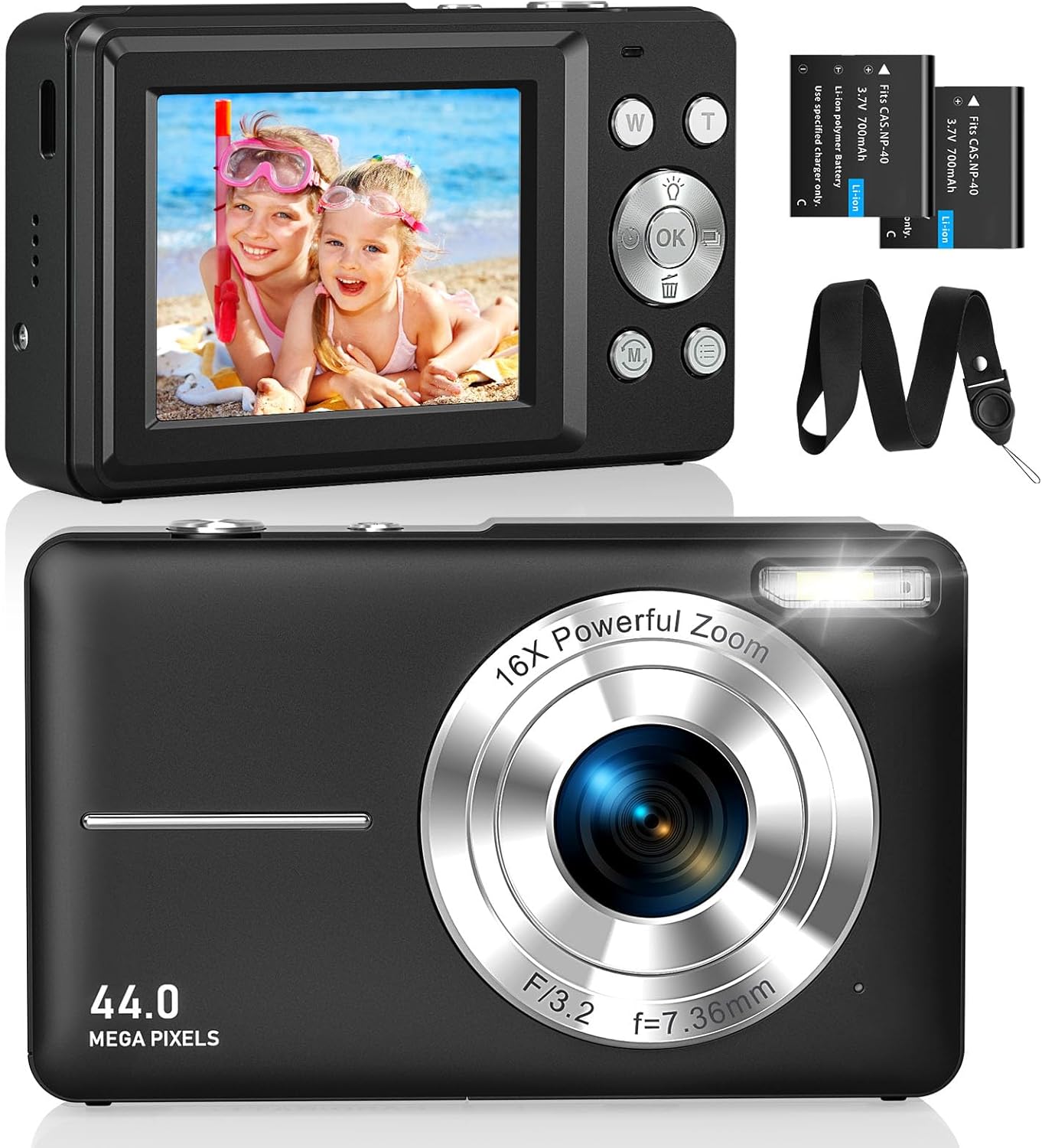
2.1 irudia: Aurrealdea eta atzealdea views of the CAMKORY DC403 Digital Camera, illustrating the lens, flash, LCD display, and various control buttons. Two rechargeable batteries are also shown.
The camera features an intuitive layout with ergonomically placed buttons suitable for small hands. Key controls include the power button, shutter button, zoom (W/T) buttons, mode button, and an OK button for menu navigation.

2.2 irudia: Xehetasun zehatza view of the camera's side controls, including the ON/OFF button, Shutter, W/T (Zoom), Fill Light, and Mode button.
3. Konfigurazioa
3.1 Bateriaren instalazioa eta kargatzea
- Ireki kameraren behealdean dagoen bateriaren konpartimentuaren estalkia.
- Insert the two provided 3.7V 700mAh rechargeable lithium-polymer batteries, ensuring correct polarity.
- Itxi bateriaren konpartimenduaren estalkia ondo.
- Connect the camera to a power source using the supplied USB Type-C cable for charging. The charging indicator will show the charging status.
3.2 Memoria txartelaren instalazioa
The camera supports Micro SD memory cards from 4GB to 32GB. A memory card is required to save photos and videos.
- Locate the Micro SD card slot, usually near the battery compartment.
- Insert the Micro SD card with the metal contacts facing the front of the camera until it clicks into place.
- Before first use, it is recommended to format the memory card directly within the camera's settings menu. This ensures compatibility and optimal performance.
3.3 Hasierako piztea
Press and hold the power button (usually located on the top or side of the camera) to turn on the device. The LCD screen will illuminate, and the camera will be ready for use.
4. Funtzionamendu-argibideak
4.1 Argazkiak ateratzea
- Piztu kamera.
- Markatu zure argazkia 2.5 hazbeteko LCD pantaila erabiliz.
- Use the W/T buttons to adjust the 16x digital zoom.
- Press the shutter button halfway down to focus, then press it fully to capture the 44MP image.

Image 4.1: The camera captures 44MP images, allowing for detailed and clear photographs.
4.2 Bideoak grabatzea
- Switch to video mode using the Mode button.
- Press the shutter button to start recording 1080p FHD video.
- Press the shutter button again to pause or stop recording.

Image 4.2: The camera supports 1080p Full HD video recording, allowing users to capture moments with clarity.
4.3 Ezaugarri bereziak
- Zoom digitala: Use the W/T buttons to zoom in and out. The camera features 16x digital zoom.
- Irudiaren egonkortzea: The optical image stabilization feature helps reduce blur from camera shake.
- Bete argia: Activate the fill light for better illumination in low-light conditions.
- Tenporizadorea: Set a delay (e.g., 2s, 5s, 10s) before taking a photo, useful for group shots or selfies.
- Etengabeko filmaketa: Atera argazki-segida azkar bat obturadore-botoia sakatuta mantenduz.
- Iragazkiak: Experiment with 20 different built-in filters to add creative effects to your photos.
- Irribarre detekzioa: The camera can automatically detect and capture a photo when a smile is detected.
- WebKamera modua: Connect the camera to a computer via USB to use it as a webcam for live streaming or video calls.

Image 4.3: Demonstrations of 16x digital zoom and image stabilization. The zoom feature allows for closer shots, while stabilization helps maintain clarity during movement.

4.4 irudia: Adibideaamples of self-timer, continuous shooting, and fill light functions. These features enhance photographic flexibility and quality in various scenarios.

Image 4.5: The camera can be used as a webcam when connected to a computer, suitable for streaming or video calls.
5. Mantentzea
5.1 Kamera garbitzea
- Erabili zapi leun eta lihorik gabeko bat kameraren gorputza garbitzeko.
- Lentearentzat eta LCD pantailarentzat, erabili lenteak garbitzeko oihal eta disoluzio espezializatu bat. Saihestu produktu kimiko gogorrak.
- Ziurtatu kamera itzalita dagoela garbitu aurretik.
5.2 Biltegiratzea
- Gorde kamera leku fresko eta lehor batean, eguzki-argitik eta muturreko tenperaturetatik babestuta.
- Denbora luzez gordetzen baduzu, kendu bateriak isuriak saihesteko.
- Use the provided long strap and pouch to protect the camera from drops and scratches during transport.
6. Arazoak
If you encounter issues with your CAMKORY DC403 camera, please refer to the following common solutions:
| Arazoa | Irtenbide posiblea |
|---|---|
| Kamera ez da pizten | Ensure batteries are correctly inserted and fully charged. Try using the second battery if available. |
| Cannot take photos/videos | Check if a Micro SD card is inserted and has sufficient free space. Ensure the card is formatted in the camera. |
| Irudiak lausoak dira | Ensure the lens is clean. Hold the camera steady or use the image stabilization feature. Check lighting conditions. |
| Camera not recognized by PC | Ensure the USB Type-C cable is securely connected to both the camera and the PC. Try a different USB port or cable. |
| Bateria azkar agortzen da | Reduce screen brightness. Turn off features like flash or continuous shooting when not needed. Ensure batteries are fully charged before use. |
7. Zehaztapenak
| Ezaugarri | Xehetasuna |
|---|---|
| Marka | CAMKORY |
| Ereduaren izena | DC403 |
| Kolorea | Beltza |
| Produktu Mota | Kamera digital trinkoa |
| Ebazpen finko eraginkorra | 44 megapixelekoa |
| Bideo Ebazpena | 1080p full HD |
| Zoom digitala | 16x |
| Zoom optikoa | 16x (Note: This appears to be a mislabeling in the source data, likely referring to digital zoom) |
| Irudi Egonkortzea | Optikoa |
| Pantailaren tamaina | 2.5 hazbeteko LCDa |
| Konektibitate Teknologia | USB (C mota) |
| Onartutako memoria txartela | Micro SD (4-32GB) |
| Bateria mota | Lithium-polymer (2 x 3.7V 700mAh included) |
| Neurriak (L x W x H) | 9.5 x 2 x 5.5 cm |
| Elementuaren pisua | 120 gramo |
| Burst Mode Speed | 30 fotograma segundoko |
| ISO barrutia | ISO 100 to ISO 1600 |
| Irekiera | F3.5-F5.6 |
| Foku mota | Foku automatikoa |
| Uraren Erresistentzia Maila | Ez iragazgaitza |
8. Bermea eta Laguntza
For any questions, technical support, or warranty inquiries regarding your CAMKORY DC403 Digital Camera, please contact CAMKORY customer service through the retailer's platform or the official CAMKORY webgunea. Gorde erosketaren egiaztagiria bermearen erreklamazioetarako.