
1. Sarrera
The faroro 2K Pet Camera with Treat Dispenser is designed to help you monitor and interact with your pets remotely. Featuring 2K Ultra HD video, two-way audio, night vision, and remote treat tossing capabilities, this device allows you to stay connected with your furry companions from anywhere. It supports both 2.4GHz and 5GHz Wi-Fi networks for stable connectivity and provides real-time motion alerts to keep you informed.

Image: The faroro 2K Pet Camera with Treat Dispenser, a white cylindrical device with a camera lens and treat dispensing hole, shown alongside a smartphone displaying a live feed of a Shiba Inu dog.
2. Zer dago kutxan
Mesedez, egiaztatu paketearen edukia elementu guztiak daudela ziurtatzeko:
- Pet Treat Dispenser (Main Unit)
- USB kablea
- Elikatze-moldagailua
- Erabiltzailearen eskuliburua

Image: Contents of the faroro Pet Camera box, including the main dispenser unit, USB cable, power adapter, and user manual.
3. Konfigurazio gida
- Potentzia-konexioa: Connect the USB cable to the Pet Treat Dispenser and the power adapter. Plug the adapter into a standard electrical outlet. The device will power on.
- Aplikazioen deskarga: Download the "Smart Life" app from your smartphone's app store (available for iOS and Android).
- Kontuaren erregistroa: Open the Smart Life app and register for a new account or log in if you already have one.
- Gehitu gailua: In the app, tap the "+" icon to add a new device. Select "Pet Treat Dispenser" or search for the device type. Follow the on-screen instructions to put the device into pairing mode.
- Wi-Fi konexioa: Connect the device to your home Wi-Fi network. This camera supports both 2.4GHz and 5GHz Wi-Fi for a more stable and faster connection. Ensure your phone is connected to the same Wi-Fi network during setup.
- Fill Treats: Open the treat compartment on the top of the dispenser and fill it with your pet's favorite dry treats. Ensure treats are of an appropriate size to prevent jamming.

Image: A smartphone displaying the Smart Life app interface for setting up the pet camera, with a beagle dog in the background looking up at the dispenser.

Image: Illustration highlighting the faroro pet camera's compatibility with both 2.4GHz and 5GHz Wi-Fi networks, emphasizing wider compatibility, more stable, and faster connections.
4. Funtzionamendu-argibideak
4.1 Remote Treat Tossing
Use the Smart Life app to remotely dispense treats for your pet. You can toss treats instantly, schedule feeding times, or set a voice recording to play when treats are dispensed. This feature helps keep your pet entertained and rewarded.
Image: A hand interacting with the Smart Life app on a smartphone, showing the "Feed" button for remote treat tossing, with a pet camera and dog in the background.
4.2 2K Ultra HD Camera and Night Vision
The camera provides a 2K HD crystal clear live stream video with a 126° wide-angle view. Monitor your pet and home environment during both day and night. The night vision feature ensures clear visibility even in low-light conditions.
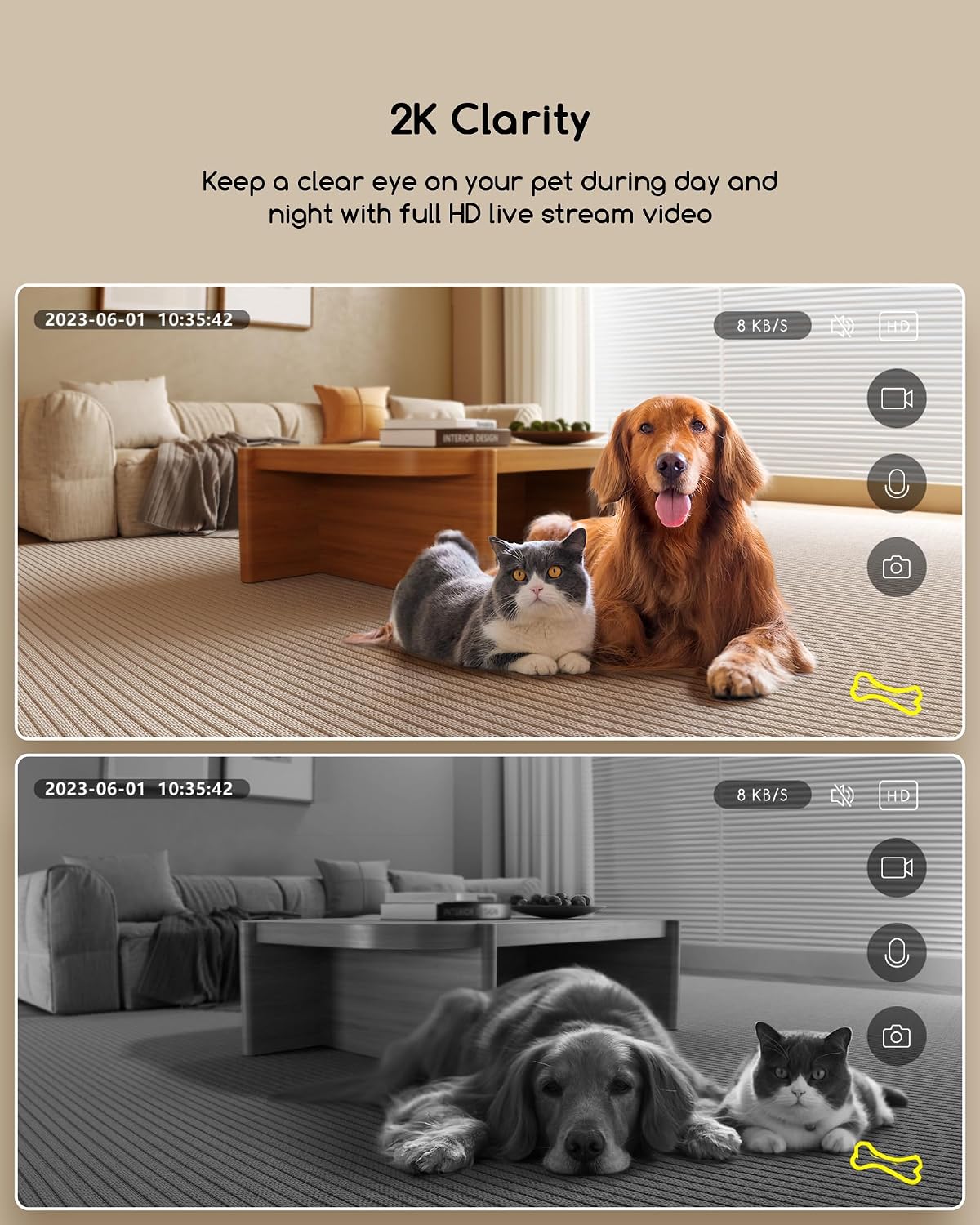
Image: Two comparative views from the pet camera: one in full color during the day showing a dog and cat, and another in black and white demonstrating night vision with the same pets.
4.3 Real-Time Motion Alerts
The device supports motion detection. When motion is detected, the Smart Life app will send a notification to your phone, allowing you to quickly check on your pets and home activity.

Image: A smartphone screen displaying "Motion Detected" notifications from the Smart Life app, with two playful puppies and a tennis ball in the background, illustrating real-time alerts.
4.4 Bi norabideko audioa
Utilize the built-in high-quality microphone and speaker for smooth two-way communication. Talk to your pets to ease their separation anxiety, cheer them up, or calm them down if they are being mischievous.

Image: A woman speaking into her phone, with a speech bubble saying "Baby, look at camera!", and a dog lying on the floor near the pet camera, demonstrating the two-way audio feature.
4.5 Check Video History
The Smart Life app supports purchasing cloud service to playback recorded videos. This allows you to review past events and monitor your pet's activities over time.

Image: A smartphone screen showing a video playback timeline with a dog in the foreground, illustrating the ability to check video history and motion-detected events.
5. Mantentzea
- Garbiketa: Regularly wipe the exterior of the device with a soft, dry cloth. For the camera lens, use a microfiber cloth to avoid scratches.
- Treat Compartment: Periodically empty and clean the treat compartment to prevent residue buildup and ensure smooth treat dispensing. Ensure the compartment is completely dry before refilling.
- Lekua: Place the dispenser on a stable, flat surface away from direct sunlight, heat sources, and excessive moisture.
6. Arazoak
| Arazoa | Balizko Kausa / Irtenbidea |
|---|---|
| Gailua ez da pizten | Ensure the power adapter is securely plugged into both the device and a working electrical outlet. Try a different outlet. |
| Ezin da Wi-Fira konektatu |
|
| Treats not dispensing or jamming |
|
| Poor video quality or no live feed |
|
| Bi norabideko audio arazoak |
|
7. Zehaztapenak
| Ezaugarri | Xehetasuna |
|---|---|
| Ereduaren izena | Animalientzako oparien banatzailea |
| Modelo zenbakia | TD20 |
| Marka | faroro |
| Konektibitate Teknologia | WiFi (2.4GHz & 5GHz) |
| Bideo Harrapaketa Ebazpena | 2K, 3 MP |
| ren eremua View | 126°-ko angelu zabala |
| Audioa | Bi norabideko audioa |
| Ezaugarri Berezia | Mugimendu detektagailua, gaueko ikusmena |
| Kontrol-metodoa | Aplikazioa (Bizitza Adimenduna) |
| Energia iturria | Kable elektrikoa |
| Materiala | Akrilonitrila Butadiene estirioa |
| Neurriak (L x W x H) | 5.75 x 5.75 x 8.86 hazbete |
| Elementuaren pisua | 2.2 libra (1 kilogramo) |
| UPC | 810112232028 |
8. Bermea eta Laguntza
faroro is committed to providing excellent customer service. If you have any concerns or questions regarding your product, please feel free to reach out at any time. In case of any damage to the product, you may request a replacement within 2 years of purchase.
For further assistance, please refer to the contact information provided on the product packaging or the official faroro webgunea.