
Della 048-OPAC-6H
Della 10000 BTU Portable Air Conditioner User Manual
Model: 048-OPAC-6H | Brand: Della
1. Segurtasun informazio garrantzitsua
Please read this manual carefully before operating your portable air conditioner. Keep this manual for future reference. Always follow basic safety precautions to reduce the risk of fire, electric shock, or injury.
- Ziurtatu unitatea gainazal lau eta egonkor batean jartzen dela, iraultzea saihesteko.
- Ez erabili unitatea hondatutako kable edo entxufe batekin.
- Ez sartu hatzak edo objektuak airearen sarreran edo irteeran.
- Mantendu unitatea material sukoietatik eta sugar irekietatik urrun.
- Deskonektatu beti unitatea garbitu edo mantentze-lanak egin aurretik.
- Tresna hau ez da gaitasun fisiko, sentsorial edo mental murriztua duten edo esperientzia eta ezagutza falta duten pertsonek (haurrak barne) erabiltzeko, baldin eta haien segurtasunaz arduratzen den pertsona batek gailuaren erabilerari buruz gainbegiratu edo jarraibiderik eman ez badu.
2. Produktua amaitu daview
The Della 10000 BTU Portable Air Conditioner is a versatile unit designed to provide cooling, heating, dehumidification, and fan functions for spaces up to 450 sq. ft. It features smart WiFi connectivity for convenient control via a mobile app, a remote control, and an intuitive soft-touch control panel.

Image: Della Portable Air Conditioner unit, remote control, and smartphone displaying the control app.
Key components include the main unit with integrated handle, exhaust hose, window installation kit, and remote control.

Image: Diagram showing the dimensions of the portable air conditioner: 12.2 inches (width) x 12.2 inches (depth) x 27.6 inches (height).
3. Konfigurazioa
3.1 Paketatzea
Carefully remove the unit and all accessories from the packaging. Retain the original packaging for future storage or transport. Allow the unit to stand upright for at least 24 hours before initial use to allow the refrigerant to settle.
3.2 Jartzea
Place the air conditioner on a firm, level surface in a location that allows for proper air circulation. Ensure there is at least 20 inches (50 cm) of space from walls or other objects to allow for adequate airflow around the unit.
3.3 Leiho-kitaren instalazioa
The included window kit is designed for easy installation in both horizontal and vertical sliding windows. No drilling is required.

Image: Diagrams illustrating the installation of the window kit in both horizontal and vertical sliding windows, showing compatibility with window openings from 25.5 to 64.1 inches.
- Assemble the window slider kit by sliding the adjustable panels together to fit your window opening. The kit is compatible with window sizes from 25.5 to 64.1 inches.
- Secure the panels with the provided screws.
- Open the window and place the assembled window kit into the window frame. Extend the panels to fit snugly and close the window against the kit to secure it.
- Ensure the window kit is sealed properly to prevent air leakage. Use foam seals if necessary.
3.4 Ihes-Hodiaren konexioa
- Attach the exhaust hose connector to one end of the exhaust hose.
- Lotu leihoko kitaren egokitzailea ihes-hodiaren beste muturrari.
- Insert the exhaust hose connector into the exhaust outlet on the back of the air conditioner unit.
- Insert the window kit adapter into the opening on the window slider kit.
- Ziurtatu konexio guztiak ondo finkatuta daudela aire beroa gelara berriro sartzea saihesteko.
3.5 Energia-konexioa
Plug the power cord into a grounded 115V/60Hz electrical outlet. Do not use extension cords or power strips.
4. Funtzionamendu-argibideak
4.1 Kontrol-panela
The unit features an intuitive soft-touch control panel on the top of the unit.
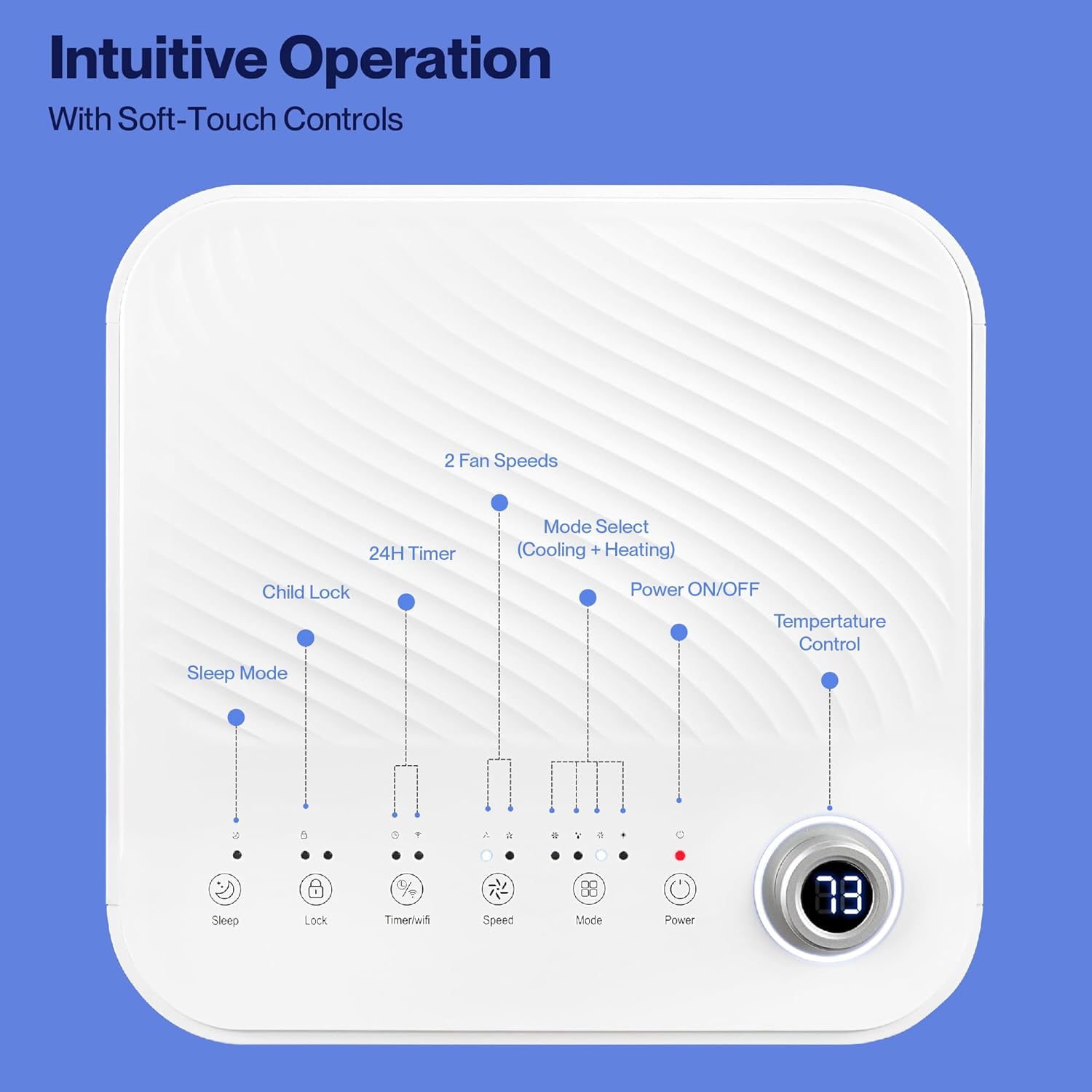
Image: Detailed diagram of the control panel with labels for each button: Sleep, Child Lock, Timer/WiFi, Fan Speed, Mode Select (Cooling + Heating), Power ON/OFF, and Temperature Control with digital display.
- Piztu/Itzali: Sakatu unitatea pizteko edo itzaltzeko.
- Modu hautatzeko: Cycle through Cooling, Heating, Dehumidification, Ventilation (Fan), and Sleep modes.
- Tenperatura kontrola: Use the up/down arrows to adjust the desired temperature.
- Fan abiadura: Select between 2 fan speeds (Low, High).
- Tenporizadorea: Ezarri 24 orduko tenporizadorea automatikoki piztu/itzaltzeko.
- Haurrentzako blokeoa: Haurren blokeo funtzioa aktibatzen edo desaktibatzen du.
- Lo egiteko modua: Lo modua aktibatzen du funtzionamendu isilago bat lortzeko eta tenperatura pixkanaka doitzeko.
4.2 Urruneko kontrola
The unit comes with a remote control for convenient operation from a distance. All functions available on the control panel can be accessed via the remote.
4.3 WiFi/Smart App Control
Control your Della Portable Air Conditioner from anywhere using the free DELLA+ app on your smartphone. The unit is compatible with Google Assistant and Amazon Alexa for voice control.

Image: A person relaxing on a couch, using a smartphone to control the air conditioner, with text indicating compatibility with Google Assistant and Amazon Alexa.
- Download the DELLA+ app from your smartphone's app store.
- Jarraitu aplikazioko argibideei zure aire girotua etxeko WiFi sarera konektatzeko.
- Once connected, you can control modes, temperature, fan speed, and set schedules remotely.
The app also supports Smart Geo Location, allowing the unit to automatically turn on or off based on your proximity to home.

Image: A smartphone screen showing a map with a car icon and a notification indicating the AC unit automatically turned on due to Smart Geo Location.
5. Mantentzea
Regular maintenance ensures optimal performance and extends the lifespan of your unit. Always unplug the unit before cleaning.
5.1 Aire-iragazkia garbitzea
Aire-iragazkia bi astean behin garbitu behar da, edo maizago, erabileraren eta airearen kalitatearen arabera.
- Aurkitu aire-iragazkiaren panela (normalean unitatearen atzealdean edo alboan).
- Kendu iragazkia.
- Garbitu iragazkia ur epel eta xaboitsuarekin. Garbitu ondo eta utzi airean guztiz lehortzen berriro sartu aurretik.
5.2 Ura hustea
The unit has a self-evaporating system, but in high humidity conditions, water may accumulate. The "Water-full indicator" will illuminate when the water tank needs draining.
- Jarri zartagin edo erretilu sakon bat hustubide-ataka azpian (unitatearen atzealdeko behealdean dago).
- Kendu drainatzeko tapoia.
- Allow all accumulated water to drain out.
- Ordeztu hustubideko tapoia ondoz ondo.
5.3 Biltegiratzea
Unitatea denbora luzez gordetzen baduzu:
- Xurgatu pilatutako ur guztia.
- Garbitu aire-iragazkia.
- Barrualdea lehortzeko, eduki unitatea haizagailu moduan martxan ordu batzuetan.
- Deskonektatu korronte-kablea eta bildu txukun.
- Gorde unitatea leku fresko eta lehor batean, ahal izanez gero jatorrizko ontzian.
6. Arazoak
Atal honetan ohiko arazoei eta haien irtenbideei buruzko informazioa aurkituko duzu.
| Arazoa | Kausa posiblea | Irtenbidea |
|---|---|---|
| Unitatea ez da pizten | No power; Power cord unplugged; Circuit breaker tripped; Water tank full | Check power outlet; Plug in power cord; Reset circuit breaker; Drain water tank |
| Unitatea ez da ondo hozten | Air filter dirty; Exhaust hose not properly installed; Room too large; Doors/windows open; Temperature setting too high | Clean air filter; Ensure exhaust hose is sealed; Close doors/windows; Lower temperature setting |
| Unitatea zaratatsua da | Unit not on level surface; Air filter dirty; Obstruction in fan | Place unit on level surface; Clean air filter; Check for obstructions |
| Ur-ihesak | Drain plug loose or missing; Unit tilted | Hustubideko tapoia ondo itxi; Ziurtatu unitatea maila berean dagoela |
| WiFi konexio arazoak | Incorrect WiFi password; Unit too far from router; Router issues | Verify password; Move unit closer to router; Restart router |
Irtenbide hauek probatu ondoren arazoa konpontzen ez bada, jarri harremanetan bezeroarentzako arreta-zerbitzuarekin.
7. Zehaztapenak
| Ezaugarri | Zehaztapena |
|---|---|
| Modelo zenbakia | 048-OPAC-6H |
| Hozteko Ahalmena | 10000 BTU |
| Estaldura Eremua | Gehienez 450 mXNUMX. Ft. |
| Funtzioak | Cooling, Heating, Dehumidifier, Fan, Sleep Mode |
| liburukiatage | 115 Volt |
| Zarata Maila | 54 dB |
| Hozgarria | R 410A |
| Neurriak (L x W x H) | 12.2 x 12.2 x 27.6 hazbete |
| Materiala | ABS plastikoa |
| Ezaugarri bereziak | Portable, Dehumidifier, WiFi Enabled, Remote Control, Built-in Handle, 24-hour timer, Child Lock |
8. Bermea eta bezeroarentzako laguntza
For warranty information or technical assistance, please refer to the warranty card included with your product or visit the official Della website. You may also contact Della customer support directly for further assistance with troubleshooting or parts replacement.
Ask a question about this manual
Ask about setup, troubleshooting, compatibility, parts, safety, or missing instructions. Manuals+ will review the question and use this page’s manual context to help answer it.