
1. Sarrera
Eskerrik asko erosketagatik.asing the Sofirn SC18 Rechargeable Flashlight. This compact and powerful EDC (Everyday Carry) flashlight is designed for various applications, offering high brightness, convenient USB-C charging, and durable construction. Please read this manual carefully before use to ensure proper operation and maintenance.
2. Segurtasun informazioa
- Begietako segurtasuna: Do not shine the flashlight directly into eyes or at other people. The high lumen output can cause temporary vision impairment.
- Haurrak: Keep out of reach of children to prevent accidental activation or misuse.
- Beroa: The flashlight head may become hot during prolonged use at high brightness levels. Exercise caution to avoid burns.
- Bateriaren segurtasuna: Use only the recommended rechargeable battery. Do not disassemble, crush, or expose the battery to extreme temperatures or fire.
- Desmihiztatu: Ez desmuntatu linternaren burua, horrek argia kaltetu eta bermea baliogabetu baitezake.
3. Paketearen edukia
Egiaztatu elementu guztiak zure paketean daudela:
- Sofirn SC18 Flashlight
- Bateria kargagarria (aurrez instalatuta edo bereizita)
- USB-C kargatzeko kablea
- Korrila
- Erabiltzailearen eskuliburua

Image: The Sofirn SC18 flashlight shown with its included accessories, typically a USB-C cable, lanyard, and battery.
4. Konfigurazioa
4.1 Bateriaren instalazioa
The Sofirn SC18 typically comes with the battery pre-installed. If not, unscrew the tail cap, insert the 18650 rechargeable battery with the positive (+) end facing towards the head of the flashlight, and then screw the tail cap back on tightly.
4.2 Hasierako karga
Before first use, fully charge the flashlight. The SC18 features a built-in USB-C charging port.
- Locate the rubber cover on the side of the flashlight head.
- Gently pull open the rubber cover to expose the USB-C port.
- Connect the provided USB-C cable to the flashlight and plug the other end into a USB power source (e.g., phone charger, power bank, computer USB port).
- The indicator light on the side switch will show charging status:
- Gorria: Kargatzen
- Berdea: Guztiz kargatuta
- Once charging is complete, disconnect the cable and firmly close the rubber cover to maintain water resistance.

Image: The Sofirn SC18 flashlight with its USB-C port exposed and connected to a charging cable, illustrating the charging process and battery indicator.
5. Funtzionamendu-argibideak
The Sofirn SC18 uses a single side switch for all operations.
5.1 Oinarrizko funtzionamendua
- Piztu/Desaktibatu: Sakatu alboko etengailua behin bakarrik argia piztu edo itzaltzeko.
- Distira moduak aldatu: While the light is on, press and hold the side switch to cycle through Moon, Low, Medium, and High modes. Release the switch to select the desired mode. The flashlight has a Smart Memory function and will turn on at the last used brightness level (except Turbo and Strobe).

Image: A person holding the Sofirn SC18 flashlight, illuminating a dark path with its powerful 1800 lumen beam, demonstrating its effective beam distance.
5.2 Modu bereziak
- Ilargiaren modua: From OFF, press and hold the side switch for 1 second to activate Moonlight mode.
- Turbo modua: Double-click the side switch from any state (ON or OFF) to activate Turbo mode. Double-click again to return to the previously used mode.
- Strobe modua: Triple-click the side switch from any state (ON or OFF) to activate Strobe mode. Single click to turn off or double-click to return to the previously used mode.
5.3 Blokeo funtzioa
The lockout function prevents accidental activation, which is useful when carrying the flashlight in a pocket or bag.
- Blokeoa aktibatzea: From OFF, quadruple-click the side switch. The main LED will flash twice to indicate lockout is active.
- Desaktibatu blokeoa: Quadruple-click the side switch again. The main LED will flash twice, and the flashlight will turn on in Moonlight mode, indicating lockout is deactivated.

Image: An illustration of the Sofirn SC18 flashlight with a protective shield graphic, demonstrating the safety lock mode feature to prevent accidental activation.
6. Mantentzea
6.1 Garbiketa
Garbitu linternaren gorputza oihal leun batekin,amp cloth. Do not use abrasive cleaners or solvents. Keep the threads and O-rings clean and lubricated with silicone grease to ensure smooth operation and water resistance.
6.2 Urarekiko erresistentzia
The Sofirn SC18 is rated IP68 waterproof, meaning it is protected against dust ingress and can withstand immersion in water up to 2 meters for 30 minutes. Ensure the USB-C port cover is fully sealed before exposing the flashlight to water.

Image: The Sofirn SC18 flashlight shown in two scenarios: one being splashed with water and another on wet rocks, highlighting its IP68 waterproof and drop-resistant design.
6.3 Bateria zaintzea
To prolong battery life, charge the battery regularly and avoid fully discharging it. If the flashlight will not be used for an extended period, remove the battery or activate the lockout function to prevent parasitic drain.
7. Arazoak
| Arazoa | Kausa posiblea | Irtenbidea |
|---|---|---|
| Linterna ez da pizten. | Bateria agortuta dago edo gaizki sartuta dago. Flashlight is in lockout mode. | Charge the battery or reinsert it with the correct polarity. Deactivate lockout mode (quadruple-click). |
| Light flickers or turns off unexpectedly. | Bateria baxua. Loose tail cap or head. Kontaktu zikinak. | Kargatu bateria. Tighten the tail cap and head. Garbitu bateriaren kontaktuak eta hariak. |
| Cannot charge the flashlight. | USB-C cable or power source issue. Kargatzeko atakaren oztopoa. | Probatu beste USB-C kable edo korronte egokitzaile batekin. Egiaztatu kargatzeko atakan hondakinik dagoen. |
8. Zehaztapenak
| Ezaugarri | Xehetasuna |
|---|---|
| Eredua | SC18 |
| Argi iturria | LED |
| Irteera maximoa | 1800 lumen |
| Gehienezko habe-distantzia | 217 metro (712 oin) |
| Energia iturria | 1x 18650 Lithium-Ion Battery (included) |
| Kargatzen | USB-C kargagarria |
| Uraren Erresistentzia | IP68 (up to 2 meters submersible) |
| Jaurtiketa Erresistentzia | 1 metro |
| Materiala | Aluminiozko aleazioa |
| Neurriak (L x D) | Approx. 10.14 cm x 2.46 cm (3.99" x 0.97") |
| Pisua | Approx. 55g (1.94oz) without battery |
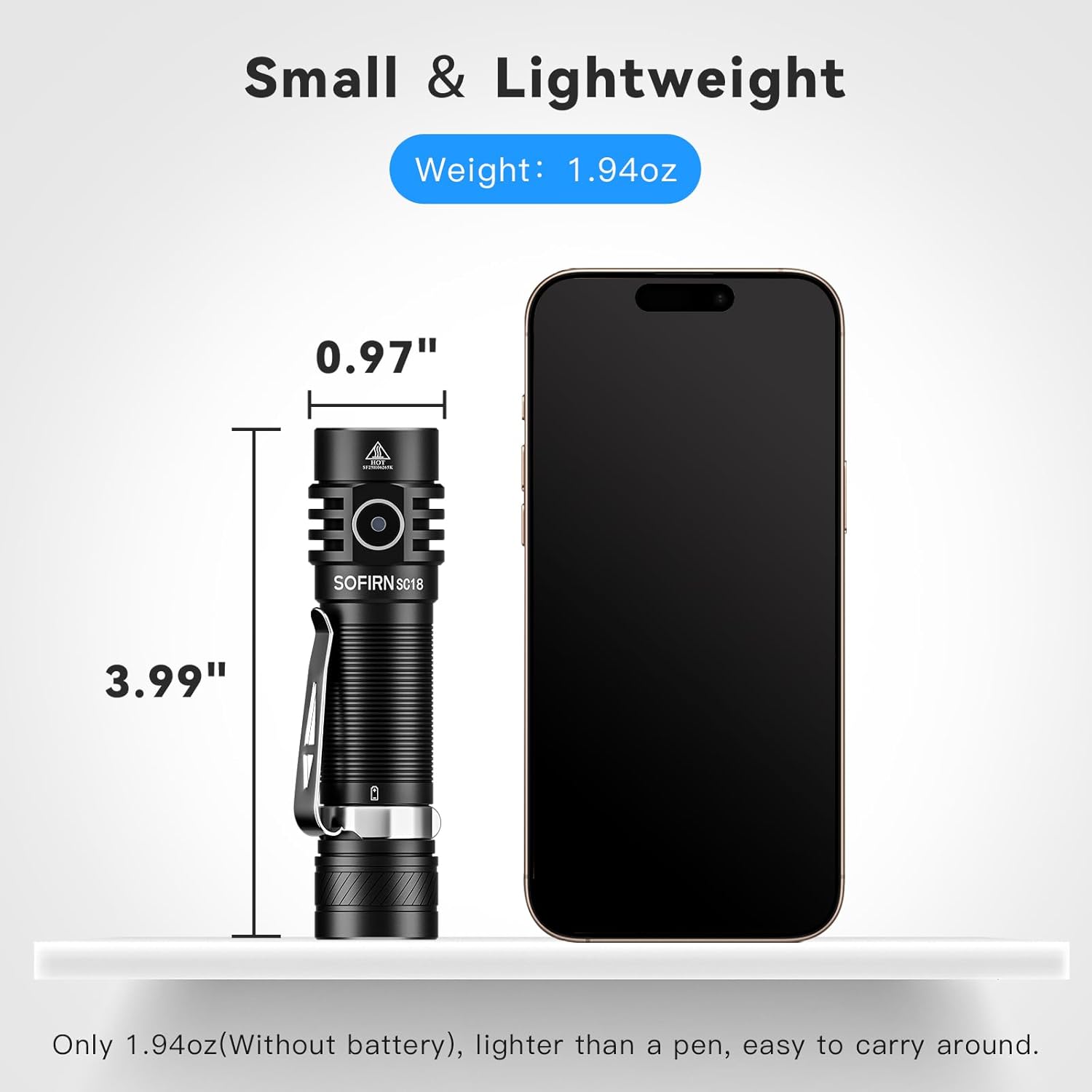
Image: The Sofirn SC18 flashlight displayed next to a smartphone, illustrating its compact size and dimensions (3.99 inches long, 0.97 inches diameter).
Brightness and Runtime Table
| Modua | Irteera (lumens) | Exekuzioa | Beam Distantzia |
|---|---|---|---|
| Ilargia | 3 lm | 230h | 11 m |
| Baxua | 100 lm | 23h | 51 m |
| Ertaina | 350 lm | 6.3h | 97 m |
| Alta | 800 lm | 2.6h | 150 m |
| Turbo | 1800 lm | 2.3h | 217 m |
| Estrobokoa | 1800 lm | 5h | - |
Note: Runtimes are approximate and may vary based on environmental conditions and battery age.
9. Bermea eta Laguntza
The Sofirn SC18 Rechargeable Flashlight comes with a 1 urteko fabrikatzailearen bermea from the date of purchase, covering defects in materials and workmanship. This warranty does not cover damage caused by misuse, unauthorized modifications, or normal wear and tear.
For warranty claims, technical support, or any questions regarding your product, please contact Sofirn customer service through the retailer where you purchased the product or visit the official Sofirn webharremanetarako informazioa lortzeko gunea.
Sareko baliabideak:
10. Produktuen bideoak
Sofirn SC18 Product Overview
Video: An official product video from Sofirn showcasing the features and functionality of the SC18 flashlight, including its design, charging, and various light modes.