
1. Sarrera
This manual provides detailed instructions for the CODi A04616 Wireless Headset. Designed for clear audio communication in various environments, this headset features advanced AI-Environmental Noise Cancellation (ENC) technology to suppress ambient noise and enhance voice clarity. Please read this manual thoroughly before using the headset to ensure proper operation and to maximize its performance and lifespan.
Paketearen edukia:
- CODi A04616 Wireless Headset
- Headset Charging Dock
- USB-A Dongle
- USB kargatzeko kablea
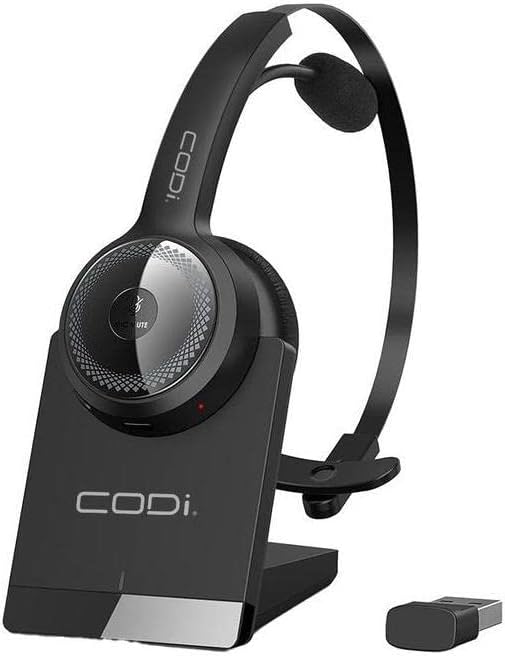
1.1. irudia: CODi A04616 Wireless Headset with its charging dock and USB-A dongle. The headset is black with a silver accent on the ear cup, resting in its black charging base. The small black USB dongle is visible next to the base.
2. Produktuaren osagaiak
Familiarize yourself with the various parts of your CODi A04616 Wireless Headset:
- Buruko banda erregulagarria: Egokitze eroso eta seguru baterako.
- Cushioned Ear Pad: Erosotasuna eskaintzen du erabilera luzean.
- Mikrofonoa: Features AI-ENC technology for clear voice pickup. Rotates 135° for use on either ear.
- Bolumen kontrolak: Buttons located on the ear cup for adjusting audio levels.
- Funtzio anitzeko botoia: For power, pairing, and call management.
- Kargatzeko ataka: Located on the headset for direct charging or via the dock.
- USB-A Dongle: For wireless connection to PCs and laptops.
- Kargatzeko kaia: Provides a convenient charging and storage solution.

2.1. irudia: The CODi A04616 Wireless Headset, highlighting its adjustable headband and the flexible, rotating microphone arm. The headset is black with a single ear cup and an over-the-head design.
3. Konfigurazioa
3.1. Entzungailua kargatzea
- Connect the USB charging cable to the charging dock and then to a power source (e.g., computer USB port or USB wall adapter).
- Place the CODi A04616 Wireless Headset onto the charging dock, ensuring the charging contacts align.
- The headset's indicator light will show charging status. A full charge provides approximately 35 hours of working time.
- Alternatively, connect the USB charging cable directly to the headset's charging port.
3.2. Bluetooth bidez konektatzen
- Ziurtatu entzungailuak kargatuta eta itzalita daudela.
- Press and hold the multi-function button on the headset until the indicator light flashes blue and red, indicating pairing mode.
- Zure gailuan (smartphone-a, ordenagailu eramangarria, etab.), gaitu Bluetooth-a eta bilatu eskuragarri dauden gailuak.
- Select "CODi A04616" from the list of found devices.
- Once connected, the indicator light on the headset will turn solid blue or flash blue periodically. The Bluetooth operating range is up to 300 feet (91 meters).
3.3. Connecting via USB-A Dongle
- Plug the USB-A dongle into an available USB-A port on your computer or laptop.
- Power on the CODi A04616 Wireless Headset.
- The headset and dongle should automatically pair. The indicator light on the headset will turn solid blue when connected.
- Ensure the CODi A04616 is selected as the audio input and output device in your computer's sound settings. The USB-A dongle operating range is up to 32 feet.
4. Funtzionamendu-argibideak
4.1. Piztu/Itzali
- Piztu: Press and hold the multi-function button for approximately 3 seconds until the indicator light flashes blue.
- Itzali: Press and hold the multi-function button for approximately 5 seconds until the indicator light flashes red and then turns off.
4.2. Deien kudeaketa
- Deia erantzun/amaitu: Sakatu funtzio anitzeko botoia behin.
- Deia baztertu: Eduki sakatuta funtzio anitzeko botoia 2 segundoz.
- Mikrofonoa desaktibatu/desaktibatu: Press the dedicated mute button (if available, or refer to specific button layout for your model).
4.3. Bolumenaren kontrola
- Handitu bolumena: Sakatu bolumena igotzeko botoia.
- Murriztu bolumena: Sakatu Bolumena Jaisteko botoia.
4.4. Microphone Adjustment
The microphone arm can rotate 135 degrees, allowing you to wear the headset on either your left or right ear. Position the microphone approximately 1-2 inches from your mouth for optimal voice clarity and AI-ENC performance.
5. Mantentzea
Proper care and maintenance will extend the life of your CODi A04616 Wireless Headset.
- Garbiketa: Use a soft, dry, lint-free cloth to clean the headset and charging dock. Do not use abrasive cleaners, solvents, or aerosol sprays.
- Biltegiratzea: When not in use, store the headset in its charging dock or a cool, dry place away from direct sunlight and extreme temperatures.
- Bateria zaintzea: To preserve battery life, avoid fully discharging the headset frequently. Charge the headset regularly, even if not in constant use.
- Uraren erresistentzia: This headset is not water-resistant. Avoid exposure to liquids.
6. Arazoak
Aurikularrekin arazoak badituzu, jo ezazu honako arazo eta irtenbide ohikoenei:
| Arazoa | Irtenbidea |
|---|---|
| Aurikularrak ez dira pizten. | Ensure the headset is fully charged. Connect it to the charging dock or directly via USB cable. |
| Ezin da Bluetooth bidez konektatu. |
|
| Soinurik ez edo audio kalitate eskasa. |
|
| Mikrofonoa ez dabil. |
|
7. Zehaztapenak
| Ereduaren izena | Wireless Headset (A04616) |
| Konektibitate Teknologia | Haririk gabeko (Bluetooth) |
| Bluetooth Eragiketa Barrutia | Gehienez 300 oin (91 metro) |
| USB-A Dongle Operating Range | 32 oin arte |
| Bateriaren iraupena | Approximately 35 hours (working time) |
| Mikrofonoa | 135° Rotating, AI-Environmental Noise Cancellation (ENC) |
| Belarrien Kokatzea | Belarri gainean |
| Forma-faktorea | On Ear / Over-the-head |
| Gailu bateragarriak | PCs, Laptops, Smartphones, Desktops, Gaming Consoles, Tablets, Telephones, Smart Speaker, Television, Car Audio Systems |
| Produktuaren neurriak | 8 x 7.5 x 3.1 hazbete |
| Elementuaren pisua | 13.4 ontza |
| Dakarten osagaiak | Wireless Headset, Headset Charging Dock |
| UPC | 633886015853 |
8. Laguntza eta Bermea
For technical assistance or warranty inquiries, please contact CODi customer support. Refer to the product packaging or the official CODi webwebgunea, kontaktu-informazio eta bermearen xehetasun eguneratuenak lortzeko.
Lineako laguntza: www.codi.com/support