
1. Sarrera
This user manual provides essential information for the installation, operation, and maintenance of your Palit GeForce RTX 4060 StormX 8GB graphics card. Please read this manual thoroughly before installing and using the product to ensure proper functionality and to prevent damage.
2. Paketearen edukia
Egiaztatu elementu guztiak zure produktuaren paketean daudela:
- Palit GeForce RTX 4060 8GB Storm X Graphics Card
- Instalazio Gida Azkarra (barne badago)
- Gidarien CD/DVD-a (badago, bestela deskargatu azken gidariak sarean)
3. Konfigurazioa eta instalazioa
3.1 Instalazioaren aurreko kontrol zerrenda
- Ziurtatu zure elikatze-iturriak (PSU) gutxieneko energia-kontsumoa betetzen duelatage requirement (typically 550W or higher for an RTX 4060, check specific PSU recommendations).
- Confirm your motherboard has an available PCI Express x16 slot.
- Turn off your computer and disconnect the power cable before proceeding.
- Ground yourself to discharge any static electricity.
3.2 Hardwarearen instalazioa
- Ireki zure ordenagailuaren kaxa.
- Bilatu zure plaka basean PCI Express x16 zirrikitu libre bat.
- Remove any expansion slot covers that obstruct the installation.
- Kontu handiz lerrokatu grafiko-txartela PCIe zirrikituarekin eta sakatu ondo ondo sartu arte. Ziurtatu atxikitze-klipak bere lekuan blokeatzen duela.
- Lotu txartel grafikoa kaxari torlojuekin.
- Connect the required 8-pin PCIe power connector from your power supply to the graphics card.
- Itxi ordenagailuaren zorroa.

1. irudia: Aurrealdea view of the Palit GeForce RTX 4060 StormX 8GB graphics card, showing the single fan cooling solution.
3.3 Gidariaren instalazioa
- Connect your display cable (HDMI or DisplayPort) from the graphics card to your monitor.
- Piztu ordenagailua.
- Once the operating system loads, download the latest NVIDIA drivers for the GeForce RTX 4060 from the official NVIDIA webgunea (www.nvidia.com/drivers).
- Jarraitu pantailan agertzen diren argibideei kontrolatzailearen instalazioa osatzeko. Baliteke sistema berrabiarazi behar izatea.
4. Txartel grafikoaren funtzionamendua
4.1 Display Connections
The Palit GeForce RTX 4060 StormX 8GB supports multiple display outputs. Connect your monitor(s) using the available ports:
- HDMI: For high-definition audio and video output.
- DisplayPort: For high-resolution and high-refresh-rate displays.
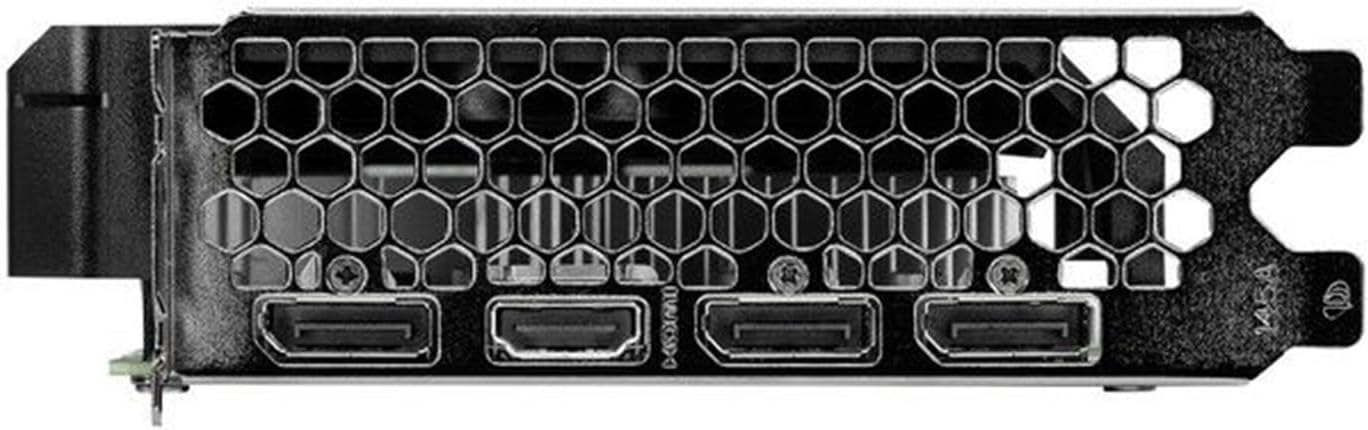
Figure 2: Rear I/O panel showing the HDMI and DisplayPort outputs.
4.2 Ezaugarri nagusiak
- NVIDIA G-SYNC: Enjoy smooth, tear-free gameplay at high refresh rates when paired with a compatible G-SYNC monitor.
- DLSS 3 & Ray Tracing: Experience enhanced visual fidelity and performance in supported games with NVIDIA's Deep Learning Super Sampling and real-time ray tracing technologies.
- 0dB Technology: The fan remains off during light workloads, ensuring silent operation. Fan activation occurs only under heavier loads to maintain optimal temperatures.
- ThunderMaster Utility: Palit's proprietary software allows you to monitor GPU status, adjust fan speeds, and manage overclocking settings for personalized performance. Download from the official Palit webgunea.
- Mini-ITX Form Factor Support: With a compact length of 17cm, this card is suitable for small form factor PC builds, offering powerful performance in a space-saving design.
5. Mantentzea
Mantentze-lan erregularrak zure txartel grafikoaren iraupena eta errendimendu optimoa bermatzen laguntzen du.
- Hautsa kentzea: Periodically clean dust from the graphics card heatsink and fan using compressed air. Ensure the computer is powered off and unplugged before cleaning. Hold the fan blades gently to prevent over-spinning during cleaning.
- Gidarien eguneraketak: Keep your graphics drivers updated by regularly checking the official NVIDIA website for the latest versions. Driver updates often include performance improvements, bug fixes, and support for new games.
- Tenperaturaren jarraipena: Use monitoring software (like Palit ThunderMaster or other third-party tools) to keep an eye on GPU temperatures, especially during heavy loads, to ensure it operates within safe limits.
6. Arazoak
Zure txartel grafikoarekin arazoak badituzu, jarraitu arazoak konpontzeko ohiko urrats hauek:
- Ez dago pantaila-irteerarik:
- Ziurtatu pantailaren kablea ondo konektatuta dagoela bai txartel grafikoari bai monitoreari.
- Egiaztatu monitoreak piztuta dagoela eta sarrera-iturri zuzenera konfiguratuta dagoela.
- Check if the graphics card is properly seated in the PCIe slot and the 8-pin power connector is firmly attached.
- Try connecting to a different display output port on the card or a different monitor if available.
- Gidariaren arazoak:
- Perform a clean installation of the latest drivers from the NVIDIA website. Use the 'Custom' installation option and select 'Perform a clean installation'.
- If issues persist, try rolling back to a previous stable driver version.
- Poor Performance/Crashes:
- Ziurtatu zure sistemak exekutatzen ari zaren aplikazio edo jokoetarako gutxieneko eskakizunak betetzen dituela.
- Monitor GPU temperatures to rule out overheating.
- Egiaztatu sistemaren baliabideak kontsumitzen dituzten atzeko planoan dauden aplikazioak.
- Verify your power supply unit is sufficient and providing stable power.
- Fan zarata:
- Ensure no cables or obstructions are interfering with the fan blades.
- Clean any dust buildup on the fan and heatsink.
- Use the ThunderMaster utility to adjust fan curves if desired, but avoid setting fan speeds too low under load.
If these steps do not resolve your issue, please contact Palit customer support or your retailer for further assistance.
7. Zehaztapenak
| Ezaugarri | Zehaztapena |
|---|---|
| Prozesadore grafikoa | NVIDIA GeForce RTX 4060 |
| CUDA Nukleoak | 3072 |
| Boost Erlojua | 2460 MHz |
| Memoria Tamaina | 8 GB GDDR6 |
| Memoria Interfazea | 128 bitekoa |
| Memoria Abiadura | 17 Gbps |
| Autobus Mota | PCI Express 4.0 x16 |
| Bistaratzeko irteerak | HDMI 1, DisplayPort 3 |
| Bereizmen digital maximoa | 8K Ultra HD |
| Potentzia-konektorea | 1 x 8 pin |
| TDP | 115 W |
| Hoztea | Active (Single Fan) |
| Neurriak (LxWxH) | 12.6 x 7.09 x 2.36 hazbete (gutxi gorabehera 320 x 180 x 60 mm) |
| Elementuaren eredu-zenbakia | NE64060019P1-1070F |
8. Bermea eta Laguntza
Palit products are manufactured to the highest quality standards. This product is covered by a limited warranty provided by Palit or your retailer. Please refer to the warranty information provided with your purchase or visit the official Palit webtermino eta baldintza zehatzetarako webgunea.
For technical support, driver downloads, or further assistance, please visit the official Palit webgunean www.palit.com or contact your local retailer.