
1. Sarrera
This manual provides detailed instructions for the installation, operation, and maintenance of your ciciglow Wireless Security Camera. Please read this manual thoroughly before using the product to ensure proper function and safety.

Irudia: Aurrealdea view of the ciciglow Wireless Security Camera, showing its dome-shaped body and lens array.
2. Produktua amaitu daview
The ciciglow Wireless Security Camera is designed for home and office surveillance, offering 1080 HD video, Wi-Fi connectivity, two-way audio, motion detection, and intelligent night vision capabilities. Its flexible rotation allows for comprehensive area monitoring.
Ezaugarri nagusiak:
- 1080 HD bideoa: Provides clear and detailed surveillance footage.
- Bi norabideko ahots-interfonoa: Enables real-time communication through the camera.
- Biraketa malgua: Offers 350° horizontal and 90° vertical rotation for wide coverage.
- Mugimendu-detekzioa: Automatically tracks moving objects and records video.
- Intelligent Full Color Night Vision: Features smart white LED lights for clear night viewing, with options for infrared or full-color modes.
- Wi-Fi konexioa: Easy integration into your existing wireless network.
- SD txartelaren biltegiratzea: Supports local storage up to 128GB (SD card not included).

Image: Detailed diagram illustrating the various components of the camera, including the reset button, TF card slot, antenna, charging port, microphone, night vision lamps, 2MP HD lens, speaker, and photosensitive resistance.
Osagaien identifikazioa:
- Berrezarri botoia: Fabrika ezarpenak berrezartzeko erabiltzen da.
- TF txartelaren zirrikitua: For inserting a microSD card for local storage.
- Antena: For Wi-Fi signal reception.
- Kargatzeko ataka: Micro USB port for power input.
- Mikrofonoa: Bi norabideko komunikaziorako eta grabazioetarako audioa hartzen du.
- Gaueko Ikuspegi Osoa Koloretan Lamp: Gaueko koloretako ikusmenerako argiztapena ematen du.
- Gaueko Ikusmen Infragorria Lamp: Provides illumination for infrared night vision.
- 2MP HD lentea: Captures high-definition video.
- Hizlaria: Bi norabideko komunikaziorako audioa ateratzen du.
- Erresistentzia fotosentikorra: Detects ambient light levels to switch between day and night modes.
3. Paketearen edukia
Mesedez, egiaztatu paketea elementu hauek dituen:
- ciciglow Wireless Security Camera (1 unit)
- USB Power Cable (1 unit)
- Muntatzeko torlojuak (2 unitate)
- Wall Plugs (2 units)
- Reset Pin (1 unit)
- Erabiltzailearen eskuliburua (dokumentu hau)

Image: The ciciglow Wireless Security Camera shown alongside its included accessories: a USB power cable, mounting screws, wall plugs, and a reset pin.
4. Konfigurazioa
4.1 Kamera piztea
- Connect the provided USB power cable to the camera's charging port.
- Plug the other end of the USB cable into a compatible USB power adapter (not included) and then into a power outlet.
- Kamera piztu eta abiarazteko sekuentzia hasiko da.

Irudia: Gertutik view of the camera's charging port, indicating where the USB power cable should be connected.
4.2 MicroSD txartel bat sartzea (aukerakoa)
For local video storage, you can insert a microSD card (up to 128GB, not included).
- Locate the TF card slot on the camera (refer to the Product Overview diagrama).
- Sartu microSD txartela astiro-astiro zirrikituan, urrezko kontaktuak behera begira dituela, klik egin arte.
- Txartela kentzeko, sakatu astiro atera arte.

Irudia: Gertutik view of the camera's TF card slot, showing where a microSD card can be inserted for local storage.
4.3 Aplikazioaren instalazioa eta Wi-Fi konexioa
The camera connects to your smartphone via a dedicated application. Please refer to the quick start guide or the app store for the specific app name and installation instructions. The camera supports Wi-Fi connectivity.
- Download and install the recommended surveillance app on your smartphone (Android or iOS).
- Erregistratu kontu bat eta hasi saioa.
- Follow the in-app instructions to add your camera. This typically involves scanning a QR code on the camera or connecting to a temporary Wi-Fi hotspot created by the camera.
- Ensure your smartphone is connected to a 2.4GHz Wi-Fi network during the setup process, as the camera primarily uses this frequency.

Image: Icons representing key camera features, including Wi-Fi connectivity and remote control via a smartphone app.
4.4 Kamera muntatzea
Kamera horman muntatzeko diseinatuta dago. Aukeratu nahi duzuna eskaintzen duen kokapen bat viewangelua egokia da eta zure Wi-Fi sarearen eta entxufe baten irismenean dago.
- Mark the positions for drilling using the camera's base as a template.
- Egin bi zulo markatutako posizioetan.
- Sartu hormako tapoiak zulatutako zuloetan.
- Align the camera's base with the holes and secure it with the provided mounting screws.
- Adjust the camera's angle as needed after installation.
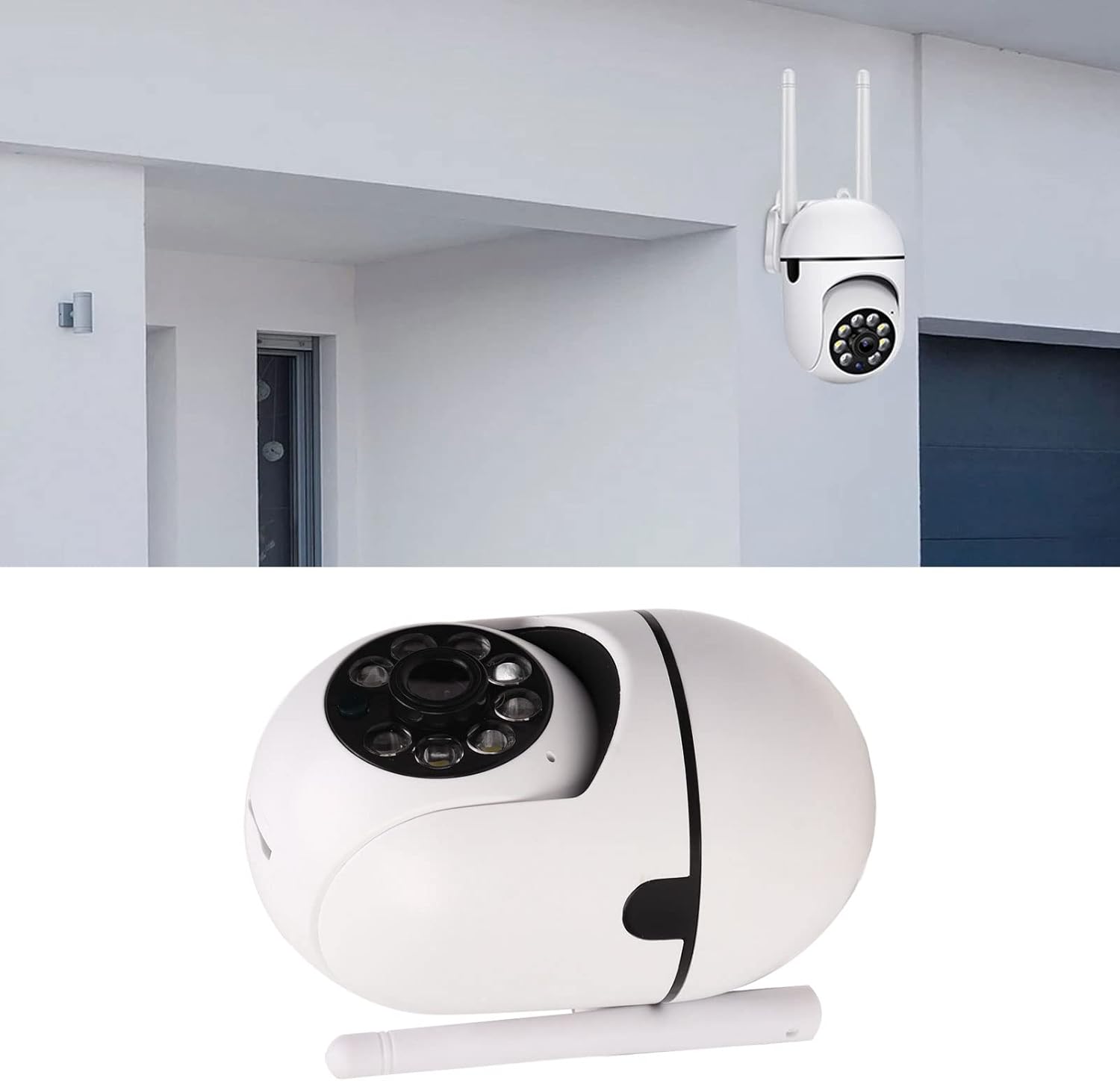
Image: The ciciglow Wireless Security Camera mounted on an exterior wall, demonstrating a typical installation scenario.
5. Funtzionamendu-argibideak
5.1 Bizi View eta urruneko kontrola
Once connected, you can access the live video feed and control the camera through the mobile application.
- Ireki aplikazioa eta hautatu zure kamera gailuen zerrendatik.
- The live video stream will appear.
- Use the on-screen controls to pan (350° horizontal) and tilt (90° vertical) the camera to adjust the viewangelua.

Image: A smartphone screen displaying the camera's live view, with arrows indicating the ability to remotely control the camera's 350° horizontal and 90° vertical rotation.
5.2 Bi norabideko audioa
The camera supports two-way voice intercom, allowing you to speak and listen through the camera.
- Zuzenean view Aplikazioaren interfazean, bilatu mikrofonoaren ikonoa.
- Tap and hold the microphone icon to speak. Your voice will be transmitted through the camera's speaker.
- Release the icon to listen for responses through the camera's microphone.

Image: A visual representation of the two-way audio feature, showing a person speaking to someone at the door through the camera and a smartphone app interface with microphone and speaker indicators.
5.3 Mugimenduaren detekzioa eta alertak
The camera can detect motion and send alerts to your smartphone.
- Gaitu mugimendu-detekzioa aplikazioaren barruko kameraren ezarpenetan.
- Configure alert preferences, such as notification types and sensitivity levels.
- When motion is detected, the camera will automatically record video and send a notification to your phone.
- The camera can also intelligently follow the rotation of moving objects.

Image: A split image demonstrating both two-way audio (person speaking to a delivery driver) and motion detection (camera detecting an intruder at night with an alert icon).
5.4 Gaueko ikusmen moduak
The camera offers intelligent full-color night vision and infrared night vision.
- Kamerak automatikoki aldatzen du eguneko eta gaueko moduen artean, inguruko argiaren arabera.
- In low light conditions, the camera can activate infrared LEDs for black and white night vision.
- For full-color night vision, the camera utilizes smart white LED lights, which can be controlled remotely via the app or set to activate automatically when motion is detected ("light is on when people come, and off when people go").

Image: A comparison showing the difference between infrared night vision (monochrome) and full-color night vision (color) in a city street setting, highlighting the camera's ability to record in full color at night.
5.5 Bideo grabaketa eta erreprodukzioa
Recordings can be stored on a microSD card or via cloud storage (if offered by the app provider).
- Ensure a microSD card is inserted for local storage.
- Sartu grabatutako footage through the playback section of the mobile app.
- Berri dezakezuview historical events and download clips to your phone.

Image: An illustration showing the camera and a microSD card, indicating support for up to 128GB of local storage for video recordings.
6. Mantentzea
- Garbiketa: Erabili zapi leun eta lehor bat kameraren lentea eta gorputza garbitzeko. Saihestu produktu kimiko gogorrak edo material urratzaileak erabiltzea.
- Firmware eguneraketak: Egiaztatu aldizka mugikorretarako aplikazioa firmware eguneratzeak eskuragarri dauden ala ez, errendimendu eta segurtasun optimoak bermatzeko.
- Elikatze-iturria: Ziurtatu kamera energia-iturri egonkor batera konektatuta dagoela.
- Sarearen egonkortasuna: Maintain a strong and stable Wi-Fi connection for uninterrupted operation.
7. Arazoak
| Arazoa | Kausa posiblea | Irtenbidea |
|---|---|---|
| Kamera lineaz kanpo / Ezin da Wi-Fi sarera konektatu |
|
|
| Bideo grabaziorik ez |
|
|
| Irudi kalitate eskasa |
|
|
| Bi norabideko audioa ez da funtzionatzen |
|
|
8. Zehaztapenak
| Ezaugarri | Xehetasuna |
|---|---|
| Ereduaren izena | ciciglow4yd8bk7w5e |
| Marka | ciciglow |
| Bideo Harrapaketa Ebazpena | 1080p HD (Note: Some specifications may list 720p as a base resolution) |
| Konektibitate Teknologia | Haririk gabeko (WiFi) |
| Konektibitate-protokoloa | Wi-Fi (2.4 GHz) |
| Ezaugarri bereziak | Motion Sensor, Night Vision (Infrared & Full Color), Two-Way Audio, Flexible Rotation (350° H, 90° V) |
| Energia iturria | Kable elektrikoa |
| liburukiatage | 1 Volts (Input voltage for adapter, actual camera voltage may vary) |
| Wattage | 3 watt |
| Biltegiratzea | MicroSD Card (up to 128GB, not included) |
| Muntatze Mota | Hormako Muntaia |
| Nazioarteko Babesteko Balorazioa | IP54 (Dust protected and splash resistant) |
| Elementuaren pisua | 8.1 ontza |
| Neurriak (gutxi gorabehera) | Height: 17cm, Width: 7cm, Depth: 6.5cm (excluding antenna) |
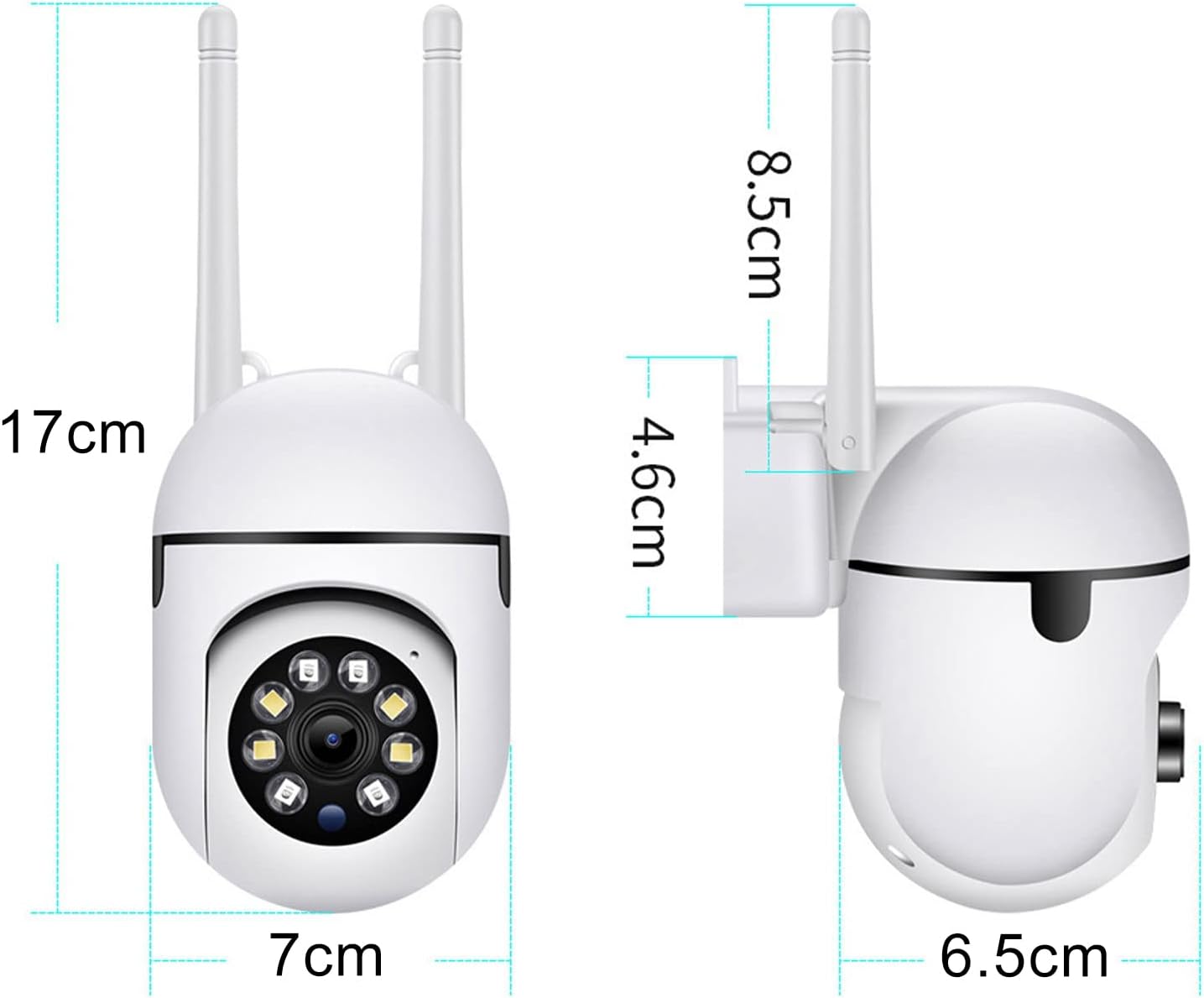
Image: Diagram illustrating the approximate dimensions of the ciciglow Wireless Security Camera in centimeters.
9. Bermearen informazioa
Specific warranty details are typically provided with the product packaging or available on the manufacturer's official website. Please retain your proof of purchase for warranty claims. For any issues, contact customer support.
10. Laguntza
For technical assistance, troubleshooting beyond this manual, or general inquiries, please refer to the contact information provided in your product packaging or visit the official ciciglow support website. Ensure you have your product model number (ciciglow4yd8bk7w5e) ready when contacting support.