
Sarrera
This manual provides detailed instructions for the operation and maintenance of your TEKMAGIC W64-NCA-BK Digital Sports Watch. Designed for durability and functionality, this watch features 10 ATM (100m) water resistance, a chronograph, stopwatch, timer, countdown, calendar, dual time zone display, and an alarm clock. Please read this manual thoroughly to ensure proper use and to maximize the lifespan of your watch.
Watch Overview eta botoien funtzioak
Your TEKMAGIC W64-NCA-BK watch features four primary buttons for navigation and function control. Refer to the diagram below for button identification.
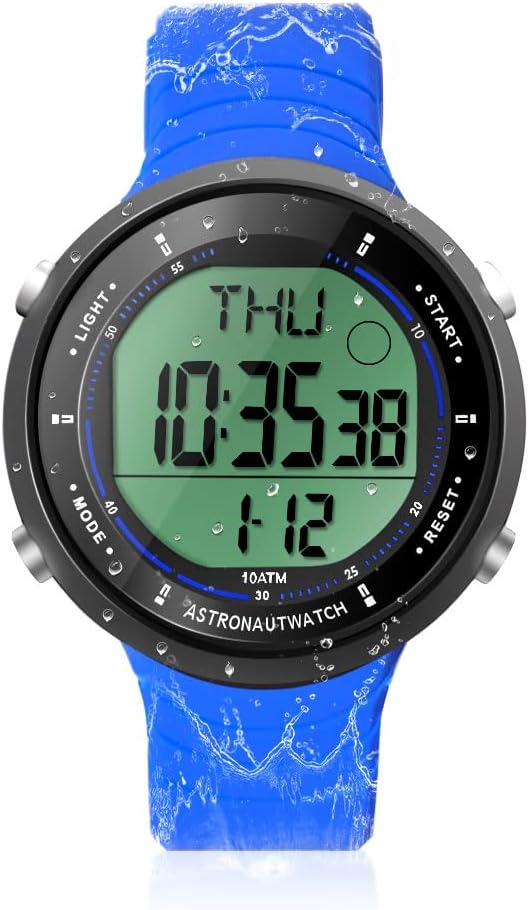
Irudiaren deskribapena: Aurrealde bat view of the TEKMAGIC W64-NCA-BK Digital Sports Watch. The watch has a blue silicone strap and a black case with a digital display showing "THU 10:35:38 1-12". Four buttons are visible on the sides, labeled "LIGHT", "MODE", "START", and "RESET".
- ARGIA botoia (goian ezkerrean): Atzeko argia aktibatzen du argi gutxiko baldintzetan ikusgarritasuna lortzeko.
- MODE botoia (beheko ezkerrean): Cycles through different modes: Time, Chronograph, Timer, Countdown, Alarm, Dual Time.
- HASIERA botoia (goian eskuinean): Starts/stops functions in Chronograph, Timer, and Countdown modes. Adjusts values in setting modes.
- BERREZARRI botoia (beheko eskuinean): Resets functions in Chronograph, Timer, and Countdown modes. Cycles through digits in setting modes.
Konfigurazioa eta oinarrizko funtzionamendua
1. Hasierako piztea
The watch typically comes pre-installed with a battery. If the display is blank, the battery may need replacement (refer to Maintenance section).
2. Ordua eta data ezartzea
- Ordu modutik, sakatu eta eutsi botoiari MODUA botoia sakatu segundoak keinuka hasi arte. Honek ezarpen modua adierazten du.
- Sakatu Berrezarri button to cycle through the setting options: Seconds → Hour → Minute → Year → Month → Day → 12/24 Hour Format.
- Erabili HASI botoia keinuka ari den balioa doitzeko.
- Ezarpen guztiak amaitutakoan, sakatu botoia MODUA botoia ezarpen modutik irteteko.
3. 12/24 Hour Format Switch
During time setting, you can switch between 12-hour (with AM/PM indicator) and 24-hour formats using the HASI button when the hour format option is flashing.
Funtzionamendu funtzioak
1. Kronografoa (kronometroa)
Kronografo funtzioak gertaeren denbora zehatza ahalbidetzen du.

Irudiaren deskribapena: A close-up of the TEKMAGIC W64-NCA-BK watch face showing the stopwatch function. The display reads "ST 0:00543" with "CHIME" indicated. The image also shows a person swimming with the watch.
- Sakatu MODUA button repeatedly until "ST" (Stopwatch) appears on the display.
- Sakatu HASI kronometrajea hasteko.
- Sakatu HASI berriro denbora gelditzeko.
- Sakatu Berrezarri kronometroa zeroraino ezabatzeko.
- Denbora gelditu ondoren berriro hasteko, sakatu HASI.
2. Atzerako kontaketa tenporizadorea
Ezarri erlojuak atzerako kontaketa egiteko denbora zehatz bat.
Irudiaren deskribapena: A close-up of the TEKMAGIC W64-NCA-BK watch face showing the countdown timer function. The display reads "TR 0:0621". The image also shows a person surfing with the watch.
- Sakatu MODUA button repeatedly until "TR" (Timer) appears on the display.
- Eduki sakatuta Berrezarri botoia orduak keinuka hasi arte.
- Sakatu HASI to adjust the flashing hour value.
- Sakatu Berrezarri to move to minutes, then HASI to adjust. Repeat for seconds.
- Once the desired countdown time is set, press MODUA ezarpen modutik irteteko.
- Sakatu HASI atzerako kontaketa hasteko.
- Sakatu HASI again to pause the countdown. Press Berrezarri to reset to the set time.
- Alarma bat joko du atzerako kontaketa zerora iristen denean.
3. Erlojua
Set a daily alarm to sound at a specific time.

Irudiaren deskribapena: A composite image showing various watch functions. One quadrant specifically shows the watch face with "AL 12:00" indicating the alarm setting mode.
- Sakatu MODUA button repeatedly until "AL" (Alarm) appears on the display.
- Eduki sakatuta Berrezarri botoia sakatu orduko digituak keinuka hasi arte.
- Sakatu HASI to adjust the flashing hour value.
- Sakatu Berrezarri to move to minutes, then HASI doitzeko.
- Sakatu MODUA alarma ezartzeko modutik irteteko.
- Alarma pizteko/itzaltzeko, sakatu HASI while in Alarm mode (not setting mode). An alarm icon will appear/disappear.
4. Hourly Txintxeta
Orraurly chime provides an audible alert at the top of every hour.
Irudiaren deskribapena: A composite image showing various watch functions. One quadrant specifically shows the watch face with "CHIME" indicated, signifying the hourly chime is active.
- While in Alarm mode ("AL"), press the Berrezarri botoia ho txandakatzekourly chime ON/OFF. A chime icon will appear/disappear.
5. Dual Time Zone
Display a second time zone for convenience when traveling or communicating across different regions.

Irudiaren deskribapena: A composite image showing two TEKMAGIC W64-NCA-BK watches side-by-side, one displaying "THU 4:52:23" and the other "T2 16:52:23", illustrating the dual time zone feature. The image also shows people wearing the watch while hiking.
- Sakatu MODUA button repeatedly until "T2" (Dual Time) appears on the display.
- Eduki sakatuta Berrezarri botoia sakatu orduko digituak keinuka hasi arte.
- Sakatu HASI to adjust the flashing hour value.
- Sakatu Berrezarri to move to minutes, then HASI doitzeko.
- Sakatu MODUA to exit dual time setting mode.
6. Atzeko argia
Pantaila argitzeko, sakatu tekla ARGIA button (top left). The backlight will remain on for a few seconds.
Mantentzea
1. Water Resistance (10 ATM / 100m)
This watch is rated for 10 ATM (100 meters / 330 feet) water resistance, making it suitable for swimming, diving, snorkeling, and other water activities. Ensure all buttons are not pressed while underwater to maintain water resistance integrity.

Irudiaren deskribapena: A composite image demonstrating the watch's 10 ATM waterproof capability. The top shows a diver underwater wearing the watch. The bottom left shows a person's arm with the watch in a swimming pool. The bottom right shows the watch submerged in water with splashes.
2. Bateria ordezkatzea
The watch uses a CR2025 battery. If the display becomes dim or the watch stops functioning, it's time to replace the battery. It is recommended to have battery replacement performed by a qualified watch technician to ensure proper sealing and maintain water resistance.
- Carefully remove the back cover of the watch using a suitable tool.
- Kendu CR2025 bateria zaharra.
- Sartu CR2025 bateria berri bat alde positiboa (+) gora begira duela.
- Replace the back cover, ensuring it is securely fastened to maintain water resistance.
3. Garbiketa
Garbitu erlojua aldizka zapi leun eta lehor batekinamp cloth. For stubborn dirt, a mild soap solution can be used, followed by rinsing with fresh water and drying thoroughly. Avoid using harsh chemicals or abrasive materials.
Arazoak konpontzea
| Arazoa | Kausa posiblea | Irtenbidea |
|---|---|---|
| Pantaila hutsik edo ilun dago. | Bateria baxua edo hilda. | Ordeztu CR2025 bateria. |
| Watch loses time or functions incorrectly. | Bateria baxua; barneko matxura. | Ordeztu bateria. Arazoak jarraitzen badu, jarri harremanetan bezeroarentzako arreta-zerbitzuarekin. |
| Ura erlojuaren barruan. | Buttons pressed underwater; back cover not sealed properly after battery change. | Immediately take to a watch repair specialist. Avoid pressing buttons underwater. Ensure proper sealing after maintenance. |
| Alarm or chime not sounding. | Alarm/chime function is turned off. | Ensure alarm/chime is activated in the respective mode. |
Zehaztapenak
| Ezaugarri | Xehetasuna |
|---|---|
| Modelo zenbakia | W64-NCA-BK |
| Uraren Erresistentzia | 10 kutxazain automatiko (100 m / 330 oin) |
| Mugimendu Mota | kuartzo japoniarra |
| Bateria mota | CR2025 |
| Bateriaren iraupena funtzionatzen | 1.5 eta 2 urte bitartekoa |
| Denboraren zehaztasuna | ± 30 segundo hilean |
| Countdown Range | 23:59'59'' to 0:0'0'' |
| Kasu Materiala | ABS |
| Uhalaren materiala | Silikona |
| Kasuaren Diametroa | 45 mm (1.8 hazbete) |
| Kasuen lodiera | 12 mm (0.47 hazbete) |
| Uhalaren zabalera | 22 mm (0.9 hazbete) |
| Max Wrist Circumference | 230 mm (9.1 hazbete) |
| Min Wrist Circumference | 160 mm (6.3 hazbete) |
| Produktuaren pisua | 53 g (0.12 lb) |

Irudiaren deskribapena: A diagram illustrating the dimensions of the TEKMAGIC W64-NCA-BK Digital Sports Watch. It shows the watch with measurements for case diameter (45mm), case thickness (12mm), strap width (22mm), and minimum/maximum wrist circumference (160mm/230mm).
Bezeroarentzako Arreta
For further assistance or inquiries, please refer to the product's official support channels or contact your retailer. Keep your purchase receipt for warranty purposes.


