
AENO AGH0004S-US
AENO Infragorri Berogailuaren Erabiltzaile Eskuliburua
Brand: AENO | Model: AGH0004S-US
1. Segurtasun informazio garrantzitsua
Please read this manual carefully before using the AENO Infrared Heater. Failure to follow these instructions may result in electric shock, fire, or serious injury.
- Beti ziurtatu berogailua deskonektatuta dagoela garbitu edo mantentze-lanak egin aurretik.
- Ez erabili berogailua hondatutako kable edo entxufe batekin.
- Keep flammable materials (furniture, curtains, bedding, paper, clothes, etc.) at least 3 feet (0.9 meters) from the front, sides, and rear of the heater.
- This heater is for indoor use only. Do not use it outdoors or in wet locations.
- Do not use in bathrooms, laundry areas, or similar indoor locations where it may come into contact with water.
- Ez sartu edo utzi objektu arrotzrik aireztapen edo ihes-zuloren batean sartzen, deskarga elektrikoa edo sutea eragin dezakeelako, edo berogailua kaltetu.
- Ez blokeatu aire-sarrerak edo irteerak inola ere. Ez erabili gainazal bigunetan, ohe batean adibidez, non irekidurak blokeatu daitezkeen.
- Berogailua martxan dagoenean, zaindu haurrak eta maskotak.
2. Produktua amaitu daview
The AENO Infrared Heater is a modern, energy-efficient heating solution designed for indoor spaces. Featuring a slim, elegant glass panel, it provides comfortable infrared heat without drying the air or burning oxygen. It can be used as a freestanding unit or wall-mounted, offering versatile placement options. The heater is equipped with smart Wi-Fi technology for convenient control via a mobile application and has been recognized as a Reddot Winner 2023 for its innovative design.

This image displays the AENO Infrared Heater in its freestanding configuration, highlighting its sleek black panel design. A close-up inset shows the digital control panel on the side of the heater, while a smartphone in the foreground illustrates the user-friendly AENO mobile application for remote control.

This image showcases the AENO Infrared Heater's "Invisible design," featuring one unit freestanding on the left and another mounted vertically on a wall on the right. The design is recognized with the Reddot Winner 2023 award, emphasizing its aesthetic integration into modern interiors.
3. Konfigurazioa eta instalazioa
The AENO Infrared Heater offers two convenient installation options: freestanding with included legs or wall-mounted using the provided brackets.
3.1 Instalazio independentea
- Kontu handiz atera berogailua eta osagarri guztiak paketetik.
- Attach the two provided legs to the bottom of the heater using the designated screws. No extra tools are typically required for this step.
- Place the heater on a stable, level surface, ensuring adequate clearance from walls and other objects as specified in the safety guidelines.
3.2 Horma-muntatzeko instalazioa
- Identify a suitable wall location, ensuring it is a sturdy surface capable of supporting the heater's weight (approx. 19.6 lbs).
- Use the mounting stencil (if provided) to mark the drilling points for the wall brackets.
- Zuloak egin eta hormako aingura egokiak sartu (beharrezkoa bada, hormaren materialaren arabera).
- Securely attach the two mounting brackets to the wall.
- Carefully hang the heater onto the mounted brackets, ensuring it is securely seated.

This image provides a visual guide for the easy unpacking and assembly of the AENO Infrared Heater. It details the included components such as mounting brackets, legs, and a quick start guide, and illustrates the straightforward process of attaching the legs for freestanding use or mounting the heater on a wall.

A detailed diagram illustrating the compact dimensions of the AENO Infrared Heater: 0.43 inches in depth, 14.37 inches in width, and 39.37 inches in height. The image also notes the use of premium materials like glass and aluminum, and its origin as "Made in Europe," emphasizing its stylish and innovative design.
4. Funtzionamendu-argibideak
The AENO Infrared Heater can be operated via its integrated control panel or through the AENO mobile application.
4.1 Eskuzko Kontrola
The control panel is located on the side of the heater and features an LED display and touch buttons.
- Pizteko botoia: Sakatu berogailua pizteko edo itzaltzeko.
- Tenperaturaren doikuntza: Use the '+' and '-' buttons to set your desired temperature. The maximum temperature setting is 248°F.
- Smart Mode: Activate or deactivate smart mode for optimized heating.

This image details the LED screen and control buttons on the AENO Infrared Heater, providing a quick reference for setting the heater's functions, including power, temperature, and smart mode.
4.2 Optimal Heating Placement
For optimal heating performance, position the infrared heater to directly face the area or individuals you wish to warm. Infrared heat warms objects and people directly, rather than heating the air.

This visual guide illustrates the optimal placement for the AENO Infrared Heater to achieve effective heating coverage up to 215 sq. ft. It shows correct placements (marked with green checkmarks) where the heater directly warms individuals, and incorrect placements (marked with red crosses) where the heat is obstructed or misdirected.
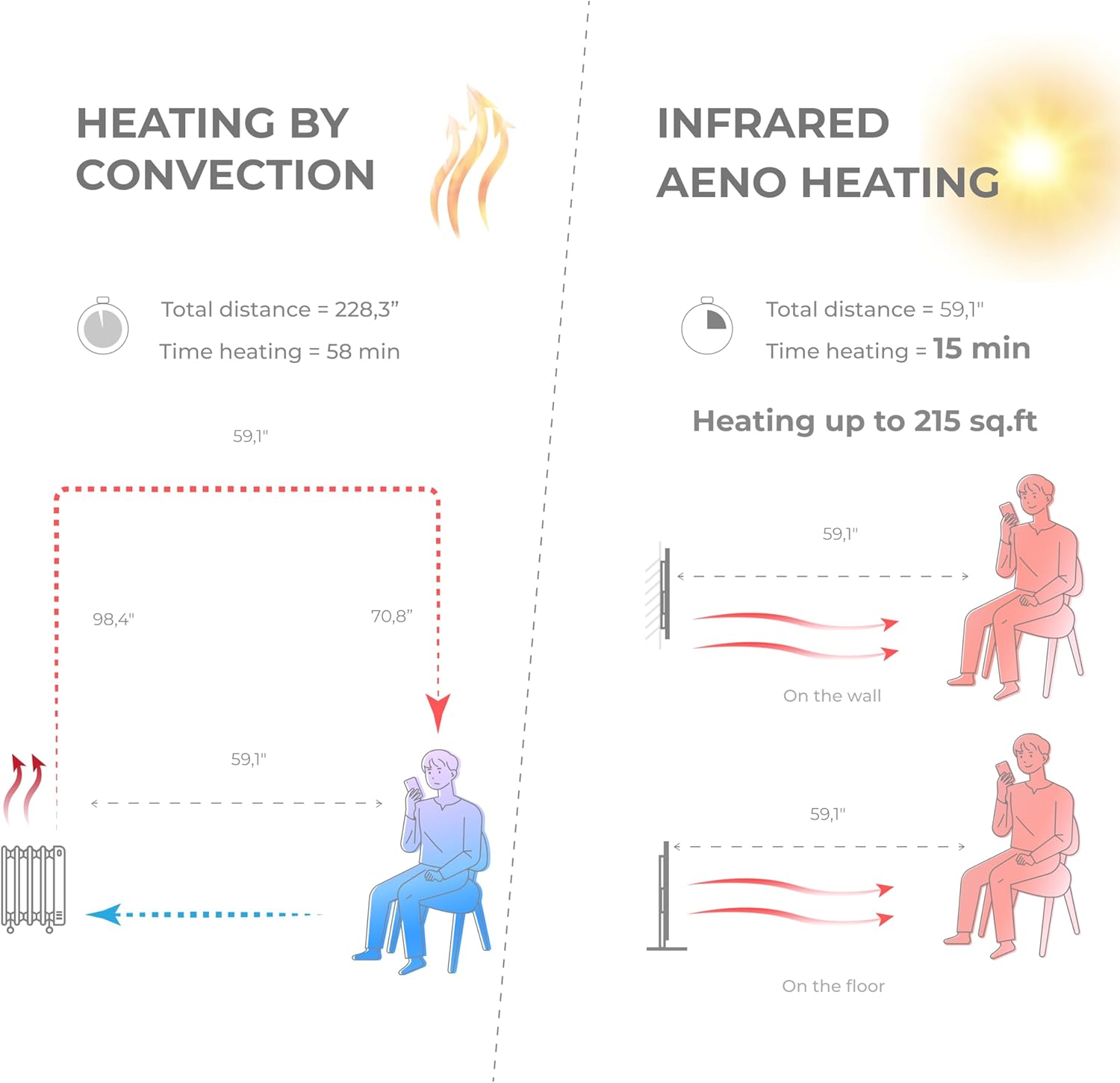
A comparative diagram illustrating the efficiency of AENO Infrared Heating versus traditional convection heating. It shows that infrared heating warms a space up to 215 sq. ft. in 15 minutes, compared to 58 minutes for convection heating, by directly warming objects and people rather than the air.

This image emphasizes the health and comfort benefits of the AENO Infrared Heater. It depicts a serene environment with a person meditating, illustrating that the heater is odorless, silent, does not blow air or cause pollution, and importantly, does not dry out the air or burn oxygen, contributing to a healthier indoor climate.

This image highlights the silent operation of the AENO Infrared Heater, stating "Totally silent 0 dB." It shows the heater in a quiet room setting, reinforcing that it provides warmth without any operational noise, making it ideal for bedrooms, offices, or any space requiring tranquility.
5. AENO App Control
Unlock the full potential of your AENO Infrared Heater by connecting it to the AENO mobile application.
5.1 Aplikazioa deskargatzea
- Bilatu "AENO" in the Apple App Store (for iOS devices) or Google Play Store (for Android devices).
- Download and install the AENO application on your smartphone.
5.2 Wi-Fira konektatzea
- Ensure your heater is plugged in and powered on.
- Open the AENO app and follow the on-screen instructions to add a new device.
- Select your AENO Infrared Heater from the list of discoverable devices.
- Enter your Wi-Fi network credentials when prompted.
- Once connected, the heater's Wi-Fi indicator will confirm successful pairing.
5.3 Aplikazioaren Ezaugarriak
The AENO app provides comprehensive control and monitoring capabilities:
- Urruneko piztu/desaktibatu: Piztu edo itzali berogailua edozein lekutatik.
- Tenperatura ezarpena: Precisely adjust the target room temperature.
- Programazioa: Create custom heating schedules and timers to automate operation.
- Energia kontsumoaren jarraipena: Track and analyze your heater's electricity usage to optimize energy savings.
- Multi-Heater Control: Manage multiple AENO smart devices from a single app.
- Etxe adimendunaren integrazioa: Compatible with popular smart home ecosystems like Amazon Alexa, Google Home, and Apple Siri.

This image demonstrates the advanced control features of the AENO Infrared Heater via its smartphone application. It shows how users can remotely turn the heater on/off, adjust the panel temperature between 140-248°F, and monitor and analyze electricity consumption from anywhere in the world. Links to download the app are also visible.

This image illustrates the remote control capabilities of the AENO App, allowing users to switch the heater on/off, set room temperature, create heating schedules, manage multiple heaters, control energy consumption, and set up devices within the AENO ecosystem.

This image highlights the energy efficiency of the AENO Infrared Heater, suggesting it can reduce heating costs by up to 50%. It promotes the concept of spot heating as an effective replacement for central heating systems, keeping specific areas warm with adaptive panel temperature.
6. Mantentzea
Regular cleaning and proper care will ensure the longevity and efficient operation of your AENO Infrared Heater.
- Garbiketa: Garbitu aurretik, deskonektatu berogailua eta utzi guztiz hozten. Erabili oihal leun eta lehorra.amp cloth to wipe the exterior surfaces. Do not use abrasive cleaners, waxes, or polishes.
- Biltegiratzea: Berogailua denbora luzez gordetzen baduzu, deskonektatu eta gorde leku fresko eta lehor batean, hobe jatorrizko ontzian.
- Erabiltzaileak ez du zerbitzurik gabeko piezarik: The heater contains no user-serviceable parts. Do not attempt to disassemble or repair the unit yourself. Refer all servicing to qualified service personnel.
7. Arazoak
If you experience issues with your AENO Infrared Heater, please consult the following common troubleshooting steps:
- Berogailua ez da pizten:
- Ziurtatu kablea ondo konektatuta dagoela funtzionatzen duen entxufe elektriko batera.
- Egiaztatu etengailua piztu den.
- Verify the power button on the heater or in the app is pressed.
- Heater is not producing enough heat:
- Confirm the temperature setting is higher than the current room temperature.
- Ensure the heater is placed optimally, facing the desired heating area, and not obstructed.
- Check the room size; the heater is designed for areas up to 215 sq. ft.
- Aplikazioen konexio arazoak:
- Ensure your smartphone is connected to a 2.4GHz Wi-Fi network (5GHz networks are not supported by some smart devices).
- Restart your Wi-Fi router and the heater.
- Ziurtatu berogailua zure Wi-Fi bideratzailearen irismenean dagoela.
- Try re-pairing the heater with the app.
- Ezohiko zaratak edo usainak:
- The AENO Infrared Heater operates silently. If you hear unusual noises, unplug the unit immediately and contact customer support.
- A slight odor may be present during the first few uses; this is normal and should dissipate quickly. If a strong or burning odor persists, unplug the unit and contact support.
If the problem persists after attempting these steps, please contact AENO customer support for further assistance.
8. Zehaztapenak
| Ezaugarri | Xehetasuna |
|---|---|
| Marka | AENO |
| Modelo zenbakia | AGH0004S-US |
| Ezaugarri Berezia | App, Manual control, Remote control, Programmable, On/off timer, Energy saving |
| Kolorea | Beltza |
| Forma-faktorea | Panela |
| Barruko/Kanpoko erabilera | Barruan |
| Produktuaren neurriak | 0.44" L x 14.38" W x 39.4" H |
| Produkturako gomendatutako erabilerak | Hasiera |
| Muntatze Mota | Hormako muntaketa, solairuko muntaia |
| Gela Mota | Room, kitchen, living room |
| Berokuntza Estaldura | gehienez 215 sq ft. |
| Erregailu mota | Infragorriak |
| Erregai Mota | Elektrikoa |
| liburukiatage | 120 Volt |
| Amparoa | 5.83 Amps |
| Tenperatura maximoaren ezarpena | 248 gradu Fahrenheit |
| Elementuaren pisua | 19.6 kilo |
| Eskuragarri dagoen lehen data | 5ko uztailaren 2023a |
9. Bermea eta Laguntza
Specific warranty details for the AENO Infrared Heater are not provided in this manual. Please refer to the warranty card included with your product or visit the official AENO webgunea bermearen informazio eguneratuena lortzeko.
For technical support, troubleshooting assistance, or any product-related inquiries, please contact AENO customer service through their official webgunea edo zure produktuaren ontzian emandako harremanetarako informazioa.
Ask a question about this manual
Ask about setup, troubleshooting, compatibility, parts, safety, or missing instructions. Manuals+ will review the question and use this page’s manual context to help answer it.