
AZATOM AZSPTLSBK1
Spitalfields 2 DAB/DAB+ irrati digital eramangarria erabiltzailearen eskuliburua
Model: AZSPTLSBK1 | Brand: AZATOM
Sarrera
Eskerrik asko erosketagatik.asing the AZATOM Spitalfields 2 Portable DAB/DAB+ Digital FM Radio. This manual provides essential information for setting up, operating, and maintaining your new radio. Please read this manual thoroughly before use to ensure proper functionality and to maximize your listening experience.
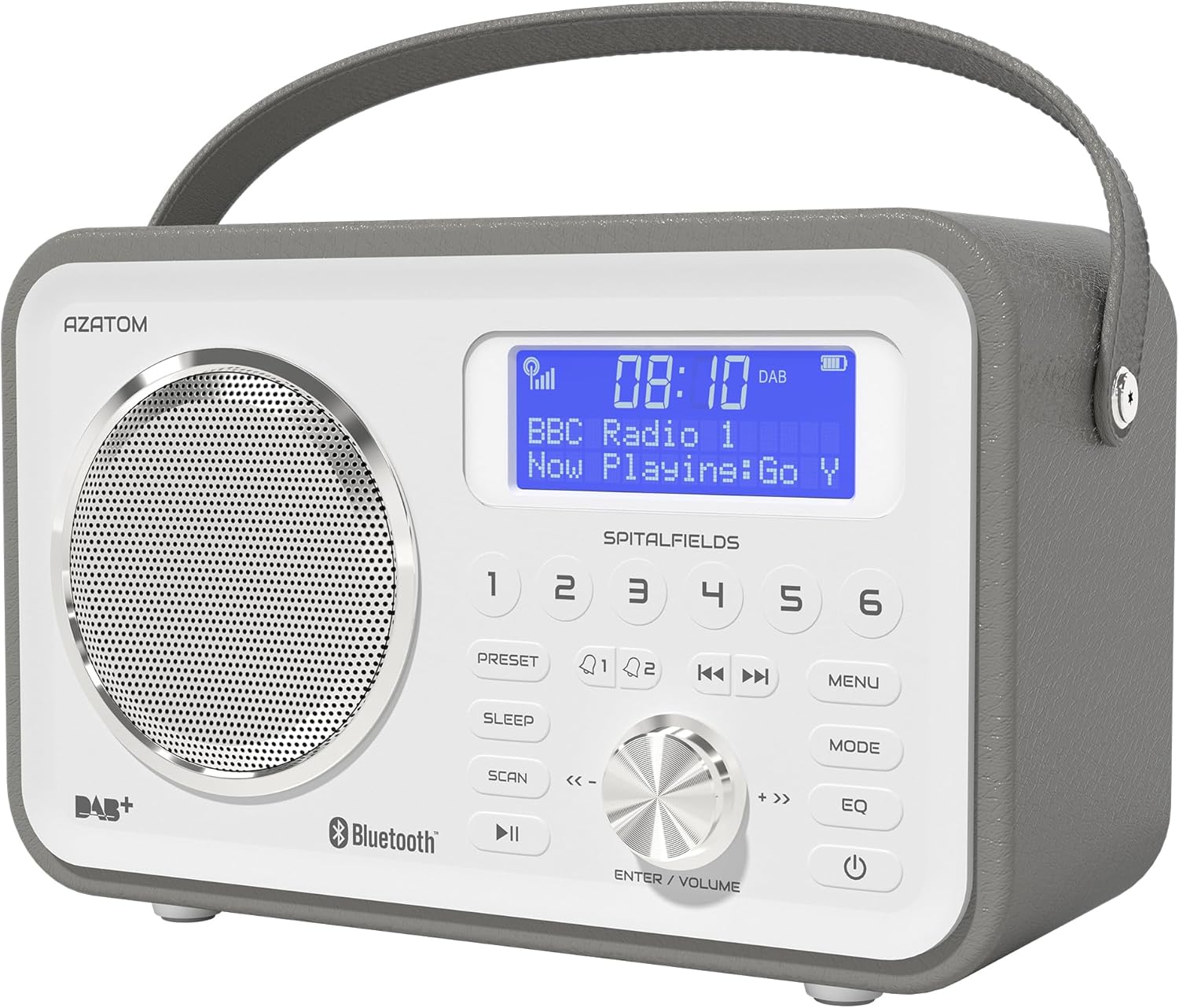
The AZATOM Spitalfields 2 radio features a classic retro design with a modern digital display and intuitive controls.
Segurtasun-argibide garrantzitsuak
Always follow these basic safety precautions when using your radio:
- Ez jarri unitatea euripean, hezetasunean edo muturreko tenperaturetan.
- Ez desmuntatu edo aldatu unitatea. Mantendu konponketa guztiak langile kualifikatuen esku.
- Ziurtatu aireztapen egokia unitatearen inguruan, gehiegi berotzea saihesteko.
- Erabili unitatearekin hornitutako korronte-egokigailua soilik.
- Mantendu unitatea eremu magnetiko indartsuetatik urrun.
- Entzumen-kalteak saihesteko, saihestu denbora luzez bolumen altuegietan entzutea.
Ezaugarri nagusiak
- DAB/DAB+ and FM Radio: Enjoy a wide range of digital and analog radio stations.
- Bluetooth 5.0 konexioa: Wirelessly stream audio from your compatible devices.
- Erlojuaren funtzioa: Set multiple alarms with snooze and sleep timer features.
- Bateria kargagarria: Bateria integratua eramangarriki erabiltzeko.
- Aurrez ezarritako geltokiak: Store your favorite DAB and FM stations for quick access.
- Urruneko kontrola: Conveniently operate the radio from a distance.
- Quality Stereo Sound: Enhanced audio experience with a built-in subwoofer.
DAB/DAB+/FM irratia

Experience crystal-clear digital radio with DAB/DAB+ or tune into traditional FM broadcasts.
Bluetooth 5.0 konexioa

Effortlessly stream music from your smartphone, tablet, or other Bluetooth-enabled devices.
Alarm Clock & Sleep Timer

Wake up to your favorite station or a buzzer with the integrated alarm clock, and drift off to sleep with the adjustable sleep timer.
Pre-set Stations

Quickly access your preferred radio stations by saving them to the dedicated preset buttons.
Bateria kargagarria

The built-in rechargeable battery allows for convenient portable use, perfect for any room or on the go.
Premier Control with Remote
Control all functions of your radio from the comfort of your couch using the included remote control.
Paketearen edukia
Mesedez, egiaztatu elementu guztiak bertan daudela:
- AZATOM Spitalfields 2 DAB/DAB+ Digital FM Radio
- Elikatze-moldagailua
- Urruneko Kontrola
- Erabiltzailearen eskuliburua (dokumentu hau)
Produktua amaituview
Familiarize yourself with the controls and display of your Spitalfields 2 radio.
The front panel features a clear display, speaker, and various control buttons.
Aurrealdeko paneleko kontrolak
- Bistaratzeko pantaila: Ordua, geltokiaren informazioa eta menu aukerak erakusten ditu.
- Aurrezarritako botoiak (1-6): Store and recall your favorite stations.
- PRESET botoia: Access preset memory.
- LO botoia: Ezarri lo egiteko tenporizadorea.
- SCAN botoia: Automatically scan for stations.
- PLAY/PAUSE botoia: Play/pause in Bluetooth mode.
- MENU botoia: Sarbide sistemaren ezarpenak.
- MODE botoia: Aldatu DAB, FM eta Bluetooth moduen artean.
- EQ botoia: Egokitu berdintzailearen ezarpenak.
- POWER botoia: Piztu / itzali unitatea.
- ENTER/VOLUME Knob: Rotate to adjust volume or navigate menus; press to confirm selection.
- SKIP Buttons (<<, >>): Navigate tracks in Bluetooth mode or stations in radio mode.
Konfigurazioa
Piztea
- Extend the telescopic antenna fully for optimal reception.
- Connect the supplied power adapter to the DC IN port on the back of the radio and plug it into a wall outlet. The internal battery will begin charging.
- Sakatu BOTEREA botoia irratia pizteko.
Initial Scan (DAB/FM)
Upon first power-on, the radio will automatically perform a full scan for DAB stations. This may take a few minutes. Once complete, the radio will tune to the first available station.
- To manually initiate a scan in DAB mode, press the ESKANETATU botoia.
- FM moduan, luze sakatu ESKANETATU button to auto-scan for the next available station.
Ordua eta data ezartzea
The time and date are usually automatically set via DAB signal. If not, or if you wish to adjust manually:
- Sakatu MENUA botoia.
- Biratu ENTER/VOLUME knob to navigate to 'System Settings' and press the knob to confirm.
- Navigate to 'Time/Date' and press to confirm.
- Select 'Set Time/Date' or 'Auto Update' as desired and follow the on-screen prompts.
Funtzionamendu-argibideak
Radio Modes (DAB, FM)
Sakatu MODUA button to switch between DAB and FM radio modes.
DAB modua
- Biratu ENTER/VOLUME knob to browse available DAB stations. Press the knob to select a station.
- Sakatu ESKANETATU to perform a full scan for new stations.
FM modua
- Biratu ENTER/VOLUME botoia maiztasuna fintzeko.
- Eduki sakatuta ESKANETATU button to automatically tune to the next strong station.
Bluetooth funtzionamendua
- Sakatu MODUA button until 'Bluetooth' is displayed. The radio will enter pairing mode.
- On your Bluetooth-enabled device (e.g., smartphone), search for 'Spitalfields 2' in the Bluetooth settings and select it to pair.
- Once paired, you can stream audio from your device to the radio. Use the JOLASTU/PAUSTU eta SALTATU buttons on the radio or remote to control playback.
Erlojuaren funtzioa
- Sakatu MENUA button and navigate to 'Alarms'.
- Select 'Alarm 1' or 'Alarm 2' to configure.
- Set the alarm time, duration, source (Buzzer, DAB, FM), and frequency (Daily, Once, Weekdays, Weekends).
- Ensure the alarm is set to 'On'.
- Alarma jotzen duenean, sakatu BOTEREA button to snooze, or press any other button to turn off the alarm.
Lo egiteko tenporizadorea
Lo egiteko tenporizadoreak irratia automatikoki itzaltzea ahalbidetzen du denbora jakin baten ondoren.
- Sakatu LO button repeatedly to cycle through sleep timer options (e.g., 15, 30, 45, 60, 90, 120 minutes, Off).
- The selected time will be displayed briefly.
Aurrez ezarriak
Aurrez ezarritako bat gordetzea
- Tune to the desired DAB or FM station.
- Press and hold one of the numbered PRESET buttons (1-6) until 'Preset Stored' appears on the display.
Aurrez ezarritako bat gogoratzea
- Briefly press the corresponding numbered PRESET button (1-6) to recall a stored station.
Audio Settings (EQ)
Soinu profesionala doitufile zure hobespenera.
- Sakatu EQ button repeatedly to cycle through equalizer presets (e.g., Normal, Flat, Jazz, Rock, Classical, Pop, News, My EQ).
- If 'My EQ' is selected, you can customize bass and treble settings via the menu.
Urruneko agintea erabiliz
The remote control provides full functionality of the radio from a distance. Ensure the remote has working batteries and is pointed towards the front of the radio.
- All buttons on the remote correspond to functions available on the radio's front panel.
- Use the numeric buttons (0-9) to directly enter preset numbers or navigate menus.
Mantentzea eta zaintzea
- Garbiketa: Garbitu irratia zapi leun eta lehor batekin. Ez erabili garbitzaile edo disolbatzaile urratzailerik.
- Bateria zaintzea: For optimal battery life, avoid fully discharging the battery frequently. If storing the radio for an extended period, charge it fully every few months.
- Antena: Handle the telescopic antenna with care to prevent damage.
- Biltegiratzea: Gorde irratia leku fresko eta lehor batean, eguzki-argitik eta muturreko tenperaturetatik babestuta.
Arazoak konpontzea
| Arazoa | Kausa posiblea | Irtenbidea |
|---|---|---|
| Botererik ez | Power adapter not connected; battery depleted. | Ensure power adapter is securely connected and plugged in. Charge the battery. |
| Soinurik ez / Soinu kalitate eskasa | Volume too low; poor signal; incorrect mode. | Increase volume. Extend antenna fully. Re-scan for stations. Ensure correct mode (DAB/FM/Bluetooth). |
| DAB stations not found | Weak DAB signal; no full scan performed. | Ensure antenna is fully extended. Perform a full DAB scan. Try repositioning the radio. |
| Bluetootha ez da parekatzen | Radio not in Bluetooth mode; device too far; previously paired. | Switch radio to Bluetooth mode. Ensure device is within range. Forget 'Spitalfields 2' on your device and try pairing again. |
| Urruneko kontrola ez dabil | Batteries depleted; obstruction; not pointed correctly. | Replace remote control batteries. Ensure no obstruction between remote and radio. Point remote directly at the radio's front panel. |
Zehaztapenak
| Ezaugarri | Xehetasuna |
|---|---|
| Marka | AZATOM |
| Modelo zenbakia | AZSPTLSBK1 |
| Pisua | 750 gramo |
| Hardware interfazea | 3.5 mm Audio, Bluetooth, Headphones |
| Bozgorailuen irteerako potentzia maximoa | 30 Watt |
| UPC | 718157745964 |
Bermearen informazioa
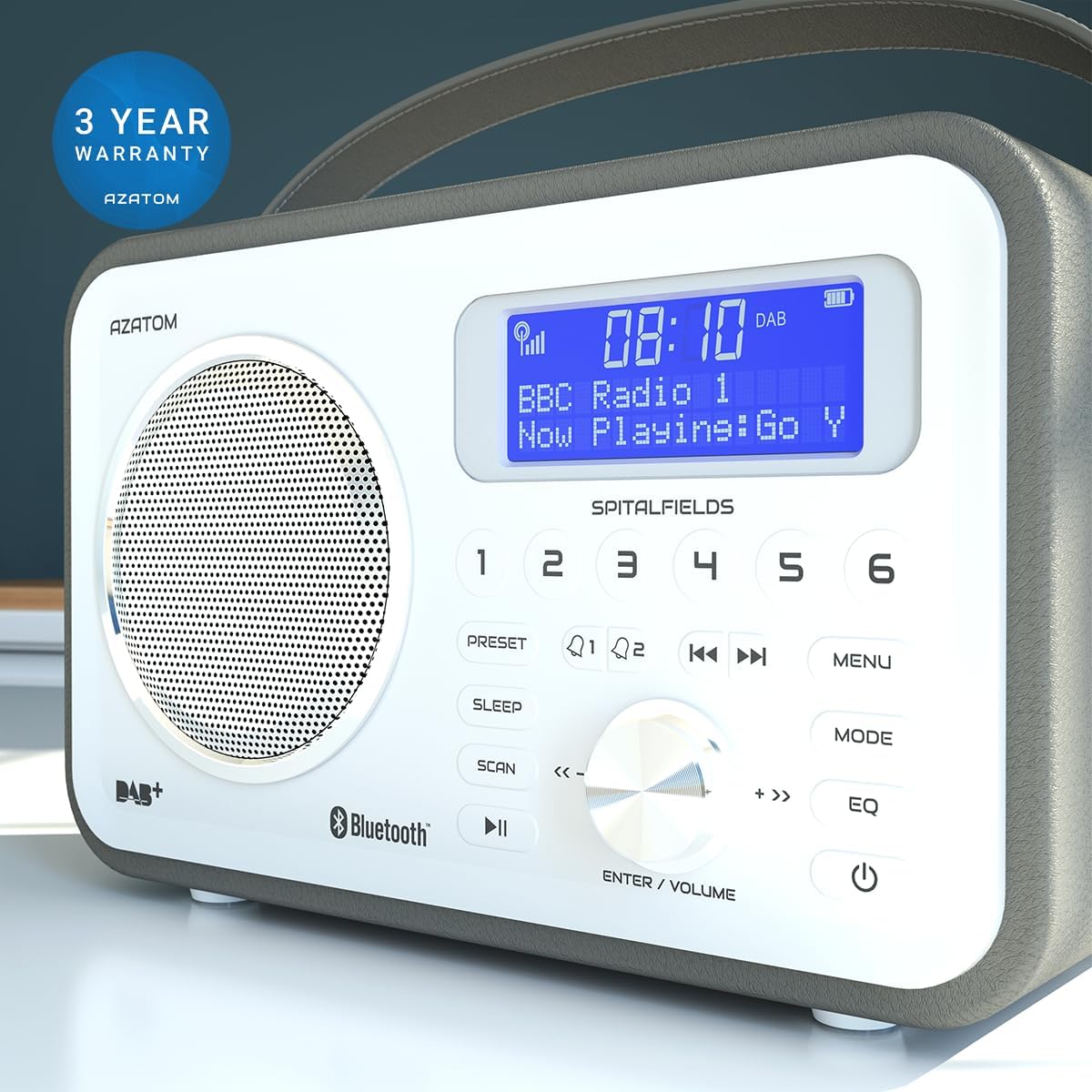
The AZATOM Spitalfields 2 radio comes with a 3 urteko bermea from the date of purchase. This warranty covers manufacturing defects and faulty workmanship under normal use. Please retain your proof of purchase for warranty claims.
The product is backed by a 3-year warranty, ensuring peace of mind.
The warranty does not cover damage caused by misuse, accident, unauthorized modification, or normal wear and tear. For full terms and conditions, please refer to the AZATOM official webwebgunean edo jarri harremanetan bezeroarentzako laguntzarekin.
Bezeroarentzako Arreta
If you encounter any issues not covered in this manual or require further assistance, please visit the official AZATOM weblaguntza baliabideetarako, maiz egiten diren galderetarako eta harremanetarako informaziorako gunea.
Webgunea: www.azatom.com
Please have your model number (AZSPTLSBK1) and purchase details ready when contacting support.
Lotutako dokumentuakAZSPTLSBK1


Ask a question about this manual
Ask about setup, troubleshooting, compatibility, parts, safety, or missing instructions. Manuals+ will review the question and use this page’s manual context to help answer it.