
GMKtec G2 PLUS
GMKtec Nucbox G2 Plus Mini PC User Manual
Model: G2 PLUS
1. Sarrera
The GMKtec Nucbox G2 Plus is a compact and powerful mini PC designed for a variety of computing tasks, from routine office work and home entertainment to more demanding applications. Featuring the Intel N150 processor, 12GB DDR5 RAM, and a 512GB SSD, it offers efficient performance in an ultra-compact form factor. This manual provides essential information for setting up, operating, maintaining, and troubleshooting your device.

Figure 1.1: GMKtec Nucbox G2 Plus Mini PC
2. Produktua amaitu daview
The Nucbox G2 Plus is equipped with the latest Intel Twin Lake N150 CPU, offering improved performance for everyday computing. It supports 4K triple display output, high-speed wireless connectivity with WiFi 6 and Bluetooth 5.2, and dual Gigabit Ethernet ports for robust network connections. Its compact design makes it suitable for various environments, including home, office, and multimedia setups.

Figure 2.1: Key Features of Nucbox G2 Plus
3. Paketearen edukia
Mesedez, egiaztatu elementu guztiak paketean daudela:
- GMKtec Nucbox G2Plus Mini PC Intel N150 12GB RAM 512GB SSD
- 1 x korronte egokitzailea
- 1 x VESA Mount with Screws
- 1 x Blue Mini PC Cover Lid
- 1 x HDMI kablea
- 1 x Erabiltzailearen eskuliburua
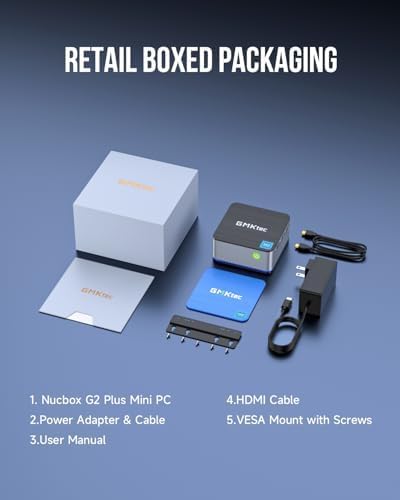
Figure 3.1: Contents of the Retail Box
4. Physical Features and Ports
The Nucbox G2 Plus offers a comprehensive set of ports for versatile connectivity:
- USB 3.2 portuak (x3): For connecting peripherals like keyboards, mice, and external storage devices.
- HDMI 2.0 atakak (x2): Supports 4K@60Hz display output for connecting to monitors or TVs.
- DP V1.4 Port (x1): Supports 4K@60Hz display output, enabling triple display configurations.
- 3.5 mm-ko audio-konexioa: Aurikularretarako edo bozgorailuetarako.
- Gigabit Ethernet RJ45 Ports (x2): For stable wired network connections.
- USB-C ataka: For power input (12V/3A) and data transfer.
- Kensington blokeoaren zirrikitua: Segurtasun fisikoagatik.
- Pizteko botoia: Gailua pizteko/izteko.

Figure 4.1: Multi-functional Interface Layout
5. Konfigurazio gida
5.1 Hasierako konexioa
- Connect your monitor(s) to the HDMI or DP ports using the provided HDMI cable or your own DP cable.
- Connect your keyboard and mouse to the USB 3.2 ports.
- For wired internet, connect an Ethernet cable to one of the RJ45 ports. For wireless, ensure your WiFi network is available.
- Connect the power adapter to the USB-C power input port on the mini PC, then plug the adapter into a power outlet.
5.2 Powering On and Operating System Setup
Press the power button on the front of the mini PC. The device comes pre-installed with Windows 11 Pro. Follow the on-screen instructions to complete the initial Windows setup, including language, region, network connection, and user account creation.
5.3 Triple Display Setup
The Nucbox G2 Plus supports up to three 4K@60Hz displays simultaneously. Connect two monitors via the HDMI 2.0 ports and a third via the DP V1.4 port. Once connected, Windows will automatically detect the displays. You can configure display settings (extend, duplicate, etc.) through the Windows Display Settings.

Figure 5.1: Triple Screen Display Configuration
5.4 Sarearen konexioa
The mini PC supports both wired and wireless network connections:
- Kable bidez (Ethernet): Connect an RJ45 Ethernet cable to either of the two Gigabit LAN ports for a stable and fast wired connection.
- Wireless (WiFi 6): The device features 802.11ax (WiFi 6) for high-speed wireless internet. After booting, select your WiFi network from the taskbar and enter the password.
- Bluetooth 5.2: Connect wireless devices such as keyboards, mice, and headphones via Bluetooth. Enable Bluetooth in Windows settings and pair your devices.

Figure 5.2: Strong LAN & Wireless Network Support
6. Storage and Expansion
The Nucbox G2 Plus comes with a built-in 512GB M.2 2242 SATA SSD, providing fast boot times and quick file transfers. The storage is expandable up to 2TB, allowing for significant upgrades if more space is required. The design includes a cooling fan system with dual copper turbine cooling pipes to maintain optimal performance during extended use.

Figure 6.1: Internal Components and Expandable Storage
7. Muntatzeko aukerak
The Nucbox G2 Plus includes a VESA mount, allowing you to conveniently attach the mini PC to the back of a compatible monitor or to a wall. This helps to declutter your workspace and create a more streamlined setup.

Figure 7.1: VESA Mount Installation
8. Mantentzea eta Zainketa
- Keep the mini PC in a well-ventilated area to ensure proper airflow and prevent overheating.
- Saihestu gailua muturreko tenperatura, hezetasun edo eguzki-argia zuzenaren eraginpean jartzea.
- Garbitu kanpoaldea zapi leun eta lehor batekin. Ez erabili garbitzaile likidorik edo aerosolik.
- Eguneratu aldizka sistema eragilea eta kontrolatzaileak errendimendu eta segurtasun optimoa bermatzeko.
- Perform routine software maintenance, such as disk cleanup and antivirus scans.
9. Arazoak
If you encounter issues with your GMKtec Nucbox G2 Plus, consider the following common troubleshooting steps:
- Potentziarik gabe: Ensure the power adapter is securely connected to both the mini PC and a working power outlet. Try a different outlet if necessary.
- Ez dago pantailarik: Check all HDMI/DP cable connections to the monitor and the mini PC. Ensure the monitor is powered on and set to the correct input source. Try a different cable or monitor if possible.
- Ez dago Interneteko konexiorik: For wired connections, check the Ethernet cable and router status. For Wi-Fi, ensure Wi-Fi is enabled in Windows settings, and you are connected to the correct network with the correct password. Restart your router and the mini PC.
- Errendimendu motela: Close unnecessary applications. Check for background processes that might be consuming resources. Ensure sufficient free space on the SSD.
- Periferikoa ez da detektatu: Saiatu periferikoa beste USB ataka batera konektatzen. Beharrezkoa bada, ziurtatu gidariak instalatuta daudela.
Arazo iraunkorren kasuan, jo Bermea eta Laguntza atalera harremanetarako informazioa lortzeko.
10. Zehaztapen Teknikoak
| Ezaugarri | Zehaztapena |
|---|---|
| Prozesadorea | Intel N150 (4 Core, 4 Threads, up to 3.6GHz) |
| RAM | 12 GB LPDDR5 4800 MHz |
| Biltegiratzea | 512GB M.2 2242 SATA SSD (Expandable up to 2TB) |
| Grafikoak | Intel UHD Graphics 24EUs (max 1000MHz) |
| Bistaratzeko irteera | 2 x HDMI 2.0 (4K@60Hz), 1 x DP V1.4 (4K@60Hz) |
| USB atakak | 3 x USB 3.2, 1 x USB-C (Power/Data) |
| Sarea | WiFi 6 (802.11ax), Bluetooth 5.2, 2 x Gigabit Ethernet RJ45 |
| Sistema eragilea | Windows 11 Pro |
| Neurriak (LxWxH) | 3.42 x 3.42 x 1.55 hazbete |
| Pisua | 1.65 kilo |
| Kolorea | Blue / Black Steel |
11. Bermea eta Laguntza
GMKtec offers a 1-year limited warranty for each mini PC, starting from the date of purchase. This warranty covers defects due to design and workmanship. For any support needs, please utilize the following channels:
- Amazonen laguntza: Log in to your Amazon account, navigate to 'Your Orders', and select 'Ask Product Question' for direct assistance.
- Salmenta osteko laguntza: You can also send an email to the GMKtec After-Sales Team at support@gmktec.com for 24/7 customer support.
GMKtec is committed to providing reliable products and professional after-sales service to ensure customer satisfaction.
Ask a question about this manual
Ask about setup, troubleshooting, compatibility, parts, safety, or missing instructions. Manuals+ will review the question and use this page’s manual context to help answer it.