
1. Sarrera eta Overview
This manual provides comprehensive instructions for the safe and efficient operation of your XWJNE 3000 Watt Pure Sine Wave Power Inverter. This device is designed to convert 12V DC power from a battery source to 110V/120V AC power, suitable for a wide range of applications including vehicles, RVs, remote workplaces, and emergency power needs.
The XWJNE inverter delivers a true 3000 watts of continuous power and a peak power of 6000 watts, ensuring stable and reliable electricity for your devices. It features a remote control, LED display, multiple protection mechanisms, and dual cooling fans for optimal performance and safety.

Image: XWJNE Pure Sine Wave Power Inverter, ideal for various applications.
2. Produktuaren ezaugarriak
- Uhin sinusoidal hutsaren irteera: Delivers true 3000W continuous power (6000W peak) for sensitive electronics, with a conversion efficiency of up to 94.2%.
- Urrutiko agintea eta LED pantaila: Equipped with a clear LCD display showing input/output voltage, battery capacity, and protection indicators. A 16.4ft remote control allows convenient power on/off and status monitoring.
- Babes anitzeko sistema: Features isolated voltage protection against low/over-voltage, overheating, overload, reverse polarity, and short circuits.
- Hozte bikoitza haizagailuak: Two intelligent cooling fans activate automatically when temperature exceeds 50°C or load is over 50%, providing efficient heat dissipation.
- Konektibitate polifazetikoa: Includes 2x 110V/120V AC output sockets and 1x 5V DC USB output for various devices.

Image: The inverter supports multiple battery inputs (GEL, AGM, SLD, FLD, LI) and powers various AC devices like laptops, microwaves, TVs, fridges, and coffee makers.

Image: Comparison highlighting the XWJNE Pure Sine Wave Inverter's low THD (less than 4%), remote control feature, 90% efficiency, and low noise levels.
3. Zer dago kutxan
Upon unboxing your XWJNE Power Inverter, you should find the following components:
- 1 x XWJNE 3000W Power Inverter
- 2 x Car Battery Cables (Red for positive, Black for negative)
- 1 x Remote Controller (with 16.4ft cable)
- 1 x giltza
- 1 x 3-in-1 Phone Charger Cable
- Ordezko Fusibleak
- Lurreko alanbrea
- Erabiltzailearen eskuliburua (dokumentu hau)
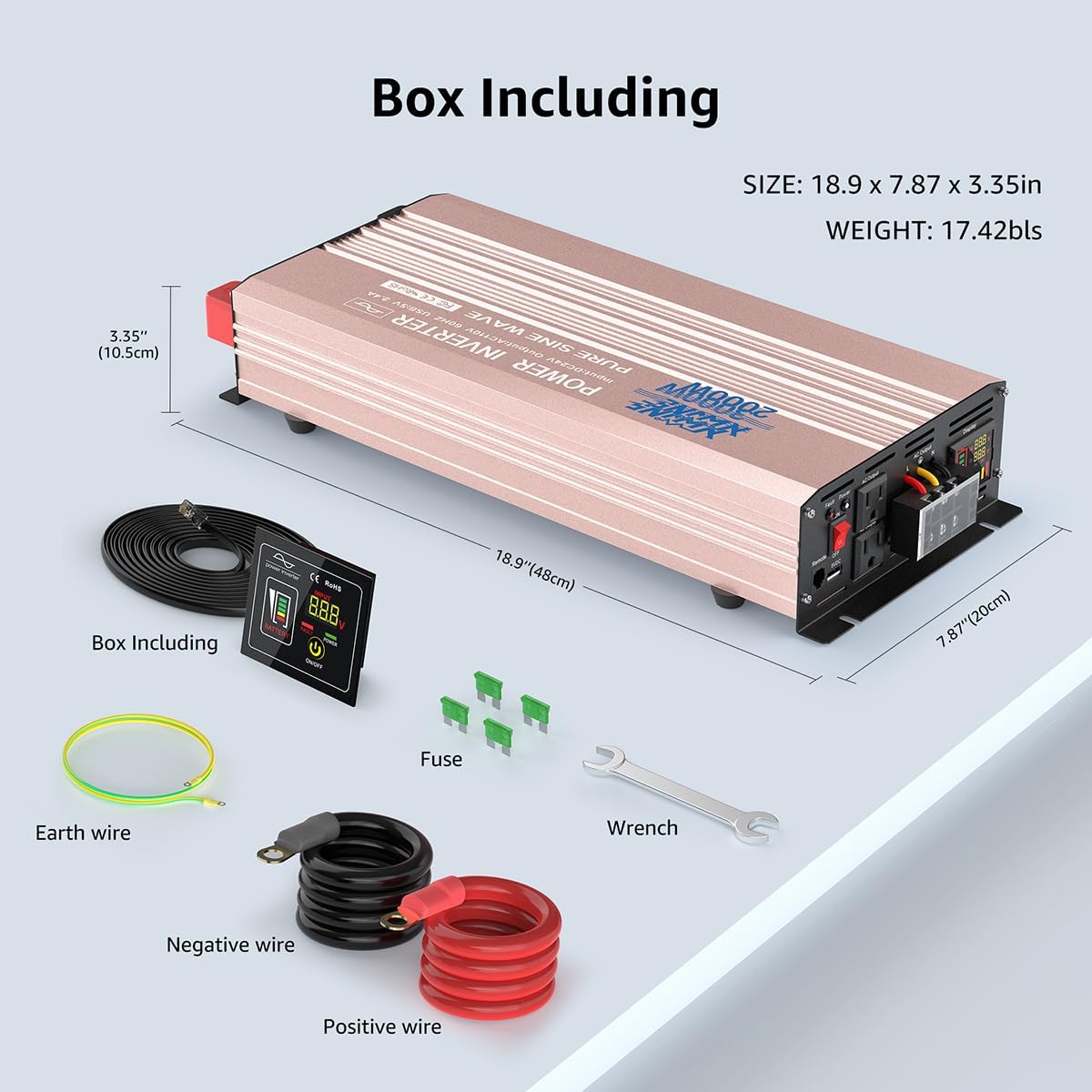
Irudia: Produktuaren paketean sartutako elementu guztien irudikapen bisuala.
4. Konfigurazioa eta instalazioa
Proper installation is crucial for the safe and effective operation of your inverter. Please follow these steps carefully:
- Aukeratu kokapena: Select a dry, well-ventilated area for the inverter. Ensure it is away from direct sunlight, heat sources, and flammable materials. The inverter should be mounted securely.
- Bateria konexioa:
- Connect the red positive (+) battery cable to the positive (+) terminal on the inverter.
- Connect the black negative (-) battery cable to the negative (-) terminal on the inverter.
- Connect the other end of the red positive (+) cable to the positive (+) terminal of your 12V battery.
- Connect the other end of the black negative (-) cable to the negative (-) terminal of your 12V battery.
- Ziurtatu konexio guztiak estuak eta seguruak direla arku elektrikoak eta gehiegi berotzea saihesteko.
- Lurreratzea: Connect the provided green/yellow ground wire to the grounding screw on the inverter and to a suitable ground point (e.g., vehicle chassis or earth ground). This is essential for safety.
- Urruneko kontrolaren konexioa: Plug the remote control cable into the "Remote" port on the inverter. The remote display can be mounted in a convenient location for easy access.

Irudia: Xehetasun handikoa view of the inverter's front panel (AC outlets, USB, display, power switch, remote port, earth wire) and rear panel (positive/negative terminals, cooling fans).

Image: How the power inverter works within a system, converting power from a battery (charged by solar panel and charge controller) to power various loads.
Instalazio bideoa:
Video: This video provides a visual guide to the product's features and demonstrates the installation process, including connecting the battery cables and remote control.
5. Funtzionamendu-argibideak
- Piztea: After ensuring all connections are secure, switch the main power button on the inverter to the "ON" position. The LED display will illuminate, showing battery voltage eta irteeraren egoera.
- Urruneko kontrola erabiltzea: The remote control allows you to turn the inverter on/off and monitor its status from a distance. Press the "ON/OFF" button on the remote to control the inverter.
- Gailuak konektatzea: Plug your AC devices into the 110V/120V AC outlets and USB devices into the 5V DC USB port. Ensure the total wattage of connected devices does not exceed the inverter's continuous power rating (3000W).
- Errendimenduaren jarraipena: The LED display provides real-time information on input voltage, irteera voltage, battery capacity, and any protection indications (e.g., fault).
- Itzaltzea: Before disconnecting any devices or the inverter from the battery, switch the inverter off using either the main power button or the remote control.

Image: The remote control unit allows for convenient operation of the inverter, especially in cramped espazioak.
Product Use Demonstration:
Video: This video provides a detailed product introduction and demonstrates various use cases and operational aspects of the inverter.
6. Safety Features and Protections
Your XWJNE Power Inverter is equipped with multiple safety features to protect both the device and your connected electronics:
- Low/Over-Voltage Babesa: Automatically shuts down if input voltage baxuegia edo altuegia da.
- Gainberotzearen babesa: Dual cooling fans activate when internal temperature exceeds 50°C, and the unit shuts down if temperatures become critical.
- Gainkarga babesa: Prevents damage from excessive power draw by shutting down when load exceeds capacity.
- Alderantzizko polaritatearen babesa: Bateria okerreko konexioetatik babesten du.
- Zirkuitu laburren babesa: Safeguards against short circuits in the output.
- Isolatua Voltage Babesa: Ensures perfect protection for your devices by isolating input and output.

Irudia: Ikus-entzunezkoaren gaineanview of the inverter's comprehensive safety features, including low-voltage, gainvoltage, output short circuit, compression, load shock, overpower, and overtemperature protection.
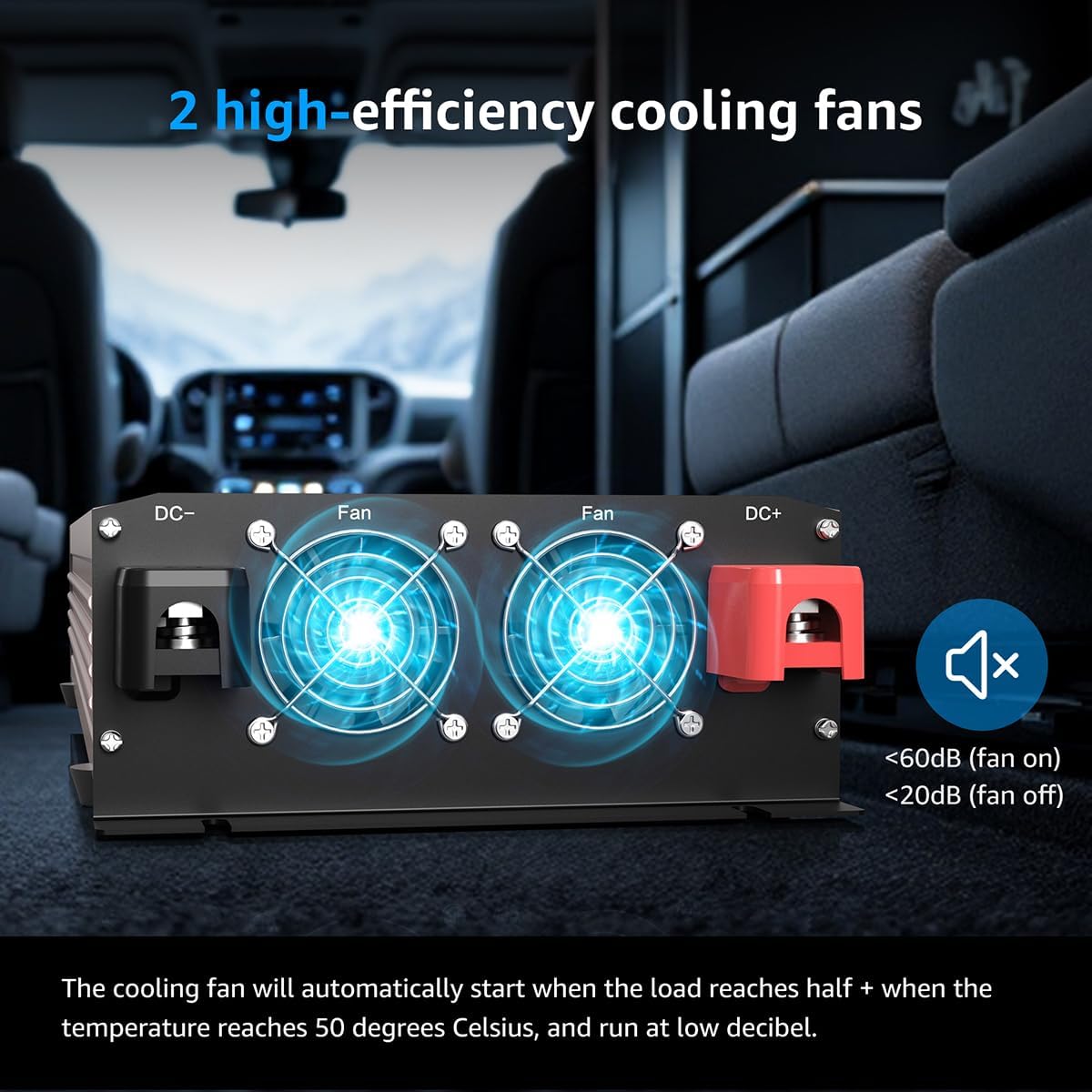
Image: The dual cooling fans ensure efficient heat dissipation, activating automatically when needed to prevent overheating.
7. Mantentzea
To ensure the longevity and optimal performance of your XWJNE Power Inverter, regular maintenance is recommended:
- Mantendu garbi: Regularly clean the exterior of the inverter with a dry cloth. Ensure ventilation openings and cooling fans are free from dust and debris.
- Egiaztatu konexioak: Periodically inspect all cable connections (battery, ground, and output) to ensure they are tight and free from corrosion. Loose connections can lead to overheating and reduced performance.
- Bateria osasuna: Monitor your 12V battery's health and charge level. A healthy battery is essential for the inverter's efficient operation.
- Biltegiratzea: Inbertsorea denbora luzez gordetzen baduzu, deskonektatu bateriatik eta gorde leku fresko eta lehor batean.
8. Arazoak
If you encounter issues with your XWJNE Power Inverter, refer to the following common troubleshooting steps:
| Arazoa | Kausa posiblea | Irtenbidea |
|---|---|---|
| Inbertsoreak ez du pizten | Bateriaren konexio solteak, bateriaren bolumen baxuatage, etengailu akastuna. | Check and tighten battery cables. Charge or replace battery. Ensure power switch is fully engaged. |
| AC irteerarik ez | Overload, short circuit, overheating, low battery voltage. | Reduce load. Check for shorted devices. Allow inverter to cool. Charge battery. Check fault indicator on display. |
| Fault indicator is on | Overload, over-temperature, low/over-voltage, reverse polarity. | Refer to the LED display for specific fault codes/indicators and address the underlying issue. Disconnect and reconnect after resolving. |
| Zaleak ez dira martxan | Normal operation (fans activate under load/temperature), fan malfunction. | Fans are temperature-controlled; they will only run when needed. If inverter is hot and fans are off, contact support. |
If troubleshooting steps do not resolve the issue, please contact XWJNE customer support for assistance.
9. Zehaztapenak
- Ereduaren izena: XWJNE
- Etengabeko potentzia: 3000 Watt
- Potentzia maximoa: 6000 Watt
- Sarrera boltage: 12V DC
- Irteera boltage: 110V/120V AC
- Irteerako maiztasuna: 60Hz
- USB irteera: 5V DC, 2.4A (2 ports)
- Bihurketa-eraginkortasuna: Gehienez %94.2
- Elementuaren pisua: 17.42 kilo
- Paketearen neurriak: 22.76 x 10.24 x 5.75 hazbete
- Fabrikatzailea: XWJNE
10. Bermea eta Laguntza
Specific warranty details for the XWJNE Power Inverter are not provided in this manual. For warranty information, technical support, or service inquiries, please refer to the contact information provided with your product packaging or visit the official XWJNE webgunea.
Baliabide gehigarrietarako, jo dezakezu Erabiltzailearen eskuliburua (PDF).