
1. Sarrera
This manual provides detailed instructions for the installation, operation, and maintenance of your Ctronics CTIPC-790C-EU 5MP PTZ Wi-Fi Security Camera. Please read this manual thoroughly before using the product to ensure proper function and safety. This camera is designed for both indoor and outdoor surveillance, offering high-resolution video, advanced detection features, and flexible connectivity.

1. irudia: Aurrealdea view of the Ctronics 5MP PTZ Wi-Fi Security Camera. This image displays the camera's dome shape, lens, and LED illuminators.
2. Paketearen edukia
Egiaztatu behean zerrendatutako elementu guztiak zure paketean sartuta daudela. Elementuren bat falta bada edo hondatuta badago, jarri harremanetan bezeroarentzako arreta-zerbitzuarekin.
- Ctronics CTIPC-790C-EU 5MP PTZ Wi-Fi Security Camera
- Elikatze-moldagailua
- Kargatzeko kablea
- Argibide eskuliburua
- Euskarria muntatzea
- Muntatzeko Torlojuak
3. Produktua amaitu daview
The Ctronics CTIPC-790C-EU camera offers advanced surveillance capabilities:
- 5MP Ultra HD Bereizmena: Provides clear 2560x1920 pixel video and images, offering more detail than 1080P or 4MP cameras.
- Dual-Band Wi-Fi (2.4/5GHz): Supports both 2.4GHz for extended range and better penetration, and 5GHz for faster transmission and reduced interference.
- PTZ funtzionalitatea: Pan 355° and Tilt 90° for comprehensive area coverage.
- AI Human Detection & Auto Tracking: Intelligent technology reduces false alarms by up to 95% and automatically tracks detected human movement.
- Kolore Gaueko Ikusmena: Achieves full-color night vision up to 25 meters or infrared night vision up to 30 meters for clear visibility in low-light conditions.
- Bi norabideko audioa: Mikrofono eta bozgorailu integratuak urruneko komunikaziorako.
- IP66 Eguraldiarekiko erresistentea: Eraikuntza iraunkorra, kanpoko erabilerarako egokia hainbat eguraldi-baldintzatan.
- Biltegiratze aukera malguak: Supports continuous 24/7 recording to a microSD card (up to 128GB), cloud storage, or FTP.

Figure 2: This image illustrates the superior clarity of 5MP resolution compared to 2MP, highlighting finer details in a vehicle.
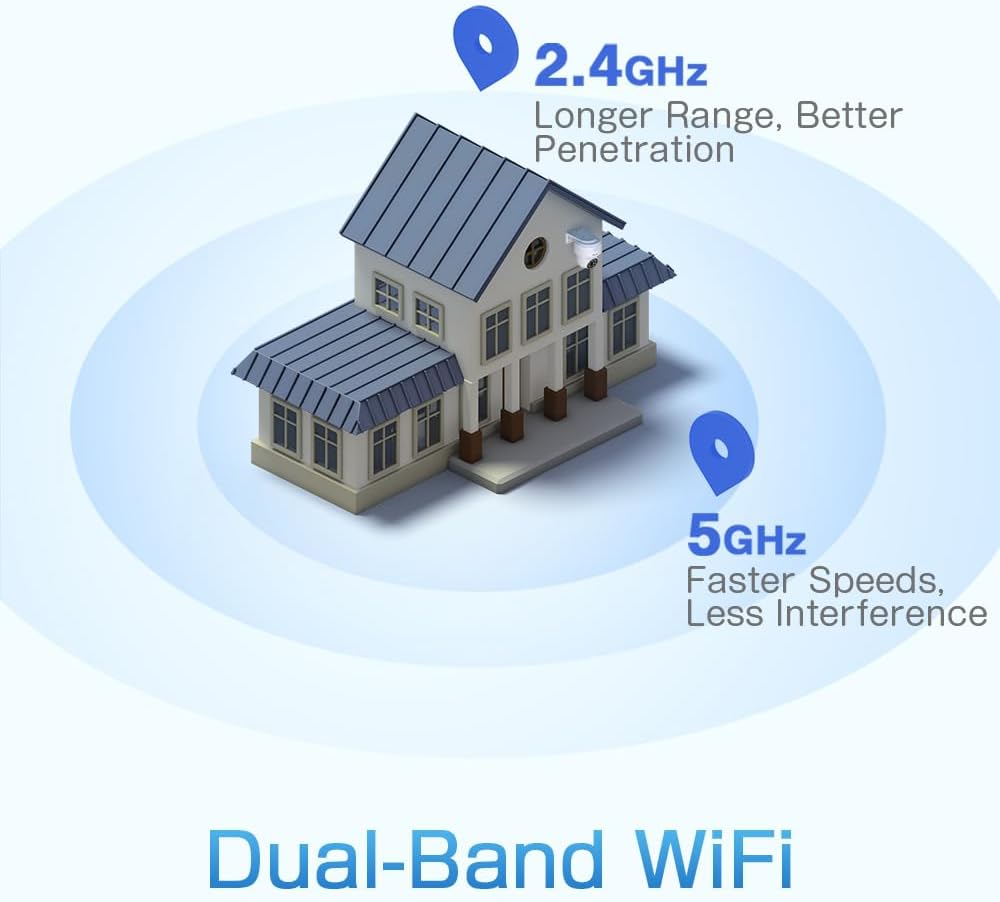
Figure 3: A diagram depicting a house with Wi-Fi signals. The 2.4GHz signal offers longer range and better penetration, while the 5GHz signal provides faster speeds and less interference.
4. Konfigurazioa
4.1 Instalazio fisikoa
The camera can be mounted on a wall or ceiling. Ensure the mounting location provides a clear field of view eta Wi-Fiaren eremuan dago.
- Aukeratu kokapena: Select a suitable indoor or outdoor location. The camera is IP66 waterproof, making it resistant to dust and water jets.
- Muntaketa:
- Hormako muntaia: Use the provided mounting bracket and screws to secure the camera to a wall.
- Sabaiko muntaia: The camera can also be mounted directly to a ceiling.
- Egokitu Angelua: After mounting, adjust the camera's orientation as needed.

Figure 4: This image displays two installation methods: wall mounting using a bracket and ceiling mounting.

Figure 5: This image illustrates both ceiling and wall installation options, emphasizing the camera's IP66 waterproof rating by showing it under simulated rain.
4.2 Energia-konexioa
Connect the provided power adapter to the camera's power input and then plug it into a standard electrical outlet. Ensure the connection is secure.
4.3 Sareko konexioa
The camera supports both 2.4GHz and 5GHz Wi-Fi networks. For initial setup, it is recommended to place the camera near your Wi-Fi router.
- Deskargatu aplikazioa: Download the Ctronics Pro or CamHi Pro app from your smartphone's app store (available for iOS and Android). For PC, use HiP2P Client software.
- Erregistratu kontua: Ireki aplikazioa eta erregistratu kontu berri bat edo hasi saioa dagoeneko baduzu.
- Gehitu kamera: Jarraitu aplikazio barruko argibideei kamera gehitzeko. Horrek normalean kamerako QR kode bat eskaneatzea edo IDa eskuz sartzea dakar.
- Konektatu wifira: Select your desired 2.4GHz or 5GHz Wi-Fi network and enter the password. The camera will connect to the network.
5. Funtzionamendu-argibideak
5.1 Bizi View eta PTZ Kontrola
Once connected, you can access the live video feed through the Ctronics app or PC software.
- Zuzeneko jarioa: Tap on the camera in the app to view the real-time video stream.
- Panorama/Tilt: Use the directional controls within the app to rotate the camera horizontally (pan 355°) and vertically (tilt 90°).
- Zooma: Digital zoom is available through the app.
- Aurrez ezarritako posizioak: Set up to 8 preset positions for quick navigation to specific areas.
5.2 Gizakien Detekzioa eta Jarraipen Automatikoa AI bidez
The camera's intelligent detection system can identify human shapes and track their movement.
- Gaitu detekzioa: In the app settings, enable AI Human Detection.
- Adjust Sensitivity & Area: Customize the detection sensitivity and define specific detection zones to minimize false alarms.
- Auto jarraipena: When enabled, the camera will automatically follow detected human movement within its field of view.
- Alertak: Receive instant notifications via the app or email when motion is detected. The camera can also trigger customizable sound and light alarms.

Figure 6: This image shows the camera detecting a person at night, with an alarm notification displayed on a smartphone, illustrating the human detection and auto-tracking features.
5.3 Gaueko ikusmena
Kamerak gaueko ikusmen gaitasun hobetuak eskaintzen ditu:
- Gaueko ikusmen koloretsua: When spotlights are activated, the camera can provide full-color video in low-light conditions up to 25 meters.
- Gaueko infragorria: In complete darkness, the camera automatically switches to infrared mode, providing clear black and white video up to 30 meters.

Figure 7: An image showing the camera mounted outdoors at night, with its spotlights illuminated to provide full-color night vision. A smartphone displays the live feed.
5.4 Bi norabideko audioa
Use the two-way audio feature to communicate with individuals near the camera.
- Hitz egin: Press and hold the microphone icon in the app to speak through the camera's speaker.
- Entzun: Enable the speaker icon to listen to audio from the camera's microphone.
5.5 Grabaketa eta biltegiratzea
The camera supports various recording and storage methods:
- MicroSD txartela: Insert a microSD card (up to 128GB, not included) into the designated slot for local 24/7 continuous recording.
- Hodeiko biltegiratzea: Subscribe to a cloud storage service (if available) for off-site video backup.
- FTP: Configure FTP settings in the app to upload recordings to an FTP server.

Figure 8: This image illustrates the camera's 24/7 recording capability and various recording modes, including a timeline view on a smartphone and a filmstrip showing recorded events.
6. Mantentzea
6.1 Garbiketa
Regularly clean the camera lens and housing to ensure optimal image quality and performance.
- Erabili biguna, damp cloth to wipe the camera's exterior.
- Lentearentzat, erabili lenteak garbitzeko oihal eta disoluzio espezializatu bat marradurak saihesteko.
- Ez erabili produktu kimiko gogorrik edo garbigailu urratzailea.
6.2 Firmware eguneraketak
Periodically check for firmware updates through the Ctronics app. Keeping your camera's firmware updated ensures access to the latest features and security enhancements.
7. Arazoak
Kamerarekin arazoak badituzu, jo ezazu honako ohiko irtenbide hauetara:
| Arazoa | Irtenbide posiblea |
|---|---|
| Kamera ez da wifira konektatzen |
|
| Irudi kalitate eskasa |
|
| Ez dago mugimenduak hautemateko alertarik |
|
| MicroSD txartelak ez du grabatzen |
|
For further assistance, please contact Ctronics customer support.
8. Zehaztapenak
Key technical specifications for the Ctronics CTIPC-790C-EU camera:
| Ezaugarri | Zehaztapena |
|---|---|
| Ereduaren izena | CTIPC-790C-EU |
| Ebazpena | 5MP (2560x1920) |
| Haririk gabeko Teknologia | Wi-Fia (2.4GHz/5GHz) |
| Pan Angelua | 355 gradu |
| Inklinazio angelua | 90 gradu |
| Gaueko Ikusmenaren barrutia | 25 Meters (Color), 30 Meters (IR) |
| Uraren Erresistentzia Maila | IP66 (iragazgaitza) |
| Biltegiratze-aukerak | MicroSD (up to 128GB), Cloud, FTP |
| Energia iturria | Kable elektrikoa (12 Volt, 12 Watt) |
| Muntatze Mota | Horman muntatzea, torlojuekin sartzeko |
| Materiala | Akrilonitrilo Butadieno Estirenoa (ABS) |
| Gailu bateragarriak | Ordenagailua, Smartphonea, Tableta |
| Sistema eragilearen euskarria | Android, iOS, Windows, Mac OS |
9. Bermea eta Laguntza
Ctronics products are designed for reliability and performance. For warranty information and technical support, please refer to the official Ctronics webwebgunera edo jarri harremanetan bezeroarentzako arreta-zerbitzura zuzenean. Gorde erosketa-agiria erosketaren frogagiri gisa berme-erreklamazioetarako.
- Lineako laguntza: Visit the Ctronics official webMaiz egiten diren galderen, arazoak konpontzeko giden eta softwarearen deskargen gunea.
- Posta elektronikoko laguntza: Contact Ctronics customer service via email for technical assistance.