
1. Sarrera
The Mobiclinic Fortuna Basic electric patient lift is designed to safely transfer individuals with reduced mobility between various positions, such as from a wheelchair to a bed or sofa. This device significantly reduces the physical strain on caregivers while ensuring the patient's comfort and safety. Its robust design and quality construction make it a reliable solution for facilitating patient care.
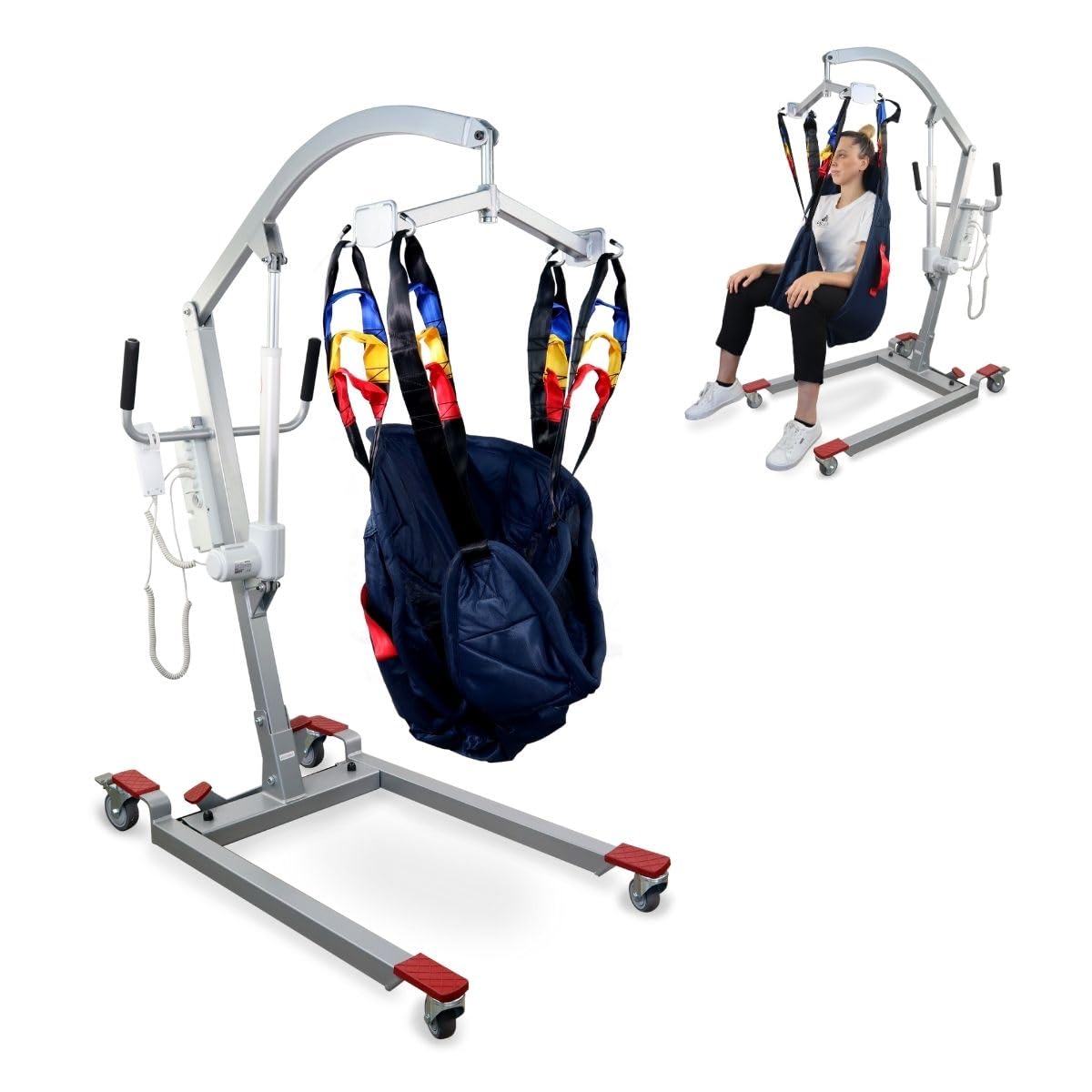
Mobiclinic Fortuna Basic electric patient lift with harness.
2. Segurtasun informazioa
Before operating the Mobiclinic Fortuna Basic patient lift, please read and understand all safety instructions. Failure to do so may result in injury to the patient or caregiver.
- Gehienezko pisu-gaitasuna: Ez gainditu 135 kg-ko (297 lb) gehienezko pisu-ahalmena.
- Larrialdi geldialdia: The lift is equipped with an emergency stop button. Familiarize yourself with its location and function. In case of an emergency, press this button immediately to halt all lift operations.
- Arnes segurua: Always ensure the patient is securely positioned in the harness and all attachment points are correctly fastened before any transfer.
- Blokeatzeko gurpilak: Engage the safety brakes on the rear wheels when the lift is stationary or during patient transfer to prevent unintended movement.
- Bide garbia: Ensure the area around the lift is clear of obstacles before moving the patient.
- Gainbegiratzea: Never leave a patient unattended in the lift.
- Erabilera profesionala: This device should be operated by trained caregivers or individuals who have thoroughly read and understood this manual.
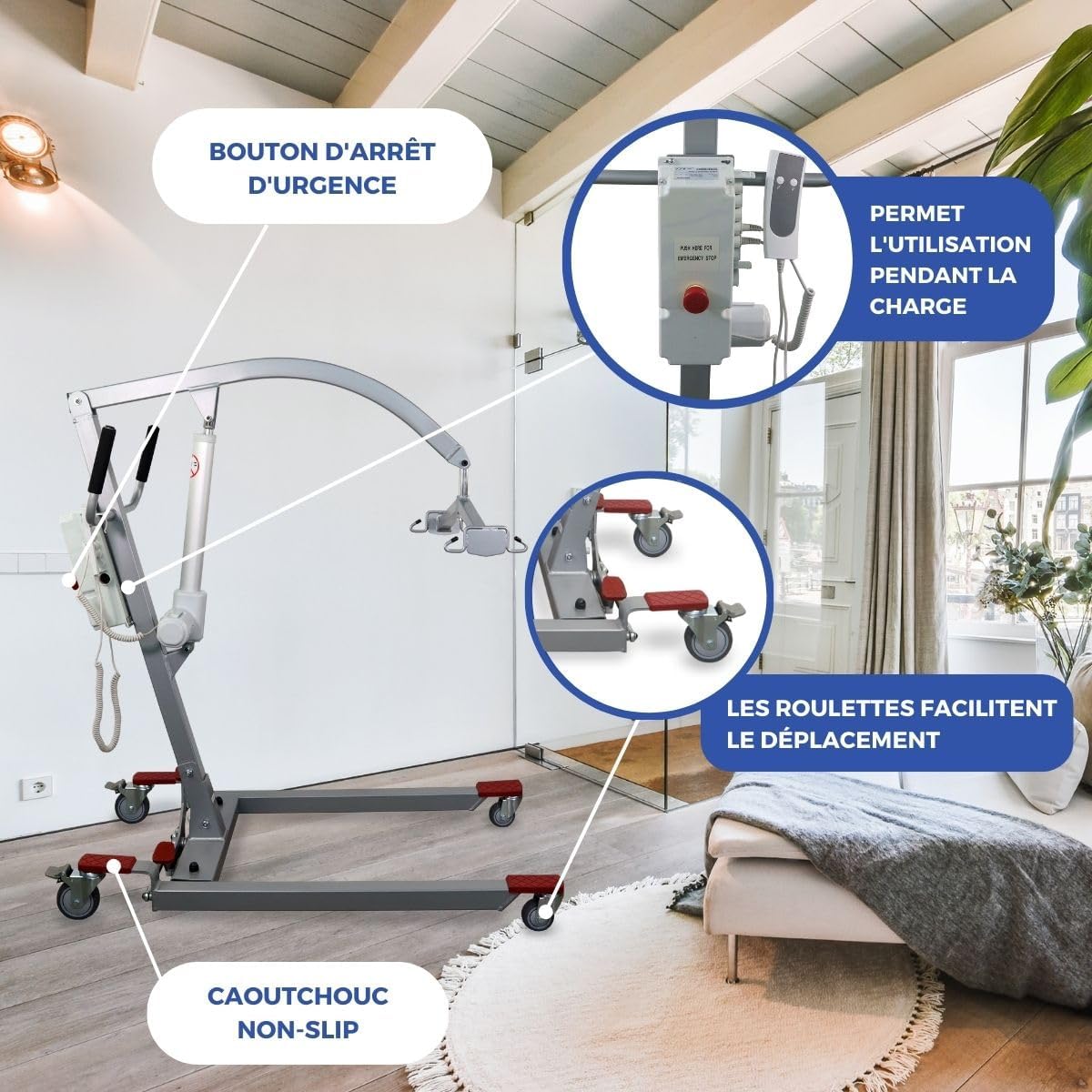
The emergency stop button and non-slip features enhance safety during operation.
3. Paketearen edukia
Desontziratzean, egiaztatu osagai guztiak daudela eta kalterik ez dutela:
- Main lift frame (pre-assembled base)
- Altxa besoa
- Electric actuator (motor)
- Harness support bar
- Control unit with cables
- Patient transfer harness
- Assembly tools (wrenches)
- Erabiltzailearen eskuliburua
4. Muntatzeko jarraibideak
The Mobiclinic Fortuna Basic patient lift comes with a pre-assembled base for simplified installation. Follow these steps for complete assembly. A visual guide is also provided in the video below.
- Attach the Base of the Structure: Secure the main vertical support to the pre-assembled base using the provided bolts and wrenches.
- Install the Lift Arm: Attach the main lift arm to the top of the vertical support, securing it with the appropriate bolt.
- Install the Electric Actuator: Connect the electric actuator (motor) to the lift arm and the vertical support. Ensure it is firmly in place.
- Attach the Harness Support Bar: Fix the horizontal bar, which holds the harness, to the end of the lift arm.
- Attach the Harness: Hook the patient transfer harness onto the four designated hooks on the harness support bar.
- Integrate the Control Unit: Mount the control unit onto the main structure.
- Connect Control and Power Cables: Plug the actuator cable, power cable, and control cable into their respective ports on the control unit. Ensure all connections are secure.
Official Mobiclinic assembly guide for the Fortuna Basic electric patient lift, demonstrating step-by-step installation.

The lift features lightweight materials, adjustable height, and a secure harness for patient safety.
5. Funtzionamendu-argibideak
Operating the Mobiclinic Fortuna Basic patient lift is straightforward with its intuitive controls.
- Piztu: Ensure the lift is connected to a power source and the battery is charged.
- Positioning the Patient: Carefully position the patient in the transfer harness while they are seated or lying down. Ensure the harness straps are evenly distributed and securely attached to the lift's hooks. The lift's 4 handles provide maximum safety and a greater sense of space for the user.
- Raising the Patient: Use the control unit to slowly raise the patient. Monitor the patient's comfort and position throughout the process. The lift arm can rotate 180 degrees for flexible maneuvering.
- Moving the Lift: Once the patient is clear of the original surface, disengage the wheel brakes and carefully push the lift to the desired location. The wheels are designed for easy movement, and the base can adapt to different door widths.
- Lowering the Patient: Position the patient over the target surface (bed, chair). Engage the wheel brakes. Use the control unit to slowly lower the patient onto the surface. Once the patient is safely seated, unhook the harness.

The four handles and safety lock on the wheels ensure maximum safety and comfort during transfers.
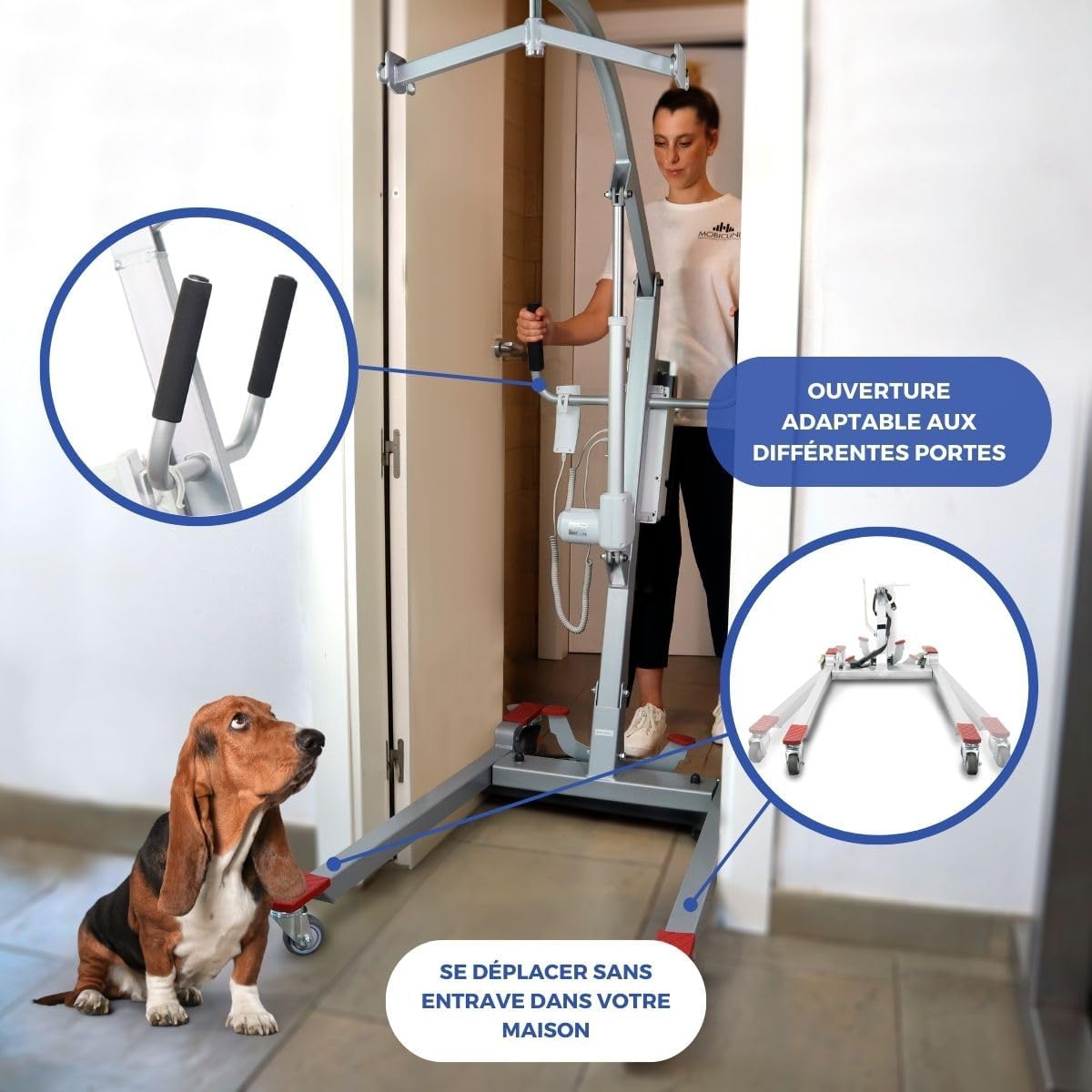
The lift's design allows for easy movement and navigation through various doorways in a home environment.
6. Mantentzea
Regular maintenance ensures the longevity and safe operation of your Mobiclinic Fortuna Basic patient lift.
- Garbiketa: Clean the lift regularly with a damp cloth and mild disinfectant. Avoid abrasive cleaners or solvents.
- Bateria kargatzea: The lift operates on two batteries. Ensure batteries are fully charged before use. Connect the charger to the control unit and a power outlet. A full charge typically takes several hours. The lift can be used while charging.
- Osagaien ikuskapena: Periodically inspect all bolts, nuts, and moving parts for tightness and wear. Check the harness for any signs of damage or fraying. Replace worn or damaged parts immediately.
- Gurpilaren funtzionaltasuna: Ensure the wheels rotate freely and the brakes engage properly. Keep wheels free of debris.
7. Arazoak
If you encounter any issues with your Mobiclinic Fortuna Basic patient lift, refer to the following common troubleshooting steps:
- Igogailuak ez du erantzuten:
- Check if the emergency stop button is pressed. Release it by twisting or pulling, as indicated on the button.
- Ensure all cables (actuator, power, control) are securely connected to the control unit.
- Verify that the battery is charged and the power cable is properly plugged into a working electrical outlet.
- Ezohiko zaratak: If the lift makes unusual noises during operation, stop use immediately and inspect all moving parts for obstructions or damage. Contact customer support if the issue persists.
- Arnesaren arazoak: If the harness appears damaged or is not holding the patient securely, discontinue use and replace the harness.
For issues not covered here, please contact Mobiclinic customer support.
8. Zehaztapenak
| Ezaugarri | Zehaztapena |
|---|---|
| Marka | Mobiklinika |
| Modelo zenbakia | QA-00561/04 |
| Kolorea | Zilarrezkoa |
| Elementuaren pisua | 38 kilogramo |
| Onartutako Gehienezko Pisua | 135 kg |
| Harness Included | Bai |
| Pilak | Bi bateria |
| Altuera erregulagarria | 90-174 cm |
| Oinarriaren Zabalera | 55.5 - 80 cm |
| Luzera | 120 cm |
| Harness Dimensions | 88 cm x 85 cm |
| Motorra | 24V / 6000N |
| Biraketa Erradioa | 127 cm |
| Garabi Besoa | 130 cm wide, 180° rotation |
| Zarata Maila | 53 dB (A) |
| ASIN | B0CDL7LZF8 |
| Eskuragarri dagoen lehen data | 3ko abuztuaren 2023a |
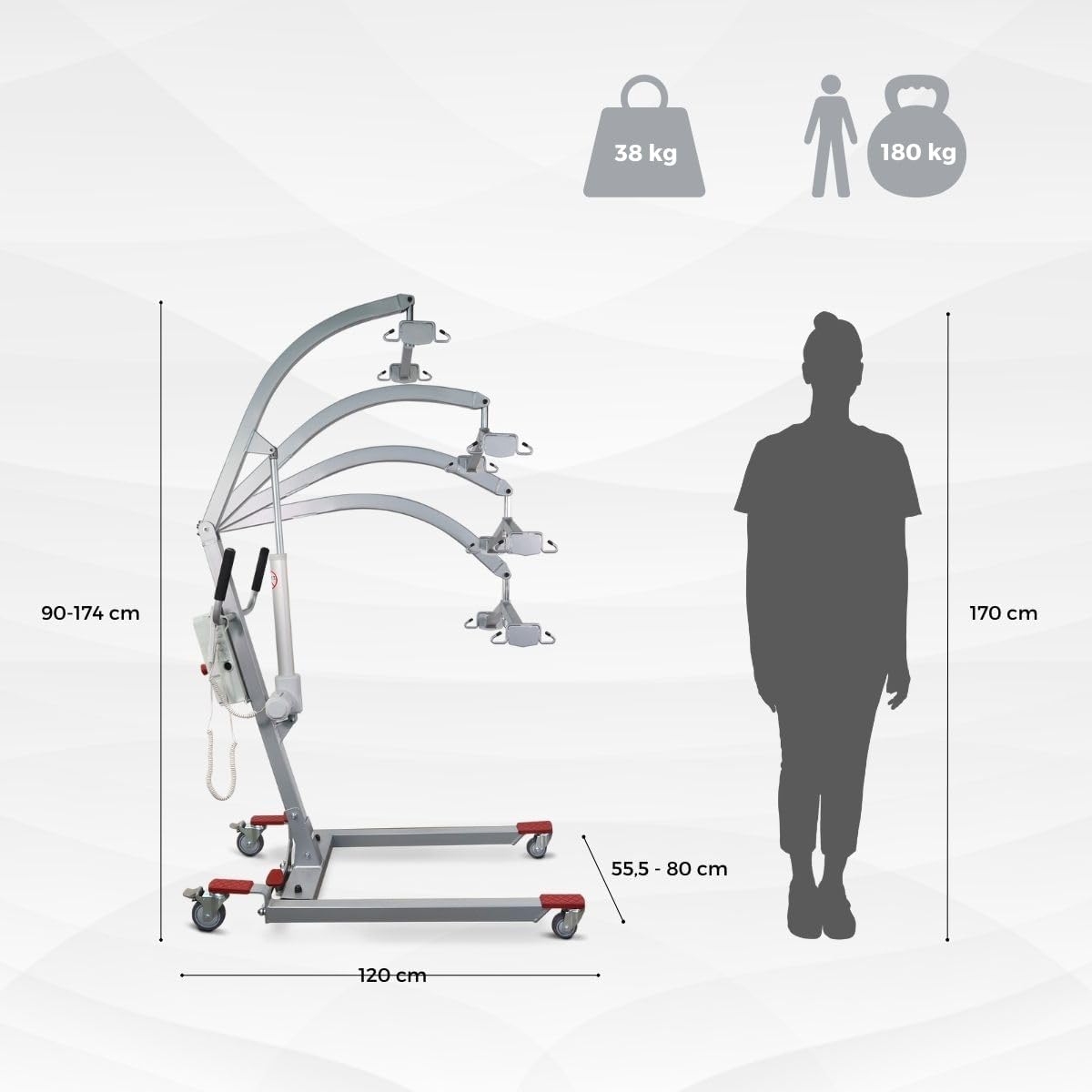
Detailed dimensions and weight capacity of the Mobiclinic Fortuna Basic patient lift.
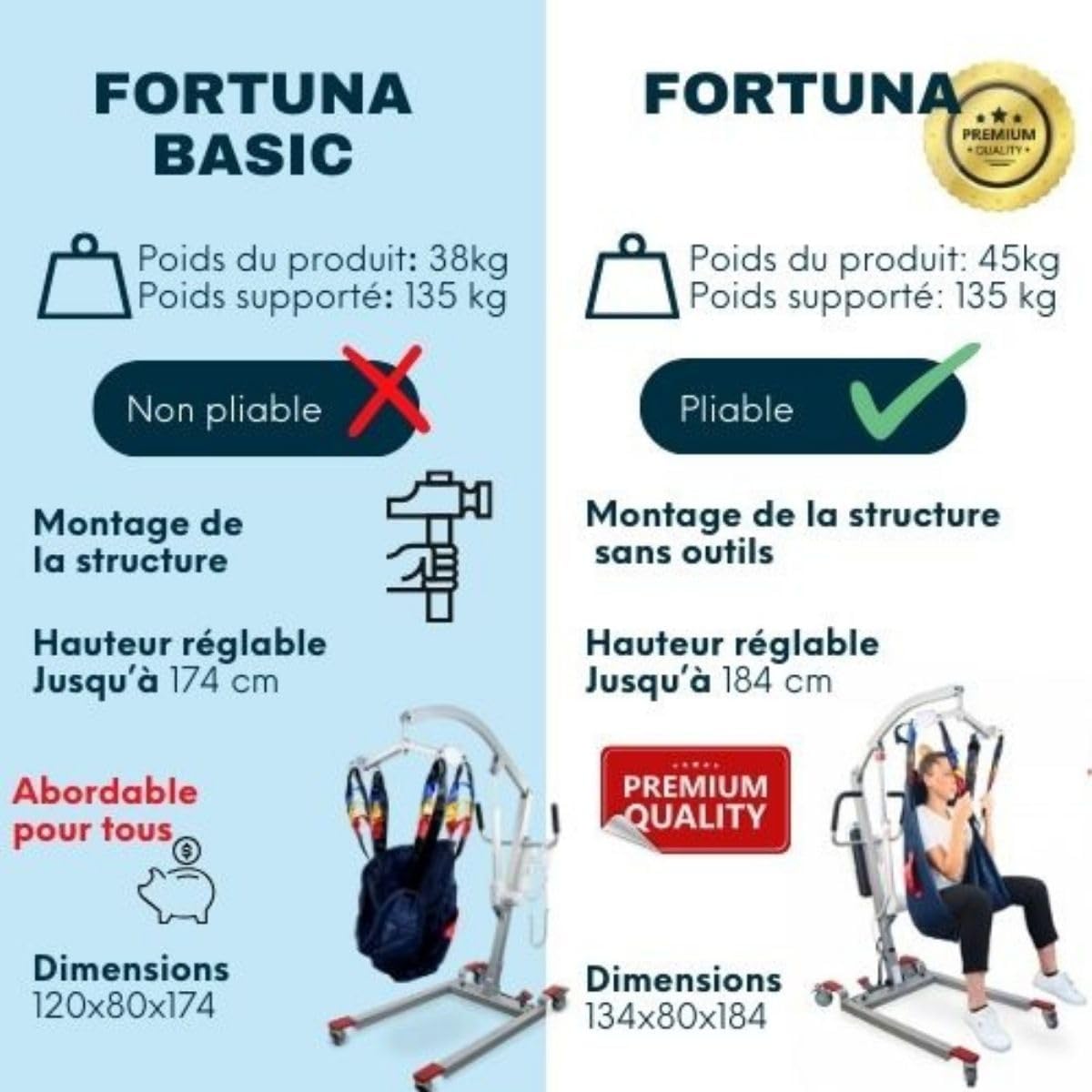
Comparison of key features between the Fortuna Basic and Fortuna models.
9. Bermea eta Laguntza
Mobiclinic S.L. is a leading manufacturer of clinical and hospital furniture, technical aids, and orthopedics, with a history dating back to 1985. We are committed to providing high-quality and reliable products.
For warranty information, technical support, or to order spare parts, please refer to the contact information provided with your purchase documentation or visit the official Mobiclinic webgunea.