
Sarrera
This manual provides essential information for the safe and proper operation, maintenance, and troubleshooting of your Sharper Image Toy Remote Control Speed Bumper Road Rage set. Please read this manual thoroughly before use and retain it for future reference.
Segurtasun informazioa:
Choking Hazard - Small Part. Not for Children under 3 years. Colors and styles may vary. Adult supervision required.
Paketearen edukia
Your Sharper Image Toy Remote Control Speed Bumper Road Rage set includes:
- 2 x Bumper Cars (one red, one blue)
- 2 x Remote Controls (one red, one blue)
- 2 x Ejecting Characters (one black helmet, one white helmet)

Image: The complete Sharper Image Speed Bumper Road Rage set, showing the red and blue bumper cars, their corresponding remote controls, and the product packaging in the background.
Konfigurazioa
Bateriaren instalazioa
The bumper cars and remote controls require AAA batteries (not included).
- For each Bumper Car: Locate the battery compartment on the underside of the car. Open the compartment cover. Insert 4 AAA batteries, ensuring correct polarity (+/-). Close the cover securely.
- For each Remote Control: Locate the battery compartment on the back of the remote. Open the compartment cover. Insert 2 AAA batteries, ensuring correct polarity (+/-). Close the cover securely.
Total Batteries Required: 8 AAA batteries for the cars (4 per car) and 4 AAA batteries for the remotes (2 per remote), totaling 12 AAA batteries.

Irudia: Goitik behera view of the red and blue bumper cars and their respective remote controls, illustrating the components before assembly or battery installation.
Character Placement
Place the ejecting characters onto their designated spots on top of each bumper car. Ensure they are seated properly for the ejection mechanism to function correctly.
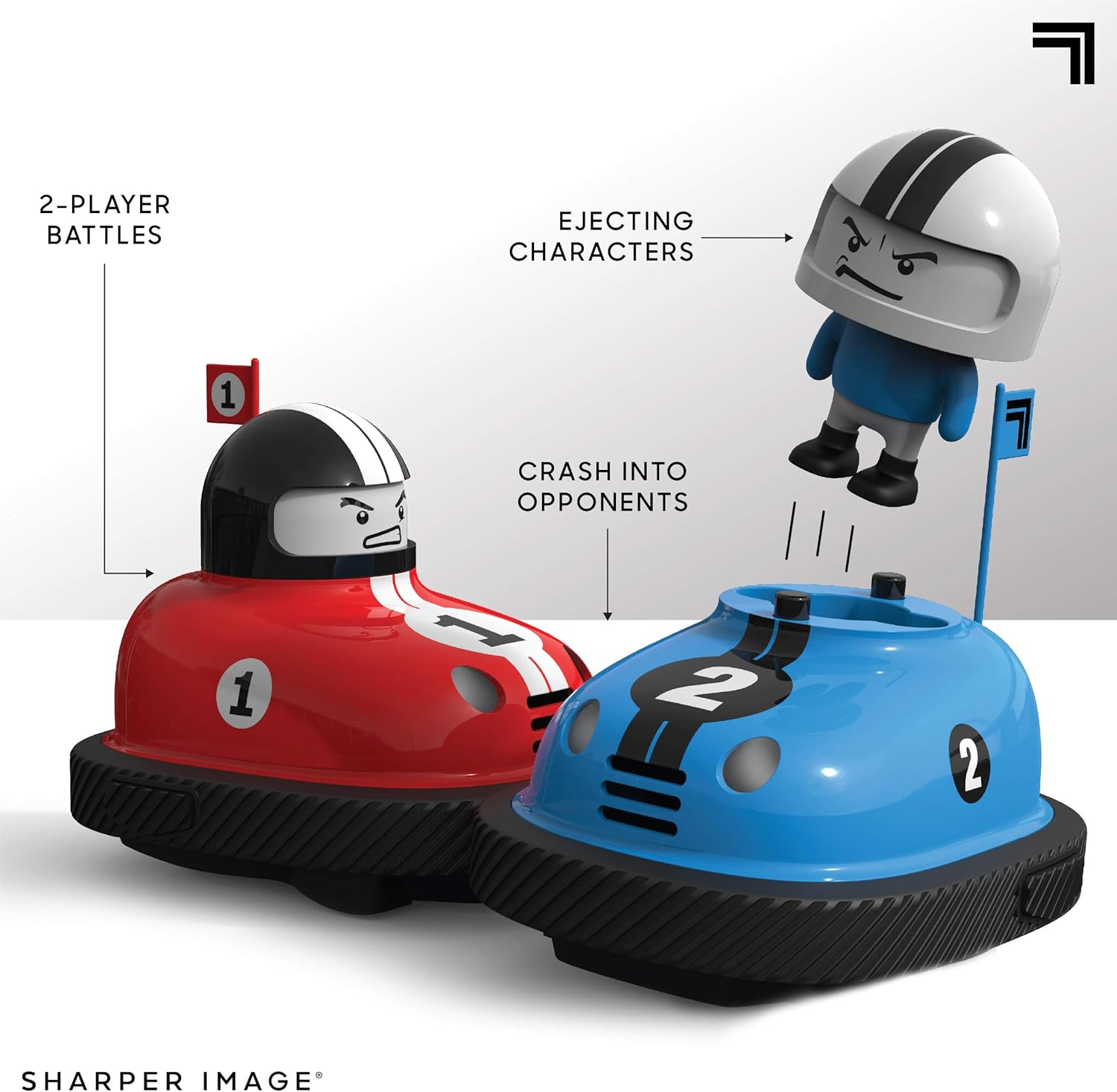
Image: The red and blue bumper cars engaged in a collision, with the character from the blue car shown in mid-ejection, demonstrating the core play feature.
Funtzionamendu-argibideak
Piztea
Turn on both bumper cars and their corresponding remote controls using the power switches located on each unit.
Pairing (Automatic)
The 2.4 GHz wireless remote controls should automatically pair with their respective cars upon power-on. Each remote is color-coded to its car (red remote for red car, blue remote for blue car).
Driving the Cars
Use the remote control to navigate your bumper car. The cars feature omnidirectional steering, allowing for movement in all directions.
- Aurrera/Atzera: Use the main joystick or directional pad to move the car forward or backward.
- Biraketa: The cars utilize rear-wheel steering. Adjust the joystick or directional pad to turn left or right while moving.
Bumper Action
The primary objective is to collide with your opponent's car. Upon a successful impact to the side of the car, the opponent's character will eject from their vehicle, accompanied by sound effects.

Image: The Sharper Image Road Rage Speed Bumpers set, highlighting features such as wireless RC action and sound effects with illustrative icons.
Mantentzea
Garbiketa
Wipe the cars and remotes with a soft, dry cloth. Do not use harsh chemicals or abrasive cleaners. Avoid exposing the electronics to water or excessive moisture.
Bateria zaintzea
- Remove batteries from the cars and remotes if they will not be used for an extended period to prevent leakage.
- Bota ezazu erabilitako bateriak arduraz tokiko araudiaren arabera.
- Ez nahastu bateria zaharrak eta berriak, edo bateria mota desberdinak.
Arazoak konpontzea
| Arazoa | Kausa posiblea | Irtenbidea |
|---|---|---|
| Autoak ez dio erantzuten urrutiko aginteari. |
|
|
| Character not ejecting upon impact. |
|
|
| Sound effects not working. |
|
|
Zehaztapenak
| Modelo zenbakia: | 1240000481 |
| Produktuaren neurriak: | 20.19 x 19.08 x 37.49 cm (packaging/overall); 353.8 g |
| Materiala: | Plastikoa |
| Kolorea: | Multicolor (Red and Blue cars) |
| Urruneko aginte mota: | 2.4 GHz irrati-kontrola |
| Bateriaren eskakizunak: | Each car: 4 x AAA batteries (not included) Each remote: 2 x AAA batteries (not included) |
| Gomendatutako adina: | 6 - 15 urte |
| Fabrikatzailea: | THREE SIXTY GROUP |
Bermea eta Laguntza
For warranty information or technical support, please refer to the contact details provided on the product packaging or visit the official Sharper Image webgunea. Gorde erosketa-agiria erosketaren frogagiri gisa.
Informazio gehiago lortzeko, bisita dezakezu Irudi zorrotzen denda Amazonen.