
HWWR T8
HWWR T8 Karaoke Machine User Manual
Eredua: T8
Sarrera
This manual provides essential information for the safe and efficient operation of your HWWR T8 Karaoke Machine. Please read these instructions carefully before using the product and retain them for future reference. The HWWR T8 is a portable PA system designed for entertainment, featuring Bluetooth connectivity, wireless microphones, and integrated lighting effects.
Paketearen edukia
Egiaztatu behean zerrendatutako elementu guztiak zure paketean sartuta daudela:
- HWWR T8 Karaoke Machine (Main Unit)
- 2 x Haririk gabeko mikrofonoak
- Urruneko Kontrola
- 3.5 mm-ko AUX kablea
- USB motako C kargatzeko kablea
- Erabiltzailearen eskuliburua

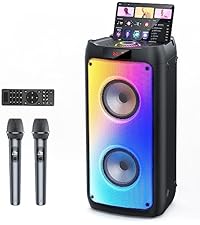
This image displays the main HWWR T8 Karaoke Machine unit, two wireless microphones, a remote control, and necessary connection cables, illustrating the complete package contents.
Produktua amaituview
Kontrol panela eta atakak
The HWWR T8 features an intuitive control panel and various ports for versatile connectivity. Familiarize yourself with the layout for optimal use.

This image highlights the control panel located on the top of the unit, showing buttons for ECHO, REC, MIC VOL, MODE, LED MODE, PLAY/PAUSE, PREV, and NEXT. It also details the rear ports including OUTPUT, TF CARD slot, USB port, AUX IN, MIC 1, MIC 2, and a 12V=1A power input.
Top Key Details:
- ECHO +/-: Mikrofonoen oihartzun efektua doitzen du.
- REC: Grabaketa funtzioa abiarazten du.
- MIC VOL +/-: Mikrofonoaren bolumena doitzen du.
- JARRAIBIDEAK: Switches between input modes (Bluetooth, AUX, USB, TF Card).
- LED MODUA: Changes the lighting effects.
- Erreproduzitu/PAUSTU: Audioaren erreprodukzioa erreproduzitzen edo pausatzen du.
- AURREAN / HURRENEAN: Aurreko edo hurrengo pistara salto egiten du.
- MASTER Bolumenaren botoia: Bozgorailuen bolumen orokorra doitzen du.
Back Face Details:
- Irteera: Audio output port.
- TF TXARTELA: Slot for TransFlash (MicroSD) cards.
- USBa: Port for USB drives.
- AUX IN: 3.5 mm-ko audio sarrera kanpoko gailuetarako.
- MIC 1 / MIC 2: Additional microphone input jacks (6.35mm).
- 12V=1A: Kargatzeko energia sarrera.
Konfigurazioa
1. Unitatea kargatzea
Before first use, fully charge the karaoke machine. Connect the USB Type-C charging cable to the 12V=1A power input on the back of the unit and plug the other end into a compatible power adapter (not included). The charging indicator will show the charging status.
2. Piztu/Itzaltzea
Locate the power switch on the unit. Slide it to the 'ON' position to power on the device. Slide it to 'OFF' to power off.
3. Preparing Wireless Microphones
The wireless microphones require batteries (not included). Open the battery compartment on each microphone and insert the required batteries, ensuring correct polarity. The microphones will automatically connect to the main unit when both are powered on.

This image illustrates the two wireless microphones, indicating a charging time of 2-3 hours and a playing time of 8-10 hours. It also shows the wireless range capability.
Funtzionamendu-argibideak
1. Bluetooth parekatzea
- Power on the HWWR T8 Karaoke Machine. The display will show 'BLUE' or 'BT' indicating Bluetooth mode. If not, press the MODUA button until Bluetooth mode is selected.
- Gaitu Bluetooth-a zure telefonoan, tabletan edo beste audio gailu batean.
- Bilatu 'HWWR T8' in the list of available devices and select it to pair.
- Once paired, a confirmation sound will be heard, and you can now play audio from your device through the karaoke machine.
2. Using Wireless Microphones
The two included wireless microphones automatically connect to the HWWR T8 when both are powered on. Ensure the microphones have sufficient battery power. Adjust microphone volume using the MIKROFONOAREN BOLUMENA +/- buttons and add echo effects with the ECHO +/- buttons on the main unit or remote control.
3. TWS (benetako haririk gabeko estereoa) parekatzea
If you have two HWWR T8 units, you can pair them for a stereo sound experience:
- Ensure both HWWR T8 units are powered on and in Bluetooth mode, but not yet connected to any external device.
- On one unit (this will be the primary unit), press and hold the MODUA button for a few seconds until you hear a pairing tone.
- The two units will automatically connect to each other. Once connected, a confirmation sound will be heard.
- Now, connect your external audio device to the primary HWWR T8 unit via Bluetooth as described in section 2.1. Audio will play in stereo through both units.

This diagram illustrates how two HWWR T8 karaoke machines can be wirelessly connected via TWS (True Wireless Stereo) Bluetooth, enabling a synchronized stereo audio experience from a single source device.
4. Disco Light Show
The HWWR T8 features integrated RGB lights that synchronize with the music. Press the LED MODUA button on the control panel or remote to cycle through various lighting effects or turn them off.

This image showcases the HWWR T8 karaoke machine with its dynamic RGB disco lights active, illustrating different color patterns and their synchronization with music.
5. USB/TF Card/AUX Playback
Sartu USB unitate bat USBa ataka edo TF txartel bat sartu TF TXARTELA slot. The unit will automatically switch to the corresponding mode and begin playback. For AUX input, connect an external audio device using the 3.5mm AUX cable to the AUX port and select AUX mode using the MODUA botoia.
6. Grabaketa funtzioa
To record your performance, ensure a USB drive or TF card is inserted. Press the REC botoia grabatzen hasteko. Sakatu berriro gelditzeko. Grabaketak sartutako biltegiratze gailuan gordeko dira.
7. Urruneko Kontrolaren Eragiketa
The included remote control provides convenient access to various functions, including power, mode selection, volume adjustment, track control, mute, and recording playback.

This image displays the remote control for the HWWR T8, highlighting buttons for mute, single loop playback, and playing recorded audio, indicating its infrared sensor functionality.
Mantentzea
To ensure the longevity and optimal performance of your HWWR T8 Karaoke Machine, follow these maintenance guidelines:
- Garbiketa: Erabili zapi leun eta lehor bat unitatearen kanpoaldea garbitzeko. Ez erabili garbitzaile likidorik edo material urratzailerik.
- Biltegiratzea: Gorde unitatea leku fresko eta lehor batean, eguzki-argitik eta muturreko tenperaturetatik babestuta.
- Bateria zaintzea: If the unit will not be used for an extended period, fully charge it before storage and recharge every 3-6 months to maintain battery health. Remove batteries from microphones if not in use for long periods.
- Saihestu ura: Mantendu unitatea uretatik eta hezetasunetik urrun kalteak saihesteko.
Arazoak konpontzea
If you encounter issues with your HWWR T8, refer to the following common problems and solutions:
| Arazoa | Kausa posiblea | Irtenbidea |
|---|---|---|
| Botererik ez | Battery depleted; Power switch off | Charge the unit; Ensure power switch is ON |
| Bozgorailutik soinurik ez | Bolumena baxuegia; Sarrera modu okerra; Gailua ez dago konektatuta | Increase MASTER volume; Select correct MODE; Re-pair Bluetooth or check AUX connection |
| Mikrofonoak ez dute funtzionatzen | Microphone batteries depleted; Microphone volume too low; Microphone not paired | Replace microphone batteries; Increase MIC VOL; Power cycle microphones and unit to re-establish connection |
| Bluetooth konexioa ezegonkorra | Device too far; Interference; Low battery | Move device closer to speaker; Avoid obstacles; Charge the unit |
| TWS parekatzeak huts egin du | Units already connected to another device; Incorrect pairing procedure | Disconnect both units from other devices; Follow TWS pairing steps carefully |
Zehaztapenak
- Eredua: T8
- Marka: HWWR
- Elementuaren pisua: 21.1 kilo
- Produktuaren neurriak: 24 x 10 x 11 hazbete
- Potentzia irteera: 200W (Size field, likely RMS or similar)
- Hizlari kopurua: 2
- Energia iturria: Bateriaren bidez
- liburukiatage: 5 Volt
- Gailu bateragarriak: Computer, iPhone, iPad, PC, Smartphone, Television
- Konektore mota: 3.5 mm Jack, USB Type C
- Ezaugarri bereziak: Adjustable Microphone Sensitivity, Built-In Handle, Echo Effect, Portable, Stereo Pairing (TWS)
- Kolorea: Beltza
Bermea eta Laguntza
Bermearen informazioa
HWWR provides a 12-month warranty for any quality-related problems with your T8 Karaoke Machine from the date of purchase. Please retain your proof of purchase for warranty claims.
Bezeroarentzako Arreta
For any questions or problems regarding your HWWR T8 product, please do not hesitate to contact our support team. We are dedicated to assisting you.
- Telefonoa: 757-943-7037
- Posta elektronikoa: service@hwwr.net
This image provides the contact details for HWWR customer support, including a phone number and email address, for assistance with product inquiries or issues.
Ask a question about this manual
Ask about setup, troubleshooting, compatibility, parts, safety, or missing instructions. Manuals+ will review the question and use this page’s manual context to help answer it.