
1. Sarrera
This manual provides essential information for the safe and efficient use of your FLEXISPOT 42-inch Sit-to-Stand Desk Riser. This height-adjustable computer workstation is designed to promote a healthy balance between sitting and standing throughout your workday. Please read these instructions thoroughly before assembly and operation.
2. Segurtasun informazioa
- Ziurtatu osagai guztiak ondo lotuta daudela erabili aurretik.
- Do not exceed the maximum weight capacity of 33 lbs for the desktop and 4.4 lbs for the keyboard tray.
- Keep hands and fingers clear of moving parts during height adjustment to prevent injury.
- Place the desk riser on a stable, level surface.
- Distribute weight evenly on the desktop to maintain stability.
- Mantendu haurrak eta maskotak unitatetik urrun funtzionamenduan zehar.
3. Paketearen edukia
Muntaketa hasi aurretik, egiaztatu pieza guztiak daudela. Piezarik falta edo hondatuta badago, jarri harremanetan bezeroarentzako arreta-zerbitzuarekin.
- Main Desk Riser Unit
- Removable Keyboard Tray
- Assembly Hardware (screws for keyboard tray)
- Argibide eskuliburua
4. Konfiguratzeko argibideak
The FLEXISPOT Sit-to-Stand Desk Riser is designed for quick and straightforward assembly. Two people are recommended for easier setup.
- Deskonprimitu unitatea: Kontu handiz kendu osagai guztiak ontzitik.
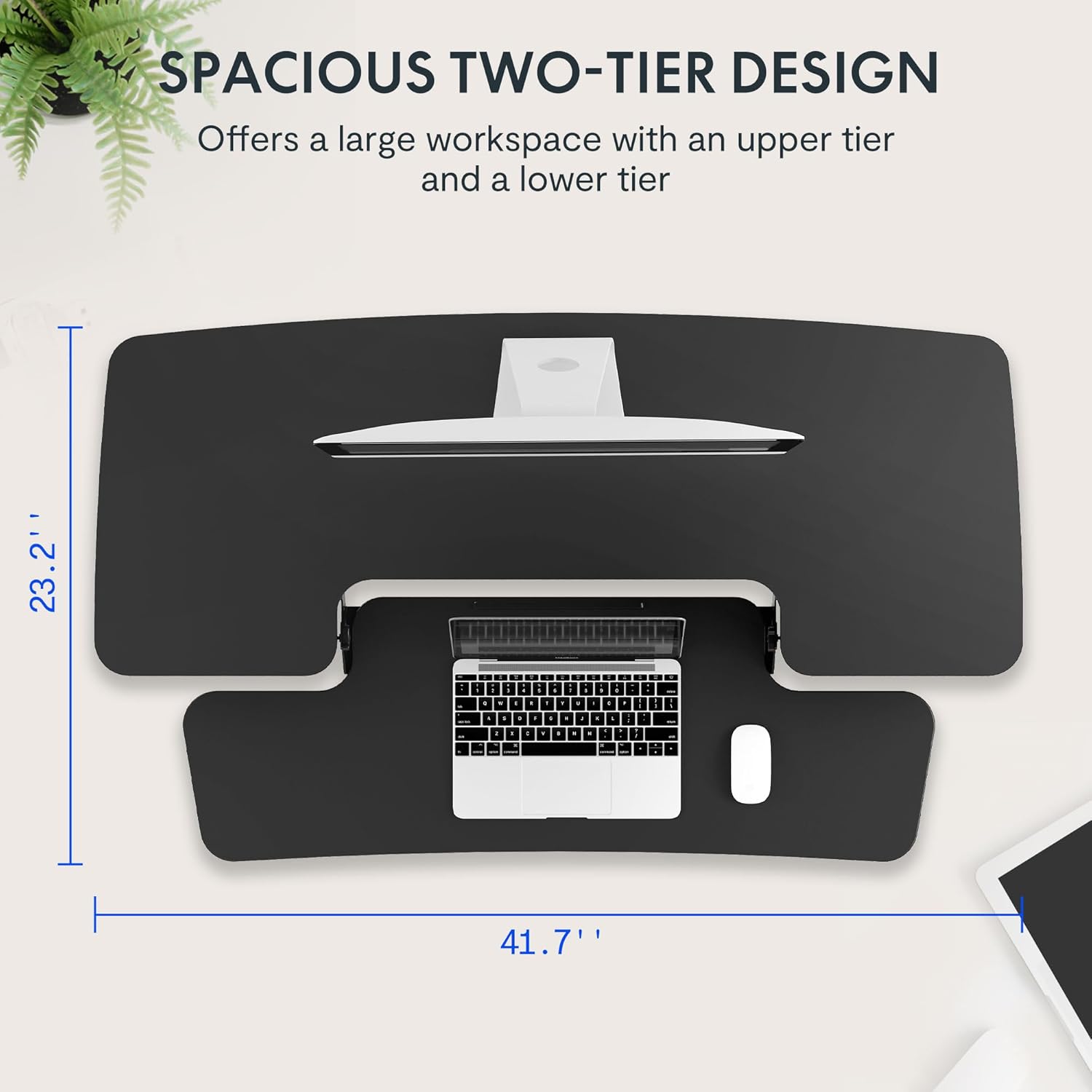
- Unitate Nagusiaren kokapena: Place the main desk riser unit on your existing desk or workstation. Ensure it is centered and stable.
- Attach the Keyboard Tray: Align the removable keyboard tray with the designated slots on the underside of the main unit. Slide the tray into place until it clicks securely. Use a Phillips screwdriver (not included) to fasten any provided screws for additional stability.
- Antolatu kableak: Utilize the included cable management loops to organize your monitor, keyboard, and mouse cables. Ensure cables have enough slack to accommodate the full range of height adjustment.


5. Funtzionamendu-argibideak
The desk riser features a spring-assisted lifting mechanism for smooth and effortless height adjustments.
- Altuera doitzea: To raise or lower the desk, locate the lever on the right side of the main unit. Squeeze the lever firmly.
- Mahaia altxatzea: While squeezing the lever, gently lift the desktop to your desired standing height. The spring-assisted mechanism will help elevate the unit. Release the lever to lock the desk in place.
- Mahaia jaistea: While squeezing the lever, gently push down on the desktop to lower it to your desired sitting height. Release the lever to lock the desk in place.
- Mugimendu bertikala: The desk riser moves straight up and down within its own footprint, requiring no additional spatial accommodations. The height can be adjusted between 4.7 inches (minimum) and 19.7 inches (maximum).


6. Mantentzea
Regular maintenance ensures the longevity and optimal performance of your desk riser.
- Garbiketa: Garbitu gainazalak leun batekin, damp oihal. Saihestu garbitzaile urratzaileak edo akabera kaltetu dezaketen produktu kimiko gogorrak.
- Ikuskapena: Aldian-aldian egiaztatu torloju eta konexio guztiak ondo estututa daudela ziurtatzeko. Beharrezkoa bada, estutu.
- Zati mugigarriak: The lifting mechanism is designed to be maintenance-free. Do not attempt to lubricate or disassemble it.
7. Arazoak
If you encounter any issues with your desk riser, refer to the following common solutions:
- Desk is difficult to adjust: Ensure no objects are obstructing the lifting mechanism. Verify that the weight on the desktop does not exceed the maximum capacity.
- Mahaia ezegonkorra sentitzen da: Check that the unit is placed on a flat, stable surface. Ensure all components, especially the keyboard tray, are securely attached. Redistribute weight evenly on the desktop.
- Keyboard tray is loose: Re-check the connection points of the keyboard tray and ensure any fastening screws are tightened.
If problems persist, please contact FLEXISPOT customer support for assistance.
8. Zehaztapenak
| Ezaugarri | Zehaztapena |
|---|---|
| Marka | FLEXISPOT |
| Eredua | B0CDWSPYKQ |
| Produktuaren neurriak (L x W x H) | 24" L x 42" W x 19.7" H |
| Kolorea | Beltza |
| Goiko material mota | Ingeniaritza Egurra |
| Elementuaren pisua | 52 kilo |
| Gutxieneko Altuera | 4.7 hazbete |
| Gehienezko Altuera | 19.7 hazbete |
| Mahaigaineko karga-ahalmena | 33 kilo |
| Keyboard Tray Load Capacity | 4.4 kilo |
| Beharrezko muntaia | Yes (Keyboard Tray) |
| Batzarrerako Gomendatutako Pertsona Kopurua | 2 |

9. Bermea eta Laguntza
Your FLEXISPOT Sit-to-Stand Desk Riser comes with a limited warranty. For specific details regarding warranty coverage, please refer to the warranty documentation included with your purchase or visit the official FLEXISPOT webgunea.
For technical support, troubleshooting assistance, or warranty claims, please contact FLEXISPOT customer service. You can typically find contact information on the manufacturer's webgunea edo zure erosketa plataformaren bidez.
Lineako laguntza: Bisitatu FLEXISPOT denda Amazonen produktuari buruzko informazioa eta laguntza-baliabideak lortzeko.