
Amazon Echo Show 21
Amazon Echo Show 21 erabiltzailearen eskuliburua
Modeloa: Echo Show 21
1. Sarrera
Welcome to your new Amazon Echo Show 21. This smart display is designed to be the central hub for your home, offering a large Full HD screen for entertainment, organization, and communication. With built-in Fire TV and Alexa, you can stream content, manage your smart home, make video calls, and keep your family organized with customizable widgets.

Figure 1.1: Amazon Echo Show 21 Overview
The Echo Show 21 integrates seamlessly into your daily life, providing a visual and interactive experience for all your Alexa commands.
2. Hasteko: Konfigurazioa
2.1 Zer dago kutxan
- Echo Show 21 gailua
- Alexa Voice Remote with batteries (2 AAA included)
- Korronte egokitzailea (30W) eta 5 metroko kablea (zuria)
- Wall mount, anchors, screws, mounting template
- Hasierako gida azkarra
2.2 Hasierako konfigurazioa
The Echo Show 21 is designed for simple setup. You will need a Wi-Fi connection.
- Piztu: Konektatu korronte-egokitzailea zure Echo Show 21ra eta entxufe batera. Gailua automatikoki piztuko da.
- Wi-Fi konexioa: Follow the on-screen instructions to connect your device to your Wi-Fi network. Amazon Wi-Fi simple setup can automatically connect your device if you are a Prime member and have previously saved your Wi-Fi credentials.
- Amazon kontuaren saioa hasteko: Log in with your Amazon account credentials.
- Pertsonalizazioa: Customize your home screen, set up profiles, and configure your preferred settings.
- Urruneko parekatzea: The included Alexa Voice Remote should pair automatically. If not, follow the on-screen instructions or refer to the quick start guide for manual pairing.
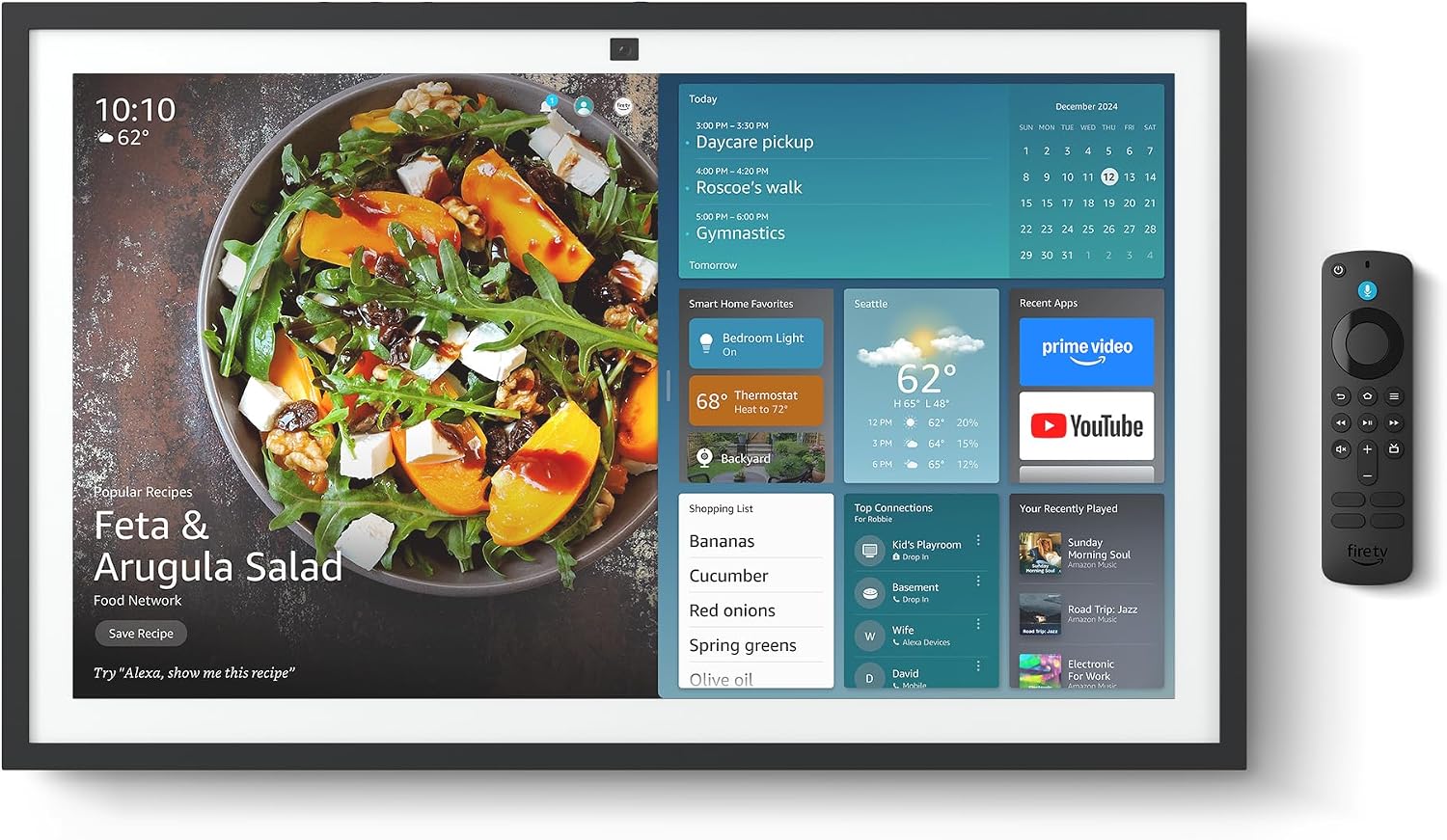
Figure 2.1: Echo Show 21 with Alexa Voice Remote
2.3 Muntatzeko aukerak
The Echo Show 21 can be wall-mounted using the included hardware or placed on a stand (sold separately). Wall mounting requires an electric drill.
3. Echo Show 21 erabiltzea
3.1 Ahots-kontrola Alexarekin
Your Echo Show 21 is primarily controlled by voice using Alexa. Simply say the wake word "Alexa" followed by your command or question.
- Agindu orokorrak: "Alexa, zer eguraldi egiten du?", "Alexa, jarri tenporizadorea 10 minutuz."
- Musika eta audioa: "Alexa, play pop music," "Alexa, play my morning playlist."
- Video & Entertainment: "Alexa, open Prime Video," "Alexa, play The Boys on Netflix."
3.2 Fire TV Integration
Enjoy endless entertainment with built-in Fire TV. Use the included Alexa Voice Remote or voice commands to navigate.

Figure 3.1: Fire TV Interface
- Access thousands of apps like Prime Video, Netflix, YouTube, Apple TV.
- Stream movies, TV shows, and live content.
- The Fire TV remote allows for traditional navigation and playback control.
3.3 Home Screen & Widgets
The 21-inch display is ideal for organizing your day with customizable widgets.

Figure 3.2: Customizable Home Screen Widgets
- Keep important information like calendars, shopping lists, and weather in view.
- Personalize your home screen with family photos.
3.4 Etxe Adimendunaren Kontrola
Control compatible smart devices using your voice or the smart home dashboard.

Figure 3.3: Smart Home Dashboard
- Turn lights on/off, adjust thermostats, or view live camera feeds.
- Supports Zigbee, Matter, and Thread Border Router for broad compatibility.
3.5 Bideo-deiak
Connect with family and friends using the 13 MP camera with auto-framing, wide field of vision, 3.3x zoom, and noise reduction.

Figure 3.4: Echo Show 21 as a Digital Photo Frame
The camera can also be used to display your favorite memories as a digital photo frame.
4. Mantentzea
Zure Echo Show 21-ren iraupena eta errendimendu optimoa bermatzeko, jarraitu mantentze-jarraibide hauek:
- Pantaila garbitzea: Erabili zapi leun eta pelurik gabeko bat pantaila astiro-astiro garbitzeko. Orban egoskorrak izanez gero, garbitu pixka bat.ampGarbitu zapi bat urarekin. Saihestu garbitzaile urratzaileak edo pantailan zuzenean sprayak botatzea.
- Gailuaren gorputza garbitzea: Wipe the exterior surfaces with a dry, soft cloth. Do not use harsh chemicals or solvents.
- Aireztapena: Ziurtatu gailuaren aireztapen-irekidurak ez daudela blokeatuta gehiegi berotzea saihesteko.
- Software eguneraketak: Your Echo Show 21 receives automatic software security updates. Ensure your device is connected to Wi-Fi to receive these updates.
5. Arazoak
If you encounter issues with your Echo Show 21, try the following common solutions:
- Gailuak ez du erantzuten: Try saying "Alexa" again clearly. If unresponsive, unplug the power adapter for a few seconds and then plug it back in to restart the device.
- Wi-Fi konexiorik ez: Check your router and modem to ensure they are working correctly. Restart your router. On the Echo Show 21, go to Settings > Network to re-select your Wi-Fi network and re-enter the password.
- Audio-arazoak: Ensure the volume is not muted or too low. Say "Alexa, turn up the volume." Check audio settings in the device menu.
- Kamera ez dabil: Ensure the physical camera shutter is open and the mic/camera-off button is not activated (red light indicates off).
- Urrunekoek ez dute erantzuten: Check the batteries in the Alexa Voice Remote. If necessary, replace them. Re-pair the remote if it becomes disconnected.
6. Zehaztapen Teknikoak
| Ezaugarri | Zehaztapena |
|---|---|
| Tamaina | 21.4 cm-ko zabalera x 13.2 cm-ko altuera x 1.5 cm-ko sakonera |
| Pisua | 10.7 lb |
| Bistaratzea | 21” with 1920 x 1080 resolution (landscape or portrait) |
| Kamera | 13 MP + Obturadorea |
| Audioa | Two 2” woofers + two 0.6” tweeters |
| Wi-Fi konexioa | Wi-Fi 6E (802.1ax), Tri-band, dual-antenna (MIMO). Supports 802.11a/b/g/n/ac. |
| Smart Home Hub | Zigbee + Materia + Hari-ertzeko bideratzailea |
| Prozesadorea | Zortzi nukleoko SoC Amazon AZ2 sare neuronalaren motorrarekin |
| Sentsoreak | ALS RGB + Azelerometroa |
| Hizkuntza | Ingelesa eta gaztelania |

Figure 6.1: Echo Show 15 vs. Echo Show 21 Dimensions
7. Pribatutasun Ezaugarriak
Echo Show 21 pribatutasun-kontrolen hainbat geruzaz diseinatuta dago:
- Mikrofonoa/Kamera itzaltzeko botoia: Mikrofonoak eta kamera elektronikoki deskonektatzeko botoi fisiko bat.
- Kamera obturatzailea: A built-in physical shutter to cover the camera lens.
- Esnatzeko Hitzaren Teknologia: Alexa devices only begin recording and sending audio to the cloud after detecting the wake word.
- Streaming adierazleak: Adierazle bisualek audioa edo bideoa hodeira erreproduzitzen ari denean erakusten dute.
- Voice Recording Control: egiteko gaitasuna view eta ezabatu zure ahots-grabaketak.

Figure 7.1: Mic/Camera-Off Button and Camera Shutter
Xehetasun gehiago lortzeko, bisitatu Alexa Pribatutasun Hub-a.
8. Irisgarritasun Ezaugarriak
The Echo Show 21 includes various accessibility features to personalize Alexa to your abilities:
- Sakatu Alexa-ra: Sartu Alexara pantailako teila edo teklatu baten bidez ukipen bidez.
- Entzute Egokitzailea: Alexak erantzun aurretik hitz egiten amaitzeko denbora gehiago ematen du.
- Hitz egiteko nahiago den tasa: Kontrolatu Alexak zein azkar edo motel hitz egiten duen.
- Azpitituluak: Alexa Captioning, Call Captioning, and Closed Captioning provide text for supported content.
- Erakutsi eta kontatu: Helps users who are blind or visually impaired identify products.
- AhotsaView Pantaila irakurgailua: Enables access for customers who are blind or visually impaired.
- Pantaila-lupa: Handitu/txikitu zooma eta mugitu pantailan zehar.
- Kindle-n ozen irakurtzeko: Utzi Alexari zure Kindle liburuak ozen irakurtzen.
- Denbora errealeko testua: Idatzi zuzeneko testua bideo-dei batean.
These features can be enabled via Settings > Accessibility on your device.
9. Bermea eta Laguntza
9.1 Produktuaren bermea
Your Echo Show 21 comes with a Urtebeteko berme eta zerbitzu mugatua. Optional 1-year, 2-year, and 3-year extended warranties are available for U.S. customers, sold separately.
Use of Echo Show 21 and Fire TV on Echo Show 21 is subject to their respective terms of service.
9.2 Bezeroarentzako laguntza
For further assistance, troubleshooting, or to learn more about your device, please visit the Amazon support webgunea edo jarri harremanetan Amazonen bezeroarentzako arreta-zerbitzuarekin.
Ask a question about this manual
Ask about setup, troubleshooting, compatibility, parts, safety, or missing instructions. Manuals+ will review the question and use this page’s manual context to help answer it.