
Sarrera
This manual provides detailed instructions for the safe and efficient use of your Blow Portable Bluetooth Speaker, Model 30-391. Please read this manual thoroughly before operating the device and retain it for future reference.
The Blow 30-391 is a versatile portable Bluetooth speaker designed for universal use with smartphones, tablets, computers, and other audio devices. It features Bluetooth 5.0 connectivity, AUX input, Micro USB port, and an integrated microphone for various audio applications.
Paketearen edukia
Egiaztatu behean zerrendatutako elementu guztiak zure paketean daudela:
- Blow Portable Bluetooth Speaker (Model 30-391)
- USB kargatzeko kablea
- Mikrofonoaren kablea
- Erabiltzailearen eskuliburua (dokumentu hau)
- Urruneko Kontrola

Irudia: Aurrealdea view of the Blow Portable Bluetooth Speaker 30-391, showcasing its RGB lighting, included remote control, and wired microphone.

Image: The USB charging cable and the microphone cable that come with the speaker.
Produktuaren Ezaugarriak
- Konektibitatea: Bluetooth 5.0, AUX-in (3.5mm), Micro USB, USB port, MicroSD card slot.
- Audio irteera: 10 Watts maximum speaker output.
- Bateria: Integrated 4500 mAh rechargeable battery.
- Ezaugarri bereziak: Integrated microphone, RGB lighting effects, voice control capability.
- Eramangarritasuna: Compact design with a handle for easy transport.
- Bateragarritasuna: Universal compatibility with desktop computers, laptops, smartphones, and tablets.
Konfigurazioa
1. Bozgorailua kargatzea
Before first use, fully charge the speaker. Connect the supplied USB charging cable to the Micro USB port on the speaker and the other end to a standard USB power adapter (not included) or a computer's USB port. The charging indicator light will illuminate during charging and turn off when fully charged.
2. Piztu/Itzaltzea
Locate the power switch on the top panel of the speaker. Slide the switch to the "ON" position to power on the speaker. Slide it to the "OFF" position to power off the speaker.

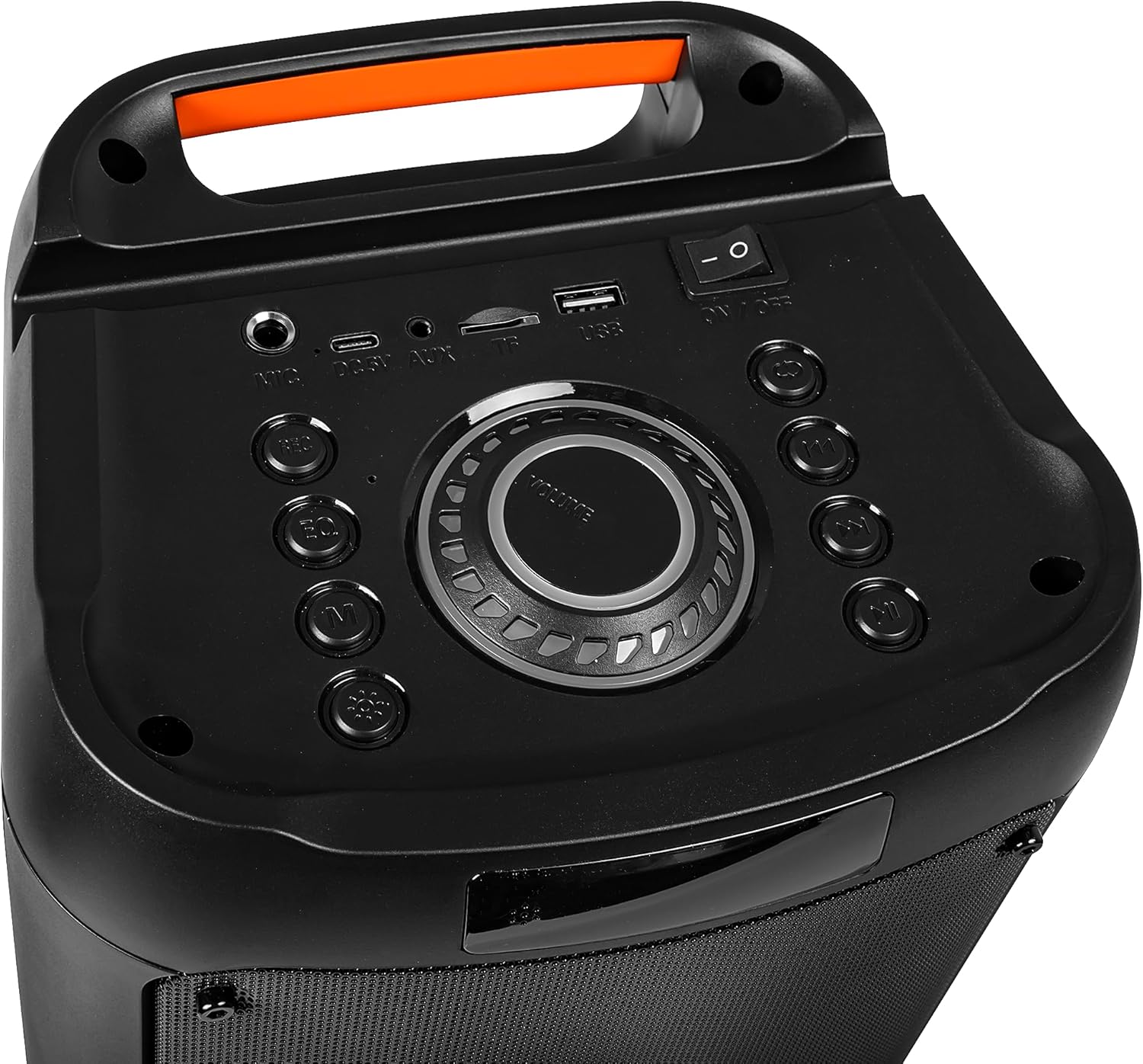
Image: Close-up of the speaker's top control panel, showing the power switch, volume knob, and various input ports.
3. Bluetooth parekatzea
- Piztu bozgorailua. Automatikoki Bluetooth parekatze moduan sartuko da, LED argi keinukari batek adierazita.
- Zure gailu mugikorrean (smartphone-a, tableta, etab.), gaitu Bluetooth-a eta bilatu eskuragarri dauden gailuak.
- Select "Blow 30-391" from the list of devices.
- Behin parekatuta, bozgorailuak baieztapen entzungarri bat igorriko du, eta LED argia keinuka ari da.
- Bozgorailuak automatikoki konektatuko da azken parekatutako gailura piztean, gailua irismen-eremuan badago eta Bluetooth-a gaituta badago.
4. AUX konexioa
To connect an external audio device via AUX, use a 3.5mm audio cable (not included). Plug one end into the AUX-in port on the speaker and the other end into the headphone jack or audio output of your device. The speaker will automatically switch to AUX mode.
5. USB/MicroSD erreprodukzioa
Insert a USB flash drive or a MicroSD card (up to 32GB) containing MP3 audio files into the respective port on the speaker. The speaker will automatically detect the storage device and begin playing music. Use the control buttons to navigate tracks.
Funtzionamendu-argibideak
1. Kontrolakview
The speaker features a control panel on the top for easy operation. Refer to the image in the "Setup" section for button layout.
- Switch potentziala: ON/OFF.
- Bolumen-eskulekua: Rotate to adjust master volume.
- Modu botoia: Press to switch between Bluetooth, AUX, USB, and MicroSD modes.
- Erreproduzitu/Pausatu botoia: Sakatu audioa erreproduzitzeko edo eteteko.
- Aurreko/Hurrengo pistaren botoiak: Sakatu aurreko edo hurrengo pistara joateko.
- EQ botoia: Press to cycle through equalizer presets.
- Argiaren modua botoia: Press to change RGB lighting effects.
- Mikrofonoaren sarrera: Connect the wired microphone here.
2. Mikrofonoa erabiliz
Connect the supplied wired microphone to the microphone input port on the speaker. Adjust the microphone volume using the dedicated control (if available) or the main volume knob. The integrated microphone allows for voice control and hands-free calling when connected via Bluetooth.
3. RGB argiztapen efektuak
The speaker features dynamic RGB lighting. Press the "Light Mode" button on the control panel or remote control to cycle through different lighting patterns or to turn the lights off.
Mantentzea
- Garbiketa: Erabili zapi leun eta lehor bat bozgorailuen kanpoaldea garbitzeko. Ez erabili garbitzaile edo disolbatzaile urratzailerik.
- Bateria zaintzea: Bateriaren iraupena luzatzeko, saihestu bateria maiz erabat deskargatzea. Kargatu bozgorailua aldizka, denbora luzez erabiltzen ez bada ere.
- Biltegiratzea: Gorde bozgorailua leku fresko eta lehor batean, eguzki-argitik eta muturreko tenperaturetatik babestuta.
- Uraren erresistentzia: Bozgorailu hau EZ da iragazgaitza. Saihestu uraren edo gehiegizko hezetasunaren eraginpean jartzea.
Arazoak konpontzea
| Arazoa | Irtenbide posiblea |
|---|---|
| Bozgorailuak ez du pizten. | Ensure the battery is charged. Connect the speaker to a power source using the USB cable. Check the power switch position. |
| Ezin da Bluetooth bidez parekatu. | Ensure the speaker is in pairing mode (flashing LED). Make sure your device's Bluetooth is enabled and within range (up to 10 meters). Forget previous pairings on your device and try again. |
| Soinurik ez. | Check the volume level on both the speaker and your connected device. Ensure the correct input mode (Bluetooth, AUX, USB, MicroSD) is selected. Check cable connections for AUX mode. |
| Soinu kalitate txarra. | Ensure the speaker is not too far from the Bluetooth device. Avoid obstacles between the speaker and the device. Try a different audio source or file. |
| Mikrofonoa ez dabil. | Ensure the microphone is securely connected to the input port. Check microphone volume settings. |
Zehaztapenak
| Modelo zenbakia | 30-391 |
| Marka | Kolpea |
| Konektibitate Teknologia | Bluetooth 5.0, Auxiliary (3.5mm), Micro USB, USB |
| Audio irteera modua | AUX, Bluetootha |
| Bozgorailuen irteerako potentzia maximoa | 10 Watt |
| Bateria Edukiera | 4500 mAh |
| Max Memory Card Size | 32 GB (MicroSD) |
| Ezaugarri bereziak | Integrated Microphone, RGB Lighting, Voice Control |
| Energia iturria | Bateriaren bidez |
| Produktuaren neurriak (L x W x H) | 26 x 46 x 24 cm (gutxi gorabehera) |
| Produktuaren pisua | 3.67 kg (gutxi gorabehera) |
| Kolorea | Black (with multicolor RGB lighting) |

Irudia: Albokoa view of the Blow Portable Bluetooth Speaker 30-391, showing its vertical orientation.
Irudia: Atzealdea view of the Blow Portable Bluetooth Speaker 30-391, highlighting the integrated carrying handle.
Irudia: Xehetasun handikoa view of the top control panel, including the power switch, volume knob, and various input ports.

Image: The retail packaging for the Blow Portable Bluetooth Speaker 30-391, showing product features and accessories.
Bermea eta Laguntza
The Blow Portable Bluetooth Speaker 30-391 comes with a limited warranty. Please refer to the warranty card included in your package for specific terms and conditions. For technical support, troubleshooting assistance, or warranty claims, please contact your retailer or the manufacturer directly. Contact information can typically be found on the product packaging or the manufacturer's official webgunea.
Fabrikatzailea: Kolpea
ASIN: B0CDXQRT9Q