
1. Sarrera
Eskerrik asko BOG aukeratzeagatikASING M6 Portable Bluetooth Speaker. This manual provides essential information for setting up, operating, and maintaining your speaker. Please read it carefully before use and retain it for future reference.
BOGASING M6 is designed to deliver powerful sound with deep bass, featuring IPX6 waterproofing, Bluetooth 5.3 connectivity, and multiple sound effects for an enhanced listening experience. Its portable design makes it ideal for various environments, from outdoor adventures to home use.
2. Paketearen edukia
Mesedez, markatu laukitxoa elementu hauetarako:
- 1 x BOGASING M6 Bluetooth bozgorailua
- 1 x USB Type-C Charging Cable (Adapter Not Included)
- 1 x 3.5 mm-ko audio-kablea
- 1 x Korrila
- 1 x Erabiltzailearen eskuliburua (dokumentu hau)
3. Produktua amaitu daview eta Kontrolak
Familiarize yourself with the buttons and ports on your BOGASING M6 speaker:
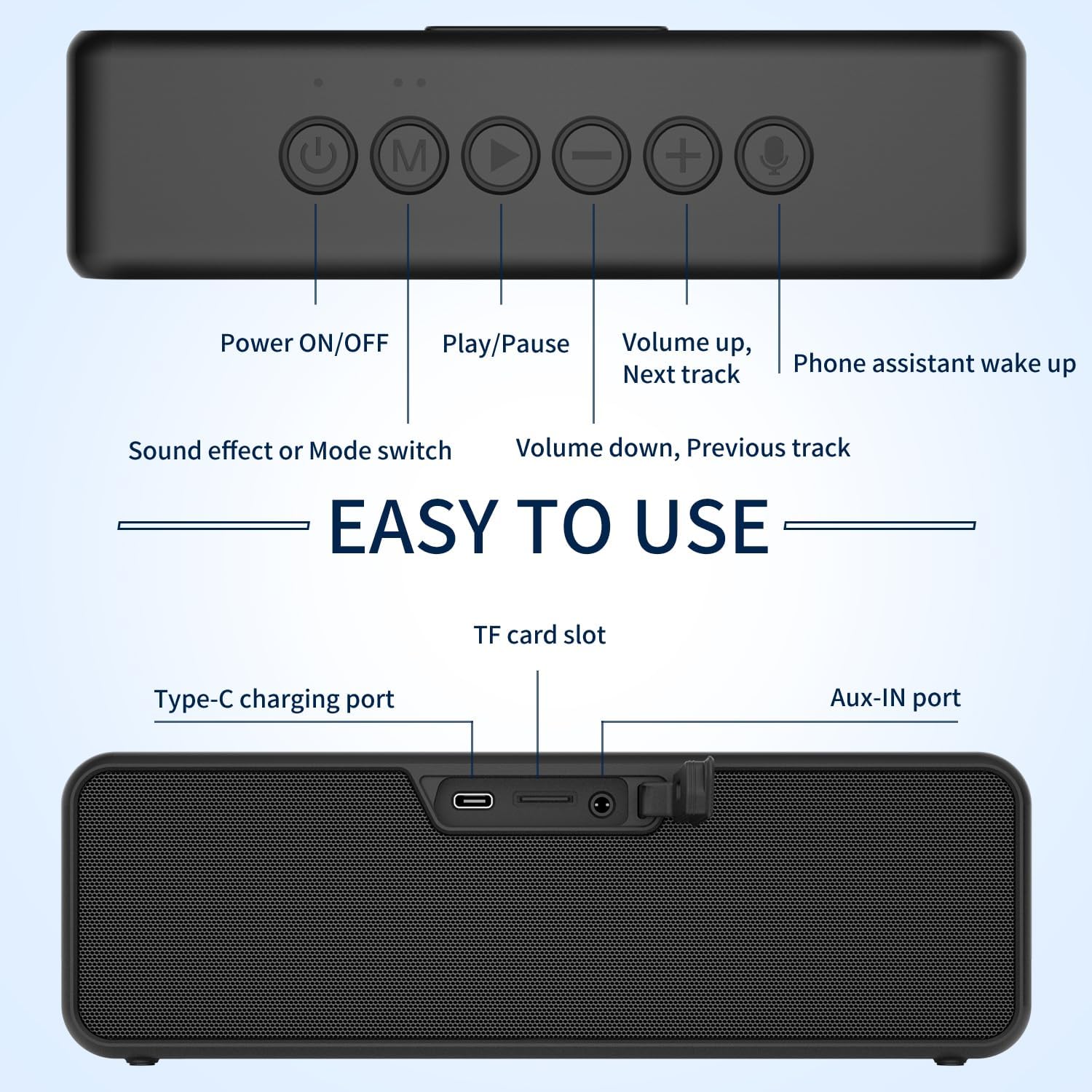
Irudia: Goiko eta atzealdeko view BOG-koASING M6 speaker, highlighting the function of each button and port.
Goiko paneleko kontrolak:
- Pizteko / itzaltzeko botoia: Press and hold to power the speaker on or off.
- 'M' (Modua) botoia: Sakatu labur Bluetooth, TF txartela eta AUX moduen artean aldatzeko.
- Erreproduzitu/Pausatu botoia: Short press to play or pause music. In Bluetooth mode, press and hold to disconnect the current device.
- '-' (Volume Down / Previous Track) Button: Sakatu labur bolumena jaisteko. Sakatu luze aurreko abestira joateko.
- '+' (Volume Up / Next Track) Button: Sakatu labur bolumena igotzeko. Sakatu luze hurrengo abestira joateko.
- Mikrofonoaren botoia: Short press to activate your device's voice assistant (e.g., Siri, Google Assistant).
Atzeko paneleko atakak:
- C motako kargatzeko ataka: Bozgorailuen barneko bateria kargatzeko.
- TF txartelaren zirrikitua: Insert a TF (MicroSD) card for direct music playback.
- AUX-IN ataka: Konektatu kanpoko audio gailuak barneko 3.5 mm-ko audio kablea erabiliz.
4. Konfigurazioa eta funtzionamendua
4.1 Bozgorailua kargatzea
- Connect the provided USB Type-C charging cable to the speaker's Type-C port.
- Connect the other end of the cable to a USB power adapter (5V/2A recommended, not included) or a computer's USB port.
- LED adierazleak kargatze-egoera erakutsiko du. Itzali edo kolorez aldatuko da guztiz kargatuta dagoenean.
4.2 Bluetooth parekatzea
- Power on the BOGASING M6 speaker by pressing and holding the Power ON/OFF button. The speaker will enter Bluetooth pairing mode, indicated by a flashing blue LED.
- Zure gailu mugikorrean (smartphone-a, tableta, etab.), gaitu Bluetooth-a eta bilatu eskuragarri dauden gailuak.
- Hautatu "BOG"ASING M6" gailuen zerrendatik.
- Behin konektatuta, LED adierazlea urdin finko jarriko da eta baieztapen soinu bat entzungo duzu.
4.3 Benetako Haririk gabeko Estereoa (TWS) Parekatzea
The TWS function allows you to pair two BOGASING M6 speakers for a stereo sound experience.

Image: Two BOGASING M6 speakers connected wirelessly to a smartphone, illustrating the True Wireless Stereo feature.
- Ensure both BOGASING M6 speakers are powered on and not connected to any Bluetooth device.
- On one speaker (this will be the primary speaker), press and hold the Play/Pause button for 2-3 seconds until you hear a prompt indicating TWS pairing mode.
- The two speakers will automatically search for and connect to each other. Once connected, you will hear a confirmation sound, and the LED indicators on both speakers will change.
- Orain, konektatu zure gailu mugikorra bozgorailu nagusira Bluetooth bidez, 4.2 atalean azaltzen den bezala.
4.4 Soinu Moduak (EQ)
BOGASING M6 offers three distinct sound effect modes:

Image: Visual representation of the three sound effect modes: Enhanced Bass, 3D Stereo, and Vocals.
- Baxu hobetua: For music genres that benefit from deeper low frequencies.
- 3D estereoa: Creates a wider, more immersive soundstage.
- ahotsa: Optimizes clarity for spoken word or vocal-heavy music.
To switch between these modes, short press the 'M' (Mode) button.
4.5 TF Card & AUX Input
- TF txartela: Insert a TF (MicroSD) card with MP3/WAV/FLAC audio files TF txartelaren zirrikituan. Bozgorailuak automatikoki aldatuko da TF txartelaren modura eta erreprodukzioa hasiko du.
- AUX sarrera: Connect an external audio device (e.g., MP3 player, computer) to the AUX-IN port using the 3.5mm audio cable. The speaker will automatically switch to AUX mode.
5. Ezaugarri nagusiak
5.1 Powerful Sound with Deep Bass

Irudia: Leherketa bat view BOG-koASING M6 speaker, illustrating its dual high-performance drivers and passive radiators for powerful sound and deep bass.
BOGASING M6 is equipped with high-performance drivers and passive radiators, combined with an advanced DSP chip, to deliver 30W of impressive sound and deep, punchy bass.
5.2 IPX6 iragazgaitza

Image: The BOGASING M6 speaker submerged in water, showcasinIPX6 iragazgaitza den gaitasunagatik.
With an IPX6 waterproof rating, the M6 speaker is protected against powerful water jets, making it suitable for use in various outdoor conditions, including poolside, beach, or camping, without fear of heavy rain or splashes.
Video: Demonstration of the BOGASING M6 speaker's IPX6 waterproof feature in various outdoor settings, including being splashed by water and submerged in shallow water.
5.3 Advanced Bluetooth 5.3 Technology
The latest Bluetooth 5.3 technology ensures optimized transmission, faster connection speeds, and stable connectivity with a wide range of devices, including smartphones, MP3 players, TVs, and PCs.
6. Mantentzea
- Garbiketa: Garbitu bozgorailua leun batekin, damp oihal. Ez erabili produktu kimiko gogorrak edo garbitzaile urratzaileak.
- Biltegiratzea: Gorde bozgorailua leku fresko eta lehor batean, tenperatura altuetatik eta eguzki-argitik babestuta.
- Bateria zaintzea: To prolong battery life, fully charge the speaker before first use and at least once every three months if not used regularly. Avoid fully discharging the battery frequently.
- Uraren esposizioa: After exposure to water, ensure the charging port and other openings are dry before charging or connecting cables.
7. Arazoak
| Arazoa | Kausa posiblea | Irtenbidea |
|---|---|---|
| Bozgorailuak ez du pizten. | Bateria baxua. | Kargatu bozgorailua gutxienez 30 minutuz. |
| Ezin da Bluetooth bidez parekatu. | Bozgorailua ez dago parekatze moduan edo beste gailu batera konektatuta dago dagoeneko. | Ensure the speaker is in pairing mode (flashing blue LED). Disconnect from other devices by long pressing the Play/Pause button. Restart both speaker and device. |
| Soinurik ez edo bolumen baxua. | Bolumena baxuegia da bozgorailuan edo konektatutako gailuan. Sarrera modu okerra. | Increase volume on both speaker and device. Press 'M' button to cycle through input modes (Bluetooth, TF, AUX). |
| TWS parekatzeak huts egin du. | Speakers are too far apart or already connected to other devices. | Ensure both speakers are within 10 meters of each other and not connected to any other Bluetooth devices. Repeat TWS pairing steps. |
8. Zehaztapenak
| Ezaugarri | Zehaztapena |
|---|---|
| Ereduaren izena | M6 |
| Hizlari mota | Subwoofer |
| Irteera Potentzia | 30W (Single Speaker), 60W (TWS) |
| Bluetooth bertsioa | 5.3 |
| Iragazgaitzaren balorazioa | IPX6 |
| Konektibitate Teknologia | Bluetooth, Aux-in, TF-Card |
| Audio irteera modua | Estereoa |
| Energia iturria | Bateriaren funtzionamendua (litio-ioizko bateria 1 barne) |
| Produktuaren neurriak | 27D x 5.3Z x 7.3A zentimetroak |
| Elementuaren pisua | 0.9 gramo |
9. Bermea eta Laguntza
BOGASING products come with a standard manufacturer's warranty. For detailed warranty information, product support, or technical assistance, please refer to the warranty card included in your package or visit the official BOGASING website. You may also contact our customer service team through the retailer where you purchased the product.
Please keep your purchase receipt as proof of purchase for warranty claims.