
Sarrera
The zelotes T30 Wired Vertical Mouse is designed to enhance comfort and reduce wrist strain during prolonged computer use. Its ergonomic vertical design promotes a natural hand and wrist posture. This manual provides essential information for setting up, operating, maintaining, and troubleshooting your new mouse.

1 irudia: Aurrealde-ezkerrean view of the zelotes T30 Wired Vertical Mouse.

Figure 2: Various side views illustrating the vertical design of the mouse.
Konfigurazioa
The zelotes T30 Vertical Mouse is designed for simple plug-and-play operation, requiring no driver installation.
Sagua konektatzen
- Locate an available USB port on your computer (Laptop, PC, Mac).
- Insert the USB connector of the zelotes T30 mouse into the USB port.
- The mouse will be automatically recognized by your operating system (Win11, Win10, Win8, Win7, Mac OS, Linux) and ready for use.
Attaching the Detachable Palm Rest
The mouse comes with a detachable palm rest for enhanced comfort. To attach it:
- Align the palm rest with the designated slots on the bottom of the mouse.
- Gently slide the palm rest into place until it clicks securely.
- Ensure the palm rest is firmly attached before use.

Figure 3: Illustration of the detachable palm rest and its attachment points.
Funtzionamendu-argibideak
Ergonomic Design and Grip
The vertical design of the T30 mouse positions your hand in a natural handshake posture, reducing pronation of the forearm and wrist. This design aims to alleviate discomfort associated with traditional mouse use.

Figure 4: Proper hand placement on the ergonomic vertical mouse.

5. irudia: Xehetasuna view of the humanized grip design, ensuring comfortable finger placement.
DPI sentikortasuna doitzea
The mouse features 4 adjustable DPI settings: 1200, 1600, 2400, and 3200 DPI. To change the sensitivity:
- Locate the DPI button on the mouse. This button is typically positioned near the scroll wheel or thumb area.
- Press the DPI button to cycle through the available sensitivity settings. Each press will switch to the next DPI level.
- The LED illumination on the mouse may change color or pattern to indicate the current DPI setting.
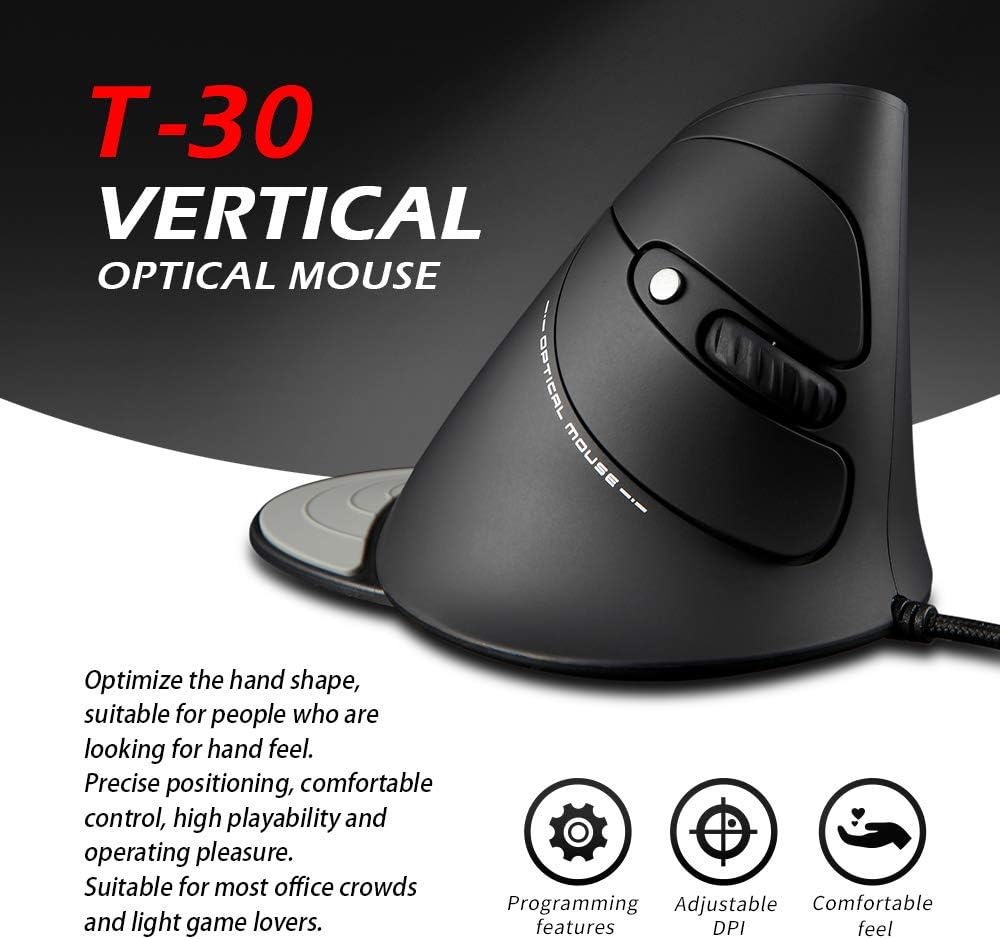
Figure 6: The T30 mouse with an emphasis on its adjustable DPI feature.
Botoiaren funtzioak
The zelotes T30 mouse is equipped with 6 buttons for various functions:
- Ezkerreko klik botoia: Klik egiteko funtzio nagusia.
- Eskuineko botoiarekin klik egiteko: Bigarren mailako klik funtzio estandarra.
- Korritzeko gurpila: Bertikalean mugitzeko. Erdiko botoiarekin klik egiteko ere sakatu daiteke.
- DPI botoia: Saguaren sentikortasuna (DPI) doitzen du.
- Aurrera egiteko botoia: Aurrera nabigatzen du web nabigatzaileak edo file esploratzaileak.
- Atzera botoia: Atzeraka nabigatzen du web nabigatzaileak edo file esploratzaileak.
Video 1: Demonstration of the zelotes T30 Ergonomic Vertical Mouse features and usage.
Mantentzea
To ensure the longevity and optimal performance of your zelotes T30 mouse, follow these maintenance guidelines:
- Garbiketa: Erabili zapi leun eta lehor bat saguaren gainazala garbitzeko. Zikinkeria egoskorra bada, garbitu zapi pixka bat.amp cloth can be used, but ensure no liquid enters the mouse. Avoid harsh chemicals or abrasive cleaners.
- Biltegiratzea: Erabiltzen ez duzunean, gorde sagua leku garbi eta lehor batean, muturreko tenperaturetatik eta eguzki-argitik babestuta.
- Kableen zainketa: Saihestu USB kablea gehiegi tolestea edo bihurritzea, barneko kableak kaltetu baititzake.
Arazoak konpontzea
If you encounter issues with your zelotes T30 mouse, refer to the following common problems and solutions:
| Arazoa | Kausa posiblea | Irtenbidea |
|---|---|---|
| Sagua ez du erantzuten | USB konexio soltea, USB ataka akastuna, sistema eragilearen arazoa. |
|
| Kurtsorearen mugimendua irregularra edo jauzilaria da | Sentsore optiko zikina, sagu-oihalaren gainazal desegokia. |
|
| DPI doikuntzak ez du funtzionatzen | Button malfunction, temporary software glitch. |
|
Zehaztapenak
| Ezaugarri | Xehetasuna |
|---|---|
| Marka | zelotes |
| Modelo zenbakia | T-30 |
| Produktuaren neurriak | 4.33 x 3.15 x 3.27 hazbete |
| Elementuaren pisua | 4.2 ontza |
| Konektibitate Teknologia | USB kableduna |
| Mugimenduak detektatzeko teknologia | Optikoa |
| DPI ezarpenak | 1200/1600/2400/3200 DPI |
| Botoi kopurua | 6 |
| Ezaugarri Berezia | Ergonomic Design, Detachable Wrist Rest, LED Illumination |
| Bateragarritasuna | Win11, Win10, Win8, Win7, Mac OS, Linux |

Figure 7: Detailed dimensions of the zelotes T30 Vertical Mouse.
Bermea eta Laguntza
For warranty information and technical support, please refer to the official zelotes webwebgunera edo jarri harremanetan zuzenean bezeroarentzako arreta-zerbitzura. Gorde erosketa-agiria berme-erreklamazioetarako.
Fabrikatzailea: zelotes