
BOXPUT X98H PRO
X98H PRO Android 12 Smart TV Box User Manual
Model: X98H PRO
Sarrera
This manual provides comprehensive instructions for setting up, operating, and maintaining your BOXPUT X98H PRO Android 12 Smart TV Box. Please read this manual thoroughly before using the device to ensure proper functionality and to maximize your user experience.

Image: The X98H PRO Android 12 Smart TV Box, a black rectangular device with a hexagonal pattern on top and a digital display on the front showing time and Wi-Fi status.
Paketearen edukia
Egiaztatu behean zerrendatutako elementu guztiak zure paketean sartuta daudela:
- X98H PRO Smart TV Box
- Urruneko Kontrola
- HDMI External Cable
- Elikatze-moldagailua
- Erabiltzailearen eskuliburua (dokumentu hau)

Image: A visual representation of the X98H PRO TV Box package contents, including the TV box, remote control, HDMI cable, power adapter, and user manual.
Produktua amaituview
The X98H PRO is a high-performance smart TV box designed for home entertainment. It features the Android 12.0 operating system and is powered by the Allwinner H618 Quad-Core Cortex-A53 CPU and Mali G31 MP2 GPU, ensuring smooth operation and excellent multimedia capabilities.
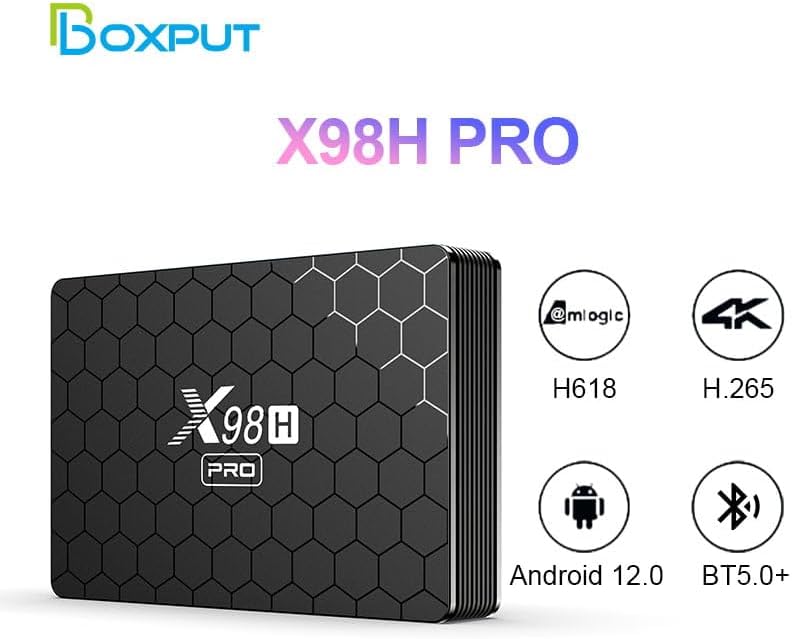
Image: The X98H PRO TV Box alongside icons highlighting its key features: Allwinner H618 chipset, H.265 decoding, Android 12.0 OS, and Bluetooth 5.0+ connectivity.
Portuak eta Interfazeak
Familiarize yourself with the various ports on your X98H PRO device:

Irudia: Xehetasun handikoa views of the X98H PRO TV Box showing its various ports. The rear panel includes DC power input, Optical audio output, HDMI In, HDMI Out, Ethernet, AV, and USB. The side panel shows two additional USB ports and a TF/MicroSD card slot.
- DC Connector (5V 2A): Potentzia sarrerarako.
- HDMI Out (2.0a): Connects to your TV or display for video and audio output (up to 4K@60fps).
- HDMI sarrera (2.0): Allows input from another HDMI source (supports 4K@60fps).
- Ethernet (LAN): For wired network connection (1000Mbps).
- USB 2.0 portuak (x3): For connecting external storage devices, keyboards, mice, or other USB peripherals.
- TF/MicroSD Card Slot: For expandable storage (up to 128GB).
- AV ataka: For older analog video and audio connections (supports PAL/NTSC).
- Audio Irteera Optikoa: Audio irteera digitalerako.
Konfigurazio Gida
1. Gailua konektatzea
- Konektatu HDMI kablearen mutur bat HDMI Irteera port on the X98H PRO and the other end to an HDMI input port on your television or display.
- Konektatu korronte egokitzaileari DC 5V port on the X98H PRO and then plug the adapter into a power outlet.
- Piztu telebista eta hautatu HDMI sarrera-iturri zuzena.
2. Sare-konexioa
The X98H PRO supports both Wi-Fi and wired Ethernet connections.
Wi-Fi konexioa:
- From the main screen, navigate to Ezarpenak.
- Hautatu Sarea eta Internet.
- Piztu Wi-Fi eta hautatu nahi duzun sarea zerrendatik.
- Enter the Wi-Fi password if prompted and select Konektatu.
Ethernet konexioa:
- Konektatu Ethernet kable bat zure bideratzailetik edo modemetik Ethernet (LAN) port on the X98H PRO.
- The device will automatically detect and connect to the wired network.
3. Periferikoak konektatzea
You can connect various peripherals to your TV box:
- USB gailuak: Plug USB flash drives, external hard drives, keyboards, or mice into the USB 2.0 ports.
- Bluetooth gailuak:
- Joan zaitez Ezarpenak > Konektatutako gailuak > Parekatu gailu berria.
- Jarri zure Bluetooth gailua parekatze moduan.
- Hautatu zure gailua zerrendatik parekatzeko.
Funtzionamendu-argibideak
Navigating the Android 12 OS
The X98H PRO runs on Android 12, providing a user-friendly interface. Use the included remote control to navigate through menus and applications.
- Gezi-teklak: Navigate up, down, left, and right.
- Ados botoia: Hautatu elementu bat edo berretsi ekintza bat.
- Atzera botoia: Itzuli aurreko pantailara.
- Hasierako botoia: Itzuli hasierako pantaila nagusira.
- Menuko botoia: Access context-sensitive options (if available).
Multimedia erreprodukzioa
The device supports various multimedia formats:
- Bideoa: H265 Main10@L5.1 (up to 4K@60fps or 6K@30fps), VP9 Profile 2 (up to 4K@60fps), AVS2 Jizhun 10bit (up to 4K@60fps), H.264 BP/MP/HP@L4.2 (up to 4K@30fps).
- Audioa: MP3, AAC, WMA, FLAC, Ogg.
- Irudia: HD JPEG, BMP, GIF, PNG, TIF.
You can play media from connected USB storage devices or through installed streaming applications.
Aplikazioen kudeaketa
Install new applications from the Google Play Store or other trusted sources. You can manage installed apps through the Android settings.
HDMI Input Switching
The X98H PRO features an HDMI input port, allowing you to connect another HDMI source (e.g., a game console or Blu-ray player) and switch between the TV box's output and the external HDMI input.

Image: A diagram illustrating the HDMI input and output functionality. The X98H PRO can display its own content or switch to an external HDMI source connected to its HDMI In port, controlled by a switch button on the device.
Mantentzea
- Garbiketa: Erabili zapi leun eta lehor bat gailua garbitzeko. Ez erabili garbitzaile likidorik edo aerosolik.
- Aireztapena: Ziurtatu gailua ondo aireztatutako leku batean dagoela gehiegi berotzea saihesteko. Ez blokeatu aireztapen-irekidurak.
- Itzali: When not in use for extended periods, it is recommended to unplug the power adapter.
- Software eguneraketak: Aldian-aldian egiaztatu sistemaren eguneraketak gailuaren ezarpenetan, errendimendu eta segurtasun optimoak bermatzeko.
Arazoak konpontzea
| Arazoa | Irtenbide posiblea |
|---|---|
| Botererik ez |
|
| Ez dago telebistan erakusten |
|
| Wi-Fi konexio arazoak |
|
| Urruneko kontrolak ez du erantzuten |
|
| Aplikazioak izoztea edo kraskatzea |
|
Zehaztapenak
| Ezaugarri | Xehetasuna |
|---|---|
| Eredua | X98H PRO |
| Sistema eragilea | Android 12.0 |
| CPU | Allwinner H618 Quad-core ARM Cortex A53 |
| GPU | Mali G31 MP2 |
| RAM Edukiera | 2GB / 4GB (Optional) |
| ROM Capacity | 16GB / 32GB / 64GB (Optional) |
| Kanpoko Biltegiratzea | USB Storage Devices, MicroSD (up to 128GB) |
| Wi-Fi | IEEE 802.11 a/b/g/n/ac (2.4G & 5G Dual Band) |
| Bluetootha | BT5.0+ |
| Bideo Irteera | HDMI 2.0a (up to 4K@60fps), CVBS (PAL/NTSC) |
| Bideo Sarrera | HDMI 2.0 (supports 4K@60fps) |
| USB atakak | 3 x USB 2.0 |
| Neurriak | 135 x 90 x 23 mm (5.31 x 3.54 x 0.91 hazbete) |
| Pisua | 0.15 kg (0.33 lb) |
| Kolorea | Beltza |
Bermea eta Laguntza
Bermearen informazioa
This product comes with a standard manufacturer's warranty. Please refer to the warranty card included in your package or contact the seller for specific warranty terms and conditions.
Bezeroarentzako Arreta
For technical assistance, troubleshooting, or any inquiries regarding your X98H PRO Smart TV Box, please contact BOXPUT customer support or visit the official BOXPUT store on Amazon:
Visit the BOXPUT Store on Amazon

Image: A person using a computer, symbolizing customer support and online resources available for BOXPUT products.
Ask a question about this manual
Ask about setup, troubleshooting, compatibility, parts, safety, or missing instructions. Manuals+ will review the question and use this page’s manual context to help answer it.