
BOXPUT X88 PRO 13
BOXPUT X88 PRO 13 Smart TV Box User Manual
Model: X88 PRO 13
1. Sarrera
This manual provides detailed instructions for the setup, operation, and maintenance of your BOXPUT X88 PRO 13 Smart TV Box. Please read this manual thoroughly before using the device to ensure proper functionality and to maximize your user experience. Keep this manual for future reference.
2. Paketearen edukia
Verify that all items listed below are included in your product package. If any items are missing or damaged, please contact your retailer.
- BOXPUT X88 PRO 13 Smart TV Box
- Urruneko Kontrola
- HDMI kablea
- Korronte egokitzailea (DC 5V/2A)
- Erabiltzailearen eskuliburua
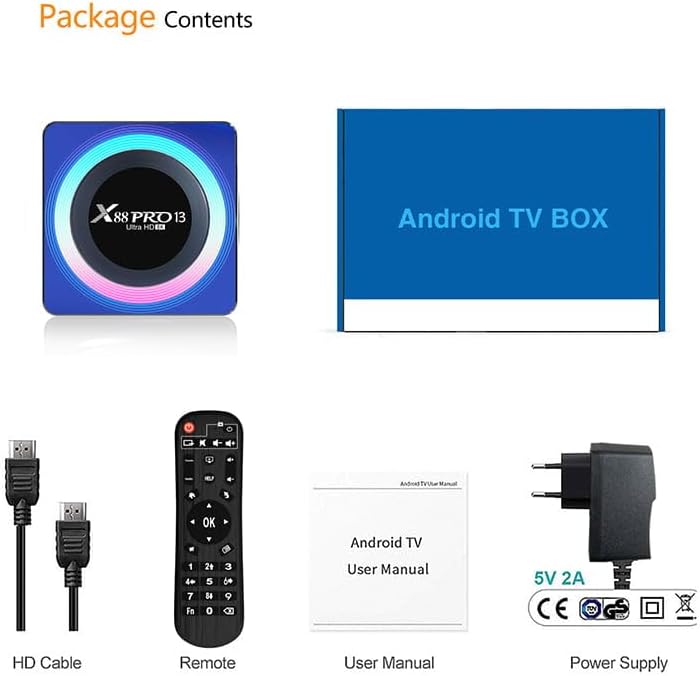
Image: Contents of the product package, including the TV box, HDMI cable, remote control, user manual, and power adapter.
3. Produktua amaitu daview
The BOXPUT X88 PRO 13 is a high-performance Smart TV Box designed to deliver an enhanced media experience. It features the Android 13.0 operating system and a powerful RK3528 Quad-Core processor.

Image: The BOXPUT X88 PRO 13 Smart TV Box and its accompanying remote control.
Ezaugarri nagusiak
- Android 13.0 sistema eragilea
- RK3528 Quad-Core 64bit Cortex-A53 Chipset
- Mali 450 MP2 GPU
- Support for 8K HD Video Decoding
- Dual-band Wi-Fi (2.4G/5G) with Wi-Fi 6
- Bluetooth V5.0
- Screen Cast Functionality

Image: Visual representation of key features including Android 13.0, 8K video support, RK3528 processor, WiFi 6, and Screen Cast.
4. Konfigurazio gida
Follow these steps to set up your BOXPUT X88 PRO 13 Smart TV Box.
- Telebistara konektatu: Connect one end of the HDMI cable to the HDMI port on the TV Box and the other end to an available HDMI input on your television.
- Konektatu energia: Plug the power adapter into the DC 5V/2A port on the TV Box, then plug the adapter into a wall outlet.
- Piztu: The device should power on automatically or can be turned on using the power button on the remote control.
- Hautatu Sarrera: On your television, select the correct HDMI input source using your TV's remote control.
- Hasierako konfigurazioa: Follow the on-screen instructions to complete the initial setup, including language selection and network configuration.
5. Funtzionamendu-argibideak
5.1 Oinarrizko nabigazioa
Use the provided remote control to navigate the Android interface. The directional buttons (up, down, left, right) are used to move the cursor, and the 'OK' button confirms selections. The 'Back' button returns to the previous screen, and the 'Home' button returns to the main menu.
5.2 Sarearen konexioa
The TV Box supports both wired and wireless network connections.
- Kable bidezko konexioa (Ethernet): Connect an Ethernet cable from your router to the LAN port on the TV Box.
- Haririk gabeko konexioa (Wi-Fi): Joan zaitez Ezarpenak > Sarea eta Internet > Wi-Fi, select your network, and enter the password. The device supports 2.4GHz and 5GHz dual-band Wi-Fi 6 for faster and more stable connections.

Image: An illustration demonstrating the improved speed and stability offered by WiFi 6 technology.
5.3 Bluetooth konexioa
The TV Box features Bluetooth V5.0, allowing connection to various external devices.
- Joan zaitez Settings > Connected Devices > Pair new device.
- Put your Bluetooth device (e.g., speaker, headphones, game controller) into pairing mode.
- Select the device from the list on your TV screen to pair.

Image: The TV box demonstrating Bluetooth 5.0 connectivity with a speaker, headphones, and a game controller.
5.4 Multimedia erreprodukzioa
The BOXPUT X88 PRO 13 supports advanced media formats, including 8K H.265 ultra-high-definition content and 3D video playback.
- 8K Video Decoding: Enjoy crystal-clear visuals with support for 8K resolution.
- 3D euskarria: Experience immersive 3D content when connected to a compatible 3D television.

Image: A television screen showcasing a high-resolution winter scene, illustrating the 8K video decoding capability of the device.
5.5 Pantaila anitzeko interakzioa
The device supports various multi-screen interaction protocols, allowing you to cast content from your mobile devices to your TV.
- Airplay: For Apple devices.
- DLNA: For compatible devices across various platforms.
- Miracast: Android gailuetarako.
To use these features, ensure your mobile device and the TV Box are connected to the same Wi-Fi network. Activate the casting feature on your mobile device and select the TV Box from the available devices.

Image: A television screen displaying a racing car, demonstrating multi-screen interaction capabilities such as Airplay, DLNA, and Miracast.
6. Mantentzea
To ensure the longevity and optimal performance of your TV Box, follow these maintenance guidelines:
- Garbiketa: Erabili zapi leun eta lehor bat gailua garbitzeko. Ez erabili garbitzaile likidorik edo aerosolik.
- Aireztapena: Ziurtatu gailua ondo aireztatutako leku batean dagoela gehiegi berotzea saihesteko. Ez blokeatu aireztapen-irekidurak.
- Software eguneraketak: Periodically check for system updates via Settings > About > System update azken funtzioak eta segurtasun-adabakiak dituzula ziurtatzeko.
- Biltegiratzea: Avoid placing heavy objects on the device. Store in a cool, dry place away from direct sunlight and extreme temperatures.
7. Arazoak
If you encounter issues with your BOXPUT X88 PRO 13, refer to the following common problems and solutions:
- Potentziarik gabe:
- Ziurtatu korronte-egokitzailea ondo konektatuta dagoela gailura eta funtzionatzen duen entxufe batera.
- Egiaztatu korronte-hartunea funtzionala dela.
- Telebistan seinalerik ez:
- Check that the HDMI cable is properly connected to both the TV Box and the TV.
- Ziurtatu telebista HDMI sarrera-iturri zuzenera konfiguratuta dagoela.
- Saiatu beste HDMI kable edo HDMI ataka bat zure telebistan.
- Wi-Fi konexiorik ez:
- Confirm your Wi-Fi router is powered on and functioning.
- Check Wi-Fi settings on the TV Box (Ezarpenak > Sarea eta Internet > Wi-Fi) and ensure the correct network is selected and password entered.
- Restart the TV Box and your Wi-Fi router.
- Urruneko kontrolak ez du erantzuten:
- Ordeztu bateriak urrutiko agintean.
- Ziurtatu ez dagoela oztoporik urrutiko agintearen eta telebista-kutxaren artean.
- Applications Crashing or Freezing:
- Itxi eta berrabiarazi aplikazioa.
- Clear the cache of the problematic application via Ezarpenak > Aplikazioak > [Aplikazioaren izena] > Biltegiratzea eta cachea > Garbitu cachea.
- Ziurtatu gailuak biltegiratze leku libre nahikoa duela.
- Perform a system update if available.
8. Zehaztapenak
| Ezaugarri | Zehaztapena |
|---|---|
| Eredua | X88 PRO 13 |
| Sistema eragilea | Android 13.0 |
| Chipset | RK3528 Quad-Core 64bit Cortex-A53 |
| GPU | Mali 450 MP2 |
| RAM | 4 GB |
| ROM (Barne Biltegiratzea) | 64 GB EMMC |
| USB ostalaria | 1 * USB 3.0; 1 * USB 2.0 |
| LAN/Ethernet | 10/100M Standard RJ-45 |
| Wireless/Wi-Fi | 2.4G / 5G Dual-band Wi-Fi 802.11 a/b/g/n/ac/ax (Wi-Fi 6) |
| Bluetootha | V5.0 |
| Elikatze Hornidura | DC 5V/2A |
| Bideo Deskodetzea | 8K H.265, 3D Support |
| Produktuaren neurriak | 107 x 107 x 21 mm |
9. Bermea eta Laguntza
For warranty information and technical support, please refer to the documentation provided with your purchase or contact your retailer. Keep your proof of purchase for warranty claims.
Ask a question about this manual
Ask about setup, troubleshooting, compatibility, parts, safety, or missing instructions. Manuals+ will review the question and use this page’s manual context to help answer it.