
ANJIELO SMART AHD-7-B+94206
Wireless Video Doorbell Intercom System User Manual
Model: AHD-7-B+94206
Brand: ANJIELO SMART
1. Sarrera
This manual provides comprehensive instructions for the installation, operation, and maintenance of your ANJIELO SMART Wireless Video Doorbell Apartment Intercom System. This system features a 1080P video entry doorphone with a 7-inch touch monitor, integrated with TUYA WiFi for smart home functionality. It is designed for use in villas and homes, offering enhanced security and communication.
While the indoor monitor supports WiFi, the system primarily relies on wired connections between the indoor monitor and the doorbell for stable operation. Please read this manual thoroughly before installation and use to ensure proper functionality and safety.
2. Segurtasun informazio garrantzitsua
- Ensure all wiring is performed by a qualified professional if you are unsure about electrical connections.
- The system operates on 110 Volts. Verify your power supply matches this requirement.
- Do not expose the outdoor doorbell unit to extreme temperatures outside the specified range (-25°C to +60°C) or immerse it in water, despite its IP65 rating.
- Keep the monitor and doorbell away from direct sunlight, heat sources, and strong electromagnetic fields.
- Use only the provided or recommended accessories and power supply.
- Ez saiatu unitatea zeuk desmuntatzen edo konpontzen. Mantendu mantentze-lan guztiak langile kualifikatuen esku.
- Keep small parts and packaging materials out of reach of children to prevent choking hazards.
3. Paketearen edukia
Egiaztatu elementu guztiak bertan daudela eta egoera onean daudela:
- 7-inch TFT Touch Monitor (Indoor Unit)
- 1080P HD Doorbell Camera (Outdoor Unit)
- Korronte egokitzailea/kargagailua
- Muntatzeko euskarria eta torlojuak
- RVV4 Cable (for wired connection between monitor and doorbell)
- 32GB Micro SD Card (pre-installed in monitor)
- Erabiltzailearen eskuliburua (dokumentu hau)

Figure 3.1: Main components of the ANJIELO SMART Video Doorbell Intercom System.
4. Produktua amaitu daview
4.1. Indoor Monitor (7-inch TFT Touch Screen)
- Pantaila: 7-inch TFT touch screen for clear video and intuitive control.
- Konektibitatea: Supports WiFi for connection to the Tuya Smart APP.
- Interfonoa: Hands-free two-way communication.
- Grabaketa: Automatic snapshot or video recording upon motion detection, saved to the included 32GB Micro SD card.
- Monitore anitzeko laguntza: Can support up to 6 indoor monitors.
4.2. Outdoor Doorbell Camera
- Kamera: 1080P HD camera with a 160° wide-angle lens.
- Gaueko ikuspegia: Built-in infrared sensor for clear IR night vision.
- Audioa: Built-in speakers and microphone for two-way audio.
- Iraunkortasuna: Rainproof, dustproof, and anti-vandalism design with IP65 rating and metal rain cover.
- Mugimendu-detekzioa: PIR motion sensors notify you when movement is detected.
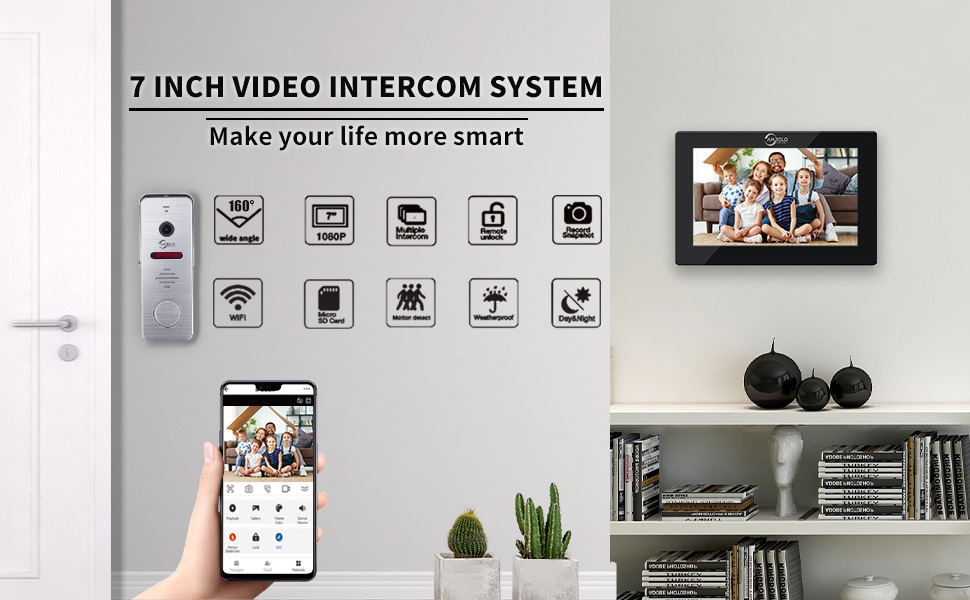
4.1 Irudia: Gainetikview of the 7-inch Video Intercom System features.
5. Konfigurazioa eta instalazioa
5.1. Wired Connection (Monitor to Doorbell)
The indoor monitor and doorbell require a wired connection using the RVV4 cable for stable operation. This is a 4-wire setup system.
- Mount the outdoor doorbell unit at your desired location, ensuring it is within reach of the wiring.
- Mount the indoor monitor unit in a convenient location inside your home.
- Connect the RVV4 cable between the outdoor doorbell unit and the indoor monitor unit. Ensure correct polarity and secure connections.
- Connect the power adapter to the indoor monitor and plug it into a 110V power outlet.

Figure 5.1: Illustration of two-way audio and the 4-wire connection setup.
5.2. TUYA APP Connection
The indoor monitor supports WiFi (2.4Ghz only) for connection to the Tuya Smart APP, allowing remote control and monitoring.
- Download the "TuyaSmart" app from your smartphone's app store.
- Erregistratu edo hasi saioa zure TuyaSmart kontuan.
- On the indoor monitor, navigate to the settings and set the screen to AP mode. (Note: Setting AP mode may require returning to the home page to restart the boot screen.)
- In the TuyaSmart app, click the "+" sign in the upper right corner to add a device.
- Select "Camera & Lock" then "Smart Doorbell".
- Click on "WiFi Mode" in the upper right corner of the app screen.
- Follow the on-screen prompts, selecting "Next" and then "AP Mode".
- Continue to the next step and open your phone's WiFi list.
- Find the WiFi name of the hotspot (e.g., "SmartLife-XXXX" or "SL-XXXX") and connect to it.
- Return to the TuyaSmart app. The device should now connect successfully.
Video 5.2.1: Detailed steps on how to connect the Tuya app to the intercom system.
6. Funtzionamendua
6.1. Deiak erantzutea eta bi norabideko audioa
When a visitor presses the doorbell, your indoor monitor will ring, and your smartphone will receive a call notification via the TuyaSmart app. You can then see, hear, and talk to the visitor.
- Monitorean: Tap the answer icon on the monitor screen to begin communication.
- Smartphonen: Answer the call notification in the TuyaSmart app to communicate remotely.
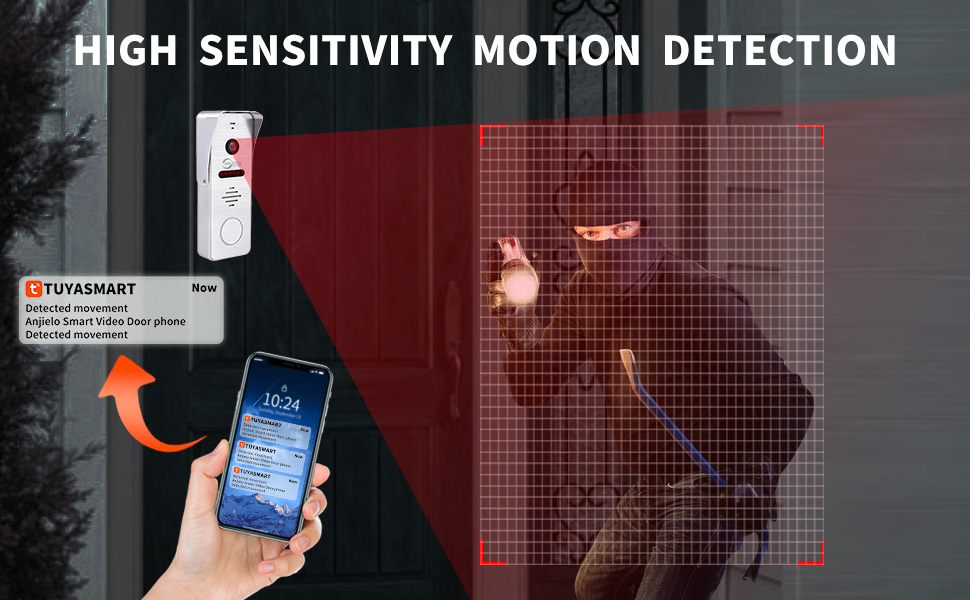
Figure 6.1: Two-way audio functionality for communication with visitors.
6.2. Remote Unlock
You can unlock connected electronic locks directly from the monitor or via the TuyaSmart app.
- On Monitor/App: During a call or monitoring session, locate the unlock icon on the screen and tap it to remotely unlock the door.

Figure 6.2: Remote unlock feature via the Tuya app.
Video 6.2.1: Demonstration of connecting the indoor unit with a smart lock and unlocking the door.
6.3. Mugimenduaren detekzioa eta grabaketa
The system features motion detection that triggers automatic recording or snapshots.
- Mugimendu detekzioa gaitu: On the indoor monitor, go to "Settings" > "Outdoor Station" (or "Doorbell Station").
- Locate "Motion Detection Switch" and ensure it is set to "On".
- Set "Motion Detect Sensibility" to "High" for optimal detection.
- Adjust "Motion Detect Duration" to "60S" for longer recording times.
- Recordings are saved to the 32GB Micro SD card in the monitor. You can review them via the TuyaSmart app.

Figure 6.3: Smart PIR Motion Detection in action, triggering notifications.
Video 6.3.1: Instructions on how to set up motion detection for the intercom system.

Figure 6.4: Playback functionality from the Tuya app.
6.4. Hizkuntza ezarpenak
The monitor supports 15 different languages.
- On the indoor monitor, go to "Settings" > "Monitor Setting".
- Locate the "Language" option and tap it to select your preferred language from the list.
Video 6.4.1: Guide on how to set up different languages on the monitor.
7. Mantentzea
- Garbiketa: Use a soft, dry cloth to clean the monitor screen and doorbell camera lens. Do not use abrasive cleaners or solvents.
- Kanpoko Unitatearen Zainketa: Periodically check the outdoor unit for any debris or obstructions around the camera and microphone. Ensure the rain cover is securely in place.
- Software eguneraketak: Check the TuyaSmart app regularly for any available firmware updates for your device to ensure optimal performance and security.
- SD Txartela Kudeatzeko: The 32GB SD card will store recordings. Periodically review and delete old recordings to free up space, or enable loop recording if available.
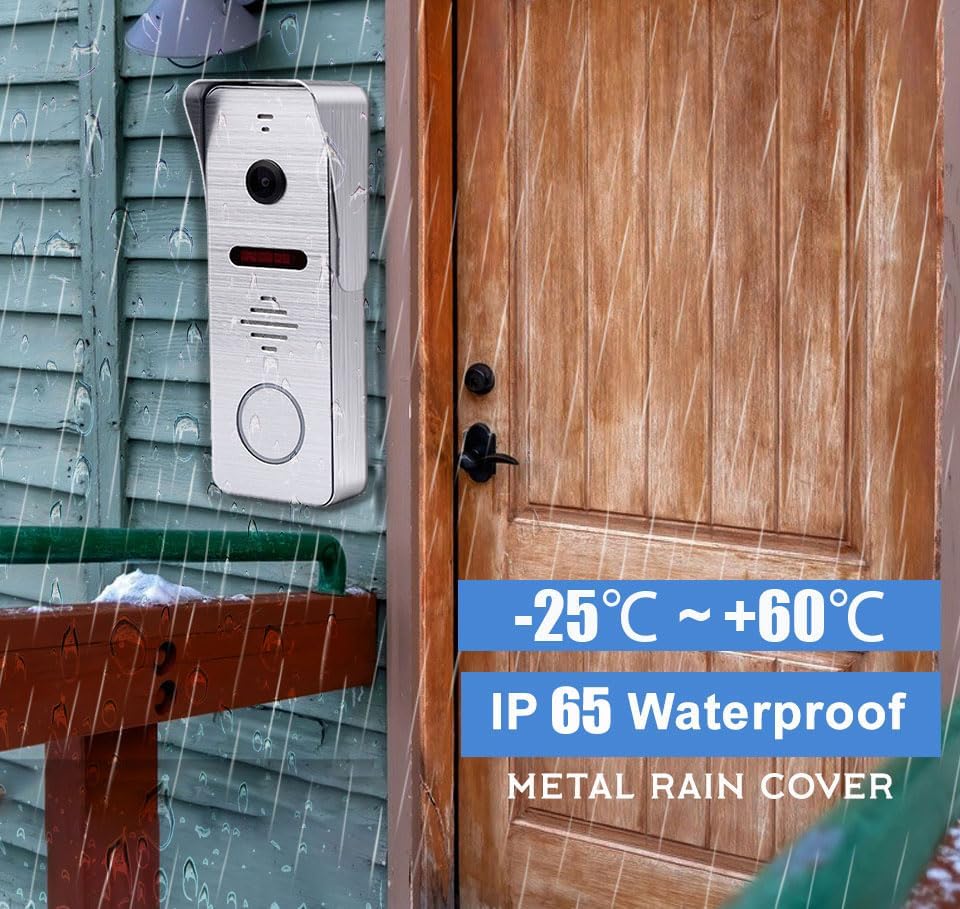
Figure 7.1: The outdoor unit is designed to withstand various weather conditions.
8. Arazoak
| Arazoa | Kausa posiblea | Irtenbidea |
|---|---|---|
| No video/audio from doorbell. | Kableatu solteak, energia arazoa, kameraren matxura. | Check all 4-wire connections between the doorbell and monitor. Ensure the monitor is powered on. If issues persist, contact support. |
| Ezin da Tuya aplikaziora konektatu. | Incorrect WiFi password, 5Ghz WiFi, incorrect AP mode setup. | Ensure you are connecting to a 2.4Ghz WiFi network. Double-check your WiFi password. Re-follow the app connection steps carefully, especially setting the monitor to AP mode. |
| Bideoaren kalitate eskasa. | Dirty camera lens, poor lighting, network interference. | Clean the camera lens. Ensure adequate lighting. Check your WiFi signal strength. |
| Mugimendu-hautemateak ez du funtzionatzen. | Feature disabled, sensitivity too low, obstructions. | Verify motion detection is enabled in settings. Increase sensitivity to "High". Ensure no physical obstructions block the sensor. |
| Txirrina ez da jotzen. | Volume too low, ring setting off, wiring issue. | Check monitor volume settings. Ensure ring setting is enabled. Verify wired connection. |
9. Zehaztapenak
| Ezaugarri | Xehetasuna |
|---|---|
| Marka | ANJIELO SMART |
| Ereduaren izena | AHD-7-B+94206 |
| Energia iturria | AC/DC (110 Volt) |
| Konektibitate-protokoloa | Wi-Fi (2.4Ghz only), Powerline (wired) |
| Bideo Harrapaketa Ebazpena | 1080p |
| Muntatze Mota | Protruding (Wall-Mounted) |
| Dakarten osagaiak | Kargagailua |
| Materiala | Aluminioa |
| Elementuaren neurriak L x W x H | 7.09 x 4.72 x 0.79 hazbete |
| Elementuaren pisua | 2.44 kilo |
| Alerta mota | Audioa eta Mugimendua |
| Bideo Harrapaketa formatua | MPEG-4 |
| Argazki sentsoreen teknologia | CMOS |
| Nazioarteko Babesteko Balorazioa | IP65 |
| Kontrol-metodoa | App (TuyaSmart) |
| Gailu bateragarriak | Smartphone |
10. Bermea eta Laguntza
For warranty information and technical support, please refer to the official ANJIELO SMART webwebgunera edo jarri harremanetan bezeroarentzako arreta-zerbitzura zuzenean. Gorde erosketa-agiria erosketaren frogagiri gisa berme-erreklamazioetarako.
- Babes Planak: Babes-plan gehigarriak eros daitezke, 2 urteko eta 3 urteko aukerak barne, eta Complete Protect hileko plana.
- Fabrikatzailea: ANJIELO SMART
Erlazionatutako dokumentuak - AHD-7-B+94206
 |
Anjielo Smart Video Intercom System - Outdoor Camera User Manual Comprehensive user manual for Anjielo Smart video intercom systems, detailing operation, installation, and specifications for outdoor camera units. Covers models 94209, 94207, and 94206-IC, including wiring, video mode selection, RFID keyfob usage, and AHD compatibility. |
 |
Anjielo Etxe Adimendunaren Bideo Interfono Sistema - Erabiltzailearen Eskuliburua eta Instalazio Gida Anjielo Smart Home hibrido digital-analogikoko 4 hariko bideo-interfono sistemaren gida osoa. Ikasi instalazioari, konfigurazioari, Tuya Smart/Smart Life-rekin aplikazioen integrazioari eta arazoak konpontzeari buruz. |
 |
ANJIELO SMART HOME Sistema Ibrido Digitale-Analogico: Guida Completa Guida completa al sistema ANJIELO SMART HOME, un videocitofono ibrido digitale-analogico a 4 fili con risoluzione 2MP, compatibile con APP Tuya Smart/Smart Life. Include installazione, configurazione, funzionalità e risoluzione problemi. |
 |
Anjielo Smart 2-Hari Digitaleko Bideo-txirrina Interfono Sistema: Erabiltzailearen Eskuliburua eta Instalazio Gida Anjielo Smart 2-Wireko bideo-txirrina digitalaren interfono sistemaren gida osoa, etxeko segurtasuna eta komunikazioa hobetzeko instalazioa, konfigurazioa, funtzioak eta aplikazioen integrazioa biltzen dituena. |
 |
Anjielo Smart Home Video Doorbell System: User Manual and Installation Guide Comprehensive guide to the Anjielo Smart Home hybrid digital-analog 4-wire video doorbell system. Features include 2MP AHD resolution, night vision, remote access via Tuya Smart/Smart Life app, indoor monitor operation, installation, and troubleshooting. |
 |
Anjielo SMART 2 Haridun Bideo-txirrina Digitalaren Interfono Sistemaren Erabiltzailearen Eskuliburua Anjielo SMART 2 Haridun Bideo-txirrina Digitalaren Interfono Sistemaren erabiltzailearen eskuliburua, etxeko sarbide eta komunikazio segurua lortzeko ezaugarriak, instalazioa, kableatua, monitorearen interfazea, ezarpenak eta telefonoaren aplikazioen integrazioa zehaztuz. |
Ask a question about this manual
Ask about setup, troubleshooting, compatibility, parts, safety, or missing instructions. Manuals+ will review the question and use this page’s manual context to help answer it.