
1. Sarrera
Eskerrik asko erosketagatik.asing the BLOW 4625FHD DVB-T2 H.265 Digital Terrestrial TV Tuner. This device allows you to receive digital terrestrial television broadcasts (DVB-T2) with H.265 (HEVC) compression, offering high-definition video quality. This manual provides essential information for the safe and efficient setup, operation, and maintenance of your new tuner. Please read it thoroughly before use and retain it for future reference.
2. Segurtasun informazioa
- Segurtasun elektrikoa: To prevent electric shock, do not open the casing. Konponketa guztiak langile kualifikatuen esku utzi.
- Energia iturria: Erabili zehaztutako energia-egokitzailea soilik. Ziurtatu bolumenatage gailuaren eskakizunekin bat dator.
- Aireztapena: Ez blokeatu aireztapen-irekidurak. Ziurtatu aire-fluxu egokia dagoela gailuaren inguruan gehiegi berotzea saihesteko.
- Hezetasuna: Keep the device away from water, rain, and excessive humidity.
- Garbiketa: Deskonektatu korrontea garbitu aurretik. Erabili zapi leun eta lehor bat. Ez erabili garbitzaile likidorik edo aerosolik.
- Lekua: Place the device on a stable, flat surface. Avoid placing it near heat sources or in direct sunlight.
3. Paketearen edukia
Paketea irekitzean, egiaztatu osagai guztiak daudela eta egoera onean daudela:
- BLOW 4625FHD DVB-T2 Tuner Unit
- Urruneko Kontrola
- Power Adapter (integrated cable)
- Erabiltzailearen eskuliburua (dokumentu hau)

Image 3.1: Retail packaging of the BLOW 4625FHD DVB-T2 Tuner, showing the tuner unit and remote control.
4. Produktua amaitu daview
4.1. Aurreko panela
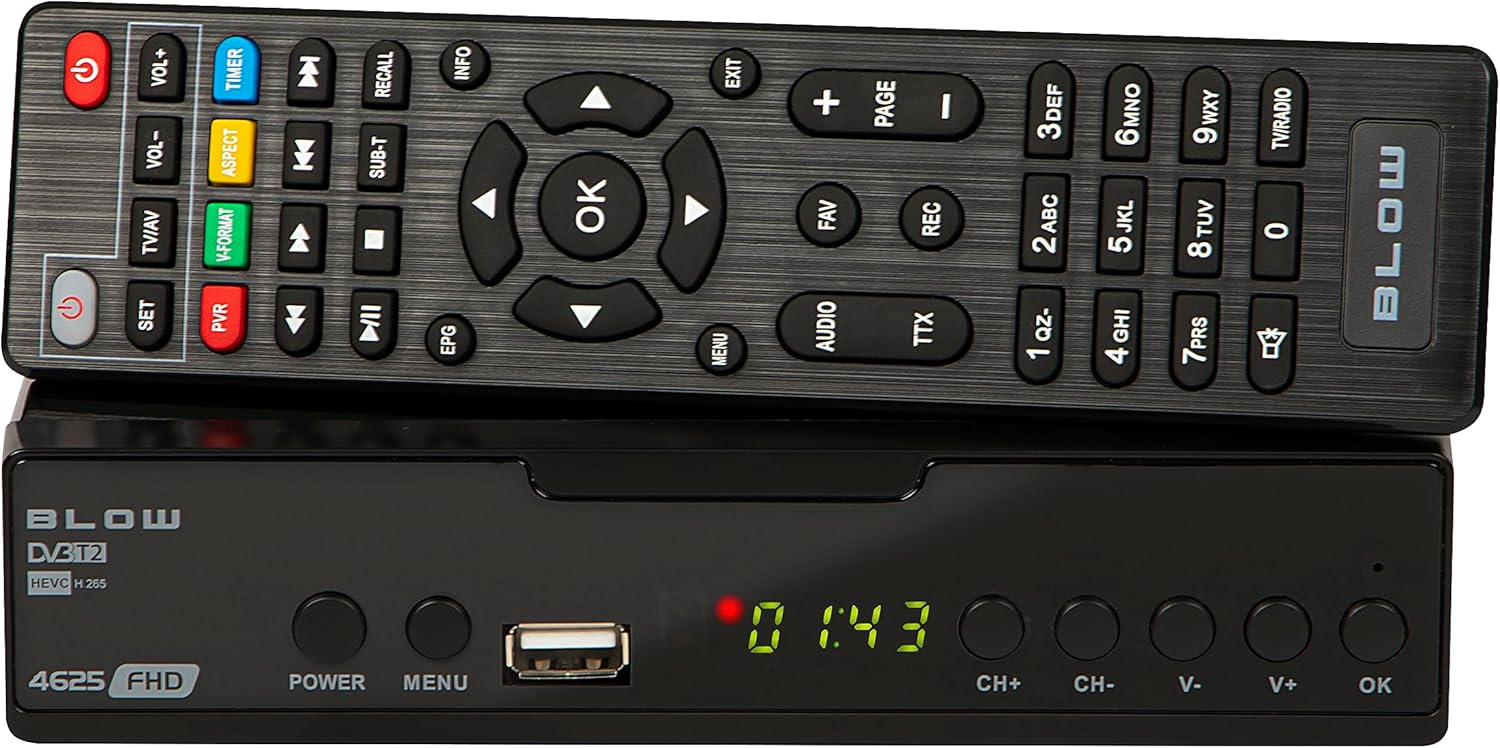
4.1. irudia: Aurrealdea view of the BLOW 4625FHD DVB-T2 Tuner with its remote control.
The front panel features a digital display, a USB port for media playback and PVR functions, and essential control buttons:
- Pantaila: Shows channel number, time, or menu information.
- POTENTZIA: Turns the device on or off (standby).
- MENUA: Menu nagusira sartzen da.
- USB ataka: USB biltegiratze gailuak konektatzeko.
- CH+/CH-: Kanalak gora edo behera aldatzen ditu.
- V+/V-: Bolumena gora edo behera doitzen du.
- ADOS: Menuko hautaketak berresten ditu.
4.2. Atzeko panela

Image 4.2: Rear panel of the BLOW 4625FHD DVB-T2 Tuner, showing various input and output ports.
Atzeko panelak beharrezko konexio-ataka guztiak eskaintzen ditu:
- RF IN: Connects to your terrestrial antenna.
- RF OUT: For looping the antenna signal to another device (e.g., another TV or tuner).
- KOAXIALA: Audio irteera digitala.
- HDMI: High-Definition Multimedia Interface output for connecting to modern TVs.
- SCART: Analog video and audio output for connecting to older TVs.
- AC AC: Gailuaren energia-sarrera.
4.3. Urruneko kontrola
The remote control provides full functionality for operating the tuner. Familiarize yourself with its buttons for easy navigation and control.
- POTENTZIA: Sintonizadorea pizten/desaktibatu egiten du.
- VOL+/VOL-: Bolumena doitzen du.
- CH+/CH-: Kanalak aldatzen ditu.
- ADOS: Hautaketak berresten ditu.
- Nabigazio botoiak (Gora/Behera/Ezkerra/Eskuina): Menuetan nabigatzen du.
- MENUA: Menu nagusia irekitzen du.
- IRTEERA: Uneko menutik edo pantailatik irteten da.
- EPG: Programaren Gida Elektronikoa bistaratzen du.
- PVR: Accesses Personal Video Recorder functions.
- REC: Starts recording the current program.
- FAV: Accesses favorite channel list.
- Telebista/AV: Switches between TV and AV input modes on the tuner.
- V-FORMATOA: Changes video output format.
- AUDIOA: Selects audio track (if available).
- TTX: Teletext function.
- Zenbaki-botoiak (0-9): Zuzeneko kanal hautaketa.
5. Konfigurazioa
5.1. Connecting the Tuner
- Antena konexioa: Connect your terrestrial antenna cable to the RF IN port on the rear panel of the tuner.
- TV Connection (HDMI): For best picture quality, connect an HDMI cable from the HDMI port on the tuner to an available HDMI input on your television.
- TV Connection (SCART): If your TV does not have an HDMI input, connect a SCART cable from the SCART port on the tuner to the SCART input on your television.
- Potentzia-konexioa: Konektatu korronte egokitzaileari AC IN port on the tuner, then plug the adapter into a wall outlet.
5.2. First Time Installation and Channel Scan
- Turn on your television and select the correct input source (HDMI or SCART) corresponding to where you connected the tuner.
- Sakatu BOTEREA button on the tuner or remote control to turn on the device.
- The first time you power on the tuner, a "First Time Installation" wizard will appear. Follow the on-screen prompts.
- Select your preferred language, country, and other initial settings.
- Initiate the "Auto Scan" or "Channel Search" function. The tuner will automatically search for available DVB-T2 channels in your area. This process may take several minutes.
- Once the scan is complete, the tuner will save the channels and display the first available channel.
6. Funtzionamendua
6.1. Basic TV Viewing
- Kanalak aldatzea: Erabili CH + / CH- buttons on the remote or front panel, or enter the channel number directly using the number buttons.
- Bolumena doitzea: Erabili VOL + / VOL- urruneko botoiak.
- Ezkutatu: Sakatu Isildu button on the remote to mute/unmute audio.
- Information Bar: Sakatu INFO button on the remote to display current program information.
6.2. Electronic Program Guide (EPG)
Sakatu EPG button on the remote control to access the Electronic Program Guide. This displays program schedules for all available channels. Use the navigation buttons to browse through channels and programs. Press OK to view details or set a reminder/recording.
6.3. Multimedia erreprodukzioa (USB)
The BLOW 4625FHD supports media playback from a USB storage device. Insert a USB drive into the front USB port. Navigate to the "Multimedia" or "USB" section in the main menu to browse and play supported audio (MP3, WMA) and video files.
6.4. Personal Video Recorder (PVR)
To use the PVR function, connect a USB storage device (e.g., USB flash drive or external hard drive) to the USB port. The device must be formatted correctly (usually FAT32 or NTFS). You can record live TV programs by pressing the REC button on the remote. Scheduled recordings can be set via the EPG or the PVR menu.
- Berehalako grabaketa: While watching a program, press REC grabatzen hasteko. Sakatu GELDITU bukatzeko.
- Programatutako grabazioa: In the EPG, select a program and press OK, then choose the option to schedule a recording.
- Erreproduzitzeko grabazioak: Access recorded content through the PVR or Multimedia menu.
7. Mantentzea
- Garbiketa: Ensure the device is unplugged before cleaning. Use a soft, dry, lint-free cloth to wipe the exterior. Do not use abrasive cleaners, waxes, or solvents.
- Aireztapena: Regularly check that the ventilation slots are not obstructed by dust or debris.
- Software eguneraketak: Aldian-aldian egiaztatu fabrikatzailearen website for any available software updates. Follow the instructions provided with the update carefully.
8. Arazoak
| Arazoa | Balizko Kausa / Irtenbidea |
|---|---|
| Ez dago irudi edo soinurik |
|
| "Seinalerik ez" mezua |
|
| Urruneko kontrola ez dabil |
|
| Picture freezes or pixelates |
|
9. Zehaztapenak
| Eredua | BLOW 4625FHD (77-048) |
| Neurriak (L x W x H) | 9D x 9B x 2.5H cm |
| Pisua | 428 gramo |
| Konektibitatea | HDMI, USB, SCART, Coaxial, RF IN/OUT |
| Bideoaren irteeraren bereizmena | 1080p |
| Onartutako estandarrak | DVB-T2, H.265 (HEVC), H.264 |
| Maiztasun barrutia | VHF: 170-230MHz, UHF: 470-860MHz |
| Audio formatuak | MP3, WMA |
| Audio irteera modua | Estereoa, Inguratzailea |
| Elikatze Hornidura | 12 Volt, 43 Milliampere (Operating) |
| Erreserbako energia-kontsumoa | <0.5W |
| Erabilera gomendatua | Digital terrestrial TV viewgrabatzea eta grabatzea |
| Fabrikatzailea | Kolpea |
10. Bermea
The BLOW 4625FHD DVB-T2 H.265 Digital Terrestrial TV Tuner comes with a 2 urteko fabrikatzailearen bermea from the date of purchase. This warranty covers defects in materials and workmanship under normal use. It does not cover damage caused by misuse, accident, unauthorized modification, or external causes. Please retain your proof of purchase for warranty claims.
11. Laguntza
If you encounter any issues that cannot be resolved using the troubleshooting guide, or if you require further assistance, please contact your retailer or the manufacturer's customer support. Refer to the product packaging or the manufacturer's official webharremanetarako datuak lortzeko gunea.