
Vorago BSP-500-V2
Vorago BSP-500-V2 Bluetooth bozgorailuen erabiltzailearen eskuliburua
Eredua: BSP-500-V2
Marka: Vorago
1. Produktua amaitu daview
The Vorago BSP-500-V2 is a portable Bluetooth speaker designed for robust performance and durability. It features IPX5 water resistance, making it suitable for various environments, including outdoor adventures and parties. This manual provides detailed instructions for setting up, operating, and maintaining your speaker.
Ezaugarri nagusiak:
- True Wireless Stereo (TWS) Connectivity: Connect two BSP-500-V2 speakers for an immersive stereo sound experience.
- Bateriaren iraupen hedatua: Enjoy up to 7 hours of music playback at 70% volume, thanks to its 2000 mAh battery.
- USB C motako karga: Convenient and modern USB-C port for charging.
- Konektibitate polifazetikoa: Supports Bluetooth for wireless streaming and a 3.5mm auxiliary input for wired connections.
- IPX5 Uraren Erresistentzia: Protected against low-pressure water jets from any direction.
Paketearen edukia:
- Vorago BSP-500-V2 Bluetooth bozgorailua
- USB motako C kargatzeko kablea
- 3.5 mm-ko audio kablea
- Erabiltzailearen eskuliburua (dokumentu hau)
Produktuen diagrama:

1.1. irudia: Aurrealdea view of the Vorago BSP-500-V2 Bluetooth speaker, showcasing its mesh grille and central Vorago logo.

1.2. irudia: Angeludun view of the speaker, highlighting its robust, rectangular design and integrated carrying strap.

1.3. irudia: Goikoa view showing the control panel with power, volume down, play/pause, and volume up buttons.
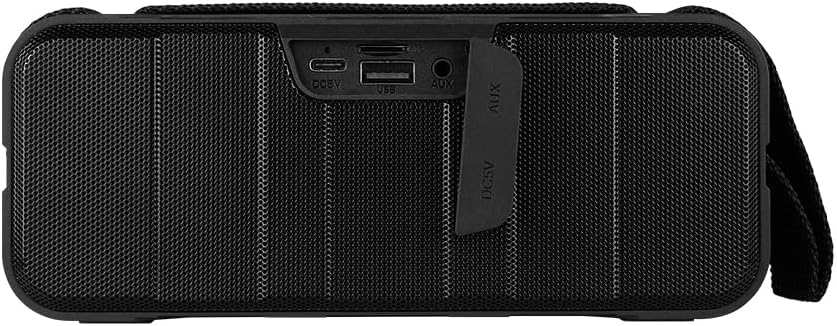
1.4. Irudia: Atzealdea view of the speaker, showing the protective flap covering the input ports.

Figure 1.5: Close-up of the input ports, including DC 5V (USB-C), USB-A, and AUX (3.5mm) inputs, protected by a rubber cover.
2. Segurtasun informazioa
- Ez jarri bozgorailua tenperatura altuen eraginpean (beroa edo hotza).
- Saihestu bozgorailua kolpe gogorrak erortzea edo jasaten.
- Keep the speaker away from direct sunlight and heat sources.
- Ez desmuntatu, konpondu edo aldatu bozgorailua zeuk. Horrek bermea baliogabetuko du.
- Ensure the port cover is securely closed when using the speaker near water to maintain IPX5 water resistance.
- Do not immerse the speaker in water. IPX5 rating protects against splashes and light rain, not submersion.
- Erabili emandako kargatzeko kablea edo ziurtatutako USB C motako kable bat soilik kargatzeko.
- Garbitu bozgorailua zapi leun eta lehor batekin. Ez erabili garbitzaile edo disolbatzaile urratzailerik.
3. Konfigurazioa
3.1 Bozgorailua kargatzea
- Open the protective rubber cover on the rear of the speaker to access the charging port.
- Connect the USB Type-C end of the charging cable to the speaker's DC 5V port.
- Konektatu USB kablearen beste muturra USB elikatze-egokitzaile batera (ez dago barne) edo ordenagailuaren USB ataka batera.
- Kargatzeko adierazlearen argia piztuko da kargatzen ari den bitartean eta itzali egingo da guztiz kargatzen denean.
- Once charging is complete, securely close the protective rubber cover to maintain water resistance.
3.2 Piztu/Itzaltzea
- Pizteko: Eduki sakatuta Pizteko botoia on the top panel for approximately 3 seconds until you hear an audible prompt.
- Itzaltzeko: Eduki sakatuta Pizteko botoia for approximately 3 seconds until you hear an audible prompt.
3.3 Bluetooth parekatzea
- Ensure the speaker is powered on. It will automatically enter Bluetooth pairing mode, indicated by a flashing LED light.
- Zure gailuan (smartphone-a, tableta, ordenagailu eramangarria), gaitu Bluetooth-a eta bilatu eskuragarri dauden gailuak.
- Select "BSP-500-V2" from the list of found devices.
- Behin parekatuta, bozgorailuak baieztapen entzungarri bat igorriko du, eta LED argia keinuka utziko du eta finko mantenduko da.
- Bozgorailuak automatikoki konektatuko da azken parekatutako gailura piztean, gailua irismen-eremuan badago eta Bluetooth-a gaituta badago.
3.4 Benetako Haririk gabeko Estereoa (TWS) Parekatzea
TWS allows you to connect two BSP-500-V2 speakers together for a true stereo sound experience.
- Ensure both BSP-500-V2 speakers are powered on and not connected to any other Bluetooth device.
- On one of the speakers (this will be the primary speaker), double-press the Erreproduzitu/Pausatu botoiaBozgorailuak TWS parekatze moduan sartuko da.
- The two speakers will automatically search for and connect to each other. You will hear an audible confirmation once they are successfully paired.
- Once TWS is established, connect your device to the primary speaker via Bluetooth as described in Section 3.3.
- To disconnect TWS, double-press the Erreproduzitu/Pausatu botoia bozgorailu bietan.
3.5 Konexio osagarria (AUX).
For devices without Bluetooth, you can use the 3.5mm audio cable.
- Open the protective rubber cover on the rear of the speaker.
- Connect one end of the 3.5mm audio cable to the speaker's AUX port.
- Connect the other end of the cable to the audio output jack of your device.
- Bozgorailua automatikoki aldatuko da AUX modura.
- Once disconnected, securely close the protective rubber cover.
4. Funtzionamendu-argibideak
4.1 Botoien funtzioak:
| Botoia | Funtzioa (Sakatu labur) | Funtzioa (sakatu luzea) |
|---|---|---|
| Pizteko botoia | N/A | Piztu/Itzali |
| Bolumena jaisteko botoia | Bolumena gutxitu | Aurreko Pista |
| Erreproduzitu/Pausatu botoia | Musika erreproduzitu/pausatu, deia erantzun/amaitu | Reject Call, Double-press for TWS Pairing |
| Bolumena igotzeko botoia | Bolumena handitu | Hurrengo Pista |
5. Mantentzea
- Garbiketa: Use a soft, dry, lint-free cloth to clean the speaker's surface. For stubborn dirt, slightly dampGarbitu zapiarekin urarekin. Ez erabili produktu kimiko gogorrik, garbiketa-disolbatzailerik edo detergente sendorik.
- Urarekiko erresistentzia zaintzea: Always ensure the rubber port cover on the back of the speaker is fully and securely sealed when using the speaker outdoors or near water. This maintains its IPX5 water resistance. After exposure to water, wipe the speaker dry before opening the port cover for charging or auxiliary connections.
- Biltegiratzea: When not in use for extended periods, store the speaker in a cool, dry place, away from direct sunlight and extreme temperatures. It is recommended to charge the speaker fully before storing and to recharge it every few months to maintain battery health.
- Bateria zaintzea: To prolong battery life, avoid fully discharging the battery frequently. Charge the speaker when the low battery indicator is active.
6. Arazoak
| Arazoa | Kausa posiblea | Irtenbidea |
|---|---|---|
| Bozgorailuak ez du pizten. | Bateria baxua. | Charge the speaker fully using the provided USB Type-C cable. |
| Ezin da Bluetooth bidez parekatu. | Speaker is not in pairing mode; Device's Bluetooth is off; Speaker is already connected to another device; Device is too far from speaker. | Ensure speaker is powered on and flashing (pairing mode). Turn on Bluetooth on your device. Disconnect from other devices. Move device closer to speaker (within 10 meters). |
| Soinurik ez edo bolumen baxua. | Bolumena baxuegia bozgorailuan edo gailuan; Sarrera modu okerra; Bozgorailua ez dago konektatuta. | Increase volume on both speaker and connected device. Ensure correct mode (Bluetooth or AUX) is active. Verify successful Bluetooth pairing or AUX cable connection. |
| Soinu distortsioa. | Bolumena altuegia; Gailua bozgorailutik urrunegi; Interferentzia. | Reduce volume on speaker and/or device. Move device closer to speaker. Avoid obstacles between speaker and device. |
| TWS parekatzeak huts egin du. | Speakers are already paired to a device; Speakers are too far apart. | Ensure both speakers are disconnected from any Bluetooth devices. Place speakers close to each other during TWS pairing. |
7. Zehaztapenak
| Ezaugarri | Xehetasuna |
|---|---|
| Ereduaren izena | BSP-500-V2 |
| Hizlari mota | Multimedia |
| Ezaugarri Berezia | Bluetootha |
| Erabilera gomendatua | For music players |
| Gailu bateragarriak | Ordenagailu eramangarria, MP3 erreproduzitzailea, telefono adimenduna, tableta |
| Kontrolagailu mota | Botoia |
| Inguruko soinu-kanalaren konfigurazioa | 5.0 |
| Bateriaren iraupena | 7 ordu |
| Osagaiak barne | Hizlaria |
| Produktuaren neurriak | 5D x 15W x 18H zentimetro |
| Produktuaren pisua | 1 Kilogramo |
| Iragazgaitza | Bai (IPX5) |
| Bateria Edukiera | 2000 mAh |
| Ampbiziagoa Mota | Aktiboa |
| Energia iturria | Bateria |
| Maiztasun Erantzuna | 180 Hz |
| Konektibitate Teknologia | Bluetootha |
| Audio irteera modua | Estereoa |
| Muntatze Mota | Mahai gaineko muntaia |
8. Bermea eta Laguntza
The Vorago BSP-500-V2 Bluetooth Speaker comes with a limited warranty. Please refer to the warranty card included with your product for specific terms and conditions, or visit the official Vorago webgunea xehetasun gehiago lortzeko.
For technical support, troubleshooting assistance, or warranty claims, please contact Vorago customer service through their official channels. You can find more information and contact details on the Vorago markako denda Amazonen edo haien ofiziala webgunea.
Gorde erosketaren egiaztagiria bermearen ondorioetarako.
Ask a question about this manual
Ask about setup, troubleshooting, compatibility, parts, safety, or missing instructions. Manuals+ will review the question and use this page’s manual context to help answer it.