
1. Produktua amaitu daview
The ZEAPON AXIS 80 Pro is a multi-axis motorized camera slider designed for professional photography and videography. It features a true dual-axis system for follow focus and surround shooting without complex tuning, an intuitive LCD central control screen, and robust carbon fiber construction.

Figure 1.1: ZEAPON AXIS 80 Pro Multi-axis Motorized Camera Slider with accessories.
2. Paketearen edukia
Egiaztatu osagai guztiak paketean daudela:

Figure 2.1: Included components in the ZEAPON AXIS 80 Pro package.
- AXIS 80 Pro Motorized Camera Slider
- Integrated Motorized Pan/Tilt Head
- Laguntza Hankak
- Eramateko zorroa
- Erabiltzailearen eskuliburua
3. Konfigurazioa
3.1 Mounting the Slider
The AXIS 80 Pro slider can be mounted on a single tripod or two tripods for enhanced stability, especially with heavier loads or extended travel distances. It features multiple 1/4" and 3/8" spring screws for versatile mounting options.

Figure 3.1: Slider mounted on two tripods.
3.2 Gailua piztea
The slider is powered by an NPF-550QC battery (not included). Ensure the battery is securely inserted into the designated slot on the slider's control unit.

Figure 3.2: NPF-550QC battery insertion.
3.3 Upgrading to Three-Axis Setup
The pan head of the slider includes a quick-mount interface, allowing compatibility with the PONS motorized pan head and PONS Tilt Arm Kit for a three-axis setup.

Figure 3.3: Key features and upgrade points.
4. Funtzionamendu-argibideak
4.1 LCD Central Control Screen
Most slider functions, including adding new devices, can be managed directly through the LCD central control screen. This allows for quick operation using buttons and on-screen options, even without a smartphone app.
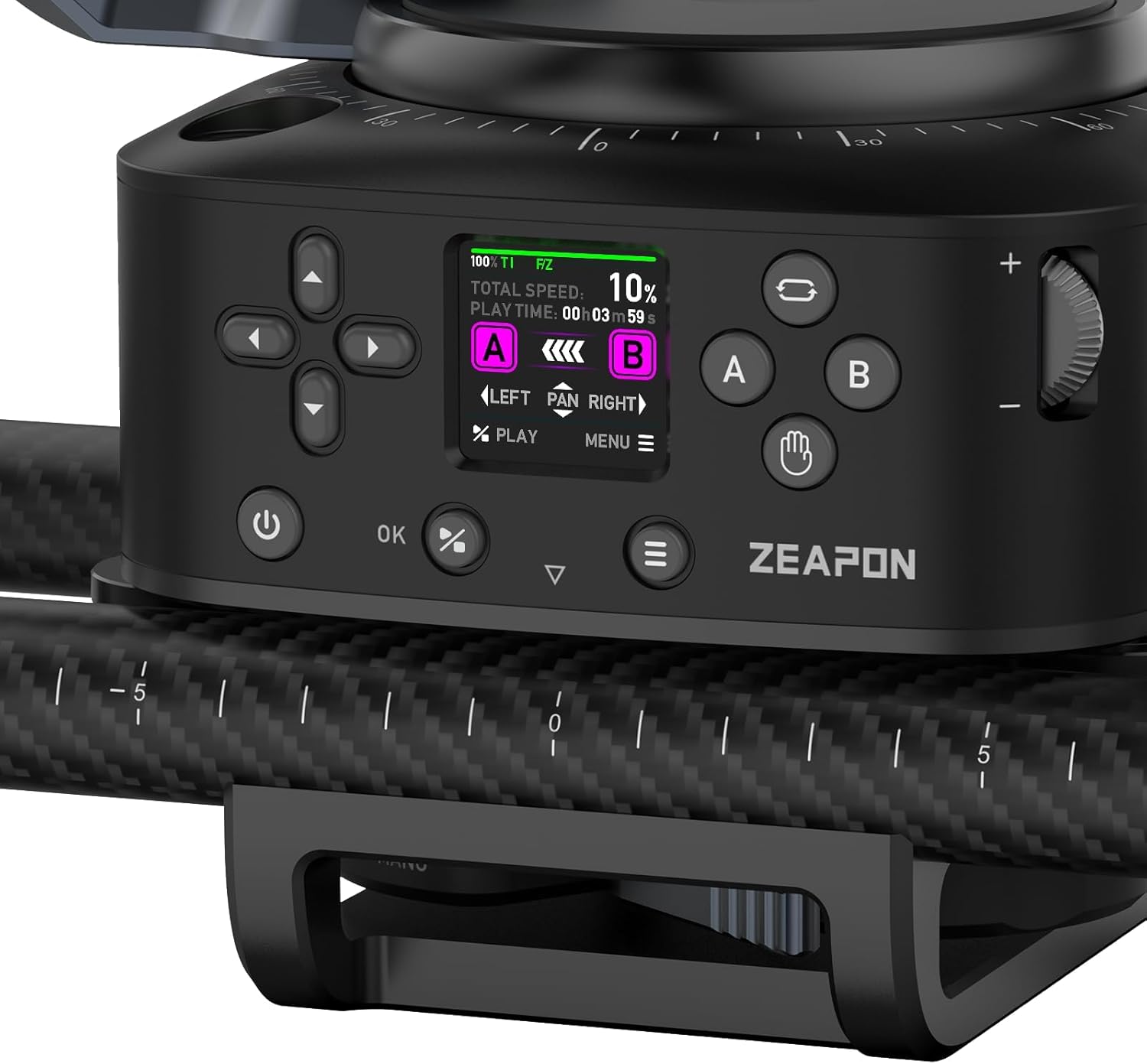
Figure 4.1: LCD Central Control Interface.
4.2 Setting Waypoints and Speed
The AXIS multi-axis series features an integrated motorized pan/tilt head that automatically follows focus tracking. Simply set the start (A) and end (B) points for your desired movement. Adjust the total speed and play time using the control dial or the app.
4.3 Seamless Manual Control
Errelearen araberaasing the lock buckle, you can instantly switch the slider to manual mode. This completely separates the belt from the motor, allowing for smooth, unhindered manual movement.
4.4 Aplikazioen kontrola
The slider can also be controlled via a dedicated smartphone app, offering comprehensive control over all parameters and modes, including video, time-lapse, macro, panorama, and stop-motion. This is particularly useful when the slider is positioned out of reach or for precise adjustments.
4.5 Produktuaren bideo ofiziala
4.1 bideoa: Aurrerapen azkar batview of the AXIS Slider's features and operation.
5. Ezaugarriak eta gaitasunak
- True Dual Axis: The integrated motorized pan/tilt head allows for automatic follow focus tracking and surround shooting, eliminating the need for manual tuning regardless of slider or subject placement.
- 11-Layer Full Carbon Fiber Construction: The carbon fiber tubes are lightweight, high-strength, and offer superior deformation resistance and stability. The tubes are polished five times for smooth and stable operation.
- Karga-ahalmen handia: The slider supports a maximum vertical load of 3.5kg and a maximum horizontal load of 12kg, accommodating heavy-duty camera equipment. It offers a 23-inch lens travel distance.
6. Mantentzea
To ensure the longevity and optimal performance of your ZEAPON AXIS 80 Pro slider, follow these maintenance guidelines:
- Keep the slider rails clean and free from dust and debris. Use a soft, dry cloth for cleaning.
- Avoid exposing the slider to extreme temperatures or moisture.
- Aldian-aldian egiaztatu torloju eta konexio guztiak ondo lotuta daudela ziurtatzeko.
- Store the slider in its dedicated carrying case when not in use to protect it from damage.
7. Arazoak
If you encounter any issues with your ZEAPON AXIS 80 Pro slider, refer to the following common troubleshooting steps:
- Slider not moving: Check battery level and ensure it is properly inserted. Verify that the slider is not in manual lock mode.
- Unstable movement: Ensure the slider is securely mounted on a stable surface or tripod(s). Check that all support legs are properly extended and locked.
- Aplikazioen konexio arazoak: Ensure Bluetooth is enabled on your smartphone and the slider. Restart both the app and the slider.
- Zarata ezohikoa funtzionamenduan zehar: Check for any obstructions on the rails. Ensure the slider is clean and free of debris.
For further assistance, please contact ZEAPON customer support.
8. Zehaztapenak
| Ezaugarri | Zehaztapena |
|---|---|
| Modelo zenbakia | ARDATZA |
| Marka | ZEAPON |
| Paketearen neurriak | 35.25 x 9 x 8.4 hazbete |
| Elementuaren pisua | 18 kilo |
| Max Horizontal Load | 12 kg |
| Max Vertical Load | 3.5 kg |
| Lens Travel Distance | 23 hazbetekoa |
| Tolestutako Tamaina | 80cm x 15cm x 15cm (l x w x h) |
| Gailu bateragarriak | Camcorder, Camera |
| Kolorea | Beltza |
9. Bermea eta Laguntza
For warranty information, product registration, or technical support, please visit the official ZEAPON website or refer to the warranty card included in your package. Keep your purchase receipt as proof of purchase.
Sareko baliabideak:


