
1. Sarrera
This manual provides essential information for the safe and efficient use of your TCL 32L5AG 32-inch Full HD Smart Google TV. Please read these instructions thoroughly before operating the device and retain them for future reference. This television combines a Full HD display with Google TV functionality, offering a wide range of entertainment options and smart features.
2. Segurtasun informazioa
Always adhere to the following safety precautions to prevent electric shock, fire, or damage to the product:
- Ez jarri telebista euri edo hezetasunera.
- Ziurtatu aireztapen egokia; ez blokeatu aireztapen-irekidurak.
- Erabili telebistarekin batera datorren elikatze-kablea soilik.
- Ez ireki telebistaren c.asing; bidali mantentze-lan guztiak langile kualifikatuen esku.
- Mantendu telebista eguzki-argitik, bero-iturrietatik eta eremu magnetiko indartsuetatik urrun.
- Place the TV on a stable, level surface or mount it securely to a wall using a VESA-compliant bracket.
3. Produktua amaitu daview
The TCL 32L5AG is a 32-inch Full HD Smart Google TV designed for an immersive viewing experience. It features a sleek, bezel-less design and integrates advanced image processing technologies.

Irudia: Aurrealdea view of the TCL 32L5AG 32-inch Full HD Smart Google TV.
4. Konfigurazioa
4.1 Paketatzea
Kontu handiz atera telebista eta osagarri guztiak paketetik. Ziurtatu osagai guztiak daudela:
- TCL 32L5AG TV unit
- Urruneko kontrola
- Elikatze-kablea
- TV stand components and screws
- Erabiltzailearen eskuliburua (dokumentu hau)
4.2 Standaren instalazioa
Telebistako euskarria instalatzeko:
- Jarri telebista aurpegia behera gainazal bigun eta lau batean, pantaila kaltetu ez dadin.
- Lerrokatu euskarriaren oinarriak telebistaren behealdeko dagokien zirrikituekin.
- Lotu euskarriak emandako torlojuak erabiliz.

Image: Diagram showing the TV dimensions and how the stand attaches to the base of the television.
4.3 Konektatzeko kableak
Connect necessary cables to the TV's rear ports:
- Potentzia: Konektatu elikatze-kablea telebistara eta hormako entxufe batera.
- Antena: Connect your terrestrial or satellite antenna cable to the ANTENNA INPUT port.
- HDMI: For external devices like Blu-ray players or game consoles, use the HDMI INPUT 1 or 2 ports.
- LAN: Kable bidezko internet konexioa lortzeko, konektatu Ethernet kable bat LAN atakara.
- USBa: For external storage (e.g., HDD for recording), use the USB port.
- Audio-irteera digital optikoa: Soinu-barra edo etxeko zinema-sistema batera konektatzeko.
- Aurikularretarako irteera: Entzungailuak konektatzeko.
- Bideoaren sarrera: Bideo konposatua erabiltzen duten gailu zaharretarako.
- miniB-CAS Card Slot: Insert your miniB-CAS card for digital broadcast reception (required for digital broadcasting in Japan).
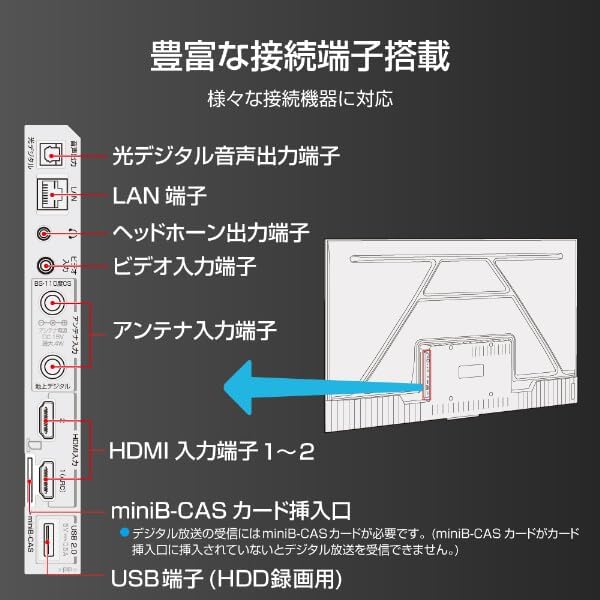
Image: Diagram illustrating the various input and output ports on the back of the TCL 32L5AG TV, including HDMI, USB, LAN, antenna, and audio outputs.
4.4 Hasierako konfigurazioa
After connecting all cables and powering on the TV for the first time, follow the on-screen instructions to complete the initial setup, which includes:
- Hizkuntza hautatzea.
- Sare konexioa (Wi-Fi edo kable bidezko LAN).
- Google account login for Google TV features.
- Channel scanning for broadcast TV.
5. Funtzionamendu-argibideak
5.1 Telebistaren oinarrizko funtzionamendua
- Piztu/Itzali: Sakatu urrutiko aginteko pizteko botoia.
- Sarrera hautatzea: Use the 'Input' button on the remote to switch between HDMI, TV, and other sources.
- Bolumen kontrola: Erabili 'Bolumena igo/jaitsi' botoiak.
- Kanal aldaketa: Use the 'Channel Up/Down' buttons for broadcast TV.
5.2 Google TV-ren ezaugarriak
Your TCL 32L5AG comes with Google TV, providing a personalized and integrated entertainment experience.
- Edukien arakatzea: The home screen displays recommended content based on your viewing history and preferences from various streaming services.
- Voice Search (OK Google): Press the Google Assistant button on your remote and speak into the microphone to search for movies, shows, or control your TV.
- Streaming aplikazioak: Access popular services like Netflix, YouTube, Amazon Prime Video, Disney+, Hulu, and more directly from the TV.

Image: Screenshot of the Google TV home screen displaying various streaming applications and content recommendations.
5.3 Chromecast integratua
The TV includes Chromecast built-in, allowing you to cast content from your smartphone, tablet, or computer directly to the TV screen.
- Ziurtatu zure gailu mugikorra eta telebista Wi-Fi sare berera konektatuta daudela.
- Open a Chromecast-enabled app (e.g., YouTube, Netflix) on your mobile device.
- Sakatu Igorri ikonoa (
 ) aplikazioaren barruan.
 - Select your TCL TV from the list of devices to start casting.

Image: A smartphone displaying a video, with an arrow indicating it is casting to the larger TCL TV screen.
6. Ezaugarriak
6.1 Algo Engine Lite
The Algo Engine Lite utilizes an advanced image analysis algorithm to enhance picture quality for both broadcast TV and streaming services, delivering a high-quality visual experience.

Image: A close-up of a microchip labeled "Algo Engine Lite" on a circuit board, representing the TV's image processing unit.
6.1.1 Detail Restoration
The Algo Engine effectively suppresses noise around text and edges, as well as wave-like noise in flat image areas. It also intelligently upscales HD and 2K images to 4K resolution, reproducing high-definition visuals.

Image: A split image showing a cityscape. The 'Before' side appears less sharp with more noise, while the 'After' side, processed by Algo Engine, shows improved detail and reduced noise.
6.1.2 Superior Contrast (Micro Dimming)
Equipped with a "Micro Dimming" function, the Algo Engine analyzes image information in detail for each zone. By clearly distinguishing brightness and darkness down to fine details, it renders landscapes with a more realistic sense of depth.

Image: A split image of a night city scene. The 'Without Micro Dimming' side shows less defined lights and shadows, while the 'With Micro Dimming' side exhibits enhanced contrast and clearer details in both bright and dark areas.
6.1.3 Precise Color Management
With 3D color management, the Algo Engine suppresses color gamut loss during color transitions, accurately reproducing tones and colors from dark to bright areas.

Image: A split image showing various food bowls. The 'Before' side has muted or inaccurate colors, while the 'After' side, processed by Algo Engine, displays vibrant and accurate colors with a wider color spectrum indicated by a gradient bar.
6.1.4 Enhanced HDR Expression
The Algo Engine analyzes High Dynamic Range (HDR) images without omission, flexibly adapting to a wide range of brightness levels. It faithfully reproduces the bright and dark areas of the image, supporting HDR10 and HLG formats (1080p only).

Image: A split image of a sunset landscape. The 'Before' side shows less dynamic range, while the 'After' side, processed by Algo Engine, reveals richer colors, brighter highlights, and deeper shadows, enhancing the HDR effect.
6.2 Full HD LCD Display
The TV features a Full HD LCD panel with direct-lit LED backlighting, providing bright and high-quality images across the entire screen. The panel resolution is twice that of standard HD, allowing for detailed visuals and rich content expression.

Image: A split image comparing an HD display to a Full HD display, showing the difference in pixel density and clarity, particularly visible in magnified sections of the image.
6.3 Dolby Audio
Experience clear and powerful sound with Dolby Audio support, enhancing your overall entertainment experience.

Image: A visual representation of sound waves emanating from a waterfall, illustrating the immersive audio experience provided by Dolby Audio.
6.4 Bezel-less Design
The TV features a metal bezel-less frame, maximizing the screen area and enhancing the aesthetic presence in your living space.

Irudia: Hiru hurbiletik views of the TCL TV, highlighting its thin metal frame and minimal bezels, showcasing the bezel-less design from different angles.
7. Zehaztapenak
| Ezaugarri | Deskribapena |
|---|---|
| Marka | TCL |
| Ereduaren izena | 32L5AG |
| Bistaratzeko Teknologia | LCDa |
| Ebazpena | Full HD (1920 x 1080) |
| Freskatze tasa | 120 Hz |
| Aspektu-erlazioa | 1.78:1 |
| Kontraste-erlazioa | 4000:1 |
| HDR euskarria | HDR10 |
| Motion Enhancement Technology | Algo Engine Lite |
| Image Quality Enhancement Technology | Algo Engine |
| Konektibitate Teknologia | Bluetooth konexioa, Wi-Fi |
| Recommended Internet Services | YouTube, Netflix |
| Audio Sarrera | RCA, Bluetootha |
| Seinalearen formatua | Composite, HDMI |
| HDMI atakak | 2 |
| USB 3.0 Portuak | 1 |
| Produktuaren neurriak (L x W x H) | 18 x 71.6 x 46.8 cm |
| Produktuaren pisua | 5 kg |
| Hizlariaren Ezaugarriak | 10W bozgorailuak |
| Speaker Channel Configuration | 2.0 |
| Wattage | 65 W |
| Energia-kontsumoa | 64 kWh/urtean |
| Kontrol-metodoa | Urrunekoa |
| Bideoa kodetzeko formatua | H.264, H.265 (HEVC) |
| Release Year / Model Year | 2021 |
| VESA muntaketa estandarra | 100x100mm |
8. Mantentzea
Telebistaren iraupena eta errendimendu optimoa bermatzeko, jarraitu mantentze-jarraibide hauek:
- Pantaila garbitzea: Garbitu pantaila astiro-astiro zapi leun eta pelusik gabeko batekin. Orba egoskorrak izanez gero, garbitu apur batampGarbitu zapia urarekin edo pantaila-garbitzaile espezializatu batekin. Ez ihinztatu likidoa zuzenean pantailan.
- C garbiketaasing: Erabili zapi leun eta lehor bat telebista garbitzeko.asing. Saihestu garbitzaile edo disolbatzaile urratzaileak.
- Aireztapena: Ensure the ventilation openings on the back of the TV are not blocked by dust or objects. Regularly clean any dust accumulation.
- Elikatze kablea: Periodically check the power cord for any damage. If damaged, contact customer support for a replacement.
9. Arazoak
Telebistarekin arazoak badituzu, jo ezazu honako arazo eta irtenbide ohikoenei:
| Arazoa | Irtenbide posiblea |
|---|---|
| Botererik ez | Egiaztatu elikatze-kablea telebistara eta hormako entxufean ondo konektatuta dagoen. Saiatu beste entxufe batekin. |
| Ez dago irudirik, baina soinua badago | Ziurtatu sarrera-iturri zuzena hautatuta dagoela. Egiaztatu kanpoko gailuetarako kable-konexioak. |
| Soinurik ez, baina irudia badago | Check volume level and mute settings. Ensure external audio systems are correctly connected and powered on. |
| Urruneko kontrola ez dabil | Aldatu bateriak. Ziurtatu ez dagoela oztoporik urrutiko agintearen eta telebistaren IR sentsorearen artean. |
| Ezin da wifira konektatu | Egiaztatu zure bideratzailea eta modema. Idatzi berriro Wi-Fi pasahitza. Saiatu telebista eta bideratzailea berrabiarazten. |
| Google TV features not working | Ensure you are logged into your Google account and have an active internet connection. |
Irtenbide hauek probatu ondoren arazoa konpontzen ez bada, jarri harremanetan bezeroarentzako arreta-zerbitzuarekin.
10. Bermea eta Laguntza
Your TCL 32L5AG TV comes with a limited warranty. Please refer to the warranty card included in your product packaging for specific terms and conditions. For technical support, service, or warranty claims, please contact TCL customer service through their official webgunea edo bermearen dokumentazioan emandako harremanetarako informazioa.
For the latest information and support, visit the official TCL webgunea: www.tcl.com