
1. Sarrera
This manual provides detailed instructions for the setup, operation, and maintenance of your boAt Aavante Bar 490 Bluetooth Soundbar. Please read this manual thoroughly before using the product to ensure proper functionality and to maximize your audio experience.

Image 1.1: The boAt Aavante Bar 490 Bluetooth Soundbar in Classic Black.
2. Paketearen edukia
Egiaztatu behean zerrendatutako elementu guztiak zure paketean sartuta daudela:
- itsasontzia Aavante Bar 490 Soundbar-en
- Kargatzeko kablea
- Erabiltzailearen eskuliburua (dokumentu hau)
- Berme Txartela
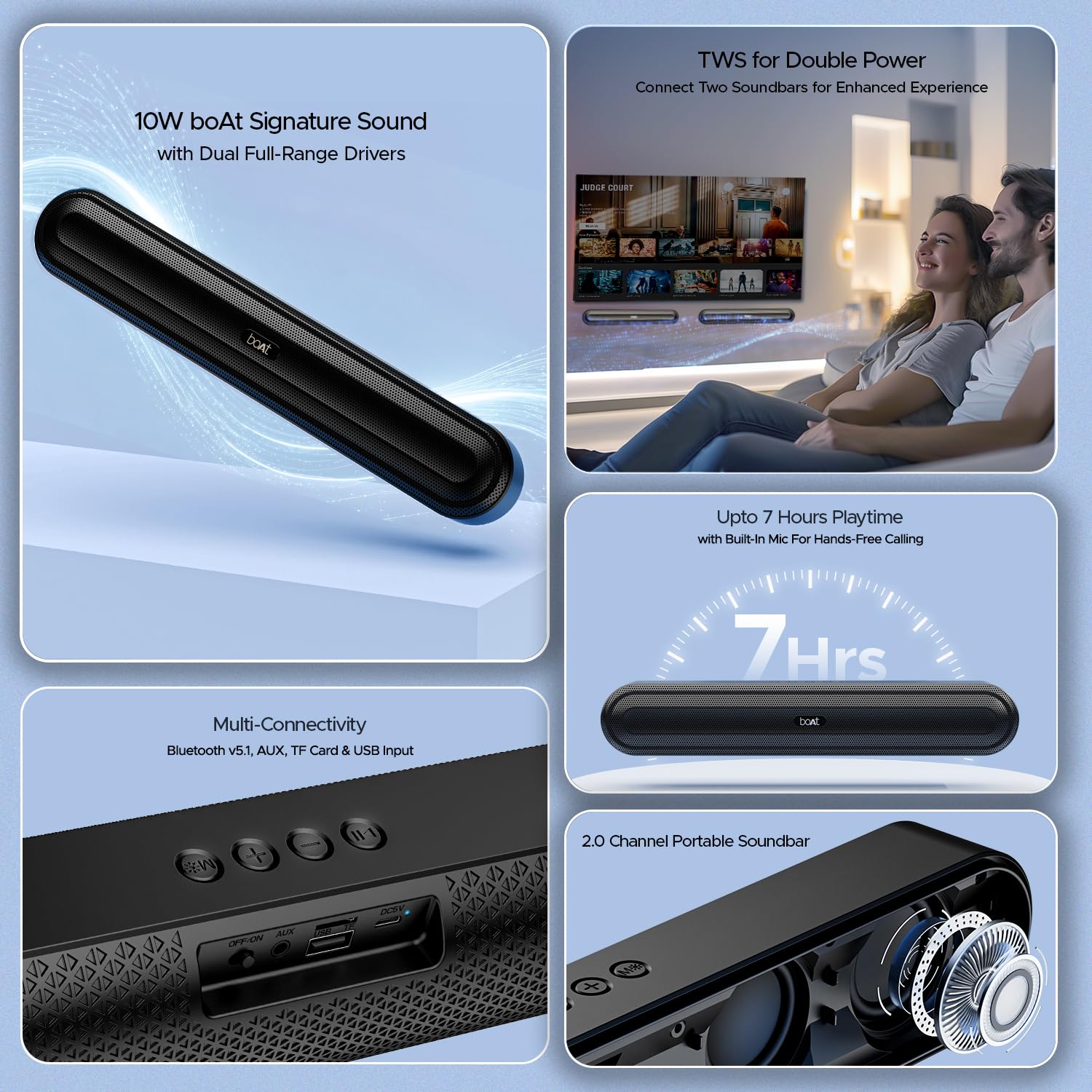
2.1. irudia: Amaituview of the boAt Aavante Bar 490 and its key features, including package contents.
3. Produktua amaitu daview
3.1. Kontrolak eta atakak
Familiarize yourself with the control buttons and connectivity ports on your Aavante Bar 490.

3.1 irudia: Gertuko planoa view of the control buttons and multi-connectivity ports (Bluetooth v5.1, AUX, TF Card, USB Input) on the soundbar.
- Pizteko botoia: Press and hold to power on/off. Short press to switch modes.
- Bolumena jaitsi (-): Bolumena gutxitu.
- Bolumena igo (+): Bolumena handitu.
- Erreproduzitu/Pausatu botoia: Play or pause music. Answer/end calls.
- Modu botoia (M): Switch between input modes (Bluetooth, AUX, USB, TF Card).
- OFF/ON etengailua: Etengailu nagusia.
- AUX ataka: Kable bidezko audio konexiorako.
- USB ataka: USB unitate batetik erreproduzitzeko.
- TF txartelaren zirrikitua: TF txartelaren erreprodukziorako.
- DC5V ataka: Gailua kargatzeko.
4. Konfigurazioa
4.1. Charging the Soundbar
Before first use, fully charge the soundbar. Connect the provided charging cable to the DC5V port on the soundbar and the other end to a compatible USB power adapter (not included). The LED indicator will show charging status and turn off when fully charged. A full charge provides up to 7 hours of playback.

Image 4.1: The boAt Aavante Bar 490 highlighting its up to 7 hours of playtime on a single charge.
4.2. Piztu/Itzali
- Ensure the OFF/ON switch at the back is in the "ON" position.
- Press and hold the Power button on the top panel for 3 seconds to power on the soundbar.
- To power off, press and hold the Power button again for 3 seconds.
4.3. Bluetooth parekatzea
- Power on the soundbar. It will automatically enter Bluetooth pairing mode (indicated by a flashing LED).
- Zure gailuan (smartphone-an, tabletan, etab.), gaitu Bluetooth-a eta bilatu eskuragarri dauden gailuak.
- Select "Aavante Bar 490" from the list.
- Behin parekatuta, LED adierazlea urdin finko jarriko da eta baieztapen-tonu bat entzungo duzu.
The soundbar supports Bluetooth v5.1 for stable and efficient wireless connection up to 10 meters.
4.4. TWS (benetako haririk gabeko estereoa) parekatzea
For an enhanced stereo experience, you can pair two Aavante Bar 490 soundbars together.
- Ensure both Aavante Bar 490 units are powered on and in Bluetooth pairing mode (not yet connected to any device).
- On one of the soundbars, double-press the Mode button (M). It will search for the other unit.
- Once successfully paired, you will hear a confirmation tone, and the LED indicators on both units will synchronize.
- Now, connect your device to one of the paired soundbars via Bluetooth as described in Section 4.3. Both soundbars will play audio in stereo.

Image 4.2: Illustration of two boAt Aavante Bar 490 soundbars connected via TWS for an enhanced audio experience.
4.5. Other Connectivity Modes
Press the Mode button (M) to cycle through the following input options:
- AUX modua: Connect an audio device using a 3.5mm AUX cable to the AUX port.
- USB modua: Insert a USB flash drive into the USB port. The soundbar will automatically play audio files.
- TF txartela modua: Insert a TF (microSD) card into the TF card slot. The soundbar will automatically play audio files.
5. Funtzionamendu-argibideak
5.1. Musika erreproduzitzea
- Erreproduzitu/Pausatu: Sakatu labur Erreproduzitu/Pausatu botoia.
- Bolumenaren doikuntza: Sakatu labur Bolumena igotzeko (+) edo Bolumena jaisteko (-) botoiak.
- Hurrengo ibilbidea: Sakatu luze bolumena igotzeko (+) botoia.
- Aurreko pista: Sakatu luze Bolumena Jaisteko (-) botoia.
5.2. Esku libreko deiak
When connected via Bluetooth, the built-in microphone allows for hands-free calls.
- Erantzun deia: Sakatu labur Erreproduzitu/Pausatu botoia.
- Amaitu deia: Sakatu labur Erreproduzitu/Pausatu botoia dei batean zehar.
- Deia baztertu: Luze sakatu Erreproduzitu/Pausatu botoia.
6. Mantentzea
- Keep the soundbar away from water, moisture, and extreme temperatures.
- Garbitu gailua zapi leun eta lehor batekin. Ez erabili garbitzaile edo disolbatzaile urratzailerik.
- Avoid dropping or subjecting the soundbar to strong impacts.
- Gorde leku fresko eta lehor batean denbora luzez erabiltzen ez duzunean.
7. Arazoak
| Arazoa | Kausa posiblea | Irtenbidea |
|---|---|---|
| Soundbar does not power on. | Low battery; OFF/ON switch is off. | Charge the soundbar; ensure OFF/ON switch is in the "ON" position. |
| Ezin da Bluetooth bidez parekatu. | Soundbar not in pairing mode; device Bluetooth is off; too far from device. | Ensure soundbar is in pairing mode; enable Bluetooth on your device; move closer to the soundbar (within 10m). |
| Soinurik ez. | Bolumena baxuegia; sarrera modu okerra; kablea ez dago behar bezala konektatuta. | Increase volume; switch to correct input mode (Bluetooth, AUX, USB, TF); check cable connections. |
| TWS parekatzeak huts egin du. | One or both units already connected to a device; units too far apart. | Disconnect both units from any Bluetooth devices; ensure they are close to each other during TWS pairing. |
8. Zehaztapenak
- Ereduaren izena: Aavante taberna 490
- Hizlari mota: Soinu barra
- Audio irteera: 2.0 Kanala
- Irteera potentzia: 10W RMS
- Gidariak: Dual Full-Range Drivers
- Bluetooth bertsioa: v5.1
- Bluetooth barrutia: Gehienez 10 metro
- Konektibitatea: Bluetooth, AUX, USB, TF txartela
- Bateriaren iraupena: Gehienez 7 ordu
- Bateria mota: Litio Polimeroa (1 x 12V barne)
- Mikrofono integratua: Yes (for hands-free calling)
- Kontrol-metodoa: Ukitu botoiak
- Produktuaren neurriak: 38.7D x 6.5Z x 5.5A zentimetro
- Elementuaren pisua: 650 gramo

Image 8.1: Dimensions of the boAt Aavante Bar 490 soundbar.
9. Bermea eta Laguntza
The boAt Aavante Bar 490 comes with a standard 1 urteko berme mugatua erosketa-datatik aurrera. Mesedez, kontsultatu barneko Berme Txartela baldintza eta zehaztapen zehatzak ikusteko.
Laguntza teknikoa, zerbitzua edo bermea erreklamazioetarako, jarri harremanetan boAt bezeroarentzako arreta-zerbitzuarekin:
- Posta elektronikoa: info@imaginemarketingindia.com
- Fabrikatzailea: Imagine Marketing Limited
- Helbidea: Unitate zk. 204 & 205, 2. solairua, D-wing & E-wing, Corporate Avenue, Andheri Ghatkopar Link Road, Mumbai, Maharashtra-400093, India
You can also download the boAt Hearables App for additional features and user guides. Scan the QR code below:

Image 9.1: QR code to download the boAt Hearables App for additional features and support.
10. Produktuen bideoak
10.1. bideoa: Aurrebista labur batview erakutsiasing the boAt Aavante Bar 490 Bluetooth Soundbar's features, including 10W RMS sound, dual full-range drivers, 7 hours playback, multi-connectivity, and hands-free calling. This video is provided by the seller.
10.2 bideoa: Laburbilduzview of the boAt Aavante Bar 490, highlighting its 10W RMS Signature Sound, dual drivers, and Bluetooth 5.1 connectivity. This video is provided by the seller.