
1. Sarrera
Thank you for choosing the ARROWMAX SES PRO Electric Precision Screwdriver. This cordless tool is designed for precision tasks, featuring smart motion control and a comprehensive set of 34 magnetic bits. It is ideal for electronics, laptops, glasses, and other delicate applications. This manual provides essential information for safe operation, setup, maintenance, and troubleshooting to ensure optimal performance and longevity of your device.
2. Segurtasun informazioa
Produktu hau erabili aurretik, irakurri arretaz segurtasun-abisu eta argibide guztiak. Argibide hauek ez jarraitzeak deskarga elektrikoak, sua eta/edo lesio larriak eragin ditzake.
- Mantendu lan-eremua garbi eta ondo argiztatuta. Eremu nahasiak edo ilunek istripuak gonbidatzen dituzte.
- Ez erabili tresna elektrikoak atmosfera lehergarrietan, adibidez, likido sukoiak, gasak edo hautsak daudenean. Erreminta elektrikoek hautsa edo keak piztu ditzaketen txinpartak sortzen dituzte.
- Mantendu haurrak eta ingurukoak urrun, erreminta elektrikoa erabiltzen duzun bitartean. Distrakzioek kontrola galtzea eragin dezakete.
- Saihestu ustekabean abiaraztea. Ziurtatu etengailua itzalita dagoela bateria-multzoari konektatu, tresna hartu edo eraman aurretik.
- Ez ezazu gainditzen. Mantendu oin eta oreka egokia uneoro. Horrek tresna elektrikoa hobeto kontrolatzen du ustekabeko egoeretan.
- Jantzi behar bezala. Ez erabili arropa solterik edo bitxirik. Mantendu zure ilea eta arropa zati mugikorretatik urrun. Arropa solteak, bitxiak edo ile luzea mugitzen diren zatietan harrapatzen dira.
- Erabili norberaren babeserako ekipoak. Erabili beti begi-babesak. Baldintza egokietarako erabiltzen diren babes-ekipoek, esaterako, hauts-maskara, irristagaitzak diren segurtasun-oinetakoak, txano gogorrak edo entzumen-babesak kalte pertsonalak murriztuko dituzte.
- Gorde inaktibo dauden erremintak haurren eskura eta ez utzi tresna elektrikoa edo argibide hauek ezagutzen ez dituzten pertsonei tresna elektrikoa erabiltzen.
- Mantendu tresna elektrikoak. Egiaztatu pieza mugikorren lerrokadura desegokia edo lotzea, piezak apurtuta dauden eta erreminta elektrikoaren funtzionamenduari eragin diezaiokeen beste edozein egoera. Hondatuta badago, konpon ezazu tresna elektrikoa erabili aurretik.
- Erabili erreminta elektrikoa, osagarriak eta erreminta bitsak argibide hauen arabera, lan baldintzak eta egin beharreko lana kontuan hartuta. Erreminta elektrikoa aurreikusitakoez bestelako eragiketetarako erabiltzeak egoera arriskutsu bat sor dezake.
- Kargatu fabrikatzaileak zehaztutako kargagailuarekin soilik. Bateria mota baterako egokia den kargagailu batek sute-arriskua sor dezake beste bateria batekin erabiltzen denean.
- Ez erabili tresna etengailuak pizten eta itzaltzen ez badu. Etengailuarekin kontrolatu ezin den edozein tresna elektriko arriskutsua da eta konpondu egin behar da.
- Deskonektatu bateria tresna elektrikotik doikuntzak egin, osagarriak aldatu edo tresna elektrikoak gorde aurretik. Horrelako prebentzio-neurriek tresna elektrikoa ustekabean abiarazteko arriskua murrizten dute.
3. Paketearen edukia
The ARROWMAX SES PRO Electric Precision Screwdriver package typically includes the following items:
- 1 x ARROWMAX SES PRO Electric Precision Screwdriver
- 1 x Magnetic Storage Case
- 34 x Magnetic Precision Bits (S2 Steel, 4mm)
- 1 x USB-A USB-C kargatzeko kablea

Image: The ARROWMAX SES PRO Electric Precision Screwdriver, its magnetic bit case, and the included 34 precision bits.
4. Produktua amaitu daview eta Osagaiak
Familiarize yourself with the main components of your ARROWMAX SES PRO screwdriver:

Image: Labeled diagram of the ARROWMAX SES PRO screwdriver's key components.
- C motako kargatzeko ataka: Located at the top for recharging the internal battery.
- LED egoeraren pantaila: An OLED screen showing battery level, torque setting, and operational status.
- Pizteko botoia: Used to turn the device on/off and adjust torque settings.
- Aluminiozko Aleaziozko Gorputza: Eraikuntza iraunkorra eta arina.
- LED argiak: Lan-eremua argitzen du ikusgarritasun hobea lortzeko.
- Bit Installation Port: Where precision bits are inserted.
5. Konfigurazioa
5.1 Bihurkinaren kargatzea
- Locate the USB-C charging port at the top of the screwdriver.
- Connect the provided USB-A to USB-C charging cable to the screwdriver and a compatible USB-A power adapter (not included).
- The LED Status Display will indicate the charging progress. A full charge allows for tightening approximately 900 screws.
- Ohar garrantzitsua: This electric screwdriver only supports USB-A to USB-C charging and is not compatible with USB-C PD (Power Delivery) chargers.

Irudia: Gainetikview of charging port, battery, torque adjustment, and OLED display.
5.2 Installing Precision Bits
- Select the appropriate precision bit from the magnetic storage case. The case features a pop-up design for easy access.
- Insert the bit firmly into the Bit Installation Port at the tip of the screwdriver. The magnetic holder will secure the bit in place.
- Pixka bat kentzeko, atera besterik ez duzu egin behar.
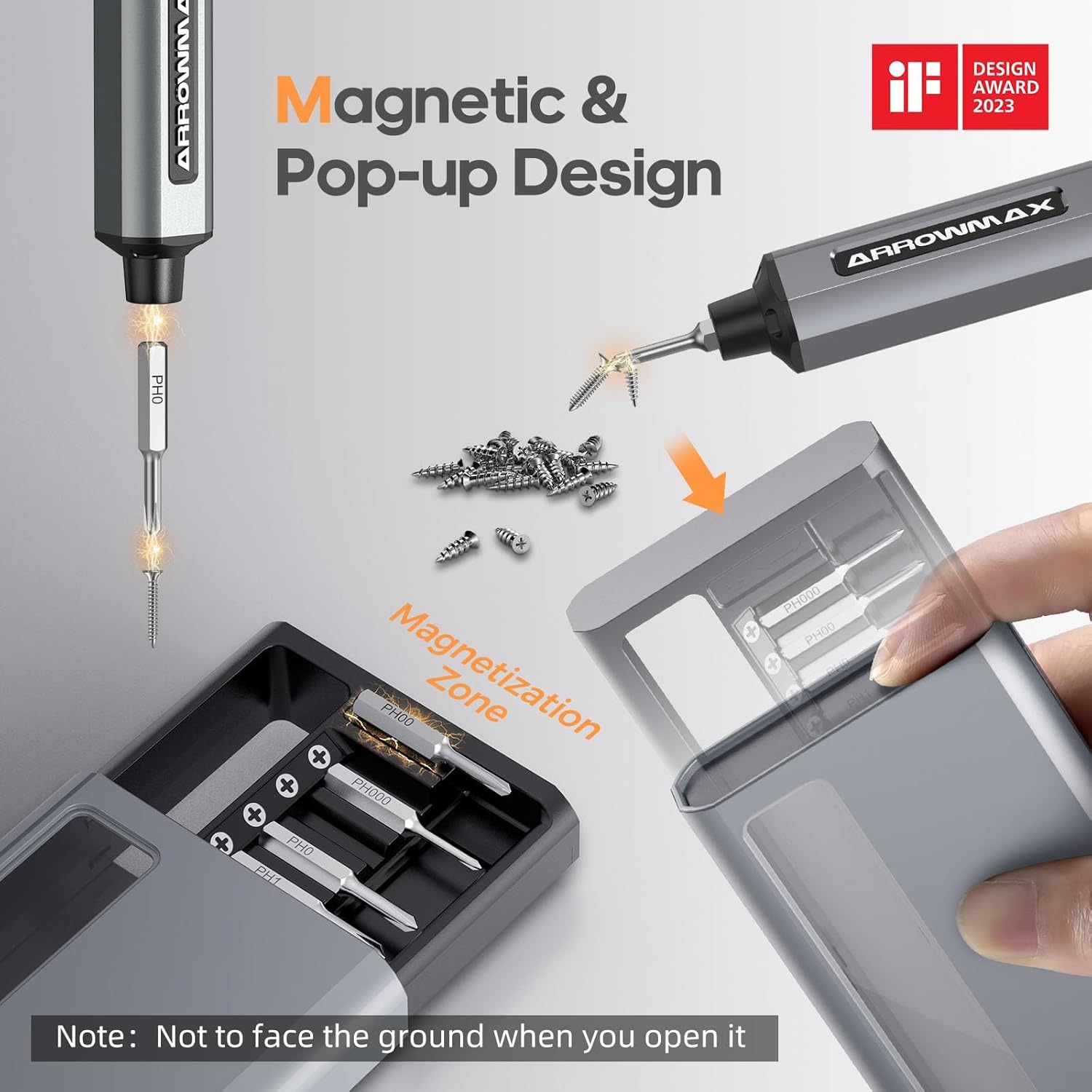
Image: Magnetic pop-up bit case design and bit magnetization zone.
6. Funtzionamendu-argibideak
6.1 Piztu/Itzaltzea
Press and hold the Power Button for a few seconds to turn the screwdriver on or off. The OLED screen will illuminate upon activation.
6.2 Adjusting Torque Settings
The SES PRO offers 5 adjustable torque levels, including an auto-sensing mode, to suit various tasks. The electric torque ranges from 0.049 N.m to 0.30-0.35 N.m, with a manual torque of 3 N.m.
- With the screwdriver powered on, press the Power Button three times continuously to cycle through the torque settings.
- The OLED screen will display the current torque level (e.g., 1, 2, 3, 4, A for Auto-Sensing).
- Select a lower torque for delicate items like glasses or small electronics, and higher torque for more robust applications.
- For screws that are too tight for the electric motor, the screwdriver can be used in manual mode by applying direct force.
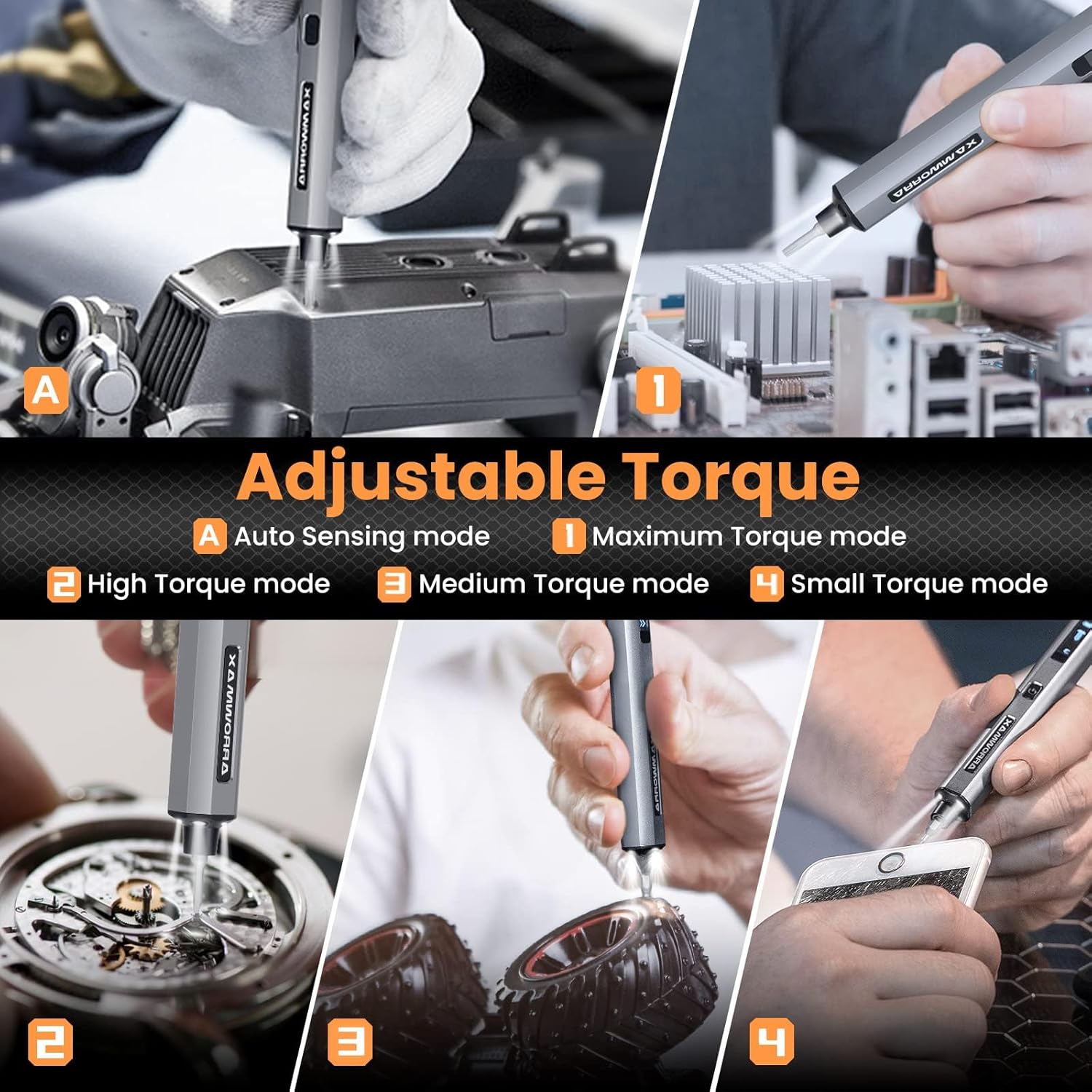
Image: Adjustable torque settings for various applications.
6.3 Body Sensory Dual-Mode (Forward/Reverse)
The SES PRO features a body sensory dual-mode for intuitive control of rotation direction.
- To drive a screw in (tighten), gently rotate your wrist in a clockwise direction while holding the screwdriver.
- To remove a screw (loosen), gently rotate your wrist in a counter-clockwise direction.
- The screwdriver's internal gyroscope detects your wrist movement and activates the motor accordingly.
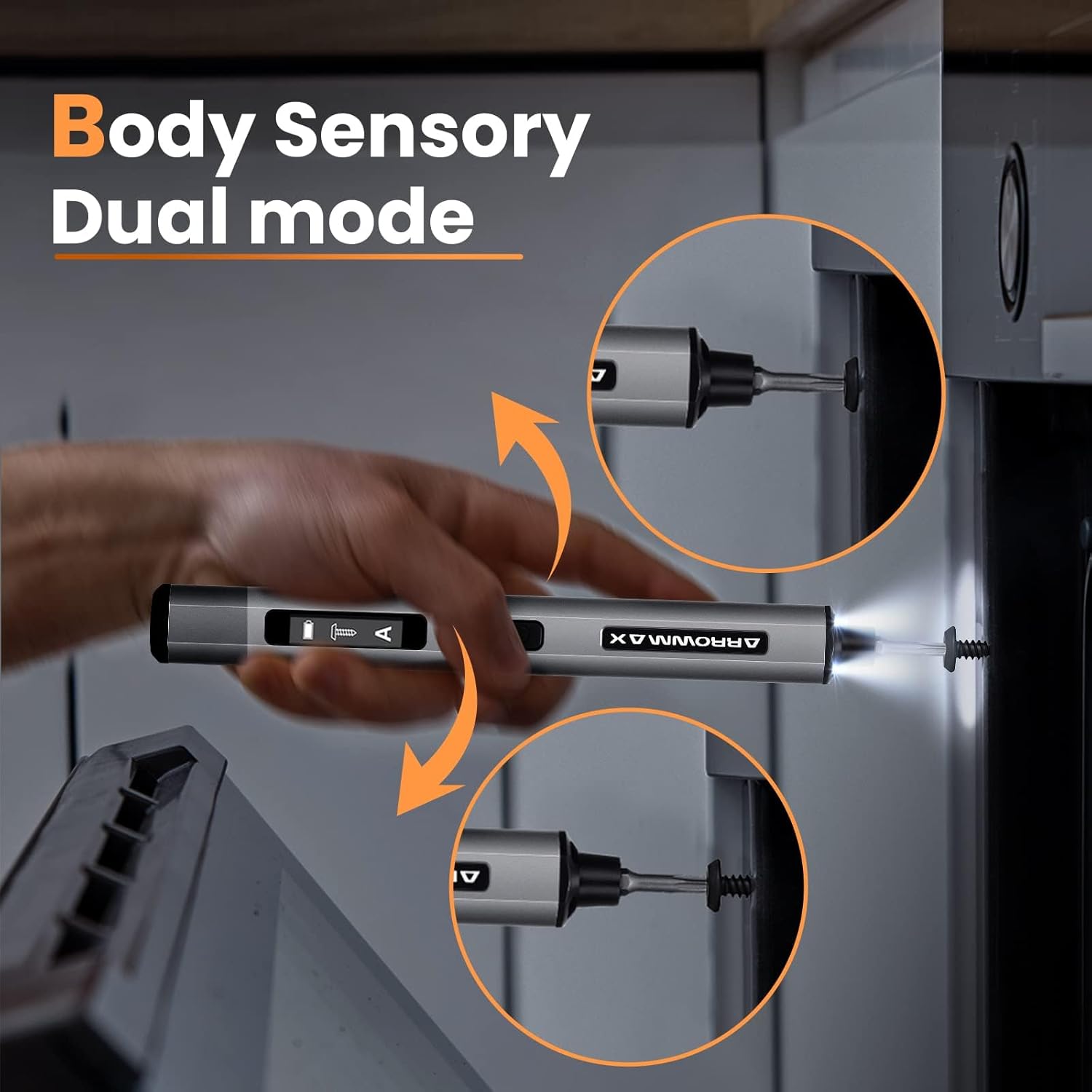
Image: Body sensory dual-mode in action for forward and reverse operation.
6.4 LED Work Lights
The integrated LED lights at the tip of the screwdriver automatically illuminate when the motor is active, providing clear visibility of your work area.
7. Mantentzea
7.1 Garbiketa
- Wipe the screwdriver body with a soft, dry cloth. Do not use abrasive cleaners or solvents.
- Ensure the bit installation port is free of debris.
7.2 Bateria zaintzea
- Bateriaren iraupena luzatzeko, saihestu bateria maiz erabat deskargatzea.
- Store the screwdriver in a cool, dry place when not in use.
- Recharge the battery periodically if stored for extended periods to prevent deep discharge.

Image: The SES PRO's long-lasting battery capacity.
7.3 Bit Arreta
- Keep the precision bits clean and free of rust.
- Store bits securely in the magnetic case to prevent loss and damage.
8. Arazoak
If you encounter issues with your ARROWMAX SES PRO screwdriver, refer to the following common problems and solutions:
| Arazoa | Kausa posiblea | Irtenbidea |
|---|---|---|
| Screwdriver does not turn on or respond. | Low battery; device is off. | Charge the screwdriver using the provided USB-A to USB-C cable. Ensure the power button is pressed to turn it on. |
| Bihurkinak ez du kargatzen. | Incorrect charger type; faulty cable/adapter. | Ensure you are using a USB-A to USB-C cable and a standard USB-A power adapter. USB-C PD chargers are not supported. Try a different cable or adapter. |
| Motor lacks power or cannot loosen/tighten screws. | Low battery; incorrect torque setting; screw is too tight for electric mode. | Charge the screwdriver. Increase the torque setting. For very tight screws, manually loosen or tighten them first, then use the electric mode. |
| Directional control (forward/reverse) is inconsistent. | Improper wrist movement; gyroscope calibration issue. | Ensure clear and deliberate wrist movements. If issues persist, try restarting the device. |
| Bits fall out or are not held securely. | Bit installation port is dirty; bit is not fully inserted. | Clean the bit installation port. Ensure the bit is pushed in firmly until it clicks or feels secure. |
9. Zehaztapenak
Key technical specifications for the ARROWMAX SES PRO Electric Precision Screwdriver:
| Ezaugarri | Zehaztapena |
|---|---|
| Marka | ARROWMAX |
| Eredua | SES PRO (AM-199913-G) |
| Abiadura | 200 RPM |
| Energia iturria | Bateriaren bidez |
| liburukiatage | 3.7 voltio (DC) |
| Momentu elektrikoa | 0.049 N.m - 0.30-0.35 N.m (Adjustable) |
| Eskuzko momentua | 3 Nm |
| Bateria mota | Litio ioia (500 mAh) |
| Kargatzeko ataka | USB-C (USB-A to USB-C charging only) |
| Elementuaren pisua | 13.7 ontza |
| Paketearen neurriak | 7.48 x 3.43 x 1.73 hazbete |
| Ezaugarri bereziak | OLED Screen, Smart Motion Control, Ergonomic Design, LED Lights |
10. Bermea eta Laguntza
The manufacturer's warranty information for this product is not explicitly provided in the available data. For details regarding warranty coverage, duration, and terms, please refer to the documentation included with your purchase or contact the retailer where the product was acquired.
For technical support, product inquiries, or assistance with troubleshooting that is not covered in this manual, please visit the official ARROWMAX website or contact their customer service department. Contact information can typically be found on the product packaging or the manufacturer's official online channels.


