
1. Sarrera
This manual provides detailed instructions for the operation and maintenance of your FANGOR F-CD-143 Portable CD Player and Bluetooth Speaker. This device offers a versatile audio experience, functioning as a standalone portable CD player or combining with its detachable Bluetooth speaker base for enhanced sound. Please read this manual thoroughly before using the product to ensure proper function and longevity.
2. Paketearen edukia
Please check the package contents upon unboxing to ensure all items are present.
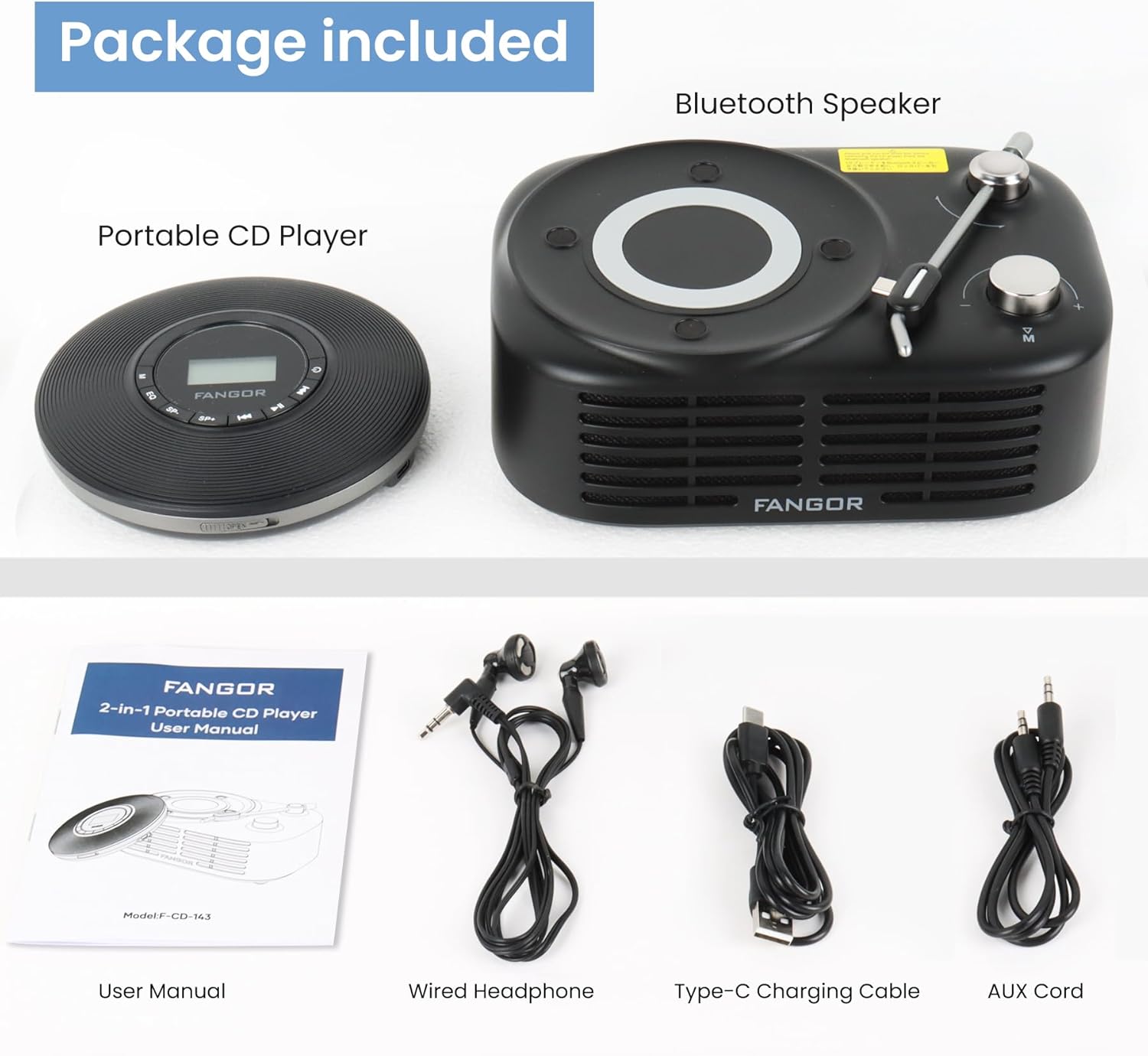
Figure 2.1: Package Contents. The image displays the portable CD player, the Bluetooth speaker base, a user manual, wired headphones, a Type-C charging cable, and an AUX cord.
- CD erreproduzitzaile eramangarria
- Bluetooth bozgorailuaren oinarria
- Erabiltzailearen eskuliburua (dokumentu hau)
- Aurikular kabledunak
- C motako karga-kablea
- AUX Kablea
3. Produktua amaitu daview
The FANGOR F-CD-143 is a versatile audio device designed for both personal and shared listening experiences. It features a portable CD player that can be used independently with wired headphones or connected to the included Bluetooth speaker base.

Figure 3.1: 2-in-1 Portable CD Player & Bluetooth Speaker. The top half shows a person using the portable CD player with wired headphones. The bottom half shows the Bluetooth speaker base with 'Bluetooth 5.3' indicated.
3.1 Ezaugarri nagusiak
- Diseinu desmuntagarria: Use the CD player independently or with the Bluetooth speaker base.
- Formatu zabaleko bateragarritasuna: Supports CD, MP3, CD-R, CD-RW, CD-DA, WMA (WAV must be below 128 bitrate) formats.
- TF txartelaren erreprodukzioa: Supports TF cards up to 32GB for additional music options.
- Saltoen aurkako babesa: 60-second Electronic Skip Protection (ESP) system prevents playback interruptions.
- Argiztatutako LCD pantaila: Allows clear viewing of information in various lighting conditions.
- Hainbat jolas modu: Includes A-B repeat, repeat all, and repeat single track.
- Soinu efektuak: Features 5 sound effects: BBS, POP, JAZZ, ROCK, Original Sound.
- Azken memoria funtzioa: Resumes playback from the last stopped position.
- Konektibitatea: 3.5mm AUX output for wired headphones or external speakers. Bluetooth 5.3 for wireless connection to the speaker base or other Bluetooth devices.
- Bateria kargagarria integratua: Provides long-lasting playtime for portable use.
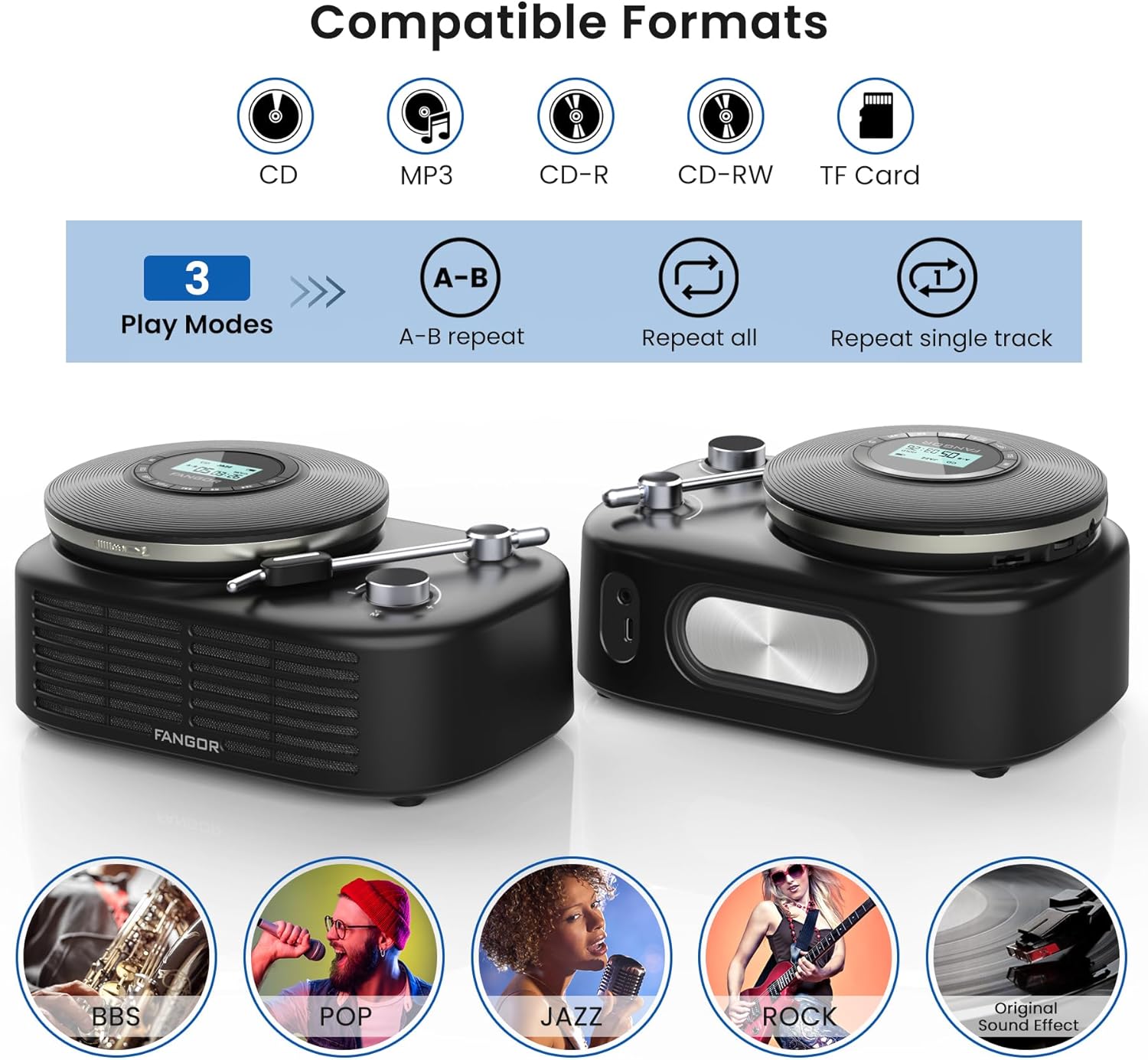
Figure 3.2: Compatible Formats, Play Modes, and Sound Effects. This image illustrates the various audio formats supported by the device, the available playback modes, and the different sound equalization options.

Figure 3.3: HIFI Stereo Sound and Connectivity. The image highlights the dual speakers of the Bluetooth base and its ability to connect via Bluetooth 5.3 or AUX to various devices like tablets, computers, and mobile phones.
4. Konfigurazioa
4.1 Gailua kargatzea
The portable CD player has a built-in rechargeable battery. Before first use, fully charge the device.
- Connect the provided Type-C charging cable to the charging port on the portable CD player.
- Connect the other end of the cable to a compatible USB power source (e.g., wall charger, power bank, computer USB port, car charger).
- Kargatzeko adierazlearen argia piztuko da kargatzen ari den bitartean eta itzali egingo da guztiz kargatzen denean.

Figure 4.1: Built-in Rechargeable Battery and Charging Options. This image demonstrates the flexibility of charging the portable CD player using common USB power sources.
4.2 Assembling the CD Player with Bluetooth Speaker Base
To use the CD player with the Bluetooth speaker base, align the CD player with the designated slot on the speaker base and gently press until it clicks into place. Ensure a secure connection.
4.3 CD bat sartzea
- Open the CD compartment cover on the portable CD player.
- Carefully place the CD with the label side facing up onto the spindle.
- Gently press the center of the CD until it is securely seated on the spindle.
- Itxi ondo CDaren konpartimentuaren estalkia.
4.4 Connecting Headphones or External Speakers
- Kabledun entzungailuak: Plug the wired headphones into the 3.5mm AUX output jack on the portable CD player.
- External Speakers (Wired): Use the provided AUX cord to connect the 3.5mm AUX output jack of the CD player to the AUX input of an external speaker system.
- External Speakers (Bluetooth): The Bluetooth speaker base can connect to other Bluetooth devices. Refer to section 5.3 for Bluetooth pairing instructions.
5. Funtzionamendu-argibideak
5.1 Basic CD Playback
- Ensure a CD is properly inserted and the device is powered on.
- Sakatu JOLASTU/PAUSTU button to start playback. The track number and elapsed time will be shown on the LCD display.
- Sakatu JOLASTU/PAUSTU berriro erreprodukzioa pausatzeko. Sakatu berriro jarraitzeko.
- Sakatu AURRERA SALTU botoia hurrengo pistara joateko.
- Sakatu ATZERA EGIN button to return to the beginning of the current track. Press it twice quickly to go to the previous track.
- Sakatu GELDITU erreprodukzioa gelditzeko botoia.
5.2 Bolumen kontrola
Doitu bolumena VOL+ eta Boluntario buttons on the portable CD player. If using the Bluetooth speaker base, additional volume control may be available on the speaker itself or the connected Bluetooth device.
5.3 Bluetooth Pairing (Speaker Base)
The Bluetooth speaker base can be used independently as a Bluetooth speaker.
- Ensure the Bluetooth speaker base is powered on.
- Activate Bluetooth on your external device (e.g., smartphone, tablet).
- Bilatu available Bluetooth devices. The speaker base will appear as "FANGOR Speaker" or similar.
- Select the speaker from the list to pair. Once paired, a confirmation sound may be heard.
5.4 TF txartelaren erreprodukzioa
- Insert a TF card (up to 32GB) into the TF card slot on the portable CD player.
- The device should automatically switch to TF card mode. If not, press the MODUA button to select TF card playback.
- Erabili JOLASTU/PAUSTU eta SALTATU erreprodukzioa kontrolatzeko botoiak.
5.5 A-B Repeat Function
The A-B repeat function allows you to repeatedly play a specific segment of a track. This is particularly useful for language learning or musical practice.
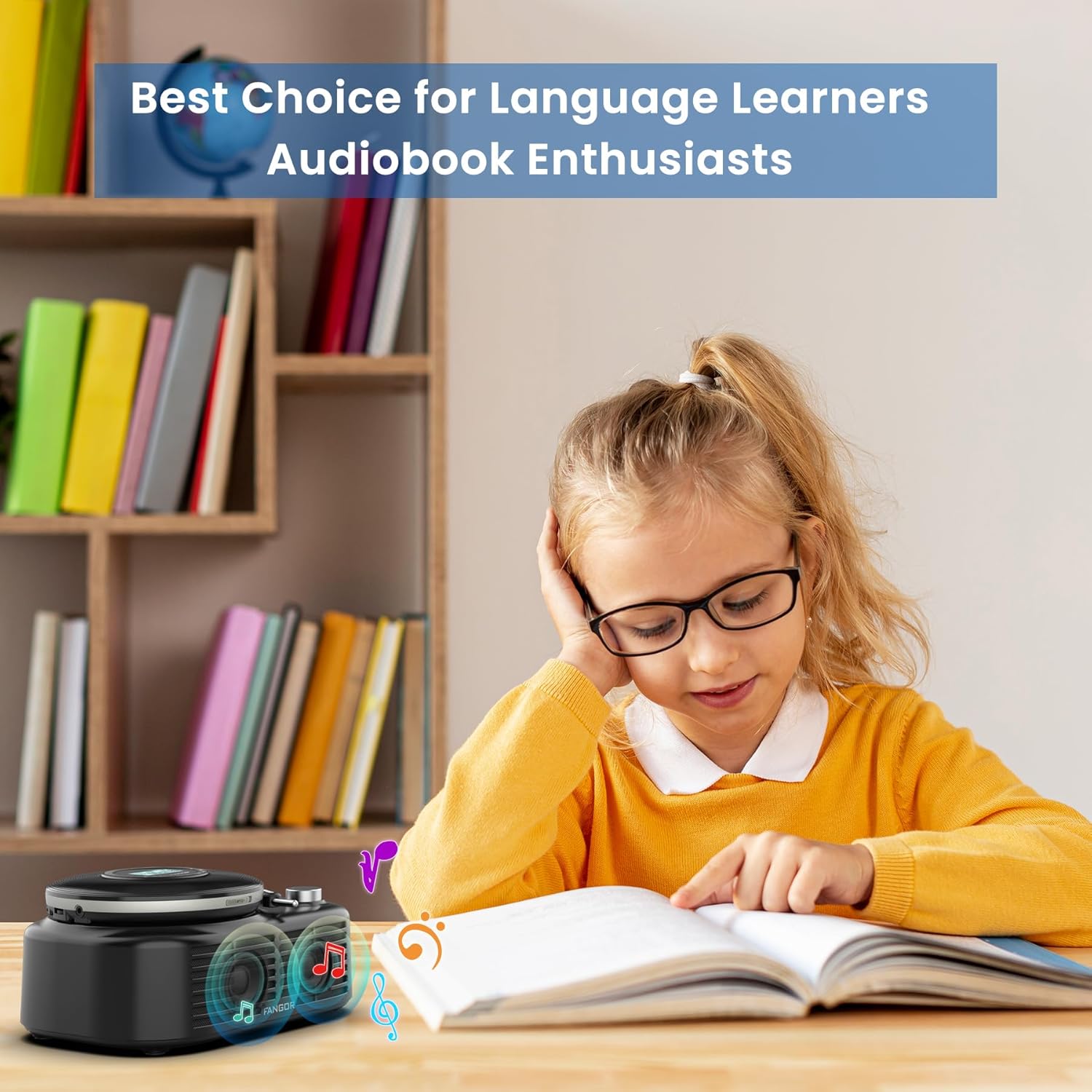
Figure 5.1: Ideal for Language Learners and Audiobook Enthusiasts. This image demonstrates a practical application of the device's features, such as A-B repeat, for educational purposes.
- Erreprodukzioan, sakatu AB button once to set the starting point (A).
- Sakatu AB button again to set the ending point (B). The segment between A and B will now repeat.
- Sakatu AB button a third time to cancel the A-B repeat function.
5.6 Sound Effects (EQ)
Sakatu EQ button repeatedly to cycle through the available sound effects: BBS, POP, JAZZ, ROCK, Original Sound. Select the effect that best suits your listening preference.
5.7 Azken memoria funtzioa
The device automatically remembers the last playback position. When you power on the CD player again, it will resume from where it last stopped.
6. Mantentzea
6.1 Gailua garbitzea
- Always power off the device and disconnect it from any power source before cleaning.
- Erabili zapi leun eta lehor bat kanpoko gainazalak garbitzeko. Ez erabili garbitzaile urratzailerik, argizaririk edo disolbatzailerik.
- For the CD lens, use a specialized CD lens cleaning kit. Do not touch the lens directly.
6.2 Bateria zaintzea
- Bateriaren iraupena luzatzeko, saihestu bateria maiz erabat deskargatzea.
- If storing the device for an extended period, charge it to approximately 50% every few months.
- Saihestu gailua muturreko tenperaturetan jartzea, bateriaren errendimendua hondatu baitezake.
6.3 Biltegiratzea
Store the device in a cool, dry place away from direct sunlight, dust, and moisture when not in use.
7. Arazoak
If you encounter issues with your FANGOR F-CD-143, please refer to the following common problems and solutions.
| Arazoa | Kausa posiblea | Irtenbidea |
|---|---|---|
| CD does not play / No sound | CD inserted incorrectly; CD is dirty or scratched; Headphones/speakers not connected; Volume too low; Device not powered on. | Ensure CD is inserted correctly (label side up); Clean or replace CD; Check headphone/speaker connection; Increase volume; Power on the device. |
| Erreprodukzioan salto egitea | CD is scratched or dirty; Device is subjected to strong vibrations; ESP system malfunction. | Clean or replace CD; Use the device on a stable surface; Ensure ESP is active (60 seconds anti-skip protection). |
| Bluetooth speaker not pairing | Speaker not in pairing mode; Bluetooth disabled on external device; Speaker too far from external device. | Ensure speaker is powered on and in pairing mode; Enable Bluetooth on your external device; Move speaker closer to the external device (within 10 meters). |
| TF txartela ez da ezagutzen | TF card inserted incorrectly; TF card corrupted; Unsupported file format on TF card. | Reinsert TF card correctly; Try a different TF card; Ensure music files are in supported formats (MP3, WMA). |
| Gailua ez da pizten | Bateria agortuta dago; Pizteko botoia ez da behar bezala sakatu. | Charge the device fully; Press and hold the power button for a few seconds. |
8. Zehaztapenak
| Ezaugarri | Zehaztapena |
|---|---|
| Marka | FANGOR |
| Modelo zenbakia | F-CD-143 |
| Konektibitate Teknologia | Laguntzailea, Bluetooth 5.3 |
| Ezaugarri bereziak | Portable, Detachable Bluetooth Speaker Base, Anti-Skip Protection, Backlit LCD Display, A-B Repeat, Last Memory |
| Onartutako audio formatuak | CD, MP3, CD-R, CD-RW, CD-DA, WMA (WAV below 128 bitrate) |
| Multimedia formatu mota | CD-R |
| TF txartelaren euskarria | Gehienez 32 GB |
| Konektore mota | 3.5mm Jack (AUX output), Type-C (Charging) |
| Disko kopurua | 1 |
| Gailu bateragarriak | Headphone, Speaker, Phones, Tablets, Smart TVs (via Bluetooth speaker base) |
| Hedabide integratua | CD erreproduzitzailea |
9. Bermea eta Laguntza
FANGOR is committed to providing high-quality products and services. Your FANGOR F-CD-143 Portable CD Player and Bluetooth Speaker comes with:
- 365-Day No-Reason Replacement: If you encounter any issues within 365 days of purchase, you are eligible for a replacement.
- Bizi osorako laguntza teknikoa: Our professional after-sales team is available to provide technical assistance for the lifetime of the product.
For any inquiries or support needs, please contact our customer service team. We aim to handle all issues properly within 24 hours.