
Sarrera
The Acoustic Research Portable Outdoor Wireless Speaker with LED Flickering Flame Light is designed to provide high-quality audio and ambient lighting for various indoor and outdoor settings. This rechargeable speaker features multiple light modes, including a realistic flickering flame, and is built with an IPX5 water-resistant rating, making it suitable for outdoor use. It also includes built-in nature sounds for relaxation and can be stereo-paired with another compatible AR speaker for an enhanced audio experience.
Paketearen edukia
- Acoustic Research Portable Outdoor Wireless Speaker (Model: AWSF9R)
- USB kargatzeko kablea
- Erabiltzailearen eskuliburua
Produktuaren Ezaugarriak
- 7 argi moduak: Soft White, Bright White, Flicker Flame, Soft Glow, Candlelight, Aurora. Separate controls for light and speaker.
- Jolasaldi luzatua: Gehienez 12 orduko audio erreprodukzioa karga bakar batekin.
- Uraren erresistentzia: IPX5 ziurtagiria du ur zipriztinen aurkako babeserako.
- Naturaren soinuak: Includes Forest, Waves, Running Stream, and Rain.
- Diseinu eramangarria: Attractive lantern style with a handle for easy carrying or hanging.
- Bluetooth konexioa: Haririk gabeko audio erreprodukzioa gailu bateragarrietatik.
- Estereo parekatzea: Connect two AWSF9R speakers for true wireless stereo sound (second speaker sold separately).
Kontrolak eta Adierazleak

1. irudia: Speaker Control Panel. This image shows a close-up of the speaker's control buttons, including power, volume, track skip, light mode, and nature sound buttons, along with the DC charging port.
| Botoia / adierazlea | Funtzioa |
|---|---|
| Pizteko botoia (⏻) | Press and hold to power the speaker ON or OFF. Press briefly to Play/Pause music. |
| Bolumena jaitsi / Aurreko pista (− / ⏮) | Press briefly to decrease volume. Press and hold to go to the previous track. |
| Bolumena igo / Hurrengo pista (+ / ⏭) | Press briefly to increase volume. Press and hold to go to the next track. |
| Argi-moduaren botoia (💡) | Press to cycle through 7 light modes: Soft White, Bright White, Flicker Flame, Soft Glow, Candlelight, Aurora, and OFF. |
| Natura Soinu Botoia (♫) | Press to cycle through 4 nature sounds: Forest, Waves, Running Stream, Rain, and OFF. |
| DC kargatzeko ataka | Connect the USB charging cable here to recharge the speaker's battery. |
| LED adierazlea | Kargatze-egoera eta Bluetooth parekatze-egoera adierazten ditu. |
Konfigurazioa
Hizlaria kargatzen
- Locate the DC charging port on the speaker's control panel.
- Connect the small end of the provided USB charging cable to the speaker's DC port.
- Konektatu USB kablearen mutur handiena USB elikatze-egokitzaile batera (ez dago barne) edo ordenagailuaren USB ataka batera.
- The LED indicator will illuminate to show charging status. Allow approximately 3-4 hours for a full charge. The indicator will change or turn off when charging is complete.
Oharra: Fully charge the speaker before first use to maximize battery life.
Funtzionamendu-argibideak
Piztu/Itzaltzea
- To power ON, press and hold the ⏻ Power button for 2-3 seconds until you hear an audible prompt.
- To power OFF, press and hold the ⏻ Power button for 2-3 seconds until you hear an audible prompt.
Bluetooth parekatzea
- Ensure the speaker is powered ON and within 10 meters (33 feet) of your Bluetooth device (smartphone, tablet, etc.).
- The speaker will automatically enter Bluetooth pairing mode when powered on for the first time or if no device is connected. The LED indicator will flash, indicating it's ready to pair.
- On your Bluetooth device, go to the Bluetooth settings and enable Bluetooth.
- Bilatu available devices and select "AR Speaker" (or similar name) from the list.
- Behin parekatuta, LED adierazlea keinuka utziko du eta finko mantenduko da, eta baieztapen soinu bat entzungo duzu.
- Orain zure gailuko musika bozgorailuaren bidez erreproduzitu dezakezu.
Oharra: Bozgorailuak automatikoki saiatuko da azken parekatutako gailura berriro konektatzen pizten denean.
Controlling Light Modes
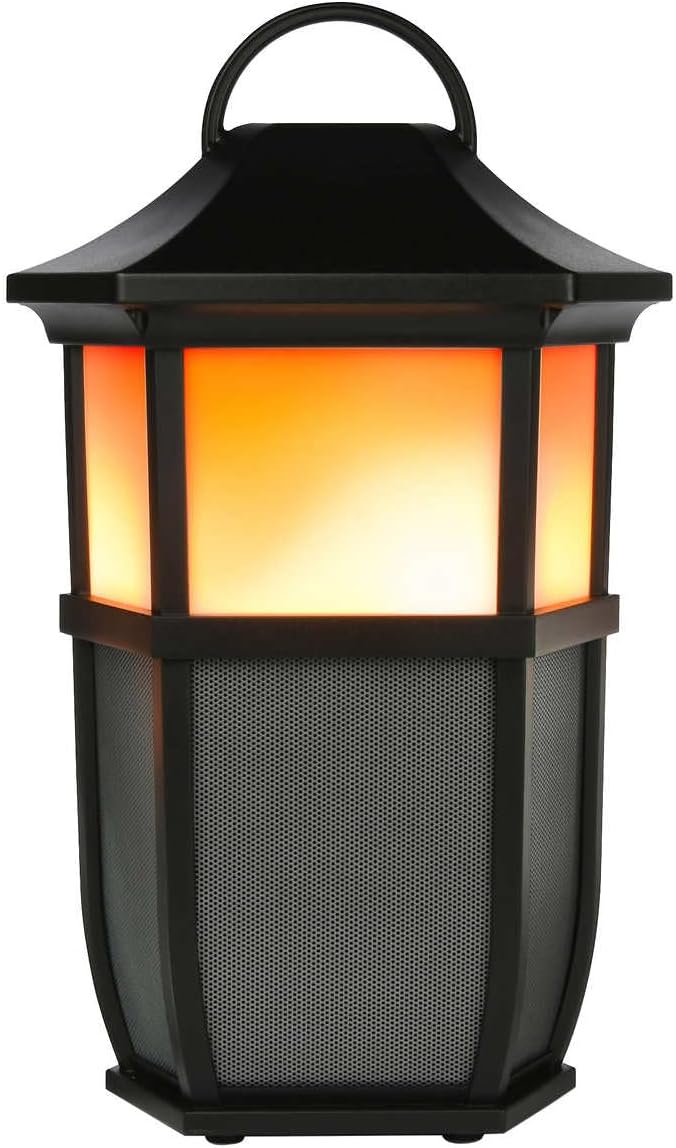

2. irudia: Speaker Light Modes. The left image shows the speaker with a warm, flickering flame light, while the right image shows it with a bright white light, demonstrating two of the available light modes.
Sakatu 💡 Light Mode button repeatedly to cycle through the 7 available light modes:
- Distira-gara
- Zuri leuna
- Zuri distiratsua
- Distira leuna
- Kandelaren argia
- Aurora
- Argia itzalita
Playing Nature Sounds
Sakatu ♫ Nature Sound button repeatedly to cycle through the 4 built-in nature sounds:
- Basoa
- Olatuak
- Running Stream
- Euria
- Nature Sound OFF
Benetako Haririk gabeko Estereoa (TWS) Parekatzea (Aukerakoa)
To achieve a true stereo sound experience, you can pair two Acoustic Research AWSF9R speakers together. (Second speaker sold separately).
- Ziurtatu bi bozgorailuak piztuta daudela eta ez daudela Bluetooth gailu batera konektatuta.
- On one speaker (this will be your primary speaker), press and hold the ⏻ Power button for 5 seconds until you hear a distinct pairing tone.
- The primary speaker will now search for the second speaker.
- Once connected, you will hear a confirmation tone, and the LED indicators on both speakers will change to indicate a successful TWS connection.
- Orain, konektatu zure Bluetooth gailua bozgorailu nagusira "Bluetooth parekatzea" atalean azaltzen den bezala. Audioa estereoan erreproduzituko da bi bozgorailuetatik.
Oharra: TWS pairing only works with two identical AWSF9R speakers.
Mantentzea
- Garbiketa: Erabili zapi leun eta lehor bat bozgorailuen kanpoaldea garbitzeko. Ez erabili garbitzaile edo disolbatzaile urratzailerik.
- Uraren esposizioa: While IPX5 water-resistant, do not submerge the speaker in water. Ensure the charging port cover is securely closed when exposed to water.
- Biltegiratzea: Denbora luzez erabiltzen ez duzunean, gorde bozgorailua leku fresko eta lehor batean, eguzki-argitik eta muturreko tenperaturetatik babestuta.
- Bateria zaintzea: To prolong battery life, fully charge the speaker at least once every three months, even if not in regular use.
Arazoak konpontzea
| Arazoa | Irtenbide posiblea |
|---|---|
| Bozgorailuak ez du pizten. | Ensure the battery is charged. Connect the speaker to a power source using the USB cable and allow it to charge for at least 30 minutes before attempting to power on again. |
| Ezin da Bluetooth gailuarekin parekatu. |
|
| Soinurik ez edo bolumen baxua. |
|
| Light modes are not working. | Press the Light Mode button repeatedly to cycle through all modes. Ensure the speaker has sufficient battery charge. |
| Nature sounds are not working. | Press the Nature Sound button repeatedly to cycle through all sounds. |
Zehaztapenak

3. irudia: Product Dimensions. This image illustrates the height (9.76 inches), width (7.2 inches), and depth (6.54 inches) of the speaker.
| Ezaugarri | Xehetasuna |
|---|---|
| Ereduaren izena | AWSF9R |
| Marka | Ikerketa Akustikoa |
| Hizlari mota | Kanpokoa, eramangarria |
| Konektibitatea | Bluetootha (haririk gabekoa) |
| Bluetooth barrutia | Gehienez 10 metro (33 oin) |
| Uraren Erresistentzia | IPX5 (urarekiko erresistentea) |
| Potentzia Irteera | 30 Watt |
| Audio irteera modua | Stereo (with TWS pairing) |
| Bateriaren iraupena | Gehienez 12 ordu |
| Energia iturria | Bateriaren bidez |
| Produktuaren neurriak (L x W x H) | 6.54" x 7.2" x 9.76" |
| Elementuaren pisua | 5 kilo |
| UPC | 044476151811 |
Bermea eta Laguntza
This Acoustic Research product comes with a Berme mugatua. For detailed warranty information, technical support, or service inquiries, please refer to the warranty card included with your product or visit the official Acoustic Research webgunea. Gorde erosketaren egiaztagiria bermearen erreklamazioetarako.
For further assistance, you may contact Acoustic Research customer support through their official channels.