
1. Segurtasun informazioa
Please read all instructions carefully before using the iZEEKER Projector. Keep this manual for future reference.
- Elikatze-iturria: Erabili zehaztutako energia-egokitzailea soilik. Ziurtatu bolumenatage zure eskualdearekin bateragarria da.
- Aireztapena: Ez blokeatu aireztapen-irekidurak. Ziurtatu proiektorearen inguruan nahikoa leku dagoela aire-fluxu egokia izan dadin eta gehiegi berotzea saihesteko.
- Ingurumena: Avoid exposing the projector to rain, moisture, direct sunlight, or extreme temperatures. Do not place it near heat sources.
- Garbiketa: Deskonektatu proiektorea garbitu aurretik. Erabili zapi leun eta lehor bat. Ez erabili garbitzaile likido edo aerosolik.
- Begietako babesa: Ez begiratu zuzenean proiektorearen lenteari l dagoenean.amp is on. The iZEEKER projector utilizes diffuse reflection technology to reduce blue light exposure and eye fatigue.
- Haurrak: Keep the projector out of reach of small children. Supervise children when the projector is in use.
- Desmihiztatu: Ez saiatu proiektorea zeuk desmuntatzen edo konpontzen. Mantendu konponketa guztiak langile kualifikatuen esku.

2. Paketearen edukia
Egiaztatu behean zerrendatutako elementu guztiak zure paketean sartuta daudela:
- iZEEKER Projector (Model: iPL320)
- Elikatze-moldagailua
- Urruneko Kontrola
- HDMI kablea
- AV Kable
- Erabiltzailearen eskuliburua
- Customized Tripod

3. Produktua amaitu daview
3.1 Ezaugarri nagusiak
- Bluetooth 5.2: For enhanced audio experience with external Bluetooth speakers or headphones. Note: Bluetooth is for audio output only, not for screen mirroring.
- Distira eta bereizmen handia: 12000 Lux brightness and native 1080P resolution with 100% NTSC color reproduction and 10000:1 contrast ratio for clear, realistic images.
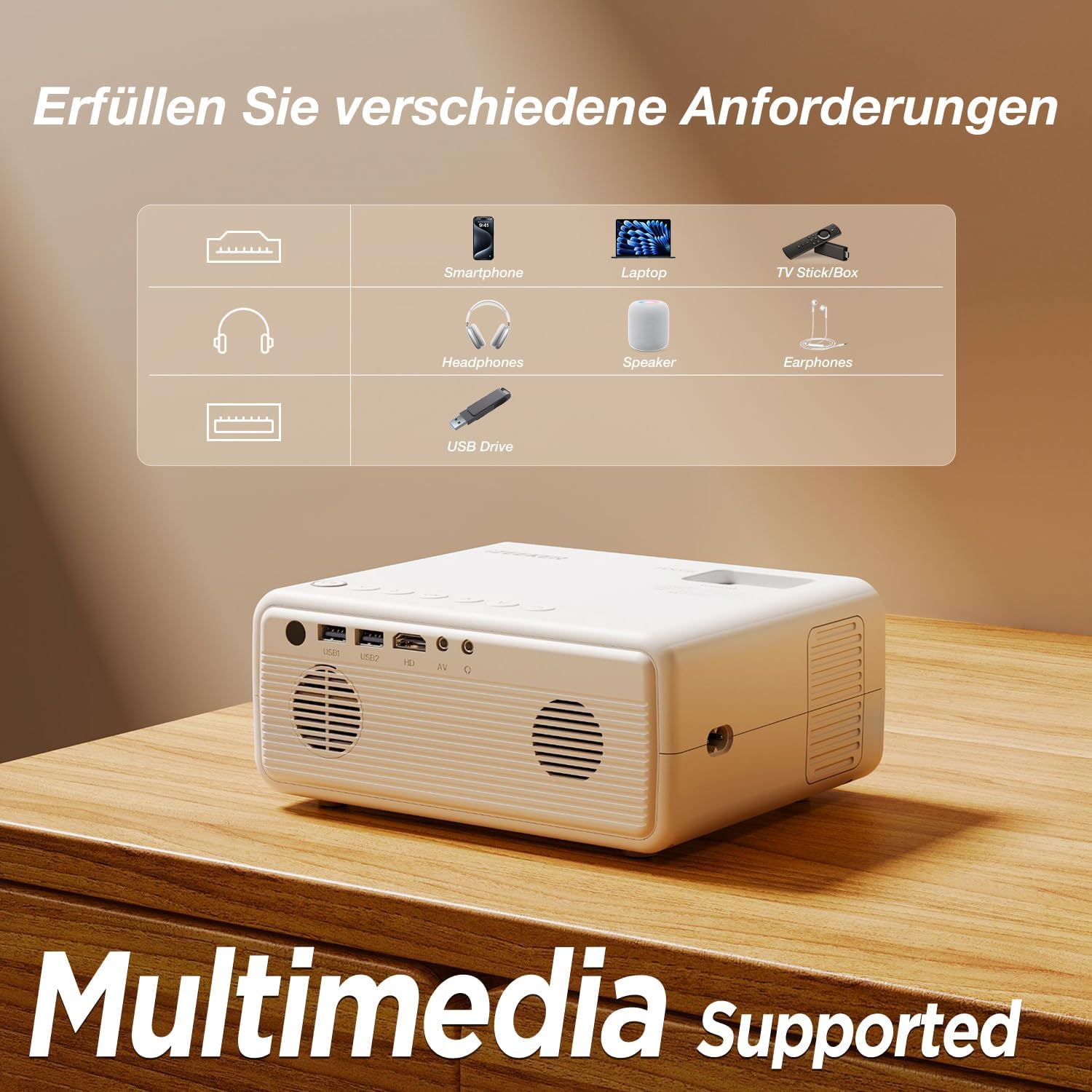
- Gailu anitzeko konexioa: Equipped with HDMI, AV, USB, and Aux ports for stable connections to smartphones, laptops, PS5, TV boxes, and DVD players.
- Pantaila handiko proiekzioa: Supports up to a 250-inch screen size with 75% zoom function for flexible screen adjustment without moving the projector.
- Begietako babesa: High-refraction lenses and diffuse reflection technology reduce blue light and eye fatigue.


4. Konfigurazioa
4.1 Jartzea
Choose a flat, stable surface for the projector. The projection distance affects the screen size. For optimal viewing, ensure the projector is perpendicular to the projection surface.
- The projector can be placed on a table, mounted on the included tripod, or ceiling-mounted.
- Doitu distantzia nahi duzun pantailaren tamaina lortzeko, gehienez 250 hazbetekoa.

4.2 Energia-konexioa
Connect the power adapter to the projector's power input port, then plug the adapter into a power outlet.
4.3 Fokua eta Keystone doikuntza
After powering on, adjust the focus ring on the projector lens until the image is clear. Use the keystone correction dial to adjust the image shape if it appears trapezoidal.

4.4 Gailuak konektatzea
The projector supports various wired connections for stable performance:
- HDMI: Connect laptops, gaming consoles (PS5), TV boxes, or DVD players using an HDMI cable.
- USBa: Sartu USB unitate bat multimedia erreproduzitzeko files zuzenean.
- OF: Erabili AV ataka gailu zaharretarako.
- Smartphones (Wired):
- iOS gailuak: Requires an Apple Lightning to HDMI adapter cable (not included).
- Android gailuak: Requires a Micro USB/Type-C to HDMI cable (not included).


4.5 Bluetooth audio konexioa
Kanpoko Bluetooth bozgorailuak edo entzungailuak konektatzeko:
- Ziurtatu zure Bluetooth audio gailua parekatze moduan dagoela.
- Proiektorean, joan Bluetooth ezarpenen menura.
- Hautatu zure gailua parekatzeko eskuragarri dauden gailuen zerrendatik.
OHARRA: The Bluetooth function is for audio output only and does not support screen mirroring from mobile devices.

5. Funtzionamendu-argibideak
5.1 Piztu/Itzali
- Piztu: Sakatu proiektorearen edo urrutiko agintearen pizteko botoia.
- Itzali: Sakatu berriro pizteko botoia. Berretsi itzaltzea eskatzen bazaizu.
5.2 Menu Nabigazioa
Use the navigation buttons on the projector or remote control to browse the on-screen menu. The "OK" button confirms selections, and the "Back" button returns to the previous screen.
5.3 Sarrera iturriaren hautaketa
Press the "Source" button on the remote control or projector to select the desired input (e.g., HDMI1, USB, AV).
5.4 Zoom Funtzioa
The projector features a 75% zoom function. Access this setting in the projector's menu to adjust the screen size without physically moving the projector.


6. Mantentzea
6.1 Lentea garbitzea
Use a professional lens cleaning cloth or air blower to clean the projector lens. Do not touch the lens directly with your hands or use abrasive cleaners.
6.2 Proiektorearen gorputza garbitzea
Wipe the projector's exterior with a soft, dry cloth. Do not use liquid, abrasive, or corrosive cleaners.
6.3 Biltegiratzea
When not in use for extended periods, store the projector in a cool, dry, dust-free environment. Use the original packaging or a protective case to prevent damage.
7. Arazoak
| Arazoa | Kausa posiblea | Irtenbidea |
|---|---|---|
| No image/No signal | Incorrect input source selected; Cable not connected properly; Device not powered on. | Select the correct input source (HDMI, USB, AV). Check all cable connections. Ensure the connected device is powered on. |
| Irudi lausoa | Focus not adjusted; Projector too far/close; Lens dirty. | Adjust the focus ring. Adjust projection distance. Clean the projector lens. |
| Trapezoidal image | Proiektorea ez dago pantailarekiko perpendikularra. | Adjust the keystone correction dial. Reposition the projector. |
| Soinurik ez | Bolumena baxuegia; Isilarazita; Kanpoko audio gailua ez dago konektatuta/parekatuta. | Increase volume. Unmute. Check Bluetooth connection for external speakers/headphones. |
| Cannot play Netflix/Prime Video | Copyright restrictions. | These services can only be played via a TV Stick (e.g., Amazon Fire Stick) connected to the projector's HDMI port. |
8. Zehaztapenak
| Marka | iZEEKER |
| Modelo zenbakia | iPL320 |
| Produktu Mota | Proiektore eramangarria |
| Distira | 12000 lux |
| Bistaratzeko ebazpena | 1920 x 1080 (1080P Native) |
| Gehienezko pantailaren bereizmena | 1920 x 1080 |
| Kontraste-erlazioa | 10000:1 arte |
| Konektibitate Teknologia | Bluetooth 5.2, HDMI, USB, AV, Aux |
| Screen Size (Max) | 250 hazbete |
| Zoom funtzioa | %75 |
| Produktuaren neurriak | 19L x 15.8W x 8.6H zentimetro |
| Muntatze Mota | Tripodearen muntaia |
| Gomendatutako Erabilerak | Home Cinema |
9. Bermea eta laguntza
iZEEKER is committed to providing excellent customer service.
- Fabrikatzailearen bermea: The iZEEKER Projector comes with a free 2-year after-sales warranty.
- Laguntza teknikoa: Professional lifetime technical support is available.
- Jarri gurekin harremanetan: If you have any questions, issues, or require assistance, please do not hesitate to contact iZEEKER customer support. Refer to the contact information provided in your product packaging or on the official iZEEKER webgunea.