
1. Sarrera
This manual provides detailed instructions for the proper use, setup, and maintenance of your Yealink W59R Ruggedized DECT Handset. Please read this manual thoroughly before operating the device to ensure optimal performance and safety. The Yealink W59R is designed for environments requiring a durable and reliable communication solution.
2. Produktua amaitu daview
The Yealink W59R is a professional ruggedized DECT handset built to withstand challenging environments. It features an IP67 rating for dust, splash, and water resistance, along with integrated Bluetooth and a vibration alarm. This handset is fully compatible with the Yealink W80 Multi-Cell System, enabling seamless roaming and call handover.
Ezaugarri nagusiak:
- IP67 balorazioa: Shock, dust, and water resistant for reliable operation in harsh conditions.
- Iraunkortasun hobetua: Tough rubberized surface protects against drops, slips, and scratches.
- Seamless Mobility: Compatible with Yealink W80 Multi-Cell System for extensive coverage.
- Bluetooth konexioa: Allows use with Bluetooth headsets for hands-free communication.
- Bibrazio-alarma: Ensures calls are not missed in noisy environments.
- Optimal HD Audio: Features FNR (Flexible Noise Reduction), full duplex, and Opus codec for clear sound.
- Comprehensive Alarm Functions: Includes push-button, no-movement, man-down, and running alarms for occupational safety.
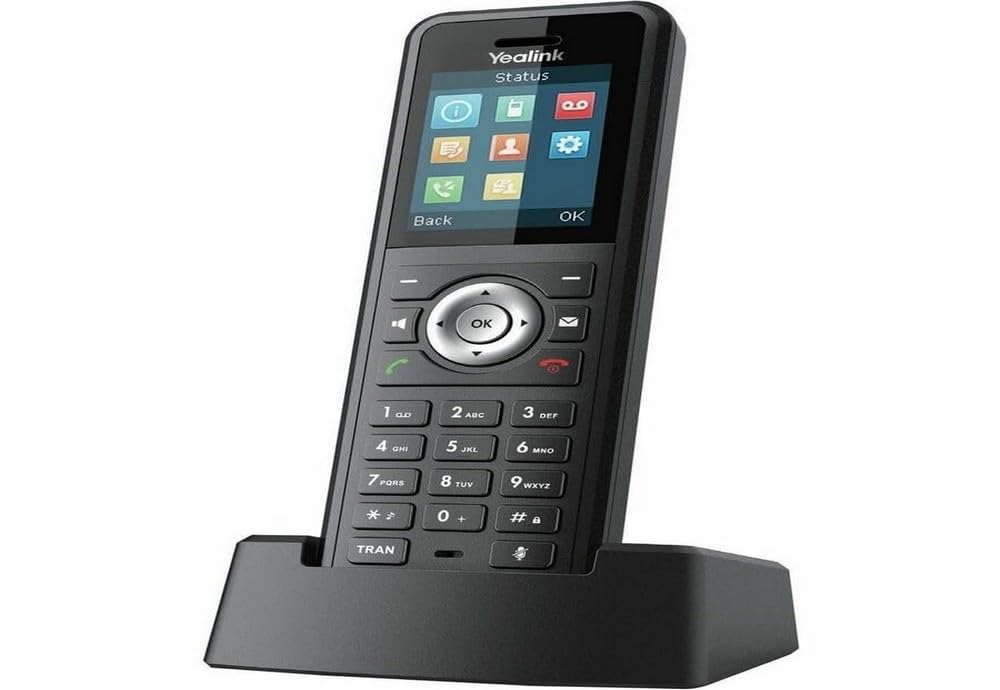
Figure 2.1: Yealink W59R Ruggedized DECT Handset. This image displays the front view of the handset, highlighting its robust design.
3. Konfigurazioa
3.1. Paketearen edukia
Aurrera jarraitu aurretik, ziurtatu elementu guztiak paketean daudela:
- Yealink W59R DECT telefono mugikorra
- Kargatzeko Sehaska
- Bateria kargagarria
- Elikatze-moldagailua
- Estalki apaingarria
- Hasierako gida azkarra
3.2. Bateriaren instalazioa
- Bilatu bateriaren konpartimentuaren estalkia telefonoaren atzealdean.
- Kontu handiz kendu estalkia.
- Insert the rechargeable battery, ensuring the contacts align correctly.
- Replace the battery compartment cover and secure it firmly to maintain the IP67 rating.
3.3. Telefonoa kargatzea
- Konektatu korronte-egokigailua kargatzeko euskarrira.
- Entxufatu korronte-egokigailua hormako entxufe batera.
- Place the handset into the charging cradle. The charging indicator on the handset will illuminate.
- Allow the handset to charge for at least 4 hours before initial use.
3.4. Telefonoa erregistratzea
The W59R handset must be registered to a Yealink DECT base station (e.g., W80 Multi-Cell System) to function. Refer to your DECT base station's manual for specific registration procedures. Generally, this involves:
- Put the DECT base station into registration mode.
- On the W59R handset, navigate to the registration menu (typically Menu > Settings > Registration > Register Handset).
- Select the desired base and enter the system PIN (default is 0000).
- Telefonoak baieztapen-mezu bat bistaratuko du erregistroa behar bezala amaitutakoan.
4. Funtzionamendu-argibideak
4.1. Oinarrizko dei-funtzioak
- Dei bat egitea: Sartu telefono zenbakia eta sakatu tekla Deitu giltza.
- Dei bati erantzutea: Sakatu Deitu key when the handset rings.
- Dei bat amaitzea: Sakatu Amaitu deia giltza.
- Bolumena doitzea: Use the navigation keys during a call to adjust the earpiece volume.
4.2. Bluetootha erabiliz
The W59R supports Bluetooth for connecting wireless headsets. To pair a Bluetooth device:
- Enable Bluetooth on your headset and set it to pairing mode.
- On the W59R, navigate to Menu > Settings > Bluetooth.
- Piztu Bluetooth-a On eta hautatu Paired Devices > Add Device.
- Select your headset from the list of available devices and enter the PIN if prompted (usually 0000 or 1234).
4.3. Alarma-funtzioak
The W59R includes several alarm features designed to enhance user safety in hazardous environments. These alarms can be configured by an administrator.
- Push-Button Alarm: Activates an emergency alert when a dedicated button is pressed.
- No-Movement Alarm: Triggers an alert if the handset detects no movement for a configurable period.
- Man-Down Alarm: Activates if the handset detects a sudden change in orientation, indicating a fall.
- Running Alarm: Can be configured to alert if the user is running or moving rapidly beyond a set threshold.

Figure 4.1: Detail of the Yealink W59R handset, showing a button that can be configured for alarm functions.
5. Mantentzea
5.1. Garbiketa
To maintain the handset's IP67 rating and overall performance:
- Wipe the handset with a soft, damp oihal.
- Ez erabili produktu kimiko gogorrak, garbiketa-disolbatzaileak edo garbigarri indartsuak.
- Ensure all port covers are securely closed after cleaning to maintain water and dust resistance.
5.2. Bateria zaintzea
- Saihestu bateria muturreko tenperaturetara ez jartzea.
- Charge the battery regularly to prolong its lifespan.
- If the handset will not be used for an extended period, fully charge the battery before storage.
6. Arazoak
This section addresses common issues you may encounter with your W59R handset.
| Arazoa | Kausa posiblea | Irtenbidea |
|---|---|---|
| Telefonoa ez da pizten. | Battery is not installed or discharged. | Ensure battery is correctly installed and fully charged. |
| Cannot register handset to base. | Base station not in registration mode; incorrect PIN. | Verify base station is in registration mode. Check the PIN. Ensure handset is within range. |
| Ez dago markatze-tonurik edo ezin dira deiak egin. | Handset not registered; network issue. | Confirm handset is registered. Check network connection of the base station. |
| Audio kalitate eskasa. | Interference; handset out of range. | Move closer to the base station. Avoid sources of interference (e.g., microwaves, Wi-Fi routers). |
If the problem persists after attempting these solutions, please contact Yealink technical support.
7. Zehaztapenak
| Ezaugarri | Xehetasuna |
|---|---|
| Marka | Yealink |
| Modelo zenbakia | W59R |
| Kolorea | Beltza |
| Telefono Mota | Haririk gabekoa |
| Energia iturria | Bateriaren bidez |
| Elementuaren neurriak (L x W x H) | 7.6 x 4.4 x 3.7 hazbete |
| Elementuaren pisua | 14.4 ontza |
| Gailu bateragarriak | Yealink W80 Multi-Cell System, Bluetooth devices |
| DECT Teknologia | CAT-iq2.0 (not compatible with third-party DECT devices) |
| IP balorazioa | IP67 (Shock, dust, and water resistant) |
| Grabatzeko gaitasuna | 30 Minutes (Answering System Type: Digital) |
| UPC | 841885104410 |
8. Bermea eta Laguntza
Bermearen informazioa: The product specifications indicate that warranty information is not available. Please refer to your purchase documentation or contact your vendor for specific warranty details.
Laguntza teknikoa: For technical assistance, troubleshooting beyond this manual, or inquiries regarding your Yealink W59R, please contact Yealink customer support or visit the official Yealink weblaguntza baliabideen gunea.


