
1. Sarrera
This manual provides comprehensive instructions for the Vaydeer Ultra Slim Mouse Mover, Air 3 (Model FM2035). This device is designed to keep your computer active by simulating realistic mouse movement, preventing it from entering sleep mode or locking. It features an ultra-slim design, adjustable interval timer, and noiseless operation, making it a discreet and efficient tool for various computing environments.
2. Produktuaren ezaugarriak
- Diseinu ultra-argala: With a thickness of only 17.3mm and a net weight of 105g, this mouse mover is compact and portable, occupying minimal desk space.
- Random and Natural Mouse Movement: Simulates realistic, random mouse movements to keep your system active and prevent sleep mode or lock-up. It is 100% undetectable by IT systems.
- Adjustable Interval Timer: Offers four stage settings for the turntable to pause between rotations: 10 seconds, 30 seconds, 3 minutes, and a random interval of 1-60 seconds. The turntable spins for a fixed 15 seconds during each active period.
- Zaratarik gabeko funtzionamendua: Equipped with a compact, ultra-quiet micro-motor to ensure silent operation, avoiding distractions.
- Driver-Free and Easy to Use: Compatible with Windows and Mac operating systems, requiring no additional software or drivers. Simply plug in the Type-C cable and place your mouse on the device.
3. Konfigurazio gida
Follow these simple steps to set up your Vaydeer Ultra Slim Mouse Mover:
- Konektatu energia: Plug the provided Type-C cable into the mouse mover. Connect the other end of the cable to a USB power source, such as your computer's USB port or a wall adapter.
- Piztu: Press the ON/OFF button located on the side of the device. The indicator light will illuminate.
- Select Interval: Use the interval adjustment button to cycle through the available time settings (10s, 30s, 3min, 1-60s random). The corresponding indicator light will show the selected interval.
- Place Mouse: Position your optical mouse on the rotating disc of the mouse mover. Ensure the mouse's optical sensor is centered over the disc for optimal movement detection.


4. Funtzionamendu-argibideak
Once set up, the Vaydeer Ultra Slim Mouse Mover operates automatically based on your selected interval. The device will rotate the disc, causing your optical mouse to detect movement and keep your computer active.
- Piztu/Itzali: Use the dedicated ON/OFF button to activate or deactivate the device.
- Adjusting Intervals: Press the interval adjustment button to cycle through the four modes:
- 10 s: Moves for 15 seconds every 10 seconds.
- 30 s: Moves for 15 seconds every 30 seconds.
- 3min: Moves for 15 seconds every 3 minutes.
- Random (1-60s): Moves for 15 seconds after a random delay between 1 and 60 seconds.
- Etengabeko funtzionamendua: For continuous movement, select the desired interval. The device will repeat the movement cycle indefinitely until powered off.

5. Bateragarritasuna
The Vaydeer Ultra Slim Mouse Mover is designed for broad compatibility with various devices and operating systems.
- Gailu bateragarriak: Laptop, Personal Computer, Tablet.
- Sistema eragileak: Android, Linux, Mac OS 11+, Windows.
- Mugimenduak hautemateko teknologia: Optikoa.
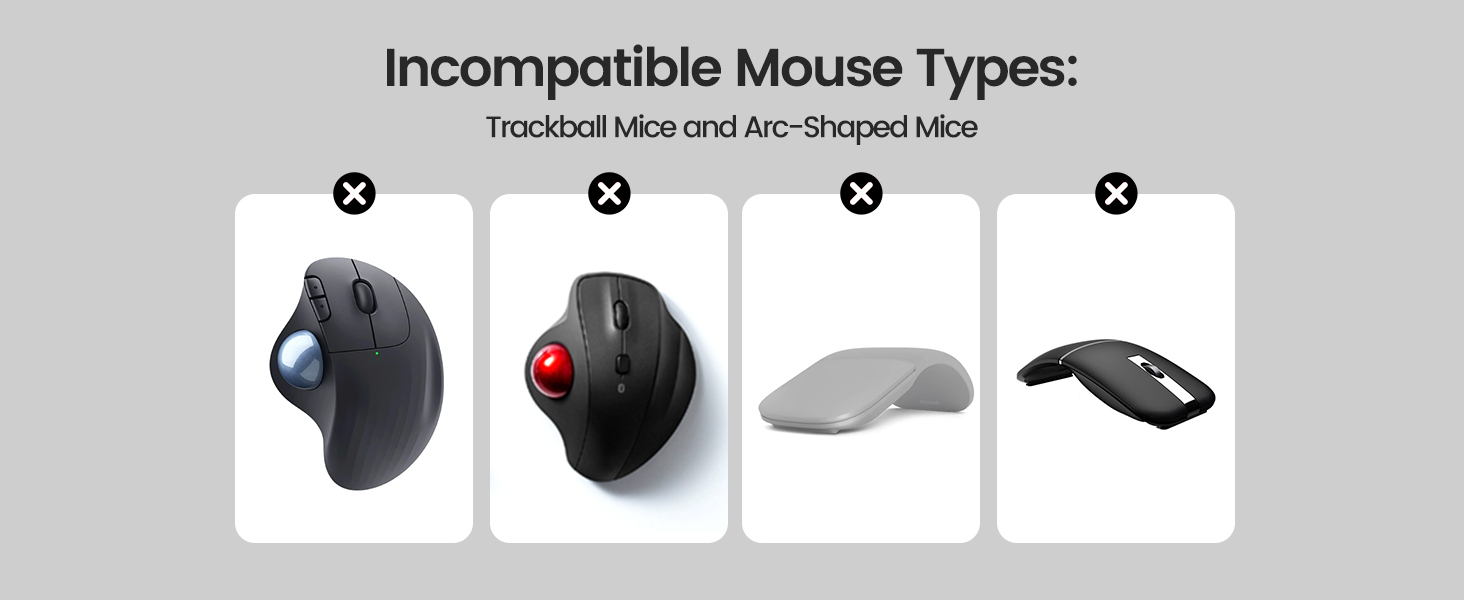
Incompatible Mouse Types:
This device is not suitable for trackball mice or arc-shaped mice, as their design may prevent proper detection of movement on the rotating disc.


6. Zehaztapenak
| Atributua | Xehetasuna |
|---|---|
| Marka | Vaydeer |
| Ereduaren izena | Mover Air 3 |
| Modelo zenbakia | FM2035 |
| Kolorea | More argia |
| Konektibitate Teknologia | USBa |
| Mugimenduak detektatzeko teknologia | Optikoa |
| Elementuaren pisua | 0.22 kilo (100 g inguru) |
| Materiala | ABS |
| Energia iturria | Kable elektrikoa |
| Ezaugarri bereziak | Adjustable Timer, Driver-free, Longer lifespan, Random and natural mice movement, Undetectable |
7. Mantentzea
To ensure the longevity and optimal performance of your Vaydeer Ultra Slim Mouse Mover, follow these simple maintenance guidelines:
- Garbiketa: Gently wipe the surface of the device and the rotating disc with a soft, dry cloth. Avoid using abrasive cleaners or solvents that could damage the material.
- Biltegiratzea: When not in use, store the mouse mover in a clean, dry place away from direct sunlight and extreme temperatures.
- Manipulazioa: Handle the device with care to prevent physical damage. Avoid dropping it or placing heavy objects on top.
8. Arazoak
If you encounter any issues with your Vaydeer Ultra Slim Mouse Mover, refer to the following troubleshooting tips:
- Gailua ez da pizten:
- Ensure the USB cable is securely connected to both the mouse mover and a working power source.
- Saiatu beste USB ataka edo korronte-egokitzaile bat erabiltzen energia-iturri akastun bat baztertzeko.
- Sakatu ON/OFF botoia irmo.
- Mouse Not Moving on Screen:
- Verify that your optical mouse is correctly positioned on the rotating disc, with its sensor centered.
- Check if your mouse is an incompatible type (e.g., trackball or arc-shaped).
- Ensure the mouse mover is powered on and the rotating disc is active.
- Confirm that your mouse's optical sensor is clean and free from obstructions.
- Ezohiko zarata:
- While designed to be noiseless, ensure no foreign objects are obstructing the rotating disc.
- Iraunkorra bada, jarri harremanetan bezeroarentzako arreta-zerbitzuarekin.
9. Bermea eta Laguntza
The Vaydeer Ultra Slim Mouse Mover, Air 3 comes with a 6 urteko bermea fabrikatzailearengandik.
For warranty claims, technical support, or any product-related inquiries, please refer to the contact information provided on the product packaging or visit the official Vaydeer webgunea.