
1. Segurtasun informazio garrantzitsua
Please read all instructions carefully before using the EVTSCAN Projection Clock. Keep this manual for future reference.
- Ez jarri gailua tenperatura altuen, eguzki-argiaren eraginpean edo hezetasun handiaren eraginpean.
- Saihestu erlojua erortzea edo kolpe gogorren eraginpean jartzea.
- Ez saiatu gailua zeuk desmuntatzen edo konpontzen. Jarri harremanetan zerbitzu-langile kualifikatuekin.
- Use only the specified power adapter (DC 5.0V, 1.2A) or appropriate batteries (2xAAA, not included).
- Mantendu haurren eskura.
2. Produktua amaitu daview
The EVTSCAN Projection Clock is a versatile digital alarm clock featuring a 3-inch backlit LCD screen that displays time, date, day of the week, temperature, and humidity. It includes a projection function to display time and temperature on a wall or ceiling, dual alarms with snooze, and a USB port for charging mobile phones.
Ezaugarri nagusiak:
- 12/24-hour time format display.
- Date and day of the week display (7 languages for week).
- Temperature detection (-9℃ to +50℃) and humidity detection (20% to 95%).
- Projection function with 180-degree rotation for time and temperature.
- Dual alarm clocks with slowly increasing bolumena.
- 5-minute snooze function.
- USB kargatzeko ataka gailu mugikorretarako.
- Adjustable backlight with 4 levels (high, medium, low, off).

2.1. irudia: Aurrealdea view of the EVTSCAN Projection Clock, showing the LCD display and projection lens.
3. Paketearen edukia
Despaketatzean, ziurtatu behean zerrendatutako elementu guztiak daudela eta egoera onean daudela:
- 1 x EVTSCAN Projection Clock
- 1 x USB kablea
- 1 x ingelesezko erabiltzailearen eskuliburua
Note: 2xAAA batteries are required for battery power and are not included in the package.
4. Konfigurazioa
4.1 Gailua piztea
The EVTSCAN Projection Clock can be powered by either AAA batteries or via the included USB cable.
4.1.1 Bateriaren instalazioa
- Bilatu bateriaren konpartimentuaren estalkia erlojuaren atzealdean.
- Slide open the cover.
- Sartu bi (2) AAA pila, polaritate zuzena (+/-) ziurtatuz.
- Itxi bateriaren konpartimenduaren estalkia ondo.
Note: When powered by batteries, the backlight will only light up for 8 seconds when activated to conserve power. The projection lamp will also light up for 8 seconds.
4.1.2 USB Power Connection
- Connect the small end of the provided USB cable to the DC 5.0V 1.2A input port on the back of the clock.
- Connect the larger end of the USB cable to a compatible USB power adapter (not included) or a powered USB port.
Note: When powered by USB, the backlight and projection lamp can remain continuously on, with adjustable brightness for the backlight.
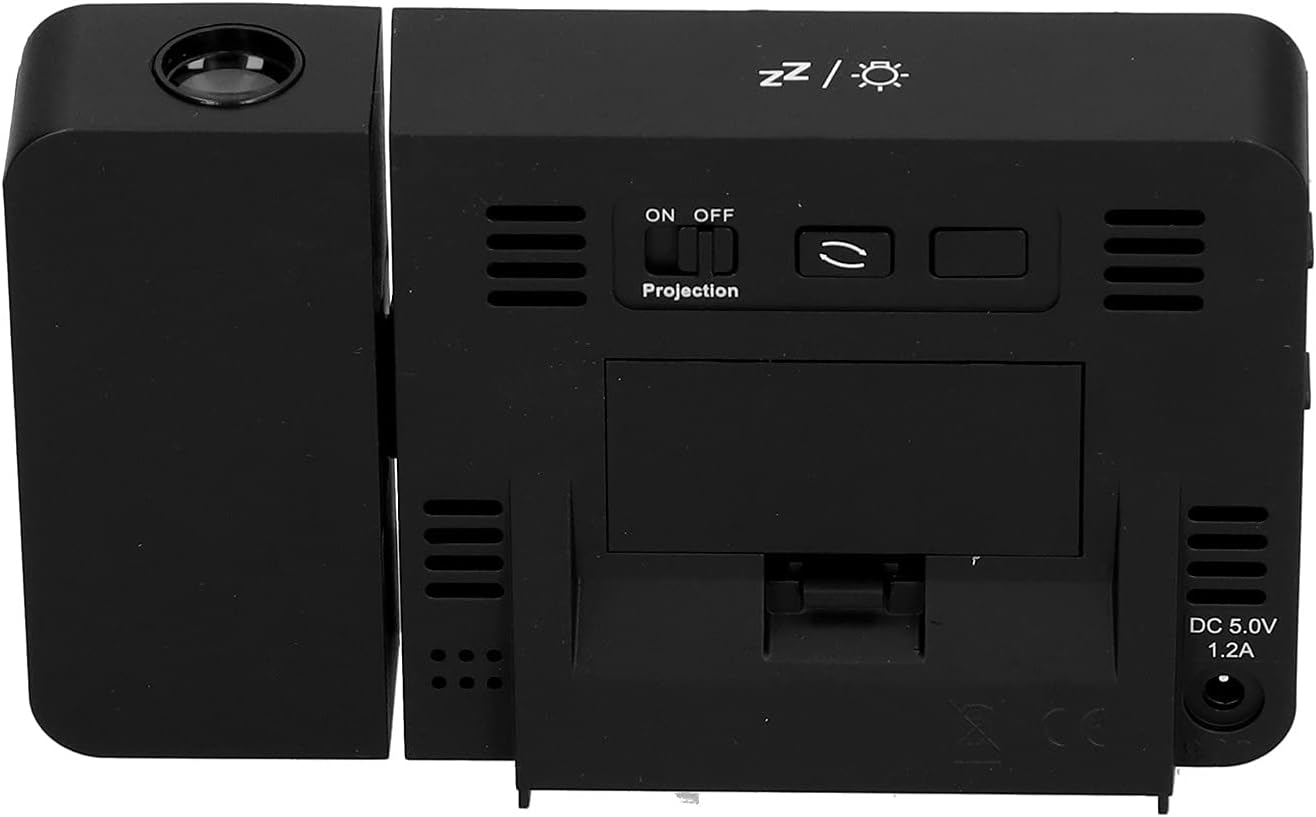
4.1. irudia: Atzekoa view of the clock, indicating the battery compartment and DC 5.0V 1.2A power input.
5. Funtzionamendu-argibideak
5.1 Botoien funtzioak
Familiarize yourself with the control buttons located on the front and sides of the clock:
- ORDUA: Ordua ezartzeko moduan sartzen da.
- ALARMA: Alarma ezartzeko moduan sartzen da.
- +: Increases values, switches 12/24HR format, adjusts backlight.
- -: Decreases values, switches temperature units (℃/℉).
- Proiekzioaren ON/OFF etengailua: Activates or deactivates the projection. (Located on the back/side)
- Alarm 1 ON/OFF Switch: Activates or deactivates Alarm 1. (Located on the side)
- Alarm 2 ON/OFF Switch: Activates or deactivates Alarm 2. (Located on the side)
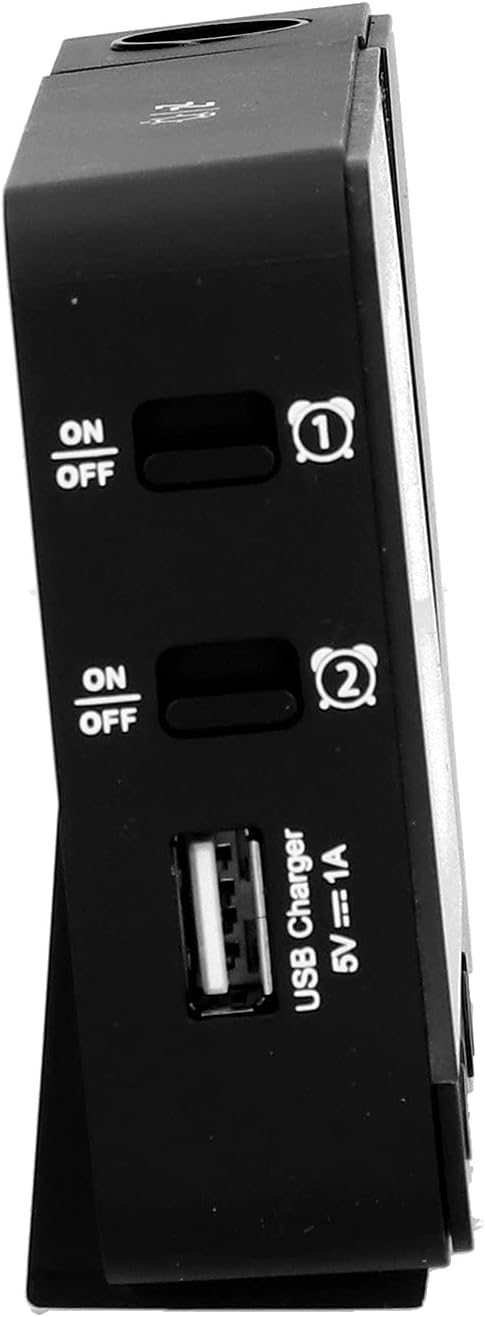
5.1. irudia: Aldea view showing Alarm 1 and Alarm 2 ON/OFF switches, and the USB charging port.
5.2 Ordua eta data ezartzea
- Eduki sakatuta DENBORA button to enter time setting mode. The hour display will flash.
- Erabili + or - ordua doitzeko botoiak.
- Sakatu DENBORA again to confirm the hour and move to minute setting. Adjust with + or -.
- Jarraitu sakatzen DENBORA to cycle through setting year, month, and day. Adjust each with + or -.
- After setting the day, press DENBORA azken aldiz ezarpen modutik irteteko.
- 12 orduko eta 24 orduko formatuaren artean aldatzeko, sakatu + button during normal time display.
- To switch between Celsius (℃) and Fahrenheit (℉) for temperature, press the - button during normal time display.
5.3 Alarmak ezartzea
The clock features two independent alarms (Alarm 1 and Alarm 2).
- Eduki sakatuta ALARMA button to enter Alarm 1 setting mode. The Alarm 1 hour display will flash.
- Erabili + or - alarma-ordua doitzeko botoiak.
- Sakatu ALARMA again to confirm the hour and move to Alarm 1 minute setting. Adjust with + or -.
- Sakatu ALARMA again to move to Alarm 2 hour setting, and repeat the process for Alarm 2.
- After setting Alarm 2 minutes, press ALARMA azken aldiz ezarpen modutik irteteko.
- To activate or deactivate an alarm, use the corresponding 1. alarma ON/OFF or 2. alarma ON/OFF switch on the side of the clock. An alarm icon will appear on the display when active.
5.3.1 Snooze funtzioa
When an alarm sounds, press any button (except the alarm ON/OFF switch) to activate the 5-minute snooze function. The alarm will sound again after 5 minutes. To turn off the alarm completely, slide the corresponding alarm ON/OFF switch to OFF.
5.4 Projection Function
The clock can project the time and temperature onto a wall or ceiling.
- Kokatu Proiekzioa ON/OFF switch on the back of the clock. Slide it to ON to activate the projection.
- Adjust the angle of the projection arm (the part with the lens) to direct the projection as desired. The arm can rotate nearly 180 degrees.
- The projection will display the current time and temperature in a soft red color.

5.2. irudia: Aldea view showing the projection arm extended and ready for use.

5.3. irudia: The clock projecting time and temperature onto a wall in a bedroom setting.
5.5 Atzeko argiaren doikuntza
When the clock is powered by USB, the backlight can be adjusted to four levels: high, medium, low, or off. Repeatedly press the + button during normal time display to cycle through the brightness levels.
When powered by batteries, the backlight will illuminate for 8 seconds when any button is pressed, then turn off to conserve power.
5.6 USB kargatzeko ataka
The clock features a USB charging port (5V=1A) on its side. You can use this port to charge your mobile phone or other small electronic devices while the clock is connected to USB power.
Note: The USB charging port only functions when the clock is powered via the USB cable. It does not work when the clock is running on battery power.
6. Mantentzea
6.1 Garbiketa
- Garbitu erlojuaren gainazala zapi leun eta lehor batekin.
- Do not use abrasive cleaners, solvents, or chemical sprays, as these may damage the finish or electronic components.
- Keep the projection lens clean for clear projection. Use a soft, lint-free cloth.
6.2 Bateria ordezkatzea
When the display becomes dim or the clock functions erratically while on battery power, it's time to replace the AAA batteries. Refer to Section 4.1.1 for battery installation instructions. Always replace both batteries at the same time with new ones.
7. Arazoak
| Arazoa | Kausa posiblea | Irtenbidea |
|---|---|---|
| Erlojuaren pantaila hutsik edo ilun dago. | No power, low batteries, or USB cable not connected. | Check battery installation and replace if necessary. Ensure USB cable is securely connected to a power source. |
| Projection is unclear or not visible. | Projection switch is OFF, lens is dirty, or projection distance is too far/close. | Ensure Projection switch is ON. Clean the projection lens. Adjust the clock's distance from the projection surface. |
| Alarmak ez du jotzen. | Alarma ez dago ezarrita edo desaktibatuta dago. | Verify alarm time is set correctly. Ensure the corresponding Alarm ON/OFF switch is in the ON position. |
| USB kargatzeko ataka ez dabil. | Clock is running on battery power, or USB cable is not connected to a power source. | Ensure the clock is powered via the USB cable and connected to a functional power adapter. |
| Ordu/data okerra. | Time/date not set correctly. | Ikusi 5.2 atala ordua eta data berrezartzeko. |
8. Zehaztapenak
| Eredua: | B0CLGDFCGX |
| Marka: | EVTSCAN |
| Materiala: | ABS (akrilonitrilo butadieno estirenoa) |
| Produktuaren neurriak: | Gutxi gorabehera 13.5 x 8 x 2.5 cm (5.3 x 3.1 x 1.0 hazbete) |
| Pisua: | Gutxi gorabehera. 242 g (8.5 oz) |
| Bistaratzeko mota: | Atzeko argiztapenarekin LCD digitala |
| Energia iturria: | 2xAAA batteries (not included) or DC 5.0V 1.2A via USB cable |
| USB kargaren irteera: | 5V=1A |
| Tenperatura detektatzeko tartea: | -9℃ to +50℃ (1℃ resolution) |
| Hezetasuna detektatzeko tartea: | % 20etik % 95ra (% 1eko bereizmena) |
| Temperature/Humidity Calibration Time: | 30 segundo |
| Atzeko argi-mailak: | 4 levels (High, Medium, Low, Off) when USB powered; 8s illumination when battery powered. |
| L proiekzioaamp: | Always on when USB powered; 8s illumination when battery powered. |

8.1. irudia: Product dimensions: 5.3 inches wide by 3.1 inches high.
9. Bermea eta Laguntza
EVTSCAN products are manufactured to high quality standards. For specific warranty information, please refer to the warranty card included with your purchase or contact your retailer.
If you encounter any issues or have questions regarding your EVTSCAN Projection Clock, please contact the seller or EVTSCAN customer support for assistance. Please have your model number (B0CLGDFCGX) ready when contacting support.
Laguntza gehiago lortzeko, bisita dezakezu EVTSCAN Store on Amazon.