
Insta360 CINSAAVH-ALT1
Insta360 Quick Release Mount 2.0 Instruction Manual
Model: CINSAAVH-ALT1
1. Sarrera
This manual provides detailed instructions for the safe and effective use of your Insta360 Quick Release Mount 2.0. This accessory is designed to enhance your camera setup by offering quick and secure attachment options for various compatible Insta360 cameras, including the X5, X4, X3, ONE RS, X, X2, ACE, ACE PRO, and ACE PRO 2.
2. Produktua amaitu daview
The Insta360 Quick Release Mount 2.0 features a robust design for reliable performance. Key features include:
- Quick and Easy Mounting: Facilitates rapid attachment and detachment of your camera.
- Double-Locked System: Incorporates a strong magnet and a secure clasp for enhanced protection against accidental detachment.
- Bateragarritasun malgua: Offers both a standard 1/4-inch screw interface and a 2-prong mount, allowing use with a wide range of accessories.
- Diseinu ultramehea: Engineered to be minimally intrusive, ensuring it remains invisible in 360-degree shots.

Image: The Quick Release Mount 2.0 displaying its versatile 1/4-inch screw and folding 2-prong mount.
3. Konfigurazioa
3.1 Attaching the Base Plate to Your Camera
- Locate the 1/4-inch screw on the top part of the Quick Release Mount.
- Align this screw with the 1/4-inch threaded hole on the bottom of your Insta360 camera.
- Carefully screw the mount onto the camera until it is finger-tight. Ensure a snug fit to prevent wobbling.

Image: Demonstrating the attachment of the quick release base to an Insta360 camera.
3.2 Attaching the Mount to an Accessory
The Quick Release Mount offers two primary ways to connect to accessories:
- 1/4-inch Threaded Hole: For tripods, monopods, or other accessories with a 1/4-inch screw.
- Locate the 1/4-inch threaded hole on the bottom of the Quick Release Mount.
- Screw your accessory's 1/4-inch screw into this hole until secure.
- Folding 2-Prong Mount: For action camera accessories (e.g., GoPro mounts).
- Extend the folding fingers from the bottom of the Quick Release Mount.
- Align these fingers with the corresponding slots on your 2-prong compatible accessory.
- Insert the fingers and secure with a thumb screw if required by the accessory.

Image: The Quick Release Mount 2.0 with its folding fingers extended, ready for attachment to 2-prong accessories.
3.3 Video: Versatile Mounting Options
Video: This video demonstrates the versatile mounting options of a quick release mount, including attachment to a selfie stick and tripod, showcasinbere diseinu trinkoa eta eramangarriagatik.
4. Funtzionamendu-argibideak
4.1 Attaching Your Camera to the Quick Release Mount
- Ensure the Quick Release Mount is securely attached to your desired accessory (selfie stick, tripod, etc.).
- Align the camera (with the base plate attached) with the Quick Release Mount. The strong magnets will guide the connection.
- Press the camera firmly onto the mount until you hear a distinct "click," indicating the clasp system has engaged.
- For added security, slide the lock switch on the side of the Quick Release Mount to the locked position (indicated by a closed padlock icon).
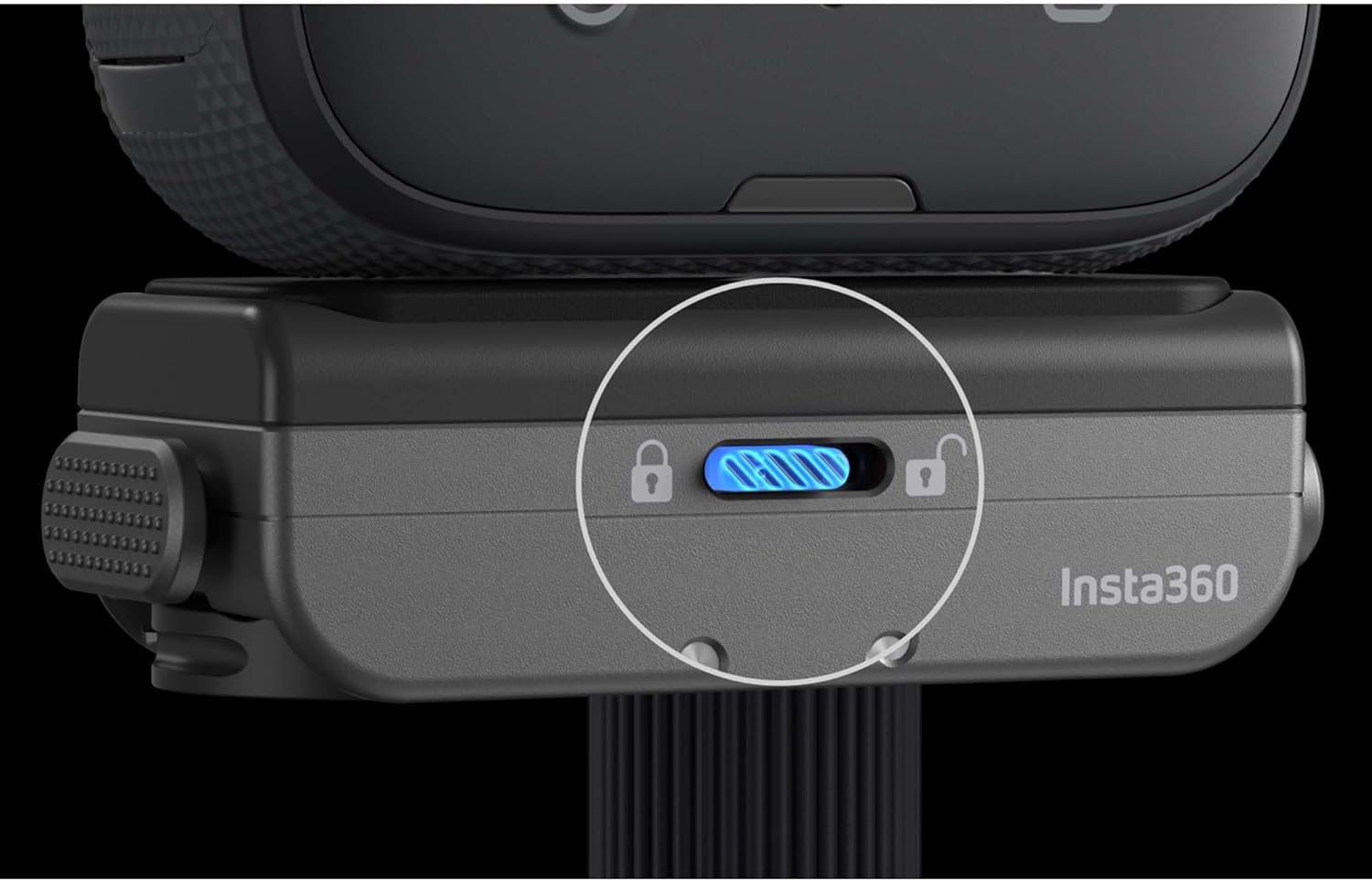
Irudia: Gertutik view of the Quick Release Mount's lock switch, highlighting its secure position.
4.2 Detaching Your Camera from the Quick Release Mount
- If the lock switch is engaged, slide it to the unlocked position (indicated by an open padlock icon).
- Press the two side release buttons simultaneously.
- Gently lift the camera away from the Quick Release Mount.
4.3 Video: Quick Release Mount for Ace Pro
Video: This video demonstrates the quick release mount's compatibility and ease of use with the Insta360 Ace Pro camera, showing attachment and detachment from various accessories.
5. Mantentzea
- Keep the magnetic surfaces and clasp mechanism clean and free from dust, dirt, or debris to ensure optimal performance.
- Avoid exposing the mount to extreme temperatures or corrosive substances.
- Regularly inspect the mount for any signs of wear or damage. Discontinue use if any damage is observed.
6. Arazoak
- Camera wobbles or feels loose:
- Ensure the 1/4-inch screw attaching the base plate to the camera is tightened securely.
- Verify that the Quick Release Mount is fully engaged with the accessory and the lock switch is in the locked position.
- Check for any debris on the magnetic surfaces or within the clasp mechanism that might prevent a tight fit.
- Difficulty detaching the camera:
- Ensure the lock switch is in the unlocked position.
- Press both side release buttons firmly and simultaneously.
7. Zehaztapenak
| Produktuaren neurriak: | 3 x 4 x 2 hazbete |
| Elementuaren pisua: | 3.2 ontza |
| Elementuaren eredu-zenbakia: | CINSAAVH-ALT1 |
| Kolorea: | Beltza |
| Ezaugarri bereziak: | Birakaria |
| Gailu bateragarriak: | Insta360 X5, X4, X3, ONE RS, X, X2, ACE, ACE PRO, ACE PRO 2 Cameras |
8. Bermea eta Laguntza
This product is manufactured by Insta360. For warranty information and customer support, please refer to the official Insta360 website or contact their customer service directly. Purchasing from EVO Gimbals supports a small Oregon business, with customer service based in Bend, OR, offering replies within 24 hours.
Laguntza gehiago behar baduzu, bisitatu Insta360 Store on Amazon.
Erlazionatutako dokumentuak - CINSAAVH-ALT1
 |
Insta360 Ace Pro オンラインマニュアル Insta360 Ace Proオンラインマニュアルへようこそ。このガイドでは、製品の紹介、基本的な使い方、充電、アクティベーション、アクセサリー、お手入れ方法、ファームウェア更新、防水性能、クリーニング、バッテリーに関する注意点など、Ace Pro カメラの包括的な情報を提供します。 |
 |
Insta360 GO 3S erabiltzailearen eskuliburua Comprehensive user manual for the Insta360 GO 3S action camera, covering setup, activation, button operations, and key features. |
 |
Insta360 Flow 2 ユーザーマニュアル:セットアップ、機能、操作ガイド Insta360 Flow 2スマートフォンジンバルの公式ユーザーマニュアル。製品のセットア〓恓惈アュアフォンジンバルの公式ユーザーマ作、高度な機能、アプリ連携、ファームウェア更新方法などを詳しぬを詳しぬす |
 |
Insta360 Flow 2 Pro 사용자 매뉴얼: 자세한 사용 가이드 및 기능 설명 Insta360 Flow 2 Pro 짐벌의 설치, 작동, 기능 및 설정을 다루는 포괄적인 사용자 매뉴얼입니다. 충전, 페어링, 버튼 조작, 짐벌 모드, 앱 연동, 촬영 인터페이스 및 펌웨어 업데이트에 대한 자세한 정보를 제공합니다. |
 |
Insta360 Pro 2 User Manual: Comprehensive Guide Explore the Insta360 Pro 2 user manual for detailed instructions on setup, shooting, post-production, and live streaming. Learn about camera features, accessories, and best practices for professional panoramic photography and videography. |
 |
Insta360 Mini 2-in-1 Tripode 2.0 Erabiltzailearen Gida eta Zehaztapenak Insta360 Mini 2-in-1 Tripod 2.0-ren gida zehatza, edukia, zehaztapenak eta erabiltzeko urratsez urrats argibideak biltzen dituena, kameraren eranskina eta tripodearen konfigurazioa barne. |
Ask a question about this manual
Ask about setup, troubleshooting, compatibility, parts, safety, or missing instructions. Manuals+ will review the question and use this page’s manual context to help answer it.