
Sarrera
This manual provides detailed instructions for the installation, operation, maintenance, and troubleshooting of your wisecoco 12.6 Inch Bar LCD Screen HDMI Display Monitor. This monitor is specifically designed to integrate seamlessly with the Hyte Y60 PC case, serving as an excellent secondary display for monitoring system performance, displaying custom visuals, or extending your desktop.

Figure 1: The 12.6-inch bar LCD screen displaying real-time system performance data.
Konfigurazioa eta Instalazioa
The wisecoco 12.6 Inch Bar LCD Screen is designed for easy installation, particularly within the Hyte Y60 PC case. The package includes all necessary components for a straightforward setup.
Paketearen edukia
Instalazioa hasi aurretik, egiaztatu paketean elementu guztiak daudela:
- 12.6-inch Bar LCD Screen
- 3.5mm DC Power Cable
- HDMI Mini HDMI kablea
- Gurutze Torkiniloa

Figure 2: Included accessories: DC power cable, HDMI to Mini HDMI cable, and a screwdriver.
Installation Steps (for Hyte Y60 PC Case)
- Prestatu ordenagailuaren karkasa: Ensure your Hyte Y60 PC case is powered off and unplugged. Carefully remove the side panel where the monitor will be installed.
- Pantaila muntatu: The screen features a bracket specifically designed to fit the Y60 case panel. Align the screen with the designated slot on the case. Use the provided screwdriver to secure the screen in place. No additional screws are typically required.
- Konektatu bideo-kablea: Connect one end of the HDMI to Mini HDMI cable to the Mini HDMI port on the monitor. Connect the other end to an available HDMI port on your graphics card (GPU) or motherboard.
- Konektatu korronte kablea:
- Connect the 3.5mm DC power cable to the DC 3.5mm port on the monitor. The other end of this cable typically connects to a power source within your PC.
- Alternatively, the screen can be powered via a Micro USB A cable (not included). If using Micro USB A, ensure the input is 5V500mA. If using the DC cable, the input should be 5V2A.
- Kableen kudeaketa: Route the cables neatly within your PC case to avoid interference with fans or other components.
- Piztu: Once all connections are secure, replace the PC case panel, plug in your PC, and power it on. The monitor should be detected as a secondary display.

Figure 3: Visual guide for installing the secondary monitor into the Hyte Y60 PC case.

Figure 4: The monitor seamlessly integrated into a Hyte Y60 PC case, displaying custom visuals.

Figure 5: Dimensions and port layout of the 12.6-inch bar LCD screen.
Funtzionamendu-argibideak
The wisecoco 12.6 Inch Bar LCD Screen functions as a standard secondary display, compatible with PCs and laptops. It offers versatile display options and user-friendly controls.
Bistaratzeko Ezaugarriak
- Ebazpena: 1920x515 IPS panel for clear and vibrant visuals.
- Erantzun denbora: 3-5ms for smooth motion.
- ViewAngelua: 178 ° zabal viewing angle ensures consistent image quality from various perspectives.
- Freskatze-tasa: 60Hz standard refresh rate.
- Kontraste-erlazioa: 1000:1 beltz sakonentzat eta zuri distiratsuentzat.
- Bozgorailu integratuak: Integrated dual speakers provide audio output.

Figure 6: The monitor features a 178° full viewing angle and IPS technology for superior image quality.
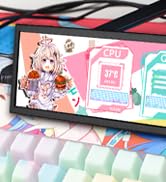
Figure 7: The Wisecoco monitor includes built-in speakers for convenience.
Bistaratzeko moduak
The monitor supports both landscape and portrait modes, allowing for flexible integration into your setup. You can adjust the display orientation through your operating system's display settings.

Figure 8: The monitor supports both portrait and landscape display orientations.
Pantailan bistaratze (OSD) kontrolak
The monitor features physical buttons on the back for accessing the OSD menu and controlling basic functions:
- Iturria: Switches between available video inputs (e.g., Mini HDMI 1, Mini HDMI 2).
- +/- bolumena: Adjusts the audio output level of the built-in speakers.
- Menua: Accesses the OSD menu for advanced settings (brightness, contrast, color, etc.).
- Potentzia: Monitorea pizten edo itzaltzen du.
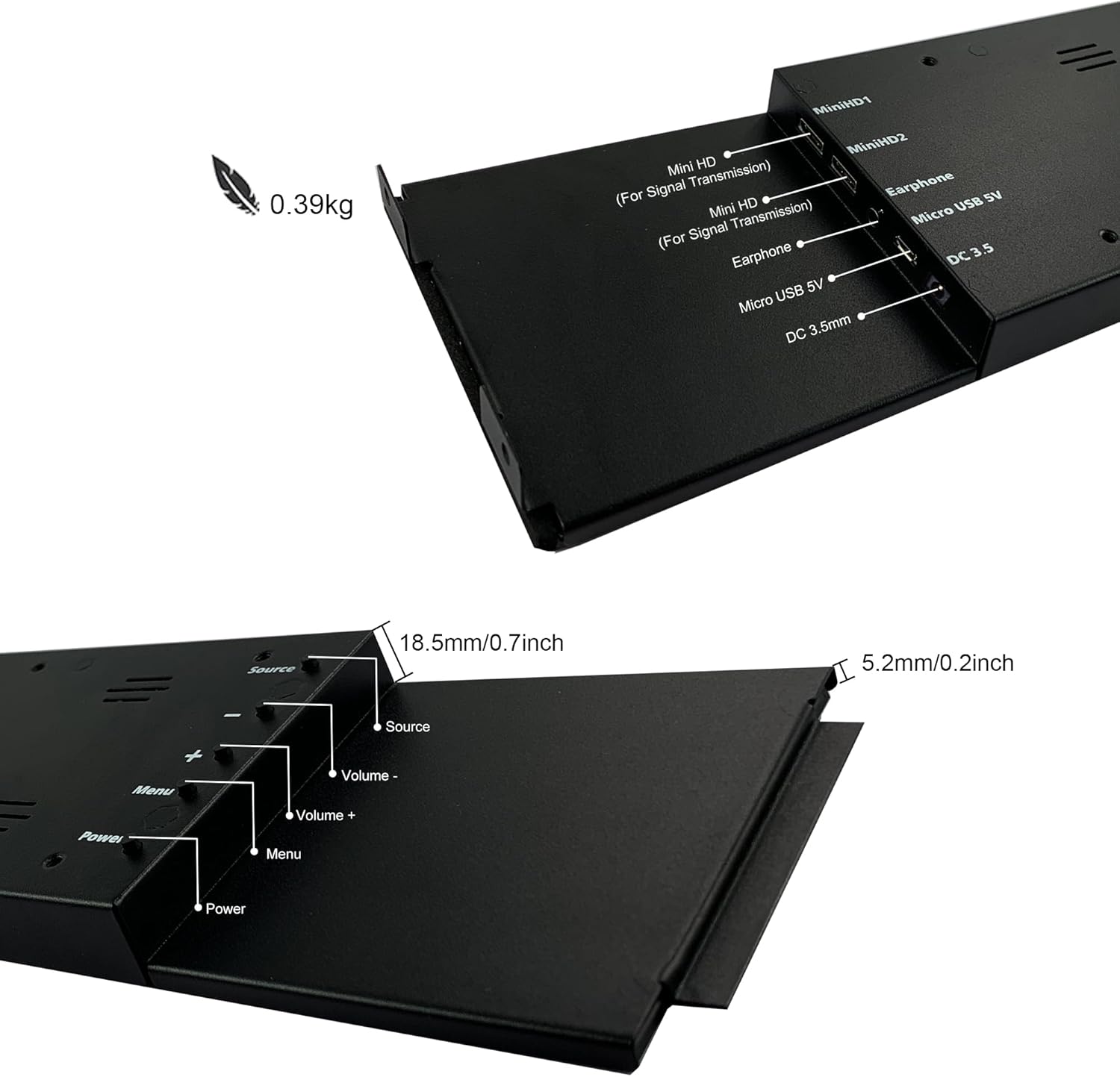
Figure 9: Location of control buttons and ports on the side of the monitor.
Mantentzea
Mantentze egokiak zure monitorearen iraupena eta errendimendu optimoa bermatzen ditu.
- Pantaila garbitzea: Use a soft, lint-free cloth specifically designed for electronics. For stubborn marks, lightly dampen the cloth with water or a screen-cleaning solution. Avoid harsh chemicals, abrasive materials, or spraying liquid directly onto the screen.
- Garbiketa orokorra: Garbitu monitorearen casinoihal leun eta lehor batekin garbitu.
- Aireztapena: Ziurtatu monitorearen aireztapen-irekidurak ez daudela blokeatuta gehiegi berotzea saihesteko.
- Ingurumen-baldintzak: Avoid exposing the monitor to extreme temperatures, high humidity, or direct sunlight.
- Itzali erabiltzen ez denean: For extended periods of inactivity, it is recommended to power off the monitor.
Arazoak konpontzea
If you encounter issues with your wisecoco monitor, refer to the following common problems and solutions:
| Arazoa | Kausa posiblea | Irtenbidea |
|---|---|---|
| Ez dago pantailarik / "Seinalerik ez" mezua |
|
|
| Screen flashes red, blue, or green when PC sleeps | Specific display settings or driver interaction. | Access the monitor's OSD menu and navigate through settings. Sometimes simply accessing and exiting the menu can resolve this. Ensure GPU drivers are updated. |
| Ez dago audiorik barneko bozgorailuetatik |
|
|
| Half of the screen not working | Hardware defect or severe connection issue. |
|
Produktuaren zehaztapenak
Detailed technical specifications for the wisecoco 12.6 Inch Bar LCD Screen HDMI Display Monitor:
| Ezaugarri | Zehaztapena |
|---|---|
| Produktuaren neurriak | 1 x 4 x 13 hazbete |
| Elementuaren pisua | 1.74 kilo |
| Fabrikatzailea | Wisecoco |
| Elementuaren eredu-zenbakia | R126F01-HB |
| Pantaila zutik bistaratzeko tamaina | 12.6 hazbete |
| Aspektu-erlazioa | 32:9 |
| liburukiatage | 5 voltio (DC) |
| Ebazpena | 1920 x 515 |
| Marka | wisecoco |
| Pantailaren tamaina | 12.6 hazbete |
| Pantailaren gainazalaren deskribapena | Distiratsua |
Bermea eta Laguntza
Wisecoco is committed to providing high-quality products and customer satisfaction.
- Bermea: Produktu honek 12 hilabeteko bermea du erosketa-datatik aurrera.
- Dirua itzultzeko bermea: 30 eguneko dirua itzultzeko bermea eskaintzen da.
- Bezeroarentzako laguntza: 24-hour customer support is available for any inquiries or assistance.
For warranty claims, technical support, or any other questions, please contact Wisecoco customer service through the official channels provided at the point of purchase or on the Wisecoco brand webgunea.

Figure 10: Wisecoco's commitment to customer satisfaction.