
Sarrera
The M-Vave Cube Baby Bass is a portable and user-friendly multi-effects processor designed for bass guitarists. It offers a range of classic amplifier emulations and essential effects to enhance your bass sound. This manual provides instructions for setting up, operating, and maintaining your Cube Baby Bass pedal.
Ezaugarri nagusiak
- 8 klasiko amplifier emulations
- 5 essential effects: Chorus, Vibrato, Compressor, Delay, and Reverb
- Support for third-party Impulse Responses (IRs)
- Built-in precise tuner
- Integrated rechargeable battery for portable use
- USB charging via power bank or mobile phone adapter
- Diseinu trinkoa eta sendoa
Paketearen edukia
Mesedez, egiaztatu elementu guztiak paketean daudela:
- M-Vave Cube Baby Bass Multi-Effects Pedal
- USB kargatzeko kablea
- Erabiltzailearen eskuliburua (dokumentu hau)

Image: M-Vave Cube Baby Bass pedal, USB cables, and user manual as included in the package.
Kontrolak eta konexioak
Familiarize yourself with the controls and connection points on your Cube Baby Bass pedal.
Goiko panela
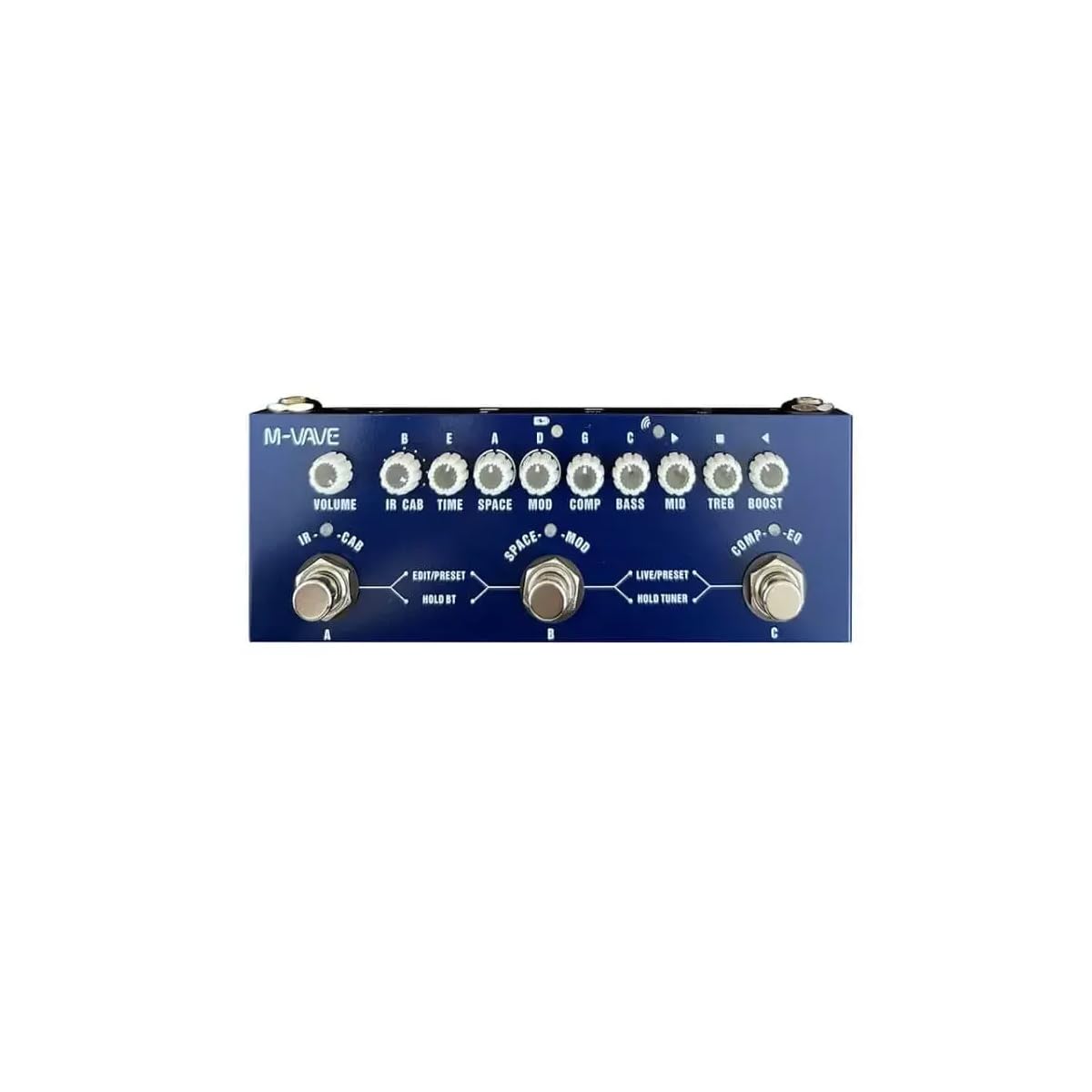
Irudia: Goian view of the M-Vave Cube Baby Bass pedal. It features multiple control knobs for various effects and two footswitches for preset selection and tuner activation.
- BOLUMENaren botoia: Irteerako bolumen orokorra doitzen du.
- CAB Knob: Selects and adjusts cabinet simulations.
- DENBORA botoia: Controls the delay time or other time-based effect parameters.
- SPACE Knob: Adjusts reverb parameters.
- MOD botoia: Controls modulation effects like Chorus or Vibrato.
- KONP botoia: Adjusts the compressor effect.
- BASS botoia: Adjusts the low-frequency equalization.
- ERDIKO botoia: Adjusts the mid-frequency equalization.
- TREB Knob: Adjusts the high-frequency equalization.
- BOOST botoia: Igoera maila kontrolatzen du.
- LEFT Footswitch (PRESET): Toggles between presets or modes.
- RIGHT Footswitch (TUNER/BOOST): Activates the tuner or boost function.
Atzeko panela

Irudia: Atzealdea view of the M-Vave Cube Baby Bass pedal. From left to right, it shows the IN (input) jack, a power button, a USB-C port for charging and data, a micro-USB port (likely for OTG/external device), a headphone output, and the OUT (output) jack.
- IN Jack (1/4-inch): Konektatu baxua hemen.
- Pizteko botoia: Unitatea pizten edo itzaltzen du.
- USB-C ataka: For charging the internal battery and connecting to a computer for IR loading or software updates.
- Mikro-USB ataka: (Likely for OTG or specific data functions, refer to software manual for details).
- Headphone Jack (1/8-inch): Konektatu entzungailuak isilpean praktikatzeko.
- OUT Jack (1/4-inch): Konektatu zure amplifier, audio interface, or mixer.
Konfigurazioa
- Bateria kargatzea: Connect the USB charging cable to the USB-C port on the pedal and to a USB power adapter (not included) or a power bank. The pedal takes approximately 2 hours to fully charge and provides 6-8 hours of operation.
- Connecting Your Instrument: Konektatu zure baxu gitarra IN jack bat 1/4 hazbeteko tresna-kable estandar bat erabiliz.
- Batera konektatzen AmpLikidatzailea/Nahasgailua: Konektatu KANPO jack to your bass amplifier, audio interface, or mixer using a standard 1/4-inch instrument cable.
- Aurikularretarako konexioa: Isilpean praktikatzeko, konektatu entzungailuak Aurikularretarako Jack.
- Piztu: Press and hold the Power Button to turn on the Cube Baby Bass.
Funtzionamendu-argibideak
Oinarrizko Funtzionamendua
- Aurrezarpenak hautatzea: Erabili LEFT Footswitch (PRESET) to cycle through available presets. The LED indicator will show the currently selected preset.
- Adjusting Effects: Turn the corresponding knobs (VOLUME, CAB, TIME, SPACE, MOD, COMP, BASS, MID, TREB, BOOST) to adjust the parameters of the active effects.
- Sintonizatzailea erabiliz: Eduki sakatuta RIGHT Footswitch (TUNER/BOOST) to activate the built-in tuner. Play a single note on your bass, and the display will indicate the note and tuning accuracy. Press the footswitch again to exit tuner mode.
- Activating Boost: A quick press of the RIGHT Footswitch (TUNER/BOOST) will engage or disengage the boost function, controlled by the BOOST knob.
Advanced Features (IR Loading)
The Cube Baby Bass supports loading third-party Impulse Responses (IRs) to expand its cabinet simulation capabilities.
- Konektatu ordenagailura: Use the USB-C cable to connect the pedal to your computer.
- Softwarea: Download and install the dedicated M-Vave software (available from the M-Vave official webgunea).
- Load IRs: Follow the software instructions to load your desired IR files into the pedal's memory.
Mantentzea
- Garbiketa: Garbitu pedala zapi leun eta lehor batekin. Ez erabili garbitzaile edo disolbatzaile urratzailerik.
- Biltegiratzea: Gorde pedala leku fresko eta lehor batean, eguzki-argitik eta muturreko tenperaturetatik babestuta.
- Bateria zaintzea: To prolong battery life, avoid fully discharging the battery frequently. Charge the pedal regularly, even if not in use for extended periods.
- Firmware eguneraketak: Check the M-Vave official webwebgunea aldian-aldian bisitatu firmwarearen eguneratzeak, errendimendu optimoa eta funtzio berrietarako sarbidea bermatzeko.
Arazoak konpontzea
- Soinu-irteerarik ez:
- Ensure the pedal is powered on and fully charged.
- Check all cable connections (instrument to IN, OUT to amplifier/mixer, headphones).
- Egiaztatu BOLUMENAren botoia igota dagoela.
- Bypass the pedal to check if the issue is with the instrument or ampbiziagoa.
- Soinu distortsionatua:
- Reduce the input level from your bass or the gain settings on the pedal.
- Kable akastunak egiaztatu.
- Ziurtatu amplifier's input is not overdriven.
- Pedal Not Charging:
- Ensure the USB-C cable is securely connected to both the pedal and the power source.
- Try a different USB power adapter or power bank.
- Egiaztatu USB-C kablea hondatuta dagoen.
- Efektuak ez dute funtzionatzen:
- Ensure the specific effect is enabled within the selected preset.
- Adjust the effect's corresponding knob to hear its impact.
- If using custom IRs, ensure they are loaded correctly.
Zehaztapenak
| Ezaugarri | Zehaztapena |
|---|---|
| Eredua | MVA-CBB |
| Neurriak | 19 x 13.5 x 3.7 cm (7.5 x 5.3 x 1.5 hazbete) |
| Pisua | 340 g (0.75 lb) |
| Eraginak | 8 Amp Emulations, Chorus, Vibrato, Compressor, Delay, Reverb |
| IR euskarria | Yes, third-party IR loading |
| Sintonizatzailea | Built-in precise tuner |
| Energia iturria | Bateria kargagarria integratua |
| Kargatzeko Denbora | Gutxi gorabehera. 2 ordu |
| Funtzionamendu Denbora | 6-8 ordu |
| Sarrera | 1/4 hazbeteko audio-konektorea |
| Irteera | 1/4 hazbeteko audio-konektorea |
| Entzungailuen irteera | 1/8 hazbeteko audio-konektorea |
| USB Interfazea | USB-C (charging, data), Micro-USB |
Bermea eta Laguntza
Bermea: This product comes with a 2-year manufacturer's warranty from the date of purchase. Please retain your proof of purchase for warranty claims. The warranty covers defects in materials and workmanship under normal use. It does not cover damage caused by misuse, accidents, unauthorized modifications, or normal wear and tear.
Laguntza: For technical support, troubleshooting assistance, or warranty inquiries, please contact M-Vave customer service through their official webgunea edo zure tokiko banatzailea.